
Home / SAP ECC to S/4HANA Conversion Guide
Result :
Planning SAP ECC to S4HANA Conversion
Introduction
Purpose
An SAP ERP 6.0 system (commonly called ECC) holds years of configuration, custom programs and business history. A system conversion lets you carry all of that into SAP S/4HANA in one controlled technical project instead of rebuilding the landscape from scratch. This chapter is the planning foundation for the whole series. It explains what changes between the two products, which route fits which situation, how the project is staged, who owns which task, and how to prepare your data before any technical work starts.
Definition. A system conversion is an in-place transition in which an existing SAP ERP 6.0 system is converted to SAP S/4HANA with the Software Update Manager (SUM). Customizing, custom code and the business data you choose to keep are carried forward. If the source system does not yet run on SAP HANA, SUM can migrate the database during the same procedure by using the database migration option (DMO).
Why it is used. Most organizations that choose a conversion want to keep their existing processes and transaction history while moving to the new data model and the SAP Fiori user experience. A conversion avoids re-implementing every process and re-loading master data, although it does mean you inherit the quality of your current data and custom code.
Who should read this. BASIS administrators, functional leads, ABAP developers and project managers who are planning or supporting an ECC to SAP S/4HANA conversion. You should already be comfortable with a three-system ECC landscape (development, quality, production), the transport system and the basics of SAP HANA.
The table below shows how this tutorial series is organized, so you can see where each part of the conversion project is covered.
| Chapter | Focus | Main outcome |
| 1 | Planning an SAP ECC to SAP S/4HANA system conversion | Route, lifecycle, teams and data strategy decided |
| 2 | Pre-conversion analysis | Readiness Check and SI-Check results understood, add-ons and reconciliation checks planned |
| 3 | Preparing source and target systems | Maintenance Planner stack file, Note Assistant and target database ready |
| 4 | Running the SUM conversion with DMO | Technical conversion executed phase by phase |
| 5 | Post-conversion activities and validation | Technical and functional validation completed |
| 6 | Troubleshooting conversion errors | Known error patterns and recovery options |
Scope and Version Context
This series is written for conversion to SAP S/4HANA 2025. The reference document is the Conversion Guide for SAP S/4HANA 2025; its current edition at the time of writing is document version 2.0 dated 25 February 2026, which covers feature package stack 01 (FPS01). SAP revises these documents regularly, so treat the version on SAP Help Portal as authoritative if it differs from this series. The SAP Notes used in this chapter were checked in the versions available at the time of writing: SAP Note 3549655 (Restriction Note) version 9 of 14 September 2026, SAP Note 3493301 (Release Information Note) version 13 of 29 September 2026, SAP Note 2399707 version 192 and SAP Note 2502552 version 126. SAP updates these notes often, so always open the latest version before you act on a number from this chapter.
The scope is limited to the system conversion path from SAP ERP 6.0. New implementation with the SAP S/4HANA Migration Cockpit, selective data transition and the adoption of SAP S/4HANA Cloud Public Edition are separate projects. They are compared briefly in this chapter only so that you can confirm a conversion is the right route.
Version Note. Some later chapters use screens and lab details from an SAP S/4HANA 1709 conversion. They are always labelled as older-release examples. Tool behaviour, minimum support package levels and SAP Note numbers change between releases, so confirm every note number in this series on the SAP Support Portal before you apply it.
Key Terms for Beginners
If you are new to SAP migrations, a few words appear again and again. Read the table once now and come back to it whenever a term feels unfamiliar. Every term is explained again in the chapter where it matters.
The table below explains the most common terms in simple words.
| Term | Simple meaning | First used in |
| SAP ECC / SAP ERP 6.0 | The older SAP business system. ECC (ERP Central Component) is the core of the product SAP ERP 6.0. | Source system |
| Enhancement package (EHP) | An optional package that adds new functions to SAP ERP 6.0. The numbers run from EHP 0 (none installed) to EHP 8. | This chapter |
| Support package (SP) | A package of corrections for a software component. Every system has a support package level. | This chapter |
| SAP S/4HANA | SAP's newer business system, built for the SAP HANA database. | Target system |
| SAP HANA | SAP's in-memory database. SAP S/4HANA runs only on it. | Database |
| System conversion | Moving the existing system to SAP S/4HANA in one project instead of building a new system. | This chapter |
| SUM | Software Update Manager: the SAP tool that performs the technical conversion. | Chapter 4 |
| DMO | Database Migration Option: a SUM option that moves the database to SAP HANA during the conversion. | Chapter 4 |
| Maintenance Planner | An SAP-hosted tool that checks your system and creates the stack.xml file for SUM. | Chapter 3 |
| Simplification item | An SAP-documented change in SAP S/4HANA that can affect your data, processes or custom code. | Chapter 2 |
| Transport request | A package that moves changes from one SAP system to another. | This chapter |
ECC and S/4HANA Compared
Data Model and Database
The biggest difference between the two products is not the screen. It is what sits underneath. SAP ERP 6.0 runs on several database types. SAP S/4HANA runs only on SAP HANA, an in-memory database. Because of that, SAP removed aggregate and redundant tables that existed only to make reports fast on disk-based databases, and reporting and posting now read the same data.
Example. In SAP ERP 6.0, a goods receipt wrote a header row to table MKPF and an item row to table MSEG, and stock totals were also kept in separate tables. In SAP S/4HANA the same movement is stored as one record in table MATDOC, and totals are calculated from it when needed. For the conversion this means the data is transformed during the SUM run, not just copied.
The table below lists the data-model and functional changes that most often surprise project teams during a conversion. It is not complete; the Simplification Item Catalog is the authoritative list for your exact start release.
| Area | In SAP ERP 6.0 | In SAP S/4HANA | What it means for the conversion |
| Material documents | Header table MKPF and item table MSEG, plus stock aggregate tables | Table MATDOC holds the data; MKPF and MSEG remain as compatibility views | Large data volume; SUM asks about partitioning of MATDOC (Chapter 4) |
| Finance postings | Separate tables for General Ledger, Controlling and Asset Accounting line items | Universal Journal in table ACDOCA | Finance data and customizing must be migrated and reconciled |
| Customers and vendors | Separate customer (KNA1) and vendor (LFA1) master records | Business Partner (BUT000) is the leading object, kept in sync through Customer Vendor Integration (CVI) | Master data must be consistent before conversion (Chapter 2) |
| Credit management | Classic credit checks in Accounts Receivable and Sales | SAP Credit Management | Dedicated conversion tasks are described in SAP Note 2270544 |
| Output control | Classic output determination | New output management based on BRFplus and bgRFC, other frameworks still usable per application | Technical setup is needed after conversion (bgRFC, storage system, BRFplus, forms) |
| Replaced functions | Foreign Trade, classic Revenue Recognition | Global Trade Services, SAP Revenue Accounting and Reporting | Check relevance in the SI-Check; business redesign may be needed |
Common Error. Treating the conversion as a purely technical upgrade. Because data structures and some functions change, functional teams own a real share of the work, and their effort is often underestimated at the start.
User Interface and Deployment
SAP GUI is still available in SAP S/4HANA, but SAP Fiori is the recommended user experience. Access through the SAP Fiori launchpad is role-based: instead of a long transaction menu, each user sees tiles from catalogs assigned through business roles. If you plan to adopt Fiori, your existing authorization concept needs to be reviewed and the back-end role menus mapped to Fiori catalogs.
SAP Fiori can be deployed in two ways for SAP S/4HANA. The table below compares them so you can choose early, because the choice affects landscape and sizing.
| Deployment option | How it works | Typical fit |
| Embedded | The SAP Fiori front-end components run in the same system as the SAP S/4HANA back end | Smaller landscapes that want fewer systems to operate |
| Standalone (hub) | A separate front-end server (hub) serves the apps; the back end is the SAP S/4HANA system | Landscapes with several back-end systems or an existing hub |
Security Consideration. Plan the authorization work as part of the project, not as an afterthought. Obsolete transactions in existing roles must be reviewed after the technical conversion (Chapter 5 covers this).
Maintenance Timeline
When people say ECC ends in 2027, they mean the end of mainstream maintenance, not that the system stops working. After mainstream maintenance ends, you either buy optional extended maintenance where it is offered, or the software moves to customer-specific maintenance, which has restrictions.
The table below summarizes the published maintenance dates for the products involved. Dates were checked against public SAP announcements and partner summaries; confirm them on the SAP Support Portal before publishing or committing to a project plan.
| Product | Mainstream maintenance ends | What follows |
| SAP ERP 6.0, enhancement packages 6, 7 and 8 | 31 December 2027 | Optional extended maintenance until 31 December 2030 at an extra cost, or customer-specific maintenance |
| SAP ERP 6.0, enhancement packages 0 to 5 | 31 December 2025 | Customer-specific maintenance; extended maintenance is not offered for these |
| SAP S/4HANA 2025 | 31 December 2032 | Stated in SAP Note 3493301. Rules for maintenance phases are in SAP Notes 52505, 2900388 and 3354958. Other releases have their own end dates |
Version Note. SAP S/4HANA 2025 was released in October 2025 (feature package stack 00) and received feature package stack 01 in February 2026. SAP Note 3493301 states that SAP S/4HANA 2025 is in maintenance until 31 December 2032. Each earlier release, such as 2021 or 2022, has an earlier end date, so confirm the date of the release you run today. The dates for SAP ERP 6.0 enhancement packages 0 to 5 in the table above come from public sources; confirm them in SAP Note 2881788.
Practical point. As of October 2026, roughly fifteen months remain before 31 December 2027. A conversion project that includes analysis, a sandbox, a development conversion, test cycles and a rehearsal rarely fits comfortably into a few months, so teams that have not started are already under time pressure.
Hand-over: the maintenance dates
The project manager takes the dates above to the business owners. They agree the target go-live window and the budget. BASIS and the functional leads start Chapter 2 once the window is agreed, because the schedule of the test cycles depends on it.
Choosing a Conversion Path
Target Deployment Options
Before you plan the technical steps, decide where the converted system will run. The decision affects who operates the infrastructure, how much you can customize, and whether a system conversion is possible at all.
The table below compares the main SAP S/4HANA deployment options from the viewpoint of a conversion project.
| Option | Who runs the infrastructure | Customization freedom | System conversion possible? |
| SAP S/4HANA (on-premise) | You or your hosting partner | Highest, including full ABAP extensibility | Yes, documented in the Conversion Guide |
| SAP S/4HANA Cloud Private Edition (also offered under RISE with SAP) | SAP | High, within the rules of the SAP-managed environment | Yes, the Conversion Guide covers it; downtime-optimized conversion needs an SAP expert who completed course ADM329 |
| SAP S/4HANA Cloud Public Edition | SAP | Limited to key-user and side-by-side extensibility | No, adoption is a new implementation |
Version Note. Older training material mentions SAP HANA Enterprise Cloud (HEC) as a separate hosting model. SAP-managed hosting is now offered under the private edition. Confirm the current commercial packaging with SAP or your account team, as this changes over time.
Useful questions when deciding:
Does your organization have the in-house skills to run SAP HANA and SAP S/4HANA, or do you prefer SAP to operate the infrastructure?
How much custom code and how many modifications do you have? Heavy customization favours on-premise or private edition.
What are your compliance and data-residency requirements?
How much downtime can the business accept for the production cutover?
Do you prefer to buy licences once (on-premise) or to subscribe?
System Conversion Compared with Other Approaches
Short answer. A system conversion keeps your existing system and moves it to SAP S/4HANA. A new implementation builds a fresh SAP S/4HANA system and loads data into it. A selective data transition combines parts of both for special cases.
New implementation and the Migration Cockpit are covered in a separate series. Selective data transition is outside the scope of this tutorial.
Which Source Releases Can Be Converted Directly
Short answer. According to SAP's Getting Started guide for SAP S/4HANA 2025, a one-step conversion starts from SAP ERP 6.0 with enhancement packages 0 to 8, with restrictions for some support package levels that are listed in SAP Note 3549655. This means a system on enhancement package 6 does not have to be upgraded to a higher enhancement package only to be converted. What can force an upgrade first is a different condition: the system is older than SAP ERP 6.0, it is not Unicode, it is a dual-stack system, or its support package level is below the minimum.
Names that confuse beginners. People often say "ECC 7 EHP6" in conversation. There is no separate product called ECC 7. The official name is SAP ERP 6.0, enhancement package 6. SAP Business Suite 7 is the name of the product family that contains SAP ERP 6.0, SAP CRM 7.0 and other applications. When you plan a conversion, always use the official name and read the real release numbers from the system.
You can read the enhancement package from the release of the software component SAP_APPL in System > Status. The table below shows the values that are confirmed in SAP community and partner documentation. Look up the remaining values in SAP's release documentation instead of guessing, because sources differ for some enhancement packages depending on the product variant.
| SAP_APPL release | Enhancement package | Comment |
| 600 | No enhancement package (EHP 0) | Base SAP ERP 6.0 |
| 601 | EHP 1 | Cumulative; EHP 4 already contains EHP 1 to 3 |
| 602 | EHP 2 | Cumulative |
| 603 | EHP 3 | Cumulative |
| 604 | EHP 4 | Cumulative |
| 605 | EHP 5 | Cumulative |
| 617 | EHP 7 | Confirmed in community documentation |
| 618 | EHP 8 | Seen as "EHP8 FOR SAP ERP 6.0" in the Installed Product Versions tab. The EHP 6 value is not confirmed here; check the SAP documentation for your product variant |
Note. In the Installed Product Versions tab, the product SAP ERP may show the release 2005. This is only the technical name of SAP ERP 6.0, and it does not mean the year 2005 or an old version. Read the enhancement package from the product line "EHP... FOR SAP ERP 6.0" instead.
The table below shows what to do for each type of source system. Use it together with the decision diagram in Figure 1 that follows.
| Source system situation | One-step conversion? | What to do first |
| SAP ERP 6.0, EHP 0 to 8, Unicode, AS ABAP only, support package level meets SAP Note 3549655 | Yes | Continue with the Maintenance Planner and the SI-Check |
| SAP ERP 6.0, EHP 0 to 8, but support package level below the minimum (see the two tables that follow) | Not yet | Apply support packages with SPAM or SAINT until the minimum level is reached, then plan the conversion |
| Product version EHP 6 for SAP ERP 6.0 on HANA | No | SAP Note 3493301 states that its mainstream maintenance ended in 2020 and that it is no longer supported as a start release. Plan an intermediate step before the conversion |
| System with an add-on that needs an intermediate upgrade: Israeli Annexing Transport solution, SRM_SERVER 550 / SRM_PLUS 550, SAP Revenue Accounting and Reporting 1.0, 1.1 or 1.2 | No | Perform the intermediate upgrade first (SAP Notes 2298073, 2251946 and 3632039) |
| SAP ERP 6.0 that is not Unicode | No | Do a combined upgrade and Unicode conversion to a supported start release, then convert to SAP S/4HANA (two steps) |
| SAP ERP 6.0 dual-stack (ABAP and Java in one system) | No | Split the stacks first (SAP Notes 1686144 and 1655335) |
| Release older than SAP ERP 6.0 | No | Upgrade to a supported SAP ERP 6.0 start release first, then convert. Read the upgrade documentation for your release to find the route |
| SAP Suite on SAP HANA, SAP Simple Finance 1.0, SAP S/4HANA Finance 1605 | Yes, listed by SAP as other supported start releases | Check SAP Note 3549655 for the exact conditions |
| A lower SAP S/4HANA release (for example 1709) | Not a conversion | This is an upgrade. Use the Upgrade Guide for SAP S/4HANA 2025 |
SAP Note 3493301 also defines the minimum support package level of the underlying SAP NetWeaver release for a system conversion to SAP S/4HANA 2025. If your system is on a lower level, you first have to go to one of these levels. The table below lists the values.
| SAP NetWeaver release (SAP_BASIS) | Minimum support package |
| SAP NetWeaver 7.0 | SP17 |
| Enhancement package 1 for SAP NetWeaver 7.0 | SP05 |
| Enhancement package 2 for SAP NetWeaver 7.0 | SP06 |
| Enhancement package 3 for SAP NetWeaver 7.0 | SP01 |
| SAP NetWeaver 7.4 | SP02 |
SAP Note 3549655 adds one more rule that concerns master data. It applies to systems that contain vendors with assigned contact persons and that are below SAP ERP 6.0 enhancement package 5 (SAP_APPL 605). For these systems you must update to the support package levels in the table below before the conversion, implement corrective SAP Note 2383051 and contact SAP through a customer incident on component AP-MD-BF-SYN for further corrections.
| Product version | Minimum support package |
| SAP ERP 6.0 | SP22 |
| Enhancement package 2 for SAP ERP 6.0 | SP10 |
| Enhancement package 3 for SAP ERP 6.0 | SP09 |
| Enhancement packages 4 to 8 for SAP ERP 6.0 | No minimum support package required |
This rule is not relevant if the system has no vendors with assigned contacts. You can check this in table KNVK: if no record has a non-initial value in field LIFNR, the rule does not apply. Use transaction SE16 or SE16N to look at the table with the condition LIFNR not equal to blank.
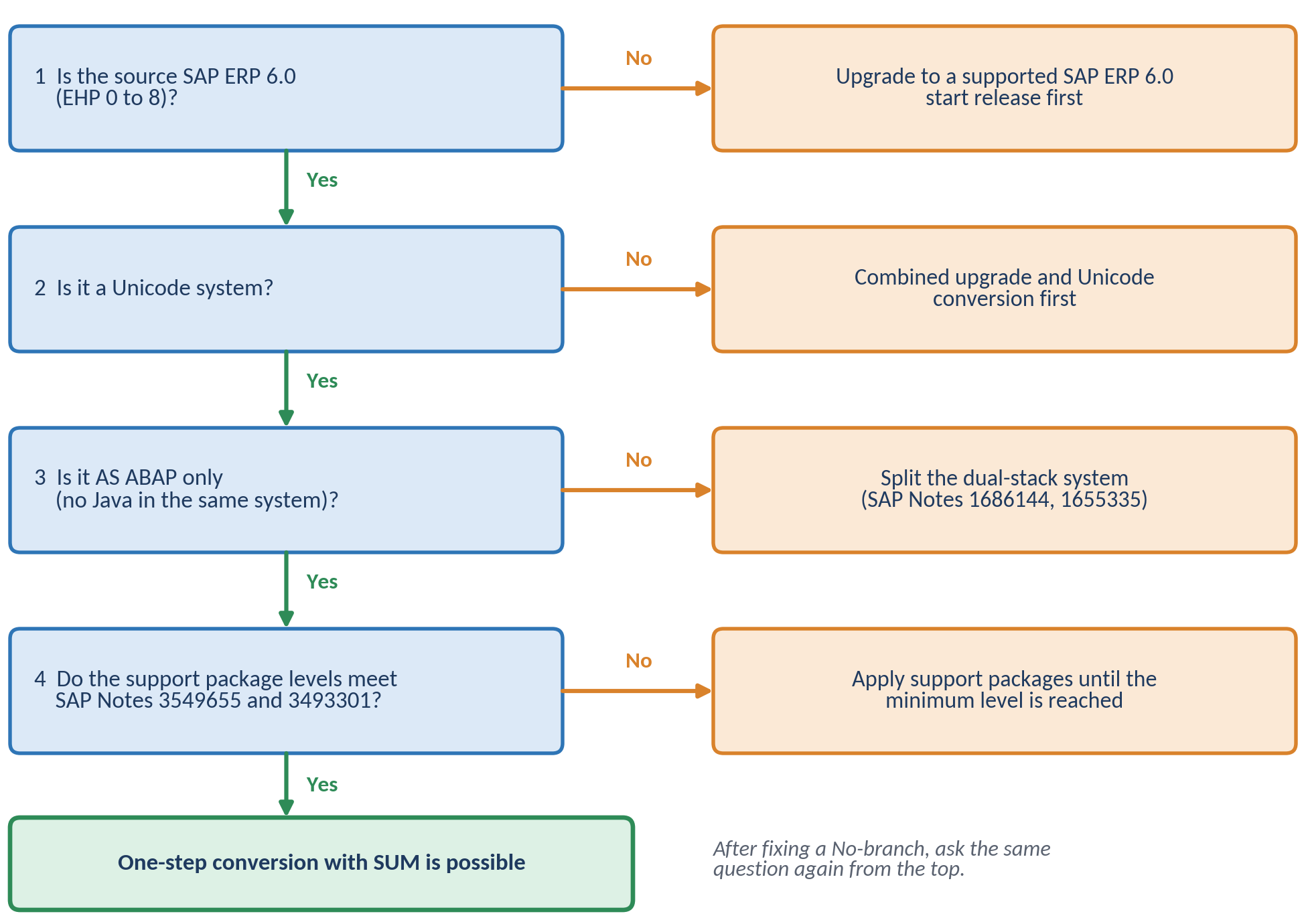
Figure 1: Decision diagram: can the source system be converted to SAP S/4HANA in one step?
Example. A company runs SAP ERP 6.0 enhancement package 6 on Oracle. The BASIS engineer opens System > Status and confirms the system is Unicode and has no Java stack. She then reads SAP Notes 3549655 and 3493301 and finds that the installed SAP_BASIS support package level meets the minimum. Because the system is on enhancement package 6, the vendor-contact rule for older enhancement packages does not apply. Result: a one-step conversion is possible and no extra enhancement package upgrade is needed. The Oracle database is moved to SAP HANA by DMO in the same run.
Version Note. The minimum support package levels and the list of supported start releases are release-specific. They are defined in the restriction note of each target release, for example SAP Note 3549655 for SAP S/4HANA 2025 and a different note for SAP S/4HANA 2023. Do not copy numbers from an older release into a new project. The numbers in this chapter apply to SAP S/4HANA 2025 only.
Common Error. Concluding "we are on EHP 6, so we must upgrade first" without reading the restriction note. The real question is whether the system meets the requirements for the target release, and the note answers that.
Start Release and System Requirements
Before you open any conversion tool, check that your system meets the entry conditions. A failed requirement found in month one costs little; the same finding during the SUM run can cost a weekend.
The table below lists the entry requirements described in the Conversion Guide for SAP S/4HANA 2025 and where to check each one.
| Requirement | What to confirm | Where to check |
| Unicode | SAP S/4HANA 2025 is a Unicode-only release. A non-Unicode system needs a two-step approach: upgrade combined with Unicode conversion first, then the conversion to SAP S/4HANA | System status in SAP GUI; SAP Note 2033243 |
| AS ABAP only | Dual-stack systems (ABAP and Java together) are not supported and must be split first | Landscape documentation; SAP Notes 1686144 and 1655335 |
| Start release | SAP ERP 6.0 with enhancement packages 0 to 8 is the standard start release; some support package levels are restricted | SAP Notes 3549655 (restriction note) and 3493301 (release information note) |
| Operating system and database | The target combination must be supported. The ABAP server needs SAP KERNEL 9.16 64-bit Unicode patch level 050 or higher unless a stack note says otherwise | SAP Product Availability Matrix (PAM); SAP Note 3493301 |
| Conversion tool | SUM 2.0 support package 24 or higher is required for the conversion. Always use the latest patch level | SAP Note 3493301; support.sap.com/sltoolset |
| Add-ons, business functions, industry solutions | All must be supported for the target release, otherwise Maintenance Planner prevents the conversion | Maintenance Planner; SAP Notes 2214409, 2240359, 2240360 |
| Java components | Only a limited set of ERP Java instances remains relevant (such as Adobe Document Services and the Enterprise Services Repository); others can be retired | Conversion Guide, section on landscape impact |
Use the following steps to record your starting point. Each step says where to click and what to write down. The result is the inventory worksheet that follows, and every later chapter relies on it. SAP GUI screens differ a little between versions, so look for the field names and not for the exact position.
- Log on to the SAP ERP 6.0 system you plan to convert, in the productive client or in a recent copy of production, with a user that may display system information. Do not use an old copy: its software levels may differ from production.
- In the menu bar choose System > Status. The dialog System: Status opens.
- In the area SAP System data, read the product version (the field Component version) and the field for Unicode. Write down whether the system is a Unicode system (Yes or No). Field names can differ slightly between SAP GUI versions; verify on your screen.
- In the area Database data, write down the database system (for example Oracle, DB2, SQL Server, SAP MaxDB or SAP HANA) and its release. In the area with the host and operating system data, write down the operating system and the kernel release if they are shown.
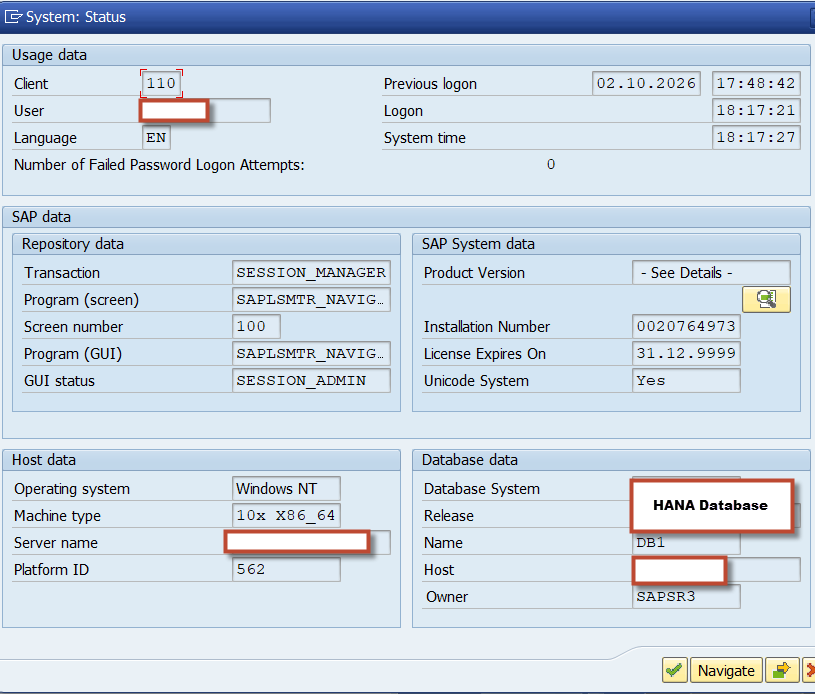
- Next to the component version, click the magnifying glass icon (component information). The dialog Installed Software opens with two tabs.
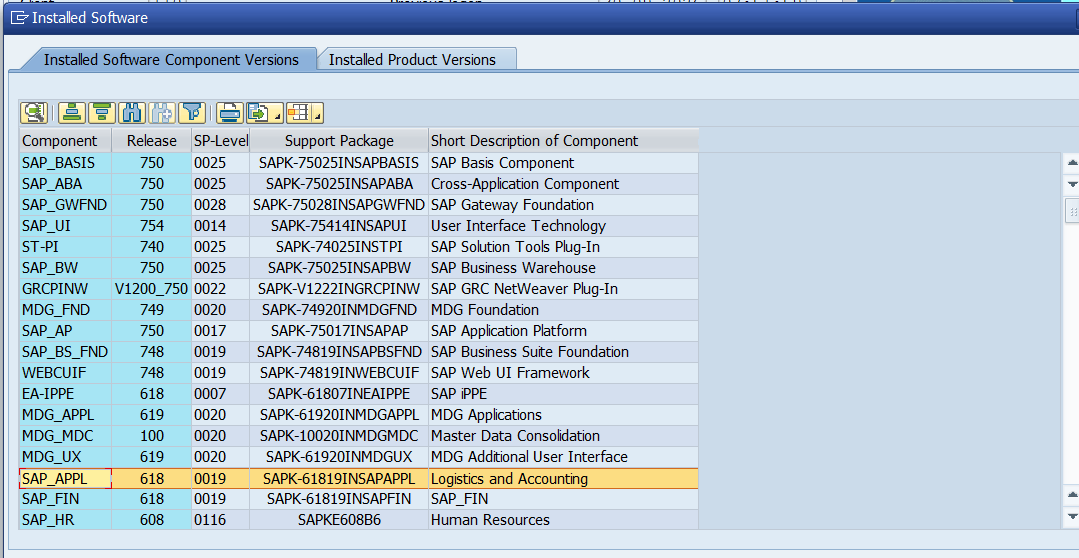
- On the first tab, Installed Software Component Versions, read the columns Component, Release, SP-Level, Support Package and Short Description. Figure 3 shows this tab. Write down the release and the SP-level of SAP_BASIS, SAP_ABA and SAP_APPL.
- On the same tab, list every component that is not part of the standard SAP core: these are your add-ons. In Figure 3, GRCPINW (SAP GRC NetWeaver Plug-In), MDG_FND, MDG_APPL, MDG_MDC and MDG_UX (Master Data Governance) and ST-PI (Solution Tools Plug-In) are such entries. Use the toolbar button to export the list or copy the lines into a spreadsheet. Chapter 2 checks each add-on in the Maintenance Planner.
- Click the second tab, Installed Product Versions. Find the product SAP ERP and the line EHP8 FOR SAP ERP 6.0 (or the EHP that your system shows). Figure 4 shows this tab. This is the enhancement package of your system.
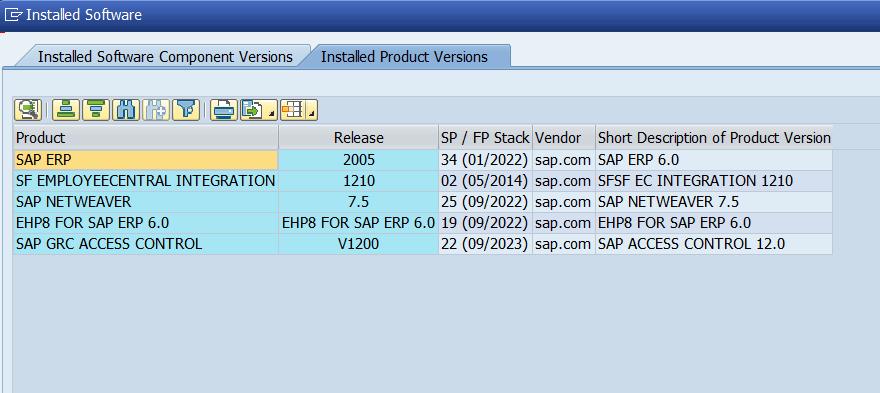
Figure 4: Installed product versions of the same system, showing EHP8 FOR SAP ERP 6.0.
- Compare the SAP_APPL release with the table earlier in this chapter to double-check the enhancement package. In the example, SAP_APPL 618 matches EHP 8.
- Check whether the system is dual-stack. A dual-stack system has an ABAP and a Java instance with the same SID. Ask the infrastructure team for the instance list, or run the command sapcontrol with the options -nr <instance number> -function GetSystemInstanceList on the server: ABAP instances and J2EE (Java) instances are listed. Verify the command with your infrastructure team. If a Java instance is listed, the system must be split first (SAP Notes 1686144 and 1655335). See Figure 5.
- Open transaction SFW5 and write down the active business functions. Chapter 2 explains why a business function that is switched on in ECC and always off in SAP S/4HANA blocks the conversion. See Figure 6.
- Open transaction SPAM and read the version in the title bar. Write it down. It must be patch 71 or higher before the preparation in Chapter 3. See Figure 7.
- Select the scope. Under Check for Productive Client(s), tick the analyses you need. The table after this step explains each option. Under Check for Client 000, tick Simplification Item Consistency only when you run the report in client 000.
- The table below explains the options of the report. They match the areas of the Readiness Check dashboard. Check the SAP Readiness Check documentation for the current wording of each option.
| Option on the screen | What it analyses |
| Business Process Analytics (and the KPI field) | Which business processes and key figures are really used in the system |
| Customer Vendor Integration Analysis | How ready your customer and vendor master data is for the business partner approach |
| Financial Data Quality | The quality of finance data in the General Ledger, Asset Accounting and Material Ledger |
| Innovation Potential | SAP S/4HANA functions that may fit your current usage |
| Integration | Interfaces and integration points that the system uses |
| Recommend SAP Fiori Apps | SAP Fiori apps that match the transactions your users run |
| HANA Sizing | An estimate of memory and disk for SAP HANA. On the screenshot this option is selected and greyed out |
| Data Volume Management | Where your data volume comes from |
| Simplification Item and Compatibility Scope relevance | Which simplification items and compatibility scope items apply to your system. Run it for every productive client |
| Simplification Item Effort Drivers | An extra analysis of the effort for items rated potentially high. It takes longer and is off by default |
| Simplification Item Consistency (Check for Client 000) | The consistency check of your data. Run it in client 000 |
| Button Delete Buffered Data for Selected Items (bottom of the screen) | Removes data that an earlier collection stored for the selected items, so that the next run collects it again. Verify the exact behaviour in the documentation before you use it |
Read SAP Notes 3549655 and 3493301 and compare the SAP_BASIS support package level, the vendor-contact rule and the add-on restrictions with your worksheet.
Open the PAM and check that your planned operating system and SAP HANA version are supported for SAP S/4HANA 2025.
Record every gap in the worksheet with an owner and a date.
The table below is a worksheet that you can copy. Fill the last column with the values you found in the steps above. The third column shows what SAP S/4HANA 2025 expects, as described earlier in this chapter.
| Item | Where to find it | What SAP S/4HANA 2025 expects | Your value |
| Product version | System > Status, Component version | SAP ERP 6.0 | |
| Enhancement package | Installed Product Versions tab; SAP_APPL release | EHP 0 to 8 | |
| SAP_BASIS release and SP-level | Installed Software Component Versions tab | At least the NetWeaver minimum support package in the table above | |
| SAP_APPL release and SP-level | Installed Software Component Versions tab | EHP 0 to 8; vendor-contact rule below EHP 5 | |
| Unicode system | System > Status | Yes | |
| Java stack in the same system | Instance list or sapcontrol | None (AS ABAP only) | |
| Database and release | System > Status, Database data | Any database; DMO is needed if it is not SAP HANA | |
| Operating system and kernel | System > Status | Check the target platform in the PAM | |
| Add-ons | Installed Software Component Versions tab | Supported in SAP Note 2214409; checked in Chapter 2 | |
| Active business functions | Transaction SFW5 | Not always-off in the target release | |
| SPAM version | Title bar of transaction SPAM | Patch 71 or higher | |
| Client 066 exists? | Transaction SCC4 | To be removed in Chapter 3 |
Hand-over: the worksheet and its gaps
BASIS shares the filled worksheet with the project manager, the functional leads, the ABAP lead and the infrastructure team. Every gap goes to an owner: a system that is not Unicode goes to the Unicode conversion project, a low support package level goes back to BASIS for a support package update, a dual-stack system or an unsupported platform goes to the infrastructure team.
When an owner has closed a gap, BASIS repeats the check on this page and updates the worksheet. Chapter 2 starts when no blocking gap is open.
Project Lifecycle
SAP Activate Phases
SAP Activate describes a project in six phases: Discover, Prepare, Explore, Realize, Deploy and Run. A conversion follows the same phases but the content is different from a new implementation. In a conversion, the Explore phase is mostly analysis, because tools tell you what must change, whereas in a new implementation it is dominated by process workshops.
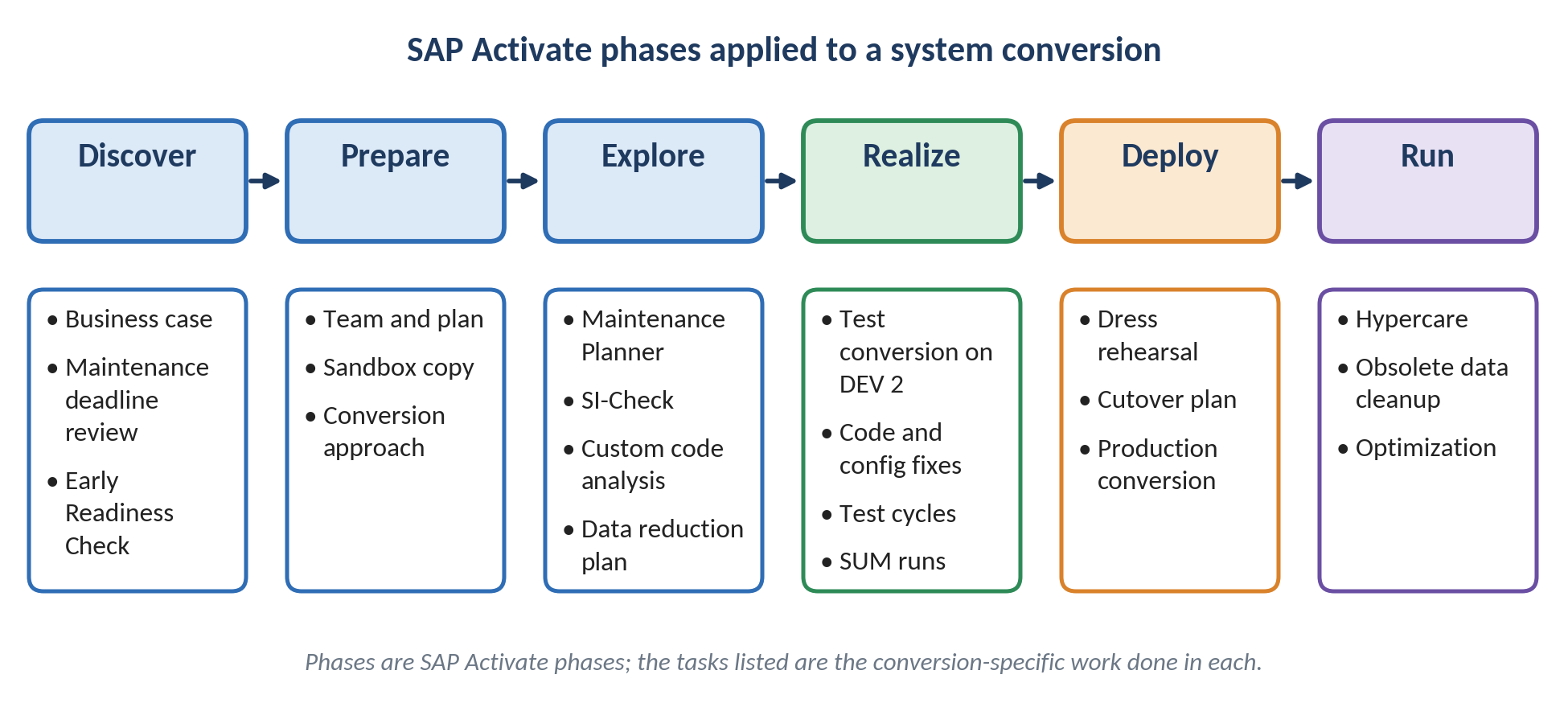
Figure 8: SAP Activate phases and the conversion-specific work done in each phase.
Figure 8 shows the phases from left to right. The table below explains what each phase achieves in a conversion and what you should have in hand when it ends.
The table below links each phase to its typical outputs.
| Phase | Purpose in a conversion | Typical outputs |
| Discover | Understand SAP S/4HANA and decide to proceed | Business case, awareness of the maintenance deadline, early SAP Readiness Check |
| Prepare | Plan and staff the project | Project plan, team, sandbox copy of production, chosen approach |
| Explore | Analyze what must change | Maintenance Planner result, SI-Check and custom code analysis, data reduction plan |
| Realize | Convert, adapt and test | Test conversion on a development copy, code adaptation, finance customizing, test cycles |
| Deploy | Rehearse and go live | Dress rehearsal, cutover plan, production conversion |
| Run | Stabilize and clean up | Hypercare, cleanup of obsolete data with transaction SODH, optimization |
Landscape and Test Cycles
Short answer. SAP recommends converting a copy of your development system first, collecting every required change in transport requests, and then replaying those changes during the real conversion of production. This is called a distributed system landscape approach.
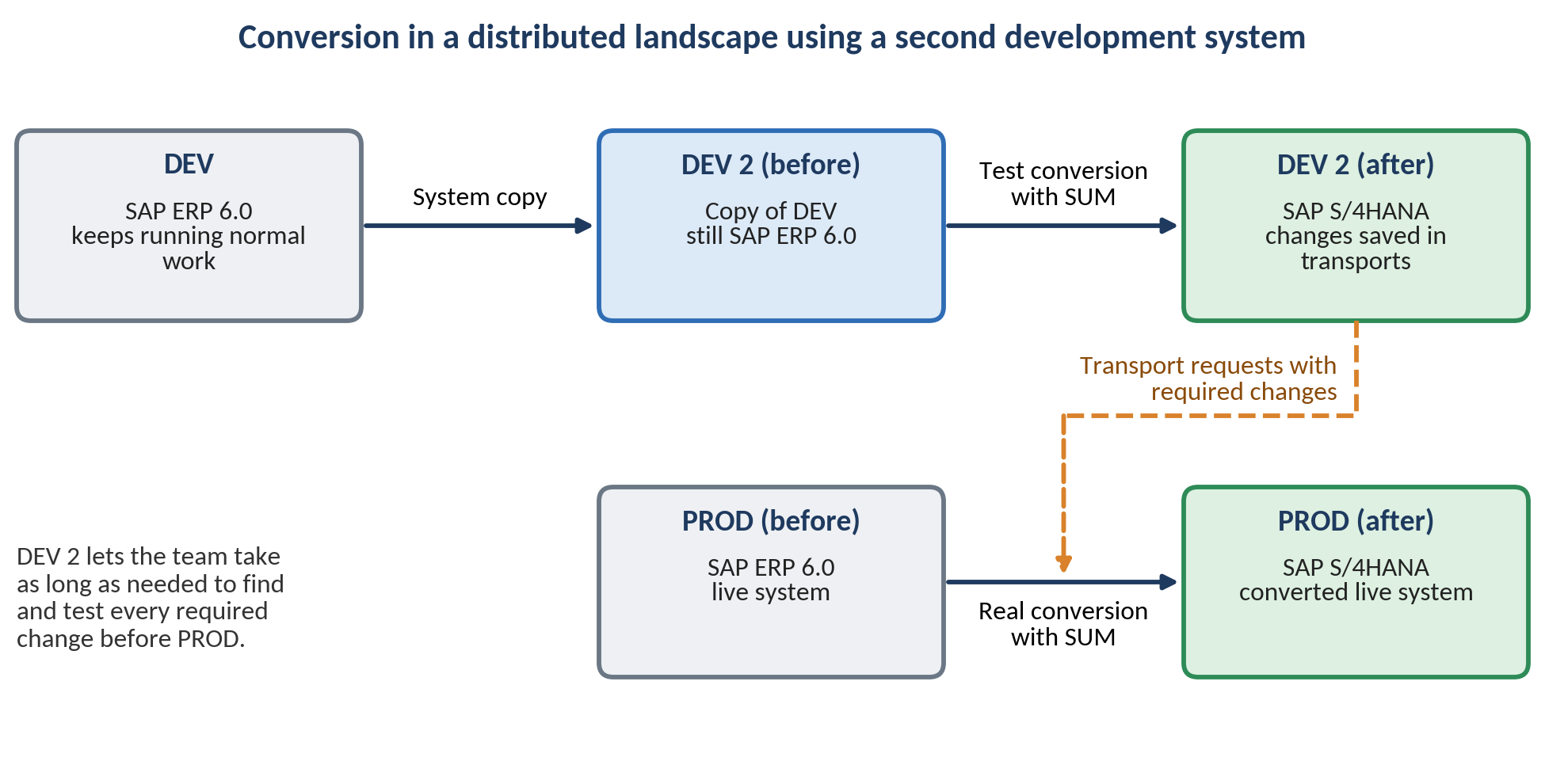
Figure 9: Test conversion on a second development system, with collected transports used for the production conversion.
In Figure 9, DEV keeps serving normal support work while DEV 2 is used for as many test conversions as needed. Changes that can only be made after the conversion, such as the finance customizing, are recorded in transport requests. SUM later accepts those transport requests as input during the real production conversion, so the production downtime is not spent discovering changes.
The following steps describe how to use the second development system. Your team may add or reorder steps to fit its landscape.
- Create DEV 2 as a system copy of DEV, while DEV continues to receive normal fixes.
- Run the Prepare-phase checks on DEV 2: Maintenance Planner, SI-Check and custom code analysis.
- Convert DEV 2 to SAP S/4HANA with SUM and note the runtime of each phase.
- Collect all required changes in transport requests, including customizing that can only be done after the conversion.
- Provide those transport requests to SUM when you convert the next system in the landscape.
- Repeat the conversion on a fresh copy if the result is not yet stable, rather than patching a half-converted system.
After DEV 2 is created as a system copy, it still holds the settings of the original system. Do the tasks in the table below before the first conversion test. They are general BASIS practice for any system copy and are not specific to SAP S/4HANA. Adapt them to your company standards.
| Task | Transaction | Why it matters |
| Convert the logical system name | BDLS | The copy still contains the logical system name of the source; BDLS replaces it in the tables so that interfaces and distribution models point to the right system |
| Check the client settings | SCC4 | Client role, change options and protection should match the purpose of DEV 2 |
| Review RFC destinations | SM59 | The copy may still point to production systems; change or deactivate such destinations so that test data is not sent to production |
| Handle background jobs | SM37 | Jobs scheduled in the source must not run against production partners; cancel or reschedule them on DEV 2 |
| Check the transport configuration | STMS | DEV 2 must not release transports into the normal production route by accident |
| Install a new licence | SLICENSE | The copy needs its own licence for its hardware key |
| Block outbound communication | SOST, WE20, WE21 | Prevent test e-mails and IDocs from reaching real partners |
| Create test users | SU01 | Give the project team the authorizations they need for the conversion tests |
Hand-over: DEV 2 is ready
BASIS signs off the post-copy checklist and tells the project manager that DEV 2 is available. The functional and ABAP teams receive the client and the test logins for Chapter 2. Nobody changes DEV 2 outside the project plan, because later cycles are compared with it.
Many projects run several conversions with different goals. The table below shows a common pattern. It is project practice, not an SAP requirement, so adapt it to your landscape.
| Cycle | System | Main goal |
| Sandbox conversion | Copy of production | Check technical feasibility and get a first runtime and downtime estimate |
| Development conversion | DEV 2 | Find and record all required changes in transports |
| Quality conversion | Quality system | Functional and integration testing with the business |
| Dress rehearsal | Production-sized copy | Time the cutover and confirm the downtime plan |
| Production conversion | Production | Go live |
Prepare and Realize Sequence
The Conversion Guide describes a recommended order of work, shown in Figure 10. Steps 2 to 4 are recommended in that order, but SAP states that they can technically be done independently or in parallel.
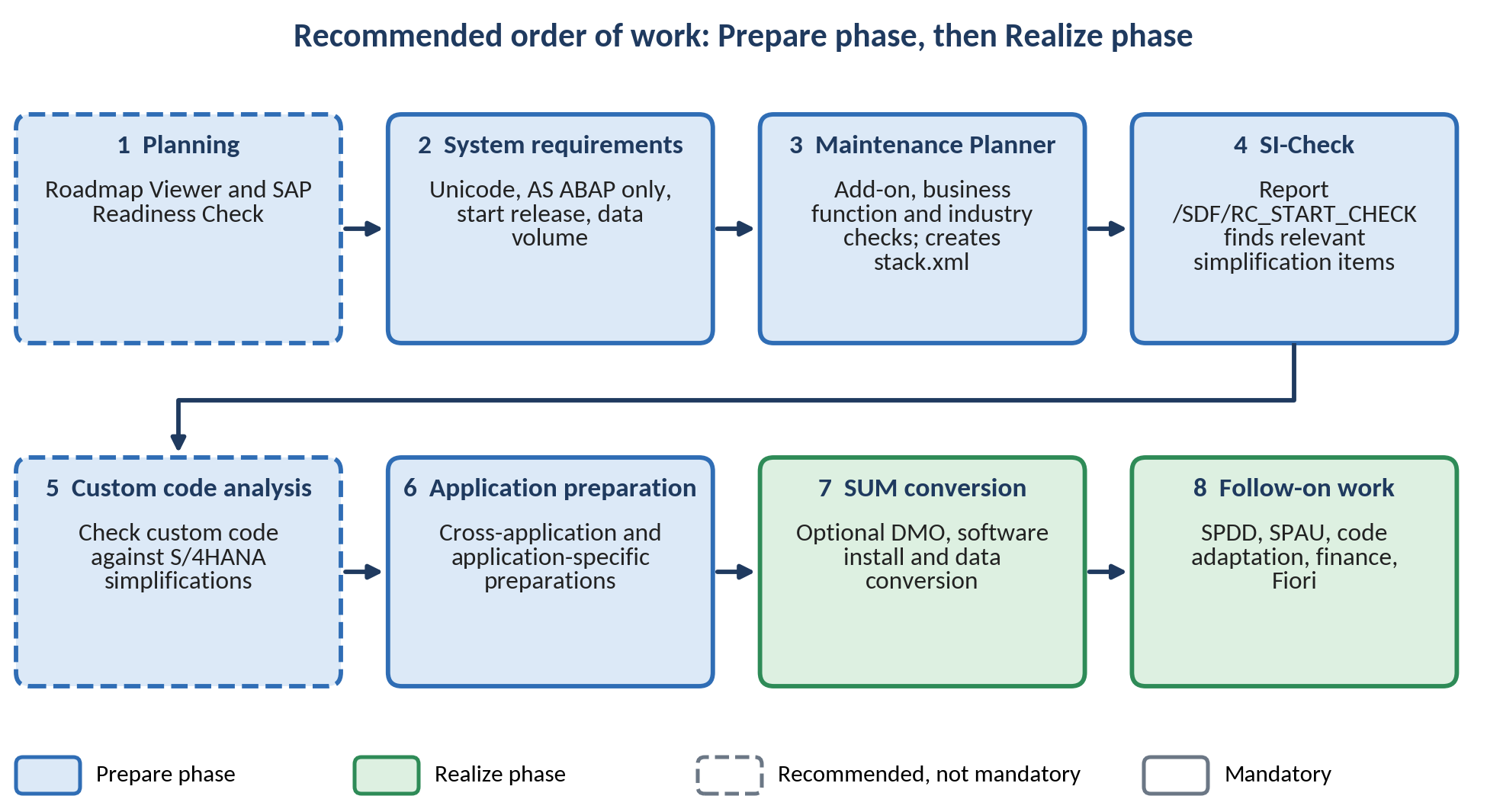
Figure 10: Recommended order of work in the Prepare and Realize phases of the conversion.
The table below states which steps are mandatory and what each one delivers.
| Step | Mandatory? | What it delivers |
| Planning with Roadmap Viewer and SAP Readiness Check | Recommended | Overview of project steps, relevant simplification items, add-on compatibility, sizing hints |
| System requirements | Yes | Confirmed Unicode, AS ABAP only, start release and data volume |
| Maintenance Planner | Yes | Compatibility check and the stack.xml file that SUM needs |
| Simplification Item-Check | Yes | List of relevant simplification items and consistency results |
| Custom code migration analysis | Highly recommended | List of custom code that does not fit SAP S/4HANA |
| Application preparation | Yes, as the items apply | Actions found by the checks and described in SAP Notes |
| SUM conversion | Yes | Optional database migration, software installation and data conversion |
| Follow-on work | Yes, as the items apply | Adapted code, finance migration, authorizations and Fiori setup |
Two tools are easy to confuse. The table below compares them.
The table below compares SAP Readiness Check and the Simplification Item-Check (SI-Check), based on the Conversion Guide.
| Aspect | SAP Readiness Check | Simplification Item-Check |
| Type | Customer self-service provided by SAP, cloud-based web interface | Standalone report /SDF/RC_START_CHECK in SAP GUI |
| Main purpose | Planning tool run early to get an overview of the required activities | Operational tool used to clean up inconsistencies up to the downtime |
| Called by SUM | No | Yes |
| Mandatory | No, but highly recommended | Yes |
| Re-run single items | No, it runs all checks | Yes, which can save a lot of time after a fix |
Expected Result. SUM runs the SI-Check at the start of its procedure and again just before the downtime. At the start it stops on a message with return code 12; before downtime it stops on return code 8 or higher. Fixing all inconsistencies early therefore protects your downtime window.
Run, share, fix, run again. Almost every check in the next chapters follows the same loop. The BASIS team runs the tool, but BASIS does not own most of the findings. The report is shared with the team that owns each finding, that team fixes its items in the SAP ERP 6.0 system, and BASIS then runs the check again to confirm. The loop repeats until no blocking item is left. Plan time for this: each loop can take days, because the owners need time to fix their items. This is one more reason to start the checks early.
Use the following steps for every check. They apply to the SAP Readiness Check, the Simplification Item-Check, the custom code analysis and the finance checks alike.
- BASIS runs the check and saves the result with the date, the target release and the versions of the SAP Notes that were used (export the list or save a screenshot). A result without a date cannot be compared with the next run.
- BASIS splits the result by owner and sends each team only its own items, with the SAP Note number of every item. Do not send the whole report to everybody: nobody will read it.
- Each owner team fixes its items in the SAP ERP 6.0 system, not in SUM, and writes down what was done and who confirmed it.
- BASIS runs the check again. For the Simplification Item-Check you can run only the single items that were fixed. Update the status of every item: open, fixed or exempted with a reason.
- Repeat until no blocking item is left, then keep the final result as evidence for the project.
The table below shows who normally owns which kind of finding and who runs the check again.
| What the check reports | Owner team | What the owner does | Who runs the check again |
| A simplification item is relevant for a business process | Functional team | Reads the SAP Note of the item, decides how the process changes, and records the decision | BASIS (single item) |
| A data inconsistency in finance, assets, material or customer and vendor data | Functional team and finance team | Corrects the data in the SAP ERP 6.0 system and documents the correction | BASIS (single item) |
| Custom code does not fit SAP S/4HANA | ABAP team | Removes unused code and fixes the findings | ABAP team with BASIS |
| An add-on is not supported for the target release | BASIS with the add-on vendor and the process owner | Asks the vendor for a version or an uninstall package; the process owner confirms that the add-on is not needed | BASIS (Maintenance Planner) |
| A business function blocks the conversion | Functional team | Decides whether the function can be switched off | BASIS |
| Notes, TCI or tool versions are missing | BASIS | Implements the notes in the correct order | BASIS |
| The memory estimate is larger than the planned hardware | Infrastructure team and database administrator | Adjusts the hardware plan or reduces the data volume | BASIS (sizing report) |
Team Responsibilities
Roles and Hand-offs
A conversion is a team project. The technical conversion is run by the Technology (BASIS) team, but the checks, the code, the roles and the business validation belong to others. Naming owners early prevents the common situation where everybody assumes a task belongs to somebody else.
The table below lists typical responsibilities. Adapt it to your organization.
| Team | Typical responsibilities | Examples of tools and objects |
| Technology (BASIS) | Maintenance Planner, preparing source and target systems, installing or updating SAP HANA, running SUM on every system, backups, technical validation | Maintenance Planner, SPAM/SAINT, SUM, SAP HANA lifecycle tools |
| Functional | Assessing simplification items for their area, finance and material ledger steps, business partner conversion, credit management, business testing | SI-Check results, SAP Notes per application area |
| ABAP | Custom code analysis and adaptation, modification and enhancement adjustment | SPDD, SPAU, SPAU_ENH, ABAP Test Cockpit with check variant S4HANA_READINESS |
| Security | Reviewing role menus for obsolete transactions and designing roles for SAP Fiori | PFCG, report for obsolete transactions in transaction SU25 |
| Fiori | Launchpad setup, catalogs, groups and front-end roles | SAP Fiori launchpad and its administration tools |
| Business and project management | Scope, acceptance testing, approval of go-live, contact to add-on vendors | Test plans, cutover plan |
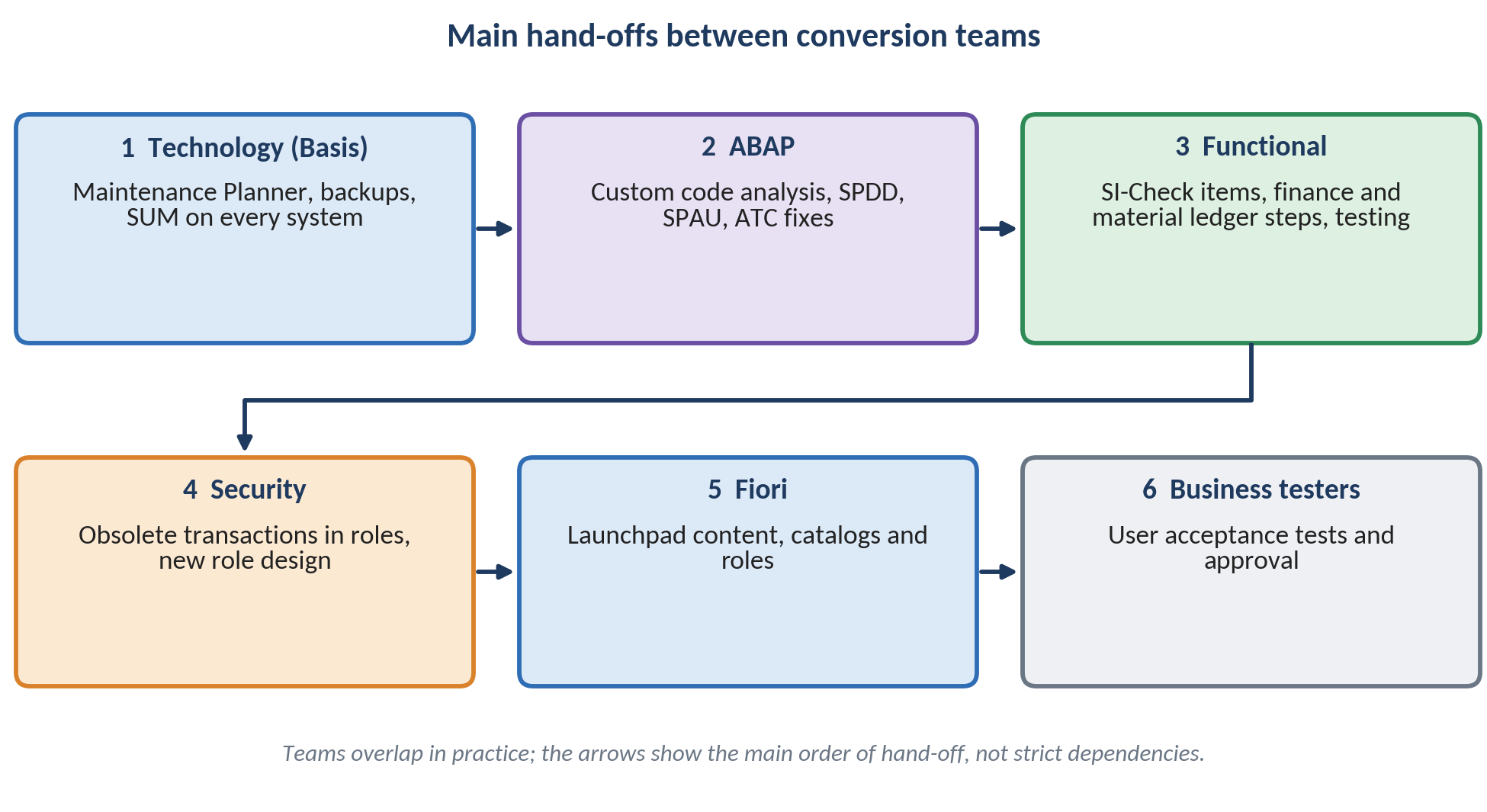
Figure 11: Main hand-offs between the conversion teams.
Example. Imagine the BASIS team finishes the SUM run on DEV 2. The system goes to the ABAP team, who work through the modification and enhancement adjustments and fix findings from the ABAP Test Cockpit. When the code compiles and activates, the functional team starts the post-conversion finance steps and testing, while the security team reviews role menus in parallel.
Version Note. A SUM dialog seen in an SAP S/4HANA 1709 lab states that SPAU adjustments can be made without an object registration key for 14 days after the phase is first entered. This is an older-release observation; check the current SUM guide before you rely on it.
Data Strategy
Data Volume Reduction
Short answer. You do not have to carry every historical record into SAP S/4HANA. A smaller database converts faster, because the load size is smaller, and it is cheaper to run on SAP HANA memory.
SAP Data Volume Management (DVM) supports this work. Typical aids include the DVM Work Center in SAP Solution Manager, the Guided Self Service that produces a best-practice document showing where data can be reduced most efficiently, and the reorganization and compression tools that simulate the savings. You can also simulate the future size of your system to forecast the effect of planned measures. Archiving itself is performed with the archive administration transaction SARA.
A simple way to start is to sort data by how much the business still needs it. The groups below are a planning aid created for this tutorial, not SAP product terms.
| Group | Meaning | Planning action |
| Active data | Needed daily by operations and reports | Keep in the system and convert |
| Reference data | Needed occasionally within legal and audit periods | Define an archiving timeline; archive data that policy allows before the conversion |
| Historical data | Needed only for legal retention | Archive according to retention rules and make sure it can still be retrieved |
Common Error. Archiving data that finance still needs for migration, such as open items and balances, or data that an open business process still uses. Agree the scope with finance and auditors, and test the archiving run on a sandbox copy first.
Hand-over: data volume and retention
The finance team and the auditors decide which data may be archived and for how long. BASIS runs the archiving on a test copy and reports the new database size. The data owners check that old documents can still be read. Only then the same steps are planned for production, and the size is measured again in the next cycle.
Common Mistakes and Troubleshooting
Planning Mistakes and Prevention
What can go wrong? Most conversion problems that appear late were visible early. The table below lists frequent planning mistakes, their effect and a way to prevent them.
The table below connects each mistake to its consequence and prevention.
| Mistake | What happens | Prevention |
| Starting too late | The team rushes and skips test cycles | Fix a start date from the maintenance deadline backwards |
| Running Maintenance Planner late | An unsupported add-on or business function blocks the plan | Run it early; it checks add-ons, business functions and industry solutions |
| Ignoring yellow SI-Check messages | Data loss or functional gaps are found after go-live | Read all yellow messages and decide an action for each |
| No test conversion on a copy | Required changes are discovered during production downtime | Use DEV 2 and collect transports |
| Treating Readiness Check as a replacement for SI-Check | SUM stops because the mandatory check was never cleaned up | Use both tools for their different purposes |
| Unclear data scope | Long runtimes or missing data | Agree reduction and archiving scope with finance and auditors |
| Forgetting add-on vendors | No released version or uninstaller is available in time | Contact vendors early and clarify licensing |
| Leaving authorizations and Fiori to the end | Users cannot work after cutover | Include security and Fiori teams from the Explore phase |
Troubleshooting. If the plan slips, first check three things in order: whether the Maintenance Planner result changed, whether new red messages appeared in the latest SI-Check run, and whether the latest conversion test ran on a copy that is still close to production size.
Summary
Key Takeaways
A system conversion moves an existing SAP ERP 6.0 system to SAP S/4HANA with SUM, with optional database migration in the same run.
The ECC date that matters is the end of mainstream maintenance: 31 December 2027 for enhancement packages 6 to 8, with optional extended maintenance until 2030.
System conversion is supported for on-premise and private cloud edition; the public edition is a new implementation.
Entry requirements: Unicode, AS ABAP only, SAP ERP 6.0 enhancement package 0 to 8 at the required support package level, and supported add-ons and business functions. Enhancement package 6 does not need an extra upgrade.
SAP S/4HANA 2025 is in maintenance until 31 December 2032 according to SAP Note 3493301.
Use a second development system for test conversions and collect required changes in transport requests.
Maintenance Planner and the SI-Check are mandatory; SAP Readiness Check is a highly recommended planning tool.
Name owners for BASIS, functional, ABAP, security, Fiori and business testing from the start.
Reduce data volume before converting.