
Home / SAP GRC Access Control 12.0
Result :
SAP Access Control Foundations and Solution Architecture
Introduction
Purpose
SAP Access Control is an enterprise access-governance application. It helps an organization identify risky access, route access requests through controlled approval, manage emergency privileges, govern role development, and perform periodic access reviews. The product supports compliance work, but it does not make an organization compliant by itself.
This chapter builds the foundation required for later configuration chapters. It explains the business problem, the product capabilities, the technical layers, landscape choices, supported integration patterns, and the operating model that connects risk analysis with day-to-day access administration.
Who Should Read This Chapter
This chapter is written for SAP Security and GRC consultants, SAP BASIS administrators, auditors, business control owners, role owners, project managers, and learners who need a reliable overview before working with detailed configuration.
Learning Objectives
After reading this chapter, the reader should understand the following outcomes.
The following points provide a practical checklist for this topic.
- Explain governance, risk, compliance, SoD, and internal control in simple terms.
- Describe the five principal SAP Access Control capability areas.
- Explain the presentation, application, database, and integration layers.
- Choose a safe landscape pattern and recognize the limits of a minimal landscape.
- Identify the main SAP, identity, HR, HANA, and cloud integration patterns.
- Connect get clean, stay clean, and stay in control to specific operational activities.
Governance Risk and Compliance Fundamentals
Governance Risk and Compliance Explained
Governance defines who can make decisions, who is accountable, and how performance and control objectives are directed. Risk management identifies events or access combinations that could prevent the organization from meeting those objectives. Compliance demonstrates that legal, regulatory, contractual, and internal policy obligations are being followed.
In an SAP environment, these areas meet around identity and authorization. A business process can be well designed, but it remains exposed if one user can perform incompatible activities, if privileged access is not reviewed, or if user access is not removed when responsibilities change.
Why Access Governance Matters
Digital business increases both speed and dependency on system access. Automation, cloud services, connected devices, analytics, and remote work allow transactions to move quickly across systems. The same connectivity can also expand the effect of excessive or incorrectly assigned access.
Industrial change provides a useful context. Mechanized work evolved into electrically powered mass production, then computer-controlled automation, and now connected operations using cloud services, the Internet of Things, analytics, artificial intelligence, and machine learning. Each stage improved efficiency while increasing the number of systems, identities, interfaces, and automated decisions that require control.
The most serious impact is not limited to a failed audit. Unauthorized activity can affect financial reporting, confidential data, production, customer service, and business trust. Access governance therefore combines prevention, detection, accountability, and evidence rather than treating user administration as a purely technical task.
Compliance and Internal Control
Compliance means meeting obligations that apply to the organization. These may come from law, regulation, industry standards, customer contracts, or internal policies. Examples include financial-reporting controls, Payment Card Industry Data Security Standard requirements, data privacy, and rules for handling sensitive operational information.
The Sarbanes-Oxley Act (SOX) is a common reason for stronger financial-system access controls. Sections 302 and 906 address executive responsibility for financial reports; Section 404 focuses on management assessment of internal controls; Section 409 concerns timely disclosure; and Section 802 includes requirements and penalties related to records. SOX does not prescribe an SAP transaction or role design, but systems that process financial information must support the organization's control and evidence obligations.
An internal control should have a clear objective, owner, frequency, evidence requirement, and response when an exception occurs. SAP Access Control can automate parts of the control process, but business management must still define acceptable risk and act on the results.
Segregation of Duties
Segregation of Duties (SoD) separates activities that should not be controlled by one person from beginning to end. The purpose is to reduce the opportunity for error or fraud and to increase the chance that an inappropriate action is detected.
For example, a user who can create or change a vendor and also release payment to that vendor has end-to-end influence over a sensitive process. SAP Access Control can detect the combination through a ruleset. The business must then remove one activity, redesign the process, or approve a documented mitigation control.
Preventive and Detective Controls
A preventive control acts before unsafe access or activity is completed. Examples include risk analysis during an access request, an approval requirement, a role-design check, or a rule that blocks a critical assignment. Preventive controls reduce exposure but must include a controlled exception process for legitimate business needs.
A detective control identifies exposure after access exists or activity has occurred. Batch risk analysis, firefighter log review, user access review, and sensitive-action monitoring are examples. A mature design normally combines both types because no preventive model can anticipate every business situation.
From Manual Control to Continuous Governance
Compliance Maturity Model
Organizations usually move through recognizable maturity stages. The labels below are an independent learning model; they are not a certification scale. The purpose is to help a project team understand its current operating behaviour and select realistic improvements.
The following table organizes the information for quick comparison and implementation use.
| Stage | Typical Behaviour | Practical Next Step |
| 1 - Reactive | Evidence is scattered across email, files, and spreadsheets. Access decisions depend on individuals. | Define ownership and inventory systems, users, roles, risks, and controls. |
| 2 - Repeatable | Some reports and approvals exist, but scope and frequency vary. | Standardize policy, risk definitions, evidence, and review schedules. |
| 3 - Managed | Central workflows and detective controls operate for major systems. | Improve data quality, integrate provisioning, and measure remediation. |
| 4 - Preventive | Risk checks and role governance reduce unsafe access before assignment. | Add exception monitoring, analytics, and continuous control improvement. |
| 5 - Adaptive | Connected services use timely data and risk signals across the enterprise. | Tune controls from evidence while preserving human accountability. |
Limitations of Manual Compliance
Spreadsheets, email approvals, and manually assembled reports can work for a small scope, but they become fragile when the user population, system count, role volume, and control frequency grow. Evidence is scattered, ownership is difficult to prove, and analysis may cover only a sample rather than the full population.
Manual work also introduces timing problems. A monthly report may show an access conflict that has already existed for weeks. Automation shortens the time between access change, risk detection, approval, and remediation, while maintaining a traceable record.
Selecting an Access Governance Solution
A product should be selected against business and technical requirements, not against a feature list alone. The evaluation must include cross-system analysis, supported target types, workflow flexibility, reporting clarity, operational effort, integration security, scalability, and the ability of business reviewers to understand the output.
The following points provide a practical checklist for this topic.
- Can it analyze risk across every in-scope system and user population?
- Does it support the required request, approval, provisioning, review, and emergency-access scenarios?
- Can business reviewers understand the risk and decision information?
- Are connectors, plug-ins, services, and target releases supported?
- Can the solution meet volume, batch-window, availability, and retention requirements?
- Are implementation, licensing, operations, and upgrade responsibilities clear?
SAP GRC Solution Portfolio
Relationship Between SAP GRC Solutions
SAP Governance, Risk and Compliance includes several solutions with different purposes. SAP Access Control governs identity-related access risk. SAP Process Control supports control documentation, testing, monitoring, and issue management. SAP Risk Management supports enterprise risk identification and assessment. SAP Audit Management organizes audit planning and execution. Other SAP offerings address fraud detection, regulation management, and cloud identity governance.
These products can exchange context, but they are not interchangeable. An Access Control implementation should define which product owns each process and which integration is required rather than duplicating the same decision in several tools.
The following table organizes the information for quick comparison and implementation use.
| SAP solution area | Primary purpose | Relationship to access governance |
| SAP Access Control | User access risk, request, privileged access, role governance, and reviews. | Core subject of this tutorial. |
| SAP Process Control | Control documentation, assessment, testing, monitoring, and issue handling. | Can provide broader control-management context. |
| SAP Risk Management | Enterprise risk identification, assessment, response, and monitoring. | Places access risk within wider enterprise risk. |
| SAP Audit Management | Audit planning, execution, findings, and reporting. | Consumes evidence but should remain independent of control operation. |
| SAP Cloud Identity Access Governance | Cloud-delivered identity access governance capabilities. | Supports cloud scenarios and bridge integration with on-premise Access Control. |
Position of SAP Access Control
SAP Access Control sits between business policy and technical authorization administration. It consumes information about users, roles, actions, permissions, and organizational values from connected systems. It applies rules and workflow, records decisions, and can send approved provisioning instructions back to target systems.
SAP Access Control Product Overview
What SAP Access Control Does
SAP Access Control provides a coordinated set of capabilities rather than one monolithic process. Risk analysis can be used during role design, access requests, periodic scans, and reviews. Workflow provides accountable decisions. Provisioning applies approved changes. Emergency access provides a controlled path for urgent privileged work. Reviews confirm whether existing access remains appropriate.
The following table organizes the information for quick comparison and implementation use.
| Capability | Question answered | Typical output |
| Access Risk Analysis | What risky access exists or would be introduced? | Risk result, affected user or role, function details, remediation or mitigation decision. |
| Access Request Management | Who requested access, who approved it, and was it provisioned? | Request record, workflow history, risk result, and provisioning status. |
| Emergency Access Management | How is urgent privileged access controlled and reviewed? | Time-bound assignment, session reason, activity log, and controller decision. |
| Business Role Management | How is role content designed, approved, generated, and certified? | Governed role record, methodology status, risk analysis, approvals, and test evidence. |
| Access Reviews | Is existing access, risk, or emergency assignment still required? | Reviewer decision and traceable removal, renewal, mitigation, or escalation action. |
Access Risk Analysis
Access Risk Analysis (ARA) compares access data with a ruleset. A ruleset represents business risks through functions, actions, permissions, critical access, and organizational conditions. Analysis can be performed for users, roles, profiles, or proposed changes and can include risks that cross system boundaries.
ARA supports remediation, which removes or redesigns conflicting access, and mitigation, which documents an approved compensating control. The quality of the result depends on current repository data, accurate rules, correct organizational logic, and assigned risk ownership.
Access Request Management
Access Request Management (ARM) controls how access is requested, risk-checked, approved, provisioned, and recorded. A request may create an account, add or remove roles, change user attributes, lock or unlock a user, or perform another supported access action.
ARM can run risk analysis before submission and during approval so the requester and approver understand the impact. After approval, provisioning updates the connected system and the request retains the workflow and provisioning history.
Emergency Access Management
Emergency Access Management (EAM) provides temporary elevated access through firefighter IDs or role-based firefighter assignments. The user gives a reason for the session, activities are captured, and an independent controller reviews the log.
EAM is intended for exceptional support or operational events. It should not replace properly designed support roles, normal request approval, or timely remediation of recurring access needs.
Business Role Management
Business Role Management (BRM) governs the lifecycle of technical and business roles. It supports role definition, ownership, naming standards, methodology stages, authorization maintenance, derivation, risk analysis, approval, generation, testing, mass maintenance, and recertification.
BRM helps prevent risk from being designed into roles. The role methodology should reflect the organization's development and transport process and should identify who may approve technical content and business use.
Access Reviews and Recertification
Periodic reviews help the organization remain in control after initial remediation. User Access Review asks whether user-role assignments are still needed. SoD Risk Review asks whether detected risks remain acceptable and properly mitigated. Firefighter ID Review confirms whether emergency assignments remain justified.
A review is effective only when decisions result in action. Removal, remediation, mitigation renewal, or escalation should be traceable from the review record to the final system state.
SAP Access Control Evolution and Version Context
Product Evolution
SAP access-governance capabilities evolved from earlier specialist products into the SAP GRC and SAP Access Control product line. Names changed across releases: risk analysis and remediation became Access Risk Analysis; compliant user provisioning became Access Request Management; superuser privilege management became Emergency Access Management; and enterprise role management became Business Role Management.
Historical terminology may still appear in old documents, custom code, role names, or support discussions. A project should use current terminology in new design documents while recognizing legacy names during migration and troubleshooting.
The following table organizes the information for quick comparison and implementation use.
| Earlier terminology | Current Access Control capability | Continuing business purpose |
| Compliance risk analysis / risk analysis and remediation | Access Risk Analysis | Detect and manage SoD and critical-access risk. |
| Access enforcer / compliant user provisioning | Access Request Management | Govern request, approval, and provisioning. |
| Firefighter / superuser privilege management | Emergency Access Management | Control and review temporary privileged access. |
| Role expert / enterprise role management | Business Role Management | Govern role design and lifecycle. |
SAP Access Control 12.0 Version Notes
SAP Access Control 12.0 is an ABAP add-on based solution. Official SAP documentation identifies GRCFND_A V1200 as the central add-on and SAP NetWeaver 7.52 as the underlying platform generation for Access Control 12.0 documentation. Exact support-package, UI, database, operating-system, plug-in, and Fiori requirements must be verified in the current Product Availability Matrix and applicable SAP Notes before installation or upgrade.
Do not treat a version number in a tutorial as an installation decision. SAP can update supported combinations and required support-package levels. Record the verified component matrix in the project design and recheck it before each technical change.
The following table organizes the information for quick comparison and implementation use.
| Capability area | Access Control 12.0 context | Validation required |
| Access Risk Analysis | Rules and analysis can cover S/4HANA, Fiori, HANA, and supported HR or cloud scenarios; analysis may be real-time, offline, or request-driven. | Confirm delivered ruleset content, connector support, and current synchronized data. |
| Usage information | Action-usage processing can include supported web application technologies in addition to classic transaction usage. | Confirm usage collectors, jobs, retention, and support-package behaviour. |
| Emergency Access Management | Supports governed firefighter scenarios, enhanced log reporting, web-interface use cases, and supported HANA privilege scenarios. | Confirm target type, plug-in, log capture, session method, and controller workflow. |
| Access Request Management | Can combine request workflow with risk analysis, mitigation decisions, and supported automated provisioning. | Confirm each action and target is supported and reconciled. |
| Business Role Management | Extends governed role lifecycle to supported business-role and HANA-related privilege scenarios. | Confirm methodology, generation target, ownership, and transport design. |
| Reviews and analytics | Supports user, SoD, firefighter, and mitigation-related reviews plus dashboards and overview information. | Confirm review data generation, reviewers, remediation action, and analytical authorization. |
Solution Architecture
Presentation Layer
Users can work with SAP Access Control through supported SAP user interfaces such as SAP GUI-based administration, browser-based applications, SAP Business Client, and SAP Fiori applications where configured. The chosen interface affects services, catalogs, roles, routing, and troubleshooting, but it does not change the underlying control requirement.
For Fiori, verify the documented front-end or embedded deployment option, SAPUI5 level, Access Control Fiori content, OData services, catalogs, and authorization roles for the installed support package. Do not activate broad service trees merely to make an application appear.
Suggested Original Screenshot
[ORIGINAL SCREENSHOT REQUIRED]
Screen to capture: the SAP Access Control launch area in SAP Business Client or the supported SAP Fiori launchpad
Purpose: Show how a user enters the governed applications without reproducing a source-book image.
Caption: SAP Access Control entry point for governed access activities
Alt text: SAP Access Control screen showing the sap access control launch area in sap business client or the supported sap fiori launchpad.
Mask before publishing: User IDs, company codes, system IDs, client numbers, role names, hostnames, email addresses, document numbers and any organization-specific values.
Application Layer
The application layer contains SAP Access Control configuration, workflow, risk rules, request processing, review data, provisioning logic, and administrative functions. GRCFND_A V1200 is the central Access Control 12.0 software component identified in SAP product documentation.
This layer should be treated as a governed business application. Configuration ownership must be separated from request approval and control review, and changes should follow the normal development, test, and production transport path.
Database Layer
SAP Access Control stores configuration, master data, workflow and audit records on the database supported by its underlying SAP platform. Platform availability must be confirmed through the current Product Availability Matrix.
When SAP HANA is used, release-specific capabilities may include HANA-oriented analytics or governed emergency access to supported HANA privileges. These features require their own integration and security design; using HANA as the application database does not automatically activate them.
Integration Layer
The integration layer connects the central Access Control system with SAP and non-SAP targets. SAP ABAP systems commonly use RFC destinations together with the appropriate GRC plug-in. HR-specific integration requires the relevant ERP or S/4HANA plug-in in addition to the general NetWeaver integration component where documented.
Identity-management products can integrate through supported services, while cloud targets may use SAP Cloud Identity Access Governance and bridge capabilities. Adapter products may be considered for applications without a standard connector, but support, security, upgrade ownership, and functional limits must be assessed.
The following table organizes the information for quick comparison and implementation use.
| Integration type | Typical mechanism | Design concern |
| SAP ABAP target | RFC plus applicable GRC plug-in | Compatibility, technical-user authorization, repository data, and provisioning. |
| SAP HANA target | Supported HANA integration components and services | Privilege scope, analysis support, and emergency access. |
| HR source | ERP or S/4HANA HR integration and action mapping | Authoritative identity data and joiner-mover-leaver behaviour. |
| Identity platform | Supported web services or documented connector | System of record, approval ownership, reconciliation, and error return. |
| Cloud application | SAP Cloud Identity Access Governance and supported bridge scenario | Current target support, function scope, licensing, and release change. |
| Unsupported target | Vendor adapter or governed custom integration | Support ownership, security, testing depth, and upgrade risk. |
End-to-End Information Flow
A typical flow starts when repository and authorization data are synchronized from a target system. Access Control evaluates that data against the ruleset. A requester or administrator then initiates a governed action, workflow records the decision, and approved provisioning updates the target. Later synchronization and review confirm that the intended state exists.
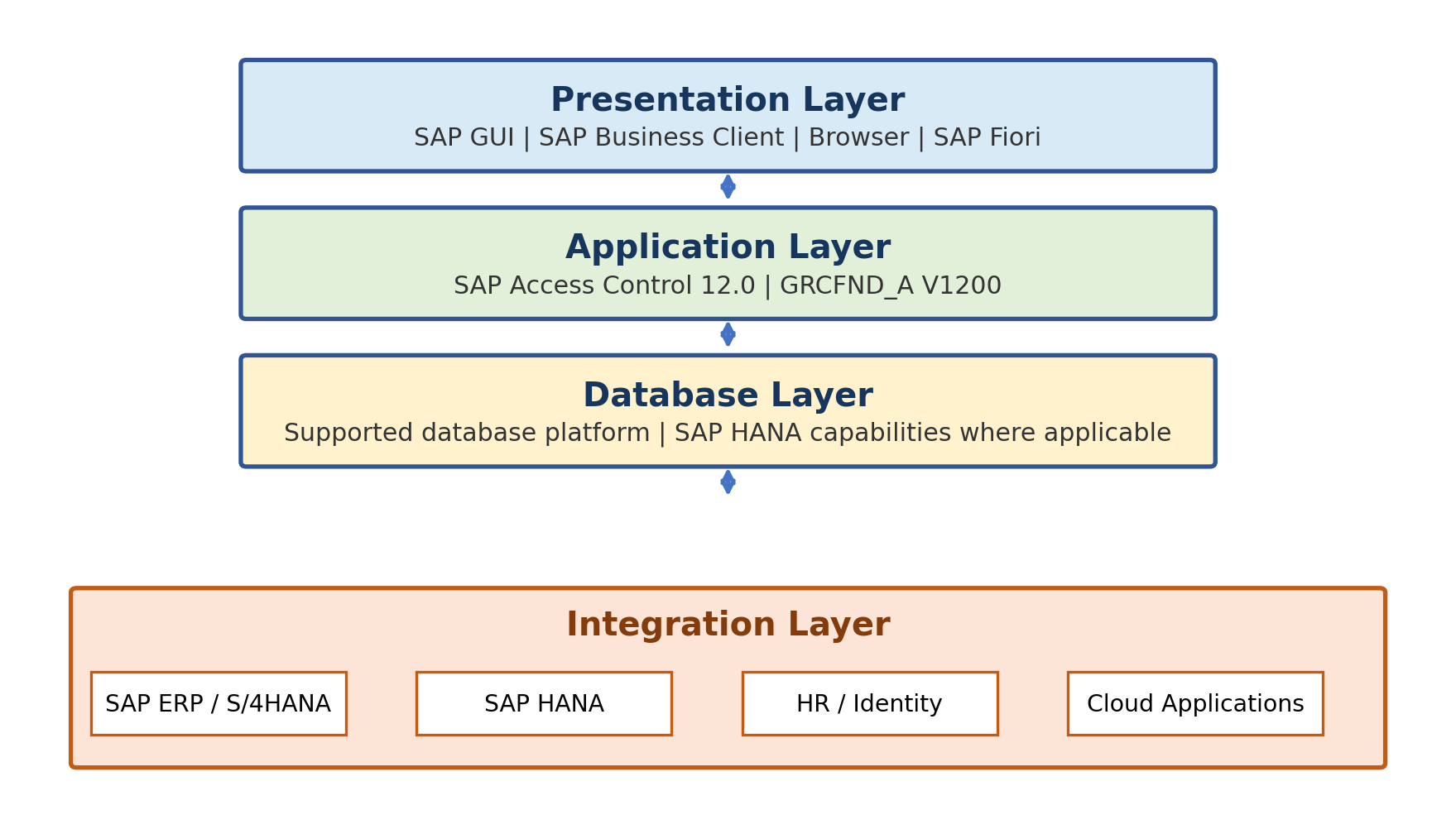
Figure 1.1 - Original layered architecture for SAP Access Control 12.0.
Landscape and Deployment Design
Recommended Three-System Landscape
A production implementation should normally use separate Development, Quality Assurance, and Production Access Control systems aligned with the organization's change process. Development holds configuration and unit tests. Quality Assurance supports integration, regression, workflow, authorization, and business acceptance testing. Production processes live requests, analysis, emergency access, and reviews.
Connected-system destinations should point to the matching environment. A development Access Control system should not provision to a production target. Naming, connector groups, workflow versions, rulesets, and job schedules must be controlled across the landscape.
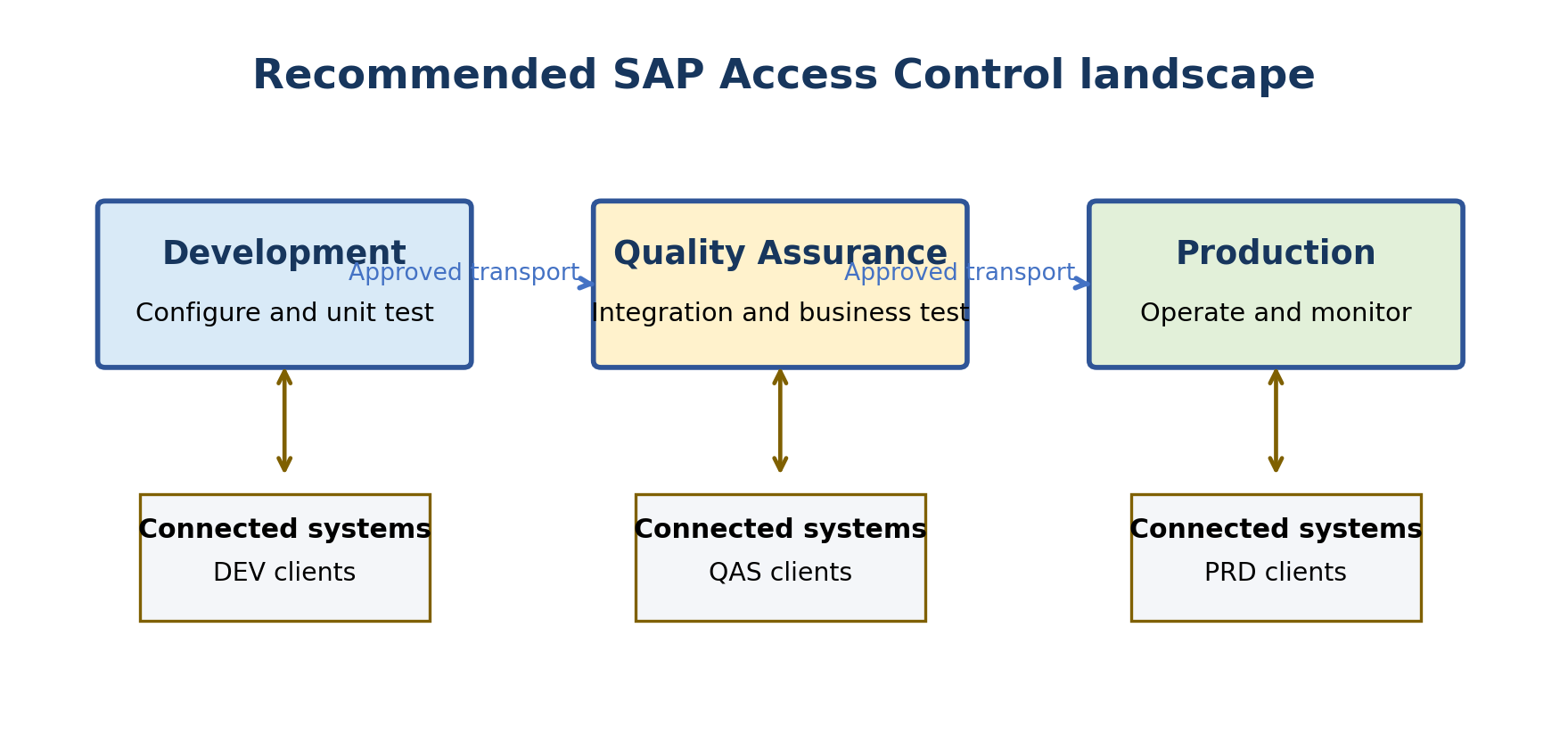
Figure 1.2 - Original development, quality, and production landscape pattern.
Minimal Landscape Limitations
A single-system or minimal landscape may be acceptable for a temporary demonstration or isolated learning environment. It is not an appropriate production design when it prevents safe testing, transport control, high availability, performance separation, or security segregation.
The project must also consider disaster recovery, backup, interface availability, batch windows, growth, and operational ownership. These decisions belong in the architecture document even though detailed installation is covered later.
Landscape Design Decisions
The following sequence helps the architecture team produce a supportable landscape design.
The following points provide a practical checklist for this topic.
- List every Access Control environment and its purpose.
- Map each environment only to the matching connected-system tier.
- Confirm the transport route for customizing, workflow, BRFplus rules, and role content.
- Define how master data and rules are promoted or synchronized.
- Plan technical users, certificates, network paths, and secret ownership.
- Define batch windows, performance monitoring, backup, recovery, and high availability.
- Document test evidence and production cutover entry criteria.
Supported Systems and Integration Patterns
SAP System Integration
SAP Access Control can connect to supported SAP NetWeaver-based systems, including SAP ERP and SAP S/4HANA scenarios, through RFC and the applicable plug-in. The plug-in exposes integration functions and supplies repository, authorization, provisioning, and emergency-access information according to the enabled scenario.
Plug-in compatibility is release-dependent. Access Control 12.0 central components and old plug-in levels must not be mixed based on assumption. Verify the exact target release, Basis level, installed HR components, and required plug-in stack before connection build.
SAP HANA and HR Integration
SAP HANA can appear in two different roles: as the database platform below the Access Control application, or as a governed target whose privileges are analyzed or used through supported emergency-access integration. Keep these designs separate in documentation.
HR integration supports identity and employment-event scenarios such as joiner, mover, and leaver processing. The design requires authoritative personnel data, action mapping, connector setup, the appropriate plug-in, workflow decisions, and a clear response when HR data is incomplete.
Identity Management and Web Services
SAP and non-SAP identity-management solutions can exchange access information with SAP Access Control through supported web-service patterns. Define which system is authoritative for identity attributes, which system owns approval, and how provisioning status and errors return to the request record.
Service accounts, certificates, endpoint protection, replay behaviour, and duplicate processing are part of the security design. A successful service call is not enough; the final target assignment must be verified.
Cloud Application Integration
Cloud integration should be designed using the capabilities available in the current SAP Cloud Identity Access Governance release and the supported bridge scenario for SAP Access Control 12.0. Current SAP documentation continues to describe bridge integration between on-premise Access Control, SAP Cloud Identity Access Governance, and cloud applications.
Potential targets may include SAP SuccessFactors, SAP Ariba, SAP Concur, SAP Fieldglass, and cloud-hosted SAP S/4HANA scenarios, but the presence of a product name in an architecture discussion does not prove that every Access Risk Analysis or Access Request Management function is supported for that target.
The book's historical limitations should not be treated as permanently current. Cloud services change more frequently than the on-premise product. Confirm the supported target, request type, risk-analysis scope, provisioning action, synchronization direction, and licensing in current SAP documentation before committing the design.
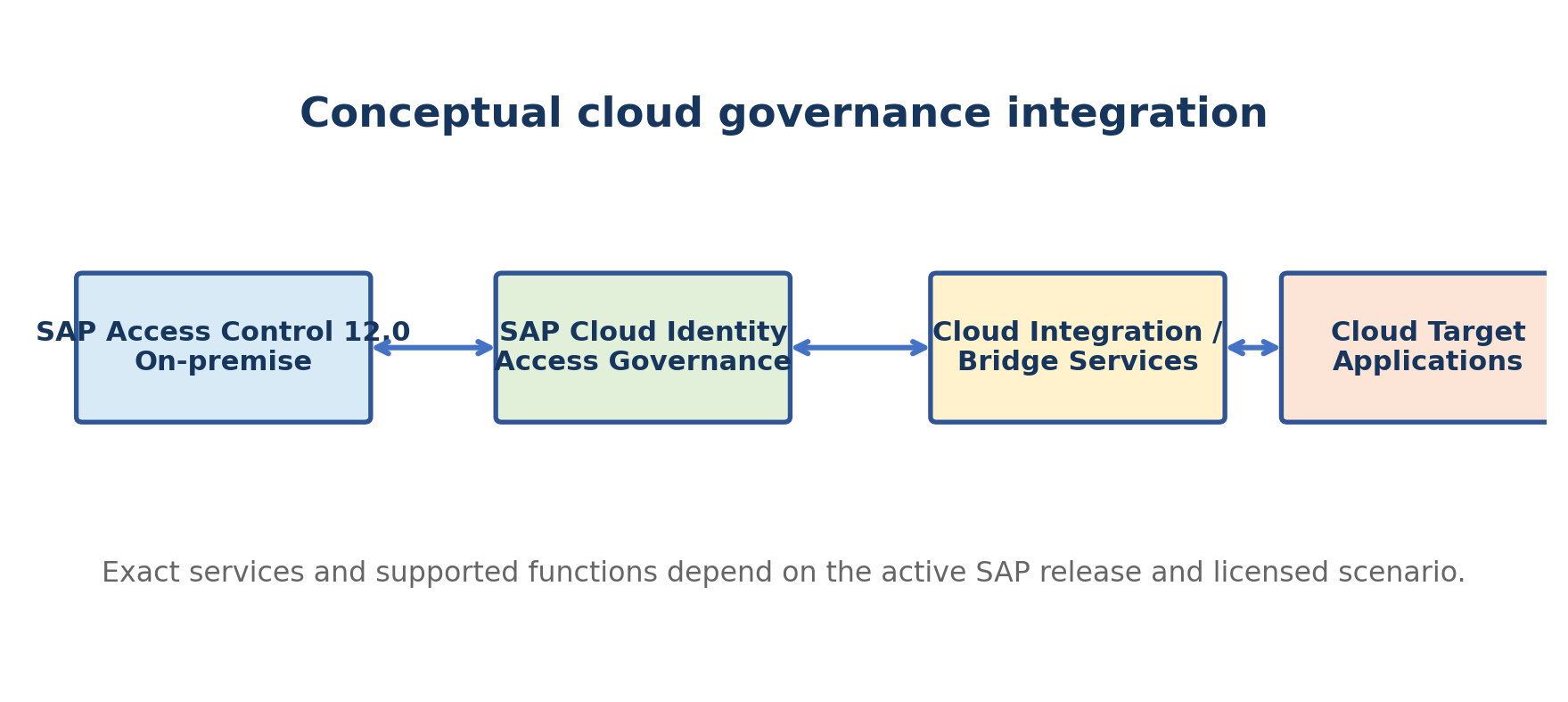
Figure 1.3 - Conceptual cloud governance integration using current supported SAP services.
Adapter-Based Integration
When no standard connector exists, an adapter or custom integration may extend coverage. The decision must include vendor support, authentication, data mapping, error handling, upgrade compatibility, audit evidence, and responsibility for failed provisioning.
Custom connectivity should not claim the same capability as a standard connector unless each required operation has been tested. Risk analysis, provisioning, password handling, emergency logs, and reconciliation are separate functions and may have different levels of support.
Access Governance Operating Model
Get Clean
Get clean establishes the current risk position. The organization synchronizes reliable data, runs risk analysis, confirms true violations with business owners, and chooses remediation or approved mitigation. High-severity and critical-access findings should be prioritized using business impact, not only technical count.
Stay Clean
Stay clean prevents resolved risks from returning. Governed role design, access requests, approval workflow, preventive risk analysis, controlled provisioning, and emergency-access processes help keep new assignments within policy.
Stay in Control
Stay in control verifies that access remains appropriate as people, roles, systems, and business responsibilities change. Recurring analysis, user access review, SoD review, firefighter assignment review, controller log review, alerts, and management reporting provide evidence and trigger remediation.
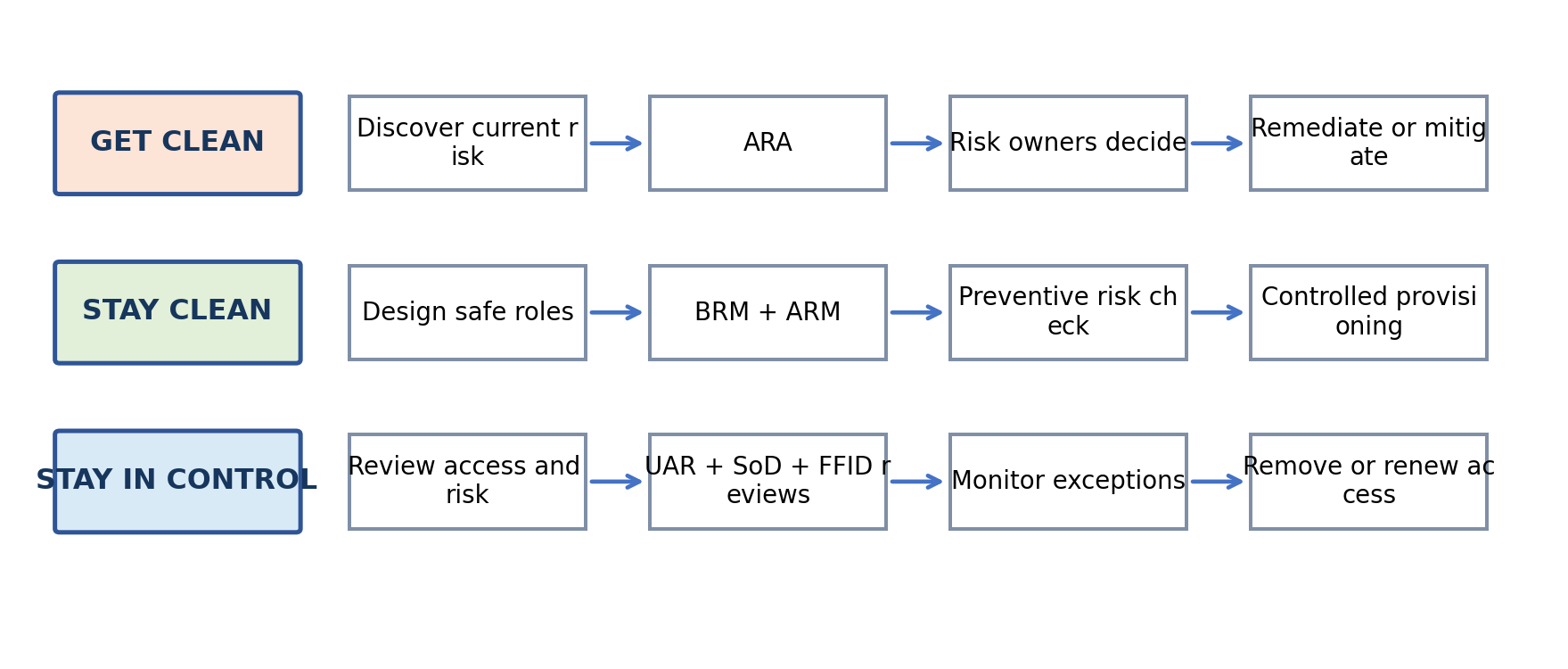
Figure 1.4 - Original get clean, stay clean, and stay in control operating model.
Roles and Responsibilities
Access governance succeeds when ownership is explicit. Technical teams maintain reliable integration and configuration; business owners decide whether access is required; risk owners interpret policy; control owners operate mitigations; role owners govern role content; approvers make timely decisions; controllers review emergency activity; auditors assess evidence without owning the control.
The following table organizes the information for quick comparison and implementation use.
| Role | Primary responsibility | Must remain independent from |
| GRC application administrator | Maintain technical configuration and operations. | Business approval of their own sensitive access. |
| SAP BASIS / integration administrator | Maintain platform, RFC, services, jobs, and technical availability. | Risk acceptance. |
| Risk owner | Own the business interpretation and response to a risk. | Technical rule change without governance. |
| Role owner | Approve role purpose, content ownership, and lifecycle decisions. | Independent certification where conflict exists. |
| Approver / manager | Decide whether requested access is necessary. | Requesting and approving the same sensitive access. |
| Mitigation control owner / monitor | Ensure the compensating control operates and evidence exists. | The activity being independently checked. |
| Firefighter controller | Review emergency activity against the stated reason. | The firefighter session being reviewed. |
| Auditor | Evaluate design and evidence. | Daily ownership or execution of the control. |
Practical Implementation Scenario
Company Scenario
A fictional manufacturing company operates SAP S/4HANA for finance, procurement, sales, and warehouse processes. It also uses an HR system and selected cloud applications. Access is currently granted through email, role content is inconsistent across systems, and emergency production access is shared informally.
Control Design
The company begins by synchronizing users, roles, actions, and permissions into Access Control and validating a prioritized SoD ruleset. It assigns business risk owners, removes clear conflicts, documents time-bound mitigation controls, and introduces ARM for new access. BRM governs role changes, EAM controls urgent production access, and periodic reviews confirm continuing need.
Expected Results
The expected result is not zero risk. The expected result is known risk with accountable decisions: risky access is identified before or shortly after assignment, approvals are traceable, privileged activity is reviewed, role changes are tested, and obsolete access is removed. Management receives understandable evidence instead of disconnected technical reports.
The following table organizes the information for quick comparison and implementation use.
| Measure | Expected evidence |
| Risk visibility | Current risk results tied to users, roles, systems, business owners, and organizational scope. |
| Request accountability | Requester, approver, risk decision, timestamps, and target provisioning result. |
| Emergency access control | Valid assignment, business reason, recorded activities, controller review, and exception follow-up. |
| Role governance | Named owner, methodology status, risk check, approval, generation, testing, and recertification. |
| Sustained control | Scheduled analysis and reviews with documented remediation and closure. |
Foundation Validation and Common Mistakes
Architecture Validation Checklist
Before detailed configuration starts, validate the foundation with the following checks.
The following points provide a practical checklist for this topic.
- The central component and support-package level are documented from current SAP guidance.
- Every target has a supported connector and compatible plug-in or service pattern.
- Development, quality, and production destinations cannot be confused.
- Technical users follow least privilege and are protected from interactive misuse.
- Repository and authorization synchronization can complete within the batch window.
- Business risk, role, control, request, and review owners are assigned.
- Workflow, email, provisioning, emergency logging, and review evidence have test owners.
- Cloud features and limitations were checked against the current service release.
- Security, backup, recovery, monitoring, transport, and upgrade responsibilities are documented.
Common Design Mistakes
Common mistakes include treating Access Control as an audit-reporting tool only, copying an old ruleset without business validation, connecting mismatched environments, using broad technical-user authorization, ignoring background-job capacity, enabling services without a security review, and assuming cloud or plug-in support from an older document.
Another mistake is assigning the same person to request, approve, administer, and review a sensitive process. Workflow automation does not compensate for an invalid responsibility model.
Troubleshooting Approach
When a foundation test fails, diagnose the flow in dependency order. First confirm the product and plug-in versions. Then confirm network and RFC or service connectivity, technical-user authorization, connector definition, synchronized repository data, workflow configuration, job status, and application logs. Fix the first failed dependency before repeating the full process.
Keep evidence from connection tests, synchronization logs, workflow status, provisioning logs, and the target system. This makes it possible to distinguish a presentation issue from an application, integration, authorization, or data-quality issue.
Foundation Diagnostic Sequence
Use the following order so the team does not troubleshoot workflow before proving the lower technical dependencies.
- Verify the central Access Control release, support package, and applicable SAP Notes.
- Verify each target release and compatible plug-in or service component.
- Test network, RFC or web-service communication without exposing credentials.
- Validate the technical user type and required authorizations.
- Confirm connector, group, and environment mapping.
- Run repository and authorization synchronization and inspect job logs.
- Validate application configuration, active services, workflow version, and email.
- Execute a controlled request or analysis and verify the final result in the target system.
- Record the root cause, correction, retest evidence, and monitoring action.
Summary
Key Takeaways
SAP Access Control connects business access policy with technical authorization data and controlled operational processes. Its main capabilities are ARA, ARM, EAM, BRM, and periodic reviews. Together they support a cycle of cleaning existing risk, preventing new uncontrolled access, and reviewing the environment continuously.
A reliable implementation begins with current component verification, an appropriate multi-system landscape, secure integration, accurate data, clear ownership, and realistic business rules. Detailed configuration should start only after these foundation decisions are approved.
References
Official SAP References
The following official sources are useful for release-dependent verification. The uploaded book was used only as conceptual reference and is not listed as a publication source.
SAP Access Control product documentation: https://help.sap.com/docs/SAP_ACCESS_CONTROL
Administrator Guide for SAP Access Control 12.0 SP11: https://help.sap.com/doc/a877d9f274d3471c9ef107e7b9fa1eef/12.0.11/en-US/loio9e08a4211c104a9696cdffccdc9bb3c8.pdf
SAP Cloud Identity Access Governance documentation: https://help.sap.com/docs/SAP_CLOUD_IDENTITY_ACCESS_GOVERNANCE