
SAP GRC / SAP GRC Access Control
Result :
01_SAP-GRC-and-Access-Control-Foundations-Revised
Introduction
Purpose
Governance, risk, and compliance (GRC) is the coordinated way an organization directs decisions, manages uncertainty, follows obligations, operates controls, and retains evidence. SAP Access Control contributes to that model by governing who can access business systems, whether the access creates risk, how approvals and provisioning are controlled, how privileged access is monitored, and whether access should remain.
This revised chapter covers the complete conceptual foundation needed before licensing, installation, and configuration. Its structure, examples, tables, and diagrams are original; technical concepts are cross-checked against the uploaded reference chapter and current SAP sources.
Learning Objectives
Explain why GRC is required in complex and regulated organizations.
Position SAP Access Control within the broader SAP GRC portfolio.
Describe the product evolution and terminology used by projects.
Understand the layered architecture and recommended landscape separation.
Relate ARA, ARM, EAM, BRM, and reviews to a continuous control lifecycle.
Recognize supported-system categories and hybrid cloud integration considerations.
Scope and Verification Context
Product examples refer to SAP Access Control 12.0. Exact component levels, UI requirements, databases, plug-ins, supported targets, cloud services, features, maintenance status, and licensing can change. Validate design decisions through the current SAP Help Portal, Product Availability Matrix, Maintenance Planner, SAP Notes, security guides, and commercial agreement.
Why Organizations Need GRC
Business and Regulatory Drivers
Organizations must protect financial reporting, personal data, intellectual property, operational assets, and critical decisions while meeting laws, regulations, contracts, and internal policies. Requirements such as management accountability, independent oversight, control testing, evidence retention, and timely disclosure increase the need for repeatable governance. Frameworks and regulations differ, but access controls frequently support their objectives.
| Driver | Access-governance implication |
| Growth and acquisitions | More systems, roles, identities, and inconsistent local controls. |
| Remote and flexible work | More digital access paths and dependence on reliable identity data. |
| Cloud and hybrid landscapes | Access decisions span different authorization and integration models. |
| Audit and regulatory scrutiny | Approvals, risk decisions, monitoring, and removals require defensible evidence. |
| Automation and AI | Machine speed increases the impact of inaccurate data, rules, or ownership. |
| Cyber and insider risk | Critical access and privilege must be limited, monitored, and reviewed. |
Technology and Operating-Model Risks
One person can initiate, approve, and complete a sensitive process.
Employees retain access after moving jobs or leaving the organization.
Privileged access is permanent, shared, or insufficiently monitored.
Multiple systems create cross-system conflicts that local reviews cannot see.
Manual approvals lack consistent risk checks, evidence, and follow-up.
Cloud and third-party applications expand the access boundary.
How to Evaluate a GRC Solution
Can it support the actual SAP, cloud, and non-SAP landscape?
Can it analyze complete and cross-system access using validated rules?
Does it integrate with identity, HR, workflow, provisioning, and audit processes?
Can business owners understand and act on the results?
Are performance, availability, security, retention, and support suitable?
Does the operating model have people and processes to sustain the technology?
GRC Operating Model
Governance
Governance defines direction, accountability, oversight, decision rights, escalation, and acceptable behavior. For access governance, it answers who owns a role, who approves access, who can accept residual risk, who monitors emergency use, and who verifies removal. Technology should enforce these decisions without becoming their owner.
Risk Management
Risk management identifies events that could prevent objectives, evaluates likelihood and impact, selects a response, operates controls, and monitors residual risk. An access conflict is a risk indicator; the organization still decides whether to remove access, redesign duties, apply a time-bound mitigation, avoid the activity, or accept the residual risk within authority.
Compliance and Control Evidence
Compliance translates external and internal obligations into policies, controls, monitoring, issue management, and retained evidence. Evidence must show more than a recorded approval: it should demonstrate the data considered, the risk result, the accountable decision, the target-system outcome, and later review or removal where applicable.
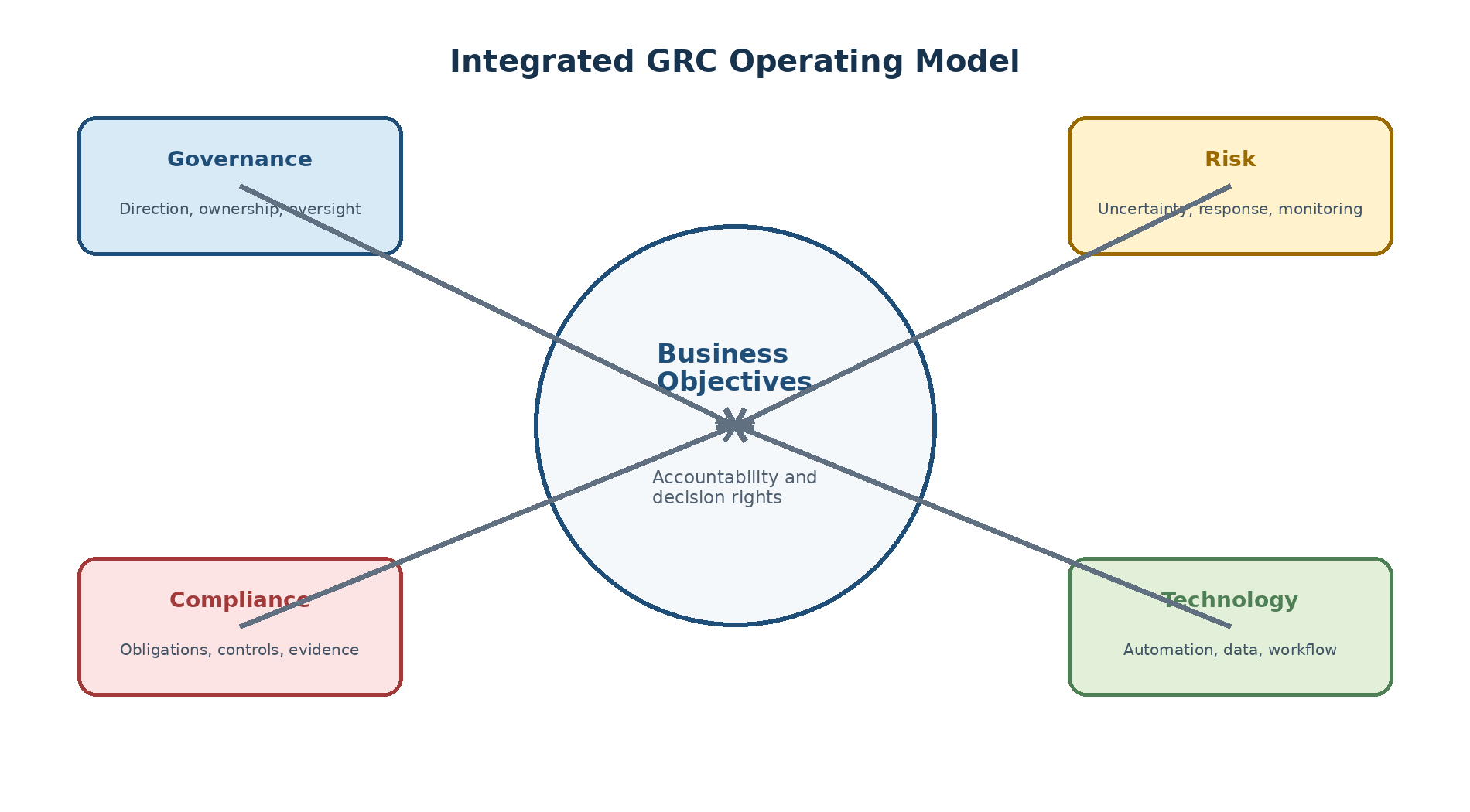
Figure 1. Original diagram: integrated GRC operating model.
SAP GRC Solution Portfolio
Major Solution Areas
| Solution area | Primary purpose |
| Identity and access governance | Govern access risk, requests, roles, privilege, and certification. |
| Enterprise risk and controls | Document risks and controls, assess effectiveness, monitor exceptions, and remediate issues. |
| Audit management | Plan, execute, document, and follow up audit work. |
| Business integrity and fraud monitoring | Detect suspicious activity and support investigation scenarios. |
| Cybersecurity and data protection | Protect business applications, sensitive data, and security operations. |
| Regulatory and trade management | Support applicable regulatory and international trade processes. |
Where SAP Access Control Fits
SAP Access Control is an application within the wider SAP GRC portfolio. Its focus is access governance: risk analysis, workflow-driven access requests, controlled emergency access, role governance, and periodic review. It complements SAP authorization administration and identity lifecycle processes; it does not replace them.
What Technology Cannot Replace
Accurate business-process ownership and role design.
Validated segregation-of-duties and critical-access rules.
Authoritative joiner, mover, leaver, and contractor data.
Management judgment for exceptions and residual-risk acceptance.
Secure systems, patching, monitoring, incident response, and change control.
Independent assurance that controls are designed and operating.
Evolution of SAP Access Governance
From Preventive Access Controls to Integrated Governance
Modern SAP Access Control evolved from earlier products focused on conflict analysis, compliant provisioning, firefighter access, and role management. Over time, the capabilities moved into an integrated ABAP-based governance platform with workflow, analytics, broader SAP S/4HANA and web scenarios, periodic reviews, and hybrid integration. Historical product names are useful for understanding older documents and project vocabulary, but current configuration must use release-specific documentation.
Terminology Across Generations
| Business capability | Common historical terminology | Current SAP Access Control terminology |
| Access-risk analysis | Compliance Risk Calibrator; Risk Analysis and Remediation | Access Risk Analysis (ARA) |
| Access provisioning | Access Enforcer; Compliant User Provisioning | Access Request Management (ARM) |
| Privileged access | Firefighter; Superuser Privilege Management | Emergency Access Management (EAM) |
| Role governance | Role Expert; Enterprise Role Management | Business Role Management (BRM) |
Why Historical Names Still Matter
Teams still use terms such as Firefighter, FFID, CUP, RAR, and role expert in conversations, custom objects, and legacy documents. Consultants should map the old term to the current capability before interpreting a requirement. A historical name must not be treated as proof that the current release behaves identically.
SAP Access Control Architecture
Experience Layer
Users may interact through SAP GUI, browser-based applications, SAP Business Client, workflow links, or SAP Fiori launchpad depending on the release and design. UI activation requires the correct services, roles, catalogs or launchpad content, routing, authentication, and supported browser. Exact UI components and support-package prerequisites require current verification.
Application and Platform Layers
The central application contains Access Control configuration, rules, workflows, owners, requests, reviews, reports, jobs, and audit histories. It runs on the supported ABAP platform and uses its security, workflow, transport, background-processing, logging, and database services. Database options and feature availability are release dependent and must be taken from the PAM.
Integration and Managed-System Layers
Connectors and plug-ins exchange users, roles, profiles, authorization values, organizational information, usage, privileged-session activity, requests, and provisioning results with managed systems. SAP ABAP targets commonly use RFC-based integration, while supported identity, database, cloud, portal, or non-SAP scenarios can use other interfaces or adapters.
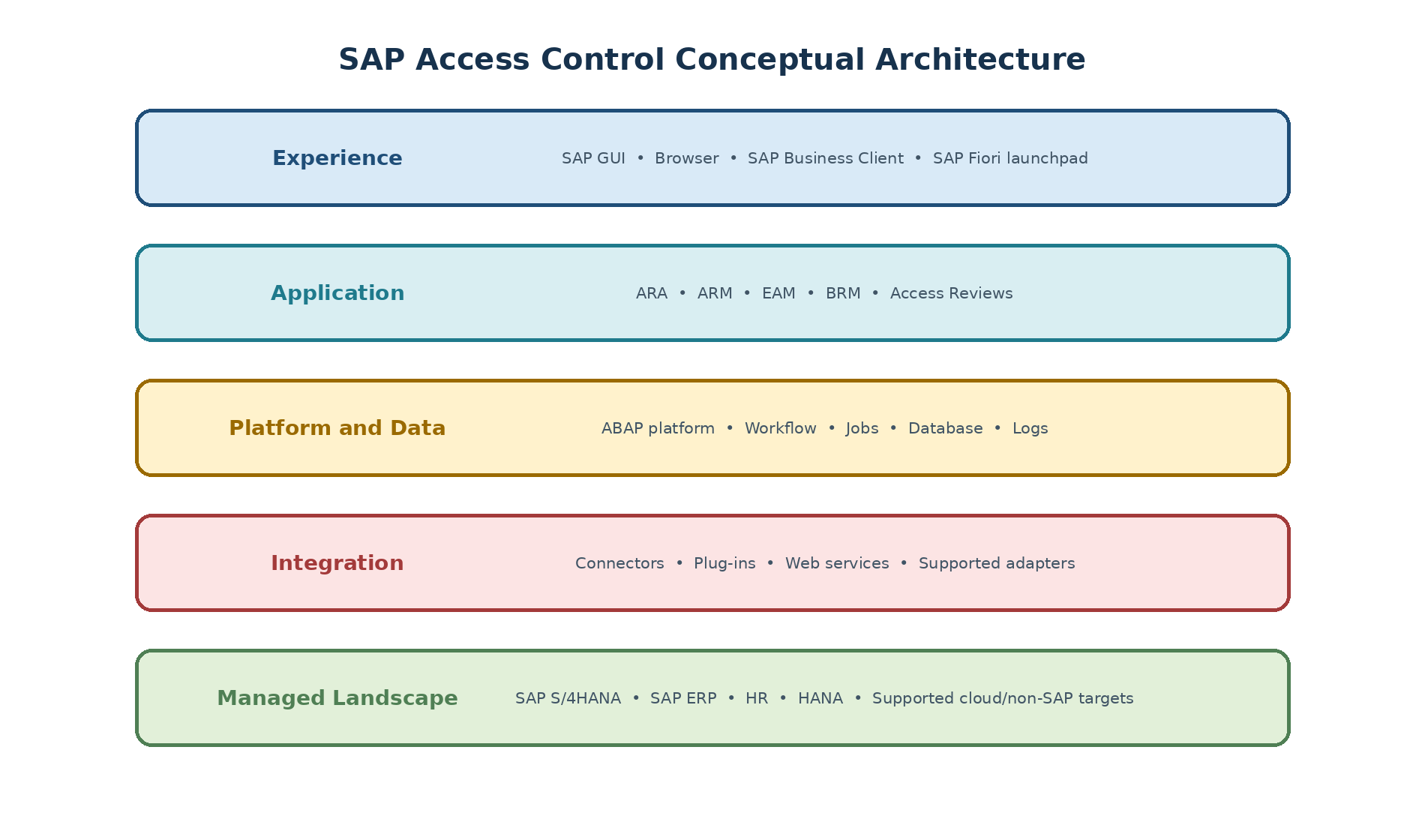
Figure 2. Original diagram: SAP Access Control conceptual architecture.
Landscape and Deployment Thinking
Development, Quality, and Production
A controlled enterprise landscape normally separates development, quality or testing, and production. Configuration and developments originate in development, integrated behavior is validated in quality, and approved changes move to production through transports and protected environment-specific maintenance. System IDs, clients, connectors, URLs, technical users, jobs, and data must not be assumed identical.
Minimal Landscapes and Their Limits
A minimal or combined landscape can be useful for demonstrations, training, or limited tests, but it weakens separation, testing realism, availability, performance isolation, and change control. Production design should consider volume, uptime, recovery, security zones, regional requirements, and the number of managed systems and active capabilities.
Availability, Security, and Change Control
Define backup, recovery objectives, monitoring, and tested restoration.
Separate configuration, administration, approval, monitoring, and audit access.
Protect technical destinations, certificates, secrets, and environment-specific values.
Control transports, post-import activities, job schedules, and rollback.
Mask or minimize production data in non-production systems.
Core SAP Access Control Capabilities
Access Risk Analysis
ARA analyzes users, roles, profiles, and proposed access against an approved ruleset for segregation-of-duties conflicts, critical actions, and critical permissions. Results can support remediation, mitigation, role design, requests, and reporting. Accuracy depends on current authorization data, correct rules, organizational scope, and business ownership.
Access Request Management
ARM structures user and access lifecycle requests through validation, risk analysis, workflow approval, provisioning, notifications, and audit history. It can support additions, removals, account actions, validity changes, and other configured processes. Automation should evaluate the resulting complete access, not only the requested delta.
Emergency Access Management
EAM provides controlled, time-bound privileged access for exceptional work. Firefighter users or roles are assigned with ownership, reason, validity, session or activity logging, and independent review. The model may be centralized or decentralized and ID- or role-based according to supported configuration and policy.
Business Role Management
BRM governs role definition and change through methodology, ownership, naming, attributes, analysis, approval, generation, testing, and lifecycle records. It supports governance around technical roles but does not substitute for correct PFCG authorization design.
Access Reviews
Periodic reviews allow managers, role owners, risk owners, firefighter owners, and other reviewers to certify or reject user access, SoD risks, role content, mitigation, or privileged assignments as supported. Effective certification requires accurate reviewers, understandable data, escalation, target-system removal, and closure evidence.
Access Governance Lifecycle
Discover and Clean
Establish scope, synchronize reliable data, validate the ruleset, analyze existing users and roles, prioritize high-impact conflicts, remediate excessive access, and approve only justified mitigation. A clean report is not the goal; controlled and necessary access is.
Design and Keep Clean
Use governed roles, risk-aware access requests, complete-access analysis, controlled provisioning, time-bound emergency access, and monitored exceptions so new changes do not recreate old risks. Role and request processes should include ownership and evidence by design.
Review and Stay in Control
Run periodic access, risk, role, mitigation, and firefighter reviews according to policy. Confirm rejected access is removed, recurring conflicts are analyzed, reviewer quality is measured, and rules, roles, workflows, owners, and training are improved.
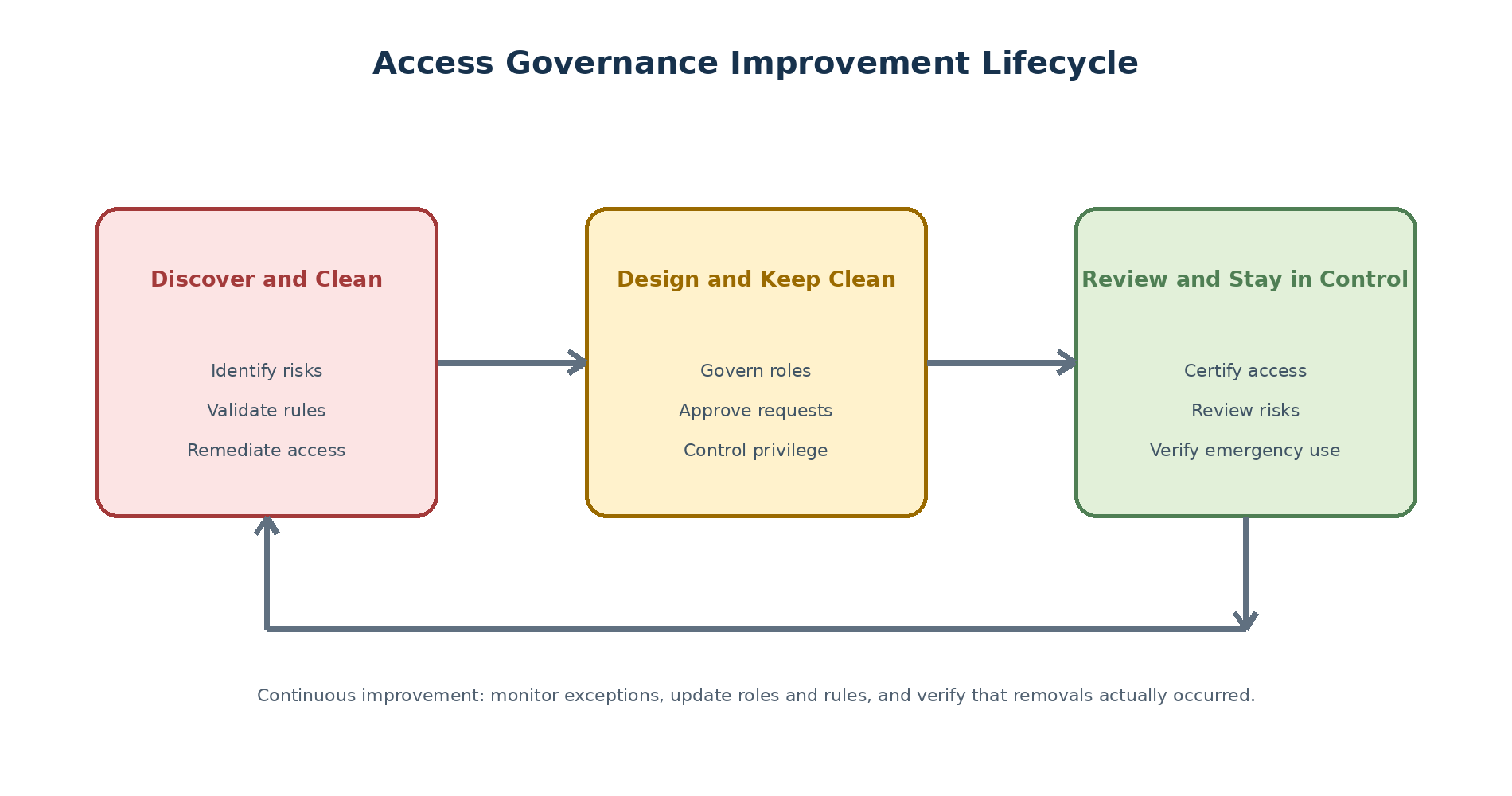
Figure 3. Original diagram: continuous access governance improvement lifecycle.
Supported-System Categories
SAP ABAP and SAP S/4HANA Systems
SAP Access Control can govern supported SAP ABAP-based systems through appropriate connectors and plug-ins. Repository analysis, authorization synchronization, provisioning, usage collection, HR functions, or emergency logging may require different components or permissions. “Connected” never means that every capability is supported.
HR, Database, Identity, and Non-SAP Systems
Supported scenarios can include SAP HR sources, SAP HANA database access, identity-management applications, directories, portals, and selected non-SAP or cloud targets through web services, OData, database connections, identity-governance services, or approved adapters. Each scenario has its own object model, mappings, limitations, and security requirements.
Capability and Plug-In Validation
| Validation item | Required evidence |
| Release compatibility | PAM, Maintenance Planner, and current plug-in or adapter documentation. |
| Analysis support | Representative users, roles, permissions, and expected risk result. |
| Provisioning support | Approved add and remove actions with target confirmation. |
| Usage or emergency logs | Complete activity sample with correct time and reviewer visibility. |
| Identity or HR data | Mapped fields, source priority, terminated-user behavior, and privacy control. |
| Operational support | Jobs, monitoring, retry, retention, recovery, and accountable owner. |
Cloud and Hybrid Integration
Cloud Governance Options
Cloud access governance can be implemented with supported SAP cloud identity-governance services and integrations. SAP Access Control documentation also describes using SAP Cloud Identity Access Governance as a bridge for certain requests from on-premise SAP Access Control to supported cloud targets. Exact services, names, entitlements, target coverage, and functional scope must be checked against current documentation and contracts.
Bridge-Based Hybrid Pattern
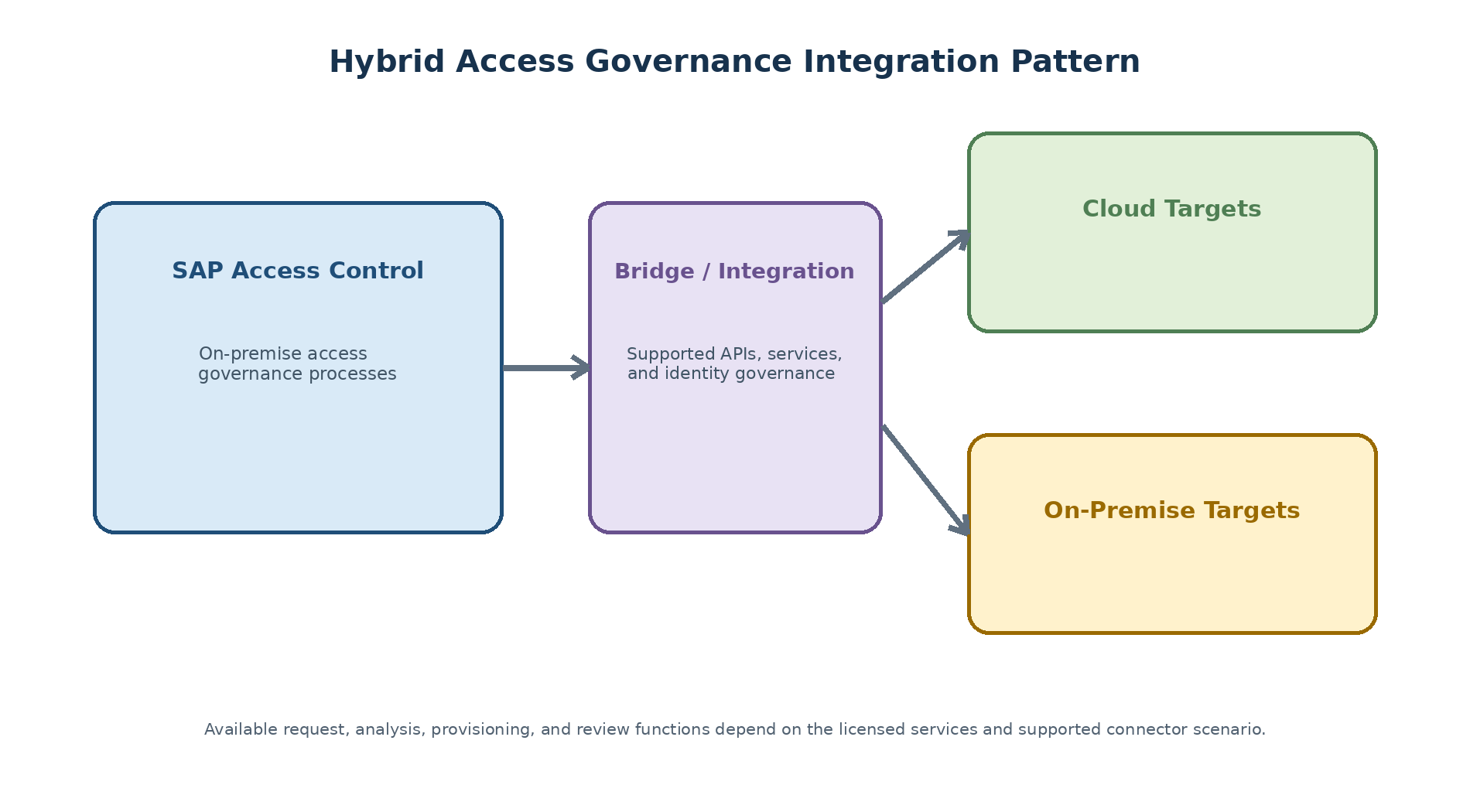
Figure 4. Original diagram: hybrid access governance integration pattern.
Limitations and Verification
Confirm whether analysis, request, provisioning, review, and usage are supported for each target.
Validate ruleset content for the target authorization model; do not assume SAP transaction rules apply.
Confirm identity authentication, BTP or tenant prerequisites, APIs, certificates, and network route.
Test error handling, partial provisioning, retries, duplicate requests, and target confirmation.
Review licensing, data residency, privacy, retention, availability, and operational ownership.
Practical Business Scenario
Purchase-to-Pay Conflict
A user can maintain supplier master data, enter supplier invoices, and execute payments across two connected systems. No single role appears excessive when viewed locally, but the combined access allows the user to create or change a supplier and complete a payment without independent intervention.
Governance Response
Confirm the business activities and the transactions, services, and permissions that implement them.
Analyze complete cross-system access using an approved rule.
Remove incompatible access or redesign responsibilities where practical.
If immediate removal is not possible, approve a time-bound mitigation with owner, monitor, evidence, and expiry.
Use controlled emergency access for exceptional privileged tasks instead of expanding permanent roles.
Include the user, roles, risk, and mitigation in periodic review.
Expected Evidence
Rule definition, owner, rationale, scope, and test cases.
User and role analysis before and after remediation.
Request, approval, risk result, provisioning, and target confirmation.
Mitigation assignment, monitoring evidence, validity, and review.
Emergency-session activity and controller decision where applicable.
Periodic certification and verified removal of rejected access.
Implementation Success Factors
People, Process, Data, and Technology
| Dimension | Success condition |
| People | Named risk, role, control, system, workflow, and operational owners with decision authority. |
| Process | Defined request, remediation, mitigation, privilege, review, escalation, and issue workflows. |
| Data | Current identities, organizations, roles, authorizations, ownership, usage, and logs. |
| Technology | Supported architecture, secure connectors, validated rules, jobs, workflow, performance, and monitoring. |
| Assurance | Traceable evidence, independent testing, metrics, issue remediation, and continuous improvement. |
Common Misunderstandings
Installing SAP Access Control makes the organization compliant.
A delivered ruleset is automatically correct for every customer.
A clean SoD result proves least privilege.
Mitigation permanently resolves a poorly designed role.
Provisioning success proves the final access is correct.
A connector supports every function merely because the connection test passes.
Periodic review is complete when reviewers click approve or reject.
Recommended Foundation
Define objectives, scope, ownership, and risk appetite before configuration.
Establish authoritative identity and role data plus reconciliation.
Build and test rules with business and authorization specialists.
Design separate DEV, QAS, and PRD controls with secure integration.
Measure data freshness, workflow age, provisioning exceptions, review completion, and removal.
Revalidate architecture, plug-ins, cloud scope, and controls after upgrades and business change.
Content Coverage Validation
Source Concept Coverage
| Reference concept family | Coverage in this chapter |
| Need for GRC and selection considerations | Business drivers, technology risk, evaluation questions, and operating model. |
| SAP GRC portfolio and Access Control position | Solution areas, scope, and limitations of technology. |
| Product evolution and terminology | Historical capability names and current mapping. |
| Architecture and landscape | Experience, application, platform, database, integration, managed systems, and DEV/QAS/PRD. |
| Capabilities and governance phases | ARA, ARM, EAM, BRM, reviews, clean/keep clean/stay in control lifecycle. |
| Supported systems and cloud integration | SAP, HR, HANA, identity, non-SAP, cloud, bridge pattern, and validation. |
| Compliance outcome | People, process, data, continuous monitoring, evidence, and practical scenario. |
Version-Dependent Items
The exact ABAP platform level, add-on and plug-in combinations, databases, SAP Fiori components, supported targets, cloud service names, bridge functions, delivered rules, and feature availability are deliberately not frozen as universal facts. These items must be verified for the implementation date and support package using official SAP sources.
Summary
Key Takeaways
GRC integrates accountability, risk decisions, obligations, controls, monitoring, and evidence.
SAP Access Control is the access-governance application within a broader SAP GRC portfolio.
The product has evolved, but historical terms remain common in project communication.
Architecture spans user experience, application, platform, database, integration, and managed systems.
ARA, ARM, EAM, BRM, and reviews support a continuous clean, keep clean, and stay-in-control lifecycle.
Supported-system and hybrid-cloud capabilities require target-specific verification.
Compliance depends on people, process, data, technology, and continuous assurance—not software alone.
SEO and Publishing Metadata
| Publishing field | Recommendation |
| SEO title | SAP GRC and Access Control Foundations: Architecture and Capabilities |
| URL slug | /sap-grc-access-control-foundations/ |
| Meta description | Learn SAP GRC and Access Control fundamentals, including business drivers, product evolution, architecture, landscape, capabilities, supported systems, and cloud integration. |
| Primary keyword | SAP GRC and Access Control fundamentals |
| Secondary keywords | SAP Access Control 12.0 overview; SAP GRC architecture; ARA ARM EAM BRM; SAP GRC cloud integration |
| Long-tail keywords | SAP GRC Access Control guide for beginners; SAP Access Control architecture and capabilities; get clean stay clean stay in control |
| Search intent | Foundational learning, product evaluation, and implementation orientation |
| Suggested schema markup | TechArticle, Article, BreadcrumbList |
| Internal-link suggestions | Implementation planning; licensing and sizing; post-installation setup; connector configuration; Access Risk Analysis |
| Image caption suggestions | Integrated GRC model; SAP Access Control architecture; governance lifecycle; hybrid integration |
| Image alt-text suggestions | Original diagrams explaining SAP GRC, SAP Access Control architecture, lifecycle, and hybrid cloud integration |
Authoritative Reference Suggestions
Screenshot Guidance
This conceptual chapter uses four original diagrams. Product screenshots are not required. If an editor later adds a SAP screen, it must be newly captured from an authorized non-production system and must hide system ID, client, hostname, user ID, company data, IP addresses, internal URLs, and role names.
02_SAP-Access-Control-Prerequisites-and-Implementation-Planning-Revised
Introduction
Purpose
Implementation planning converts an access-governance ambition into an executable SAP Access Control program. The plan must align business controls, product scope, technical architecture, data readiness, security, delivery governance, testing, cutover, and long-term operations. Installation is only one activity inside that larger program.
This chapter provides an independent planning method for SAP Access Control 12.0. It is written for project managers, architects, SAP GRC consultants, Basis and security teams, business control owners, and audit stakeholders who need a shared view before configuration begins.
Learning Objectives
Translate business objectives into a controlled implementation scope.
Identify commercial, technical, integration, data, security, and operational prerequisites.
Collect sizing inputs based on workloads instead of user count alone.
Structure delivery phases, testing, cutover, and governance decisions.
Create a defensible readiness decision supported by evidence.
Version and Verification Context
Examples refer to SAP Access Control 12.0. Support packages, available UI content, compatible plug-ins, databases, operating systems, browsers, cloud integrations, maintenance dates, and licensing terms can change. Confirm the target design against the current SAP Product Availability Matrix (PAM), SAP Help Portal guides, Maintenance Planner, SAP Notes, and your signed commercial agreement immediately before build.
| Current reference point: SAP product documentation available in January 2025 identifies SAP Access Control 12.0 SP27 as based on SAP NetWeaver 7.52 SP01. This is a documentation reference, not a recommendation to install a particular support package. Select the target level through the current PAM and Maintenance Planner. |
Implementation Outcomes
Define Business Outcomes
Begin with control outcomes rather than module names. A business outcome might be to prevent conflicting access before provisioning, replace permanent privileged roles with time-bound emergency access, standardize joiner-mover-leaver approvals, or certify high-risk access every quarter. Each outcome needs an accountable owner and a way to prove that it operates.
| Outcome | Evidence of success | Example owner |
| Risk-aware provisioning | Risk analysis and approval are completed before assignment | Access governance lead |
| Controlled privileged access | Temporary assignment, reason, session log, and independent review | Infrastructure or application owner |
| Sustainable role governance | Role changes follow ownership, analysis, testing, and approval | Role design lead |
| Periodic certification | Review decisions lead to confirmed removals and retained evidence | Control owner |
Set Measurable Success Criteria
Percentage of in-scope systems with validated and current repository data.
Percentage of eligible requests provisioned successfully within the agreed service level.
Number and age of stuck workflows or failed provisioning items.
Percentage of emergency sessions reviewed within policy time.
Percentage of rejected review items removed and verified in target systems.
False-positive rate and unresolved ownership gaps in the risk ruleset.
Establish Design Principles
Useful principles include least privilege, complete resulting-access analysis, named business ownership, automated processing with visible exceptions, time-bound elevated access, evidence by design, transport-controlled changes, and reuse of standard capabilities where they meet the requirement. Any departure should be recorded as an explicit architecture decision.
Scope and Current-State Assessment
Select Capabilities and Systems
Define scope across three dimensions: capabilities, connected systems, and business populations. For each system, state whether it requires repository synchronization, risk analysis, provisioning, usage collection, emergency-access logging, HR-trigger integration, role governance, or review campaigns. A connector does not automatically support every capability.
| Scope field | Questions to answer |
| Capabilities | Which of ARA, ARM, EAM, BRM, reviews, HR triggers, and Fiori are required? |
| Systems | Which development, quality, production, cloud, and non-SAP targets are governed? |
| Population | Which employees, contractors, administrators, service accounts, and privileged users are included? |
| Regions | Which legal entities, languages, time zones, and local approval requirements apply? |
| Release strategy | What is delivered in the first release, and what is deferred with an owner and target date? |
Assess Existing Controls and Roles
Inventory existing roles, request channels, approval matrices, SoD rules, critical access lists, privileged IDs, periodic reviews, custom reports, and audit findings. Record whether each control is preventive, detective, manual, automated, or compensating. The assessment should distinguish a documented process from a process that is actually operating.
Identify Dependencies and Constraints
Authoritative identity and organizational data.
Role redesign or remediation programs outside the SAP Access Control project.
Email, workflow, directory, SSO, Fiori, and network services.
Change freezes, audit periods, financial close, and regional deployment windows.
Availability of business owners, testers, security administrators, and support teams.
Retention, privacy, residency, and evidence-handling requirements.
Licensing and Commercial Readiness
Understand the Licensing Scope
SAP Access Control licensing must be confirmed before installation planning is finalized. The technical add-on and the right to use the Access Control application are related but not identical commercial questions. Historically, the ABAP foundation add-on has carried multiple SAP GRC applications while Access Control, Process Control, and Risk Management entitlements have been licensed separately. Within Access Control, capabilities such as Access Risk Analysis, Access Request Management, Business Role Management, and Emergency Access Management have generally been treated as one Access Control product rather than independently selected technical add-ons.
| Commercial verification required: Licensing models, product SKUs, user metrics, digital-access rules, cloud-service rights, and non-production entitlements can change. Treat the description above as implementation context only. The signed order form, current SAP use-rights documents, and written advice from SAP or an authorized licensing representative are controlling. |
Classify User Populations
| Population | Typical activity | Planning action |
| Administrators | Configuration, technical operations, rules, workflows, and support | Identify named administrators and environment access |
| Business reviewers | Approve requests, own roles or risks, review access and logs | Estimate active and occasional reviewers |
| Requesters and end users | Submit or track access requests and self-service actions | Validate channel and license classification |
| Technical identities | RFC, web service, batch, connector, or integration processing | Confirm whether and how each identity is covered |
Do not assume that a person who never opens the central SAP Access Control client has no licensing relevance. Request submission, approval links, self-service actions, risk ownership, role ownership, monitoring, and automated access channels should all be included in the population assessment. The end-user home page may reduce the need to grant broad central-system access, but it does not by itself decide the contractual user category.
Register the SAP GRC Product System
Registering the product system allows the support organization to associate incidents, downloads, and maintenance activities with the correct licensed installation. SAP has been moving system and license-key administration from older Support Portal navigation to SAP for Me, so labels and screen positions may differ by tenant and date.
Sign in to SAP for Me with an authorized S-user and open the Systems and Provisioning area. If your organization still uses a Support Portal entry point, follow its redirect to the current system-management application.
Select the installation number that contains the relevant SAP GRC or SAP Access Control entitlement.
Create or register a product system and select SAP Access Control with the approved release where the portal requests product and version information.
Maintain the planned system ID and the required organizational and technical fields. Do not invent a production SID merely to complete the form.
Review the portal message about whether a product-specific license key is required. Some SAP GRC product registrations may be created for support purposes without a separate technical key.
Submit the registration and retain the system record, installation number, approver, and date as project evidence.
| Original screenshot required: SAP for Me Systems and Provisioning page showing a newly registered non-production SAP Access Control product system and its installation association. |
| Publishing detail | Guidance |
| Caption | Registered SAP Access Control product system in SAP for Me |
| Alt text | SAP for Me system registration for an SAP Access Control implementation |
| Mask before publishing | S-user name, customer number, installation number, system ID, hardware key, company name, contact data, and incident information |
Generate and Install the Platform License
The central ABAP system still requires a valid platform license. First check the existing license status in transaction SLICENSE. If a new or replacement key is required, use the hardware key displayed for the correct system and request the appropriate platform license through the authorized SAP system-provisioning application.
Log on to the intended SAP GRC ABAP system and run transaction SLICENSE.
Confirm the system number, installation number, hardware key, license validity, and any temporary or expired licenses. Capture evidence without exposing the full key.
In SAP for Me, open the license-key request for the correct installation and registered platform system.
Select the platform/product and license type presented for the approved system design, such as the applicable ABAP platform entry. Available labels depend on the contract and current portal.
Enter the hardware key exactly as shown in SLICENSE and complete the requested system data.
Generate and securely download the license file. Limit access because the file contains customer-specific licensing information.
Return to SLICENSE, choose the license installation function, select the generated file, and confirm the result.
Recheck validity and license status, then record the successful installation in the build evidence pack.
| Troubleshooting note: A hardware-key mismatch, wrong installation number, incorrect system registration, expired temporary license, or insufficient S-user authorization can prevent generation or installation. Do not reuse another system's key. Correct the master data or obtain SAP support rather than bypassing the license check. |
Create a Licensing Evidence Pack
Store the approved product order and relevant use-rights documents.
List in-scope systems, capabilities, environments, user populations, and access channels.
Record the product-system registration and platform-license installation evidence.
Record questions and written commercial clarifications.
Assign an owner to monitor scope changes that may alter licensing.
Revalidate before production cutover and after material expansion.
Deployment and Landscape Design
Choose the Deployment Pattern
Evaluate standalone and supported embedded patterns against separation of duties, upgrade coupling, availability, integration, operational ownership, performance isolation, and roadmap constraints. The design decision must come from current SAP compatibility information and the customer architecture, not from a generic preference.
Design the System Landscape
A common enterprise approach uses separate development, quality, and production systems for SAP Access Control, with controlled transports and environment-specific connector details. Sandbox or training systems may be added when justified. Define system IDs, clients, network zones, data refresh rules, backup, recovery objectives, monitoring, and non-production data masking.
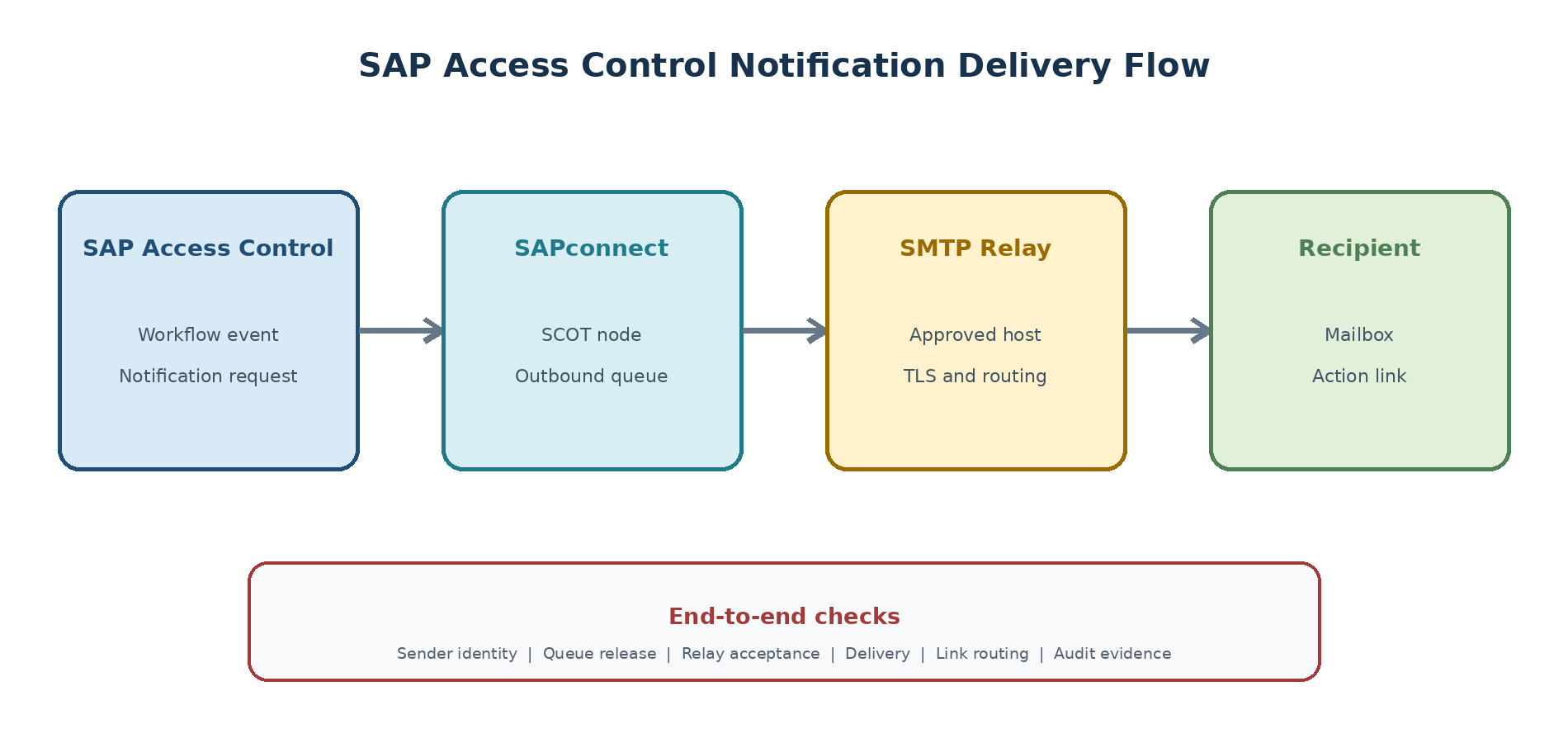
Figure 1. Original diagram: SAP Access Control implementation landscape decision map.
Plan Connectivity and Trust
| Decision area | Required design detail |
| Connector purpose | Analysis, provisioning, synchronization, log collection, or another supported function |
| Protocol and route | RFC, HTTP(S), OData, database, web service, adapter, firewall, proxy, and load balancer as applicable |
| Identity | Named technical user, authentication method, secret or certificate ownership, and rotation |
| Authorization | Minimum permissions, emergency procedure, monitoring, and periodic review |
| Failure handling | Timeout, retry, queue behavior, alerting, owner, and recovery test |
Component and Plug-In Planning
Select the Central GRC Foundation Component
The central application requires the approved GRC Foundation for ABAP component and support-package level. Historical component labels include GRCFND_A V1200 for a standalone SAP Access Control 12.0 deployment and GRCFND_A V8100 for an embedded Access Control deployment on a compatible SAP S/4HANA foundation. These labels describe distinct deployment lines; they are not interchangeable simply because both contain the number 12.0.
| Deployment question | Evidence required |
| Standalone or embedded? | Approved architecture decision and current SAP-supported deployment path |
| Central foundation level? | Maintenance Planner stack, PAM entry, and installation/upgrade guide |
| Underlying ABAP platform? | Supported release and support-package combination |
| Database and operating system? | PAM-supported platform combination and infrastructure design |
| Upgrade or greenfield? | Source release, supported path, data-conversion requirements, backups, and rollback plan |
Select Managed-System Plug-Ins
Managed systems need the plug-in or adapter required for the intended capability. GRCPINW provides non-HR integration for supported SAP NetWeaver, SAP ERP, and SAP S/4HANA systems. GRCPIERP is used when supported HR integration functions are required. The exact package name, release, installation sequence, and prerequisite level depend on the managed-system release and must be calculated rather than guessed.
| Component family | Typical purpose | Selection caution |
| GRCPINW | Non-HR repository, authorization, risk, provisioning, and related integration functions | Confirm the target release, minimum support package, and required installation order |
| GRCPIERP | Supported SAP ERP or SAP S/4HANA HR integration functions | Install only when the HR scenarios are in scope and compatibility is proven |
| HANA integration plug-in or adapter | Supported database-level governance scenarios | Older documentation may refer to earlier-release plug-ins; verify the current supported route |
| Portal integration component | Portal-related integration where still applicable | Portal versions and Java components are lifecycle-dependent; validate current support |
| Dependency rule: SAP documentation for earlier Access Control 12.0 levels states that the relevant NetWeaver plug-in is installed before the corresponding ERP plug-in. Confirm the exact sequence in the current Maintenance Planner result and installation notes for the chosen target release. |
Plan SAP Fiori and Other Integration Components
SAP Fiori content requires a compatible UI architecture, not only an Access Control back-end component. Earlier Access Control 12.0 documentation identifies UIGRAC01 for GRC Fiori content and notes historical packaging changes involving UIGRC001. An embedded design may place UI content with the central system, while a hub design uses a separate front-end server. In both cases, confirm SAP_UI dependencies, catalogs or spaces and pages, OData or ICF services, roles, launchpad routing, browser support, and security settings for the exact support package.
If SAP HANA database integration, SAP Enterprise Portal, identity-governance services, cloud targets, or non-SAP connectors are planned, record the supported adapter and its functional limits separately. A successful connection test proves reachability; it does not prove that risk analysis, provisioning, usage collection, or emergency log collection is supported.
Build a Compatibility Matrix
| Matrix field | Record for every system |
| System identity | SID/tenant alias, client, environment, business owner, and technical owner |
| Product stack | Application release, ABAP platform, support package, database, OS, and UI level |
| GRC component | Central foundation or managed-system plug-in and calculated target level |
| Capabilities | Repository sync, risk analysis, provisioning, HR, usage, EAM logs, reviews, and UI |
| Source of truth | PAM, Maintenance Planner transaction, guide version, SAP Note/KBA, and validation date |
| Decision | Supported, supported with condition, out of scope, or blocked |
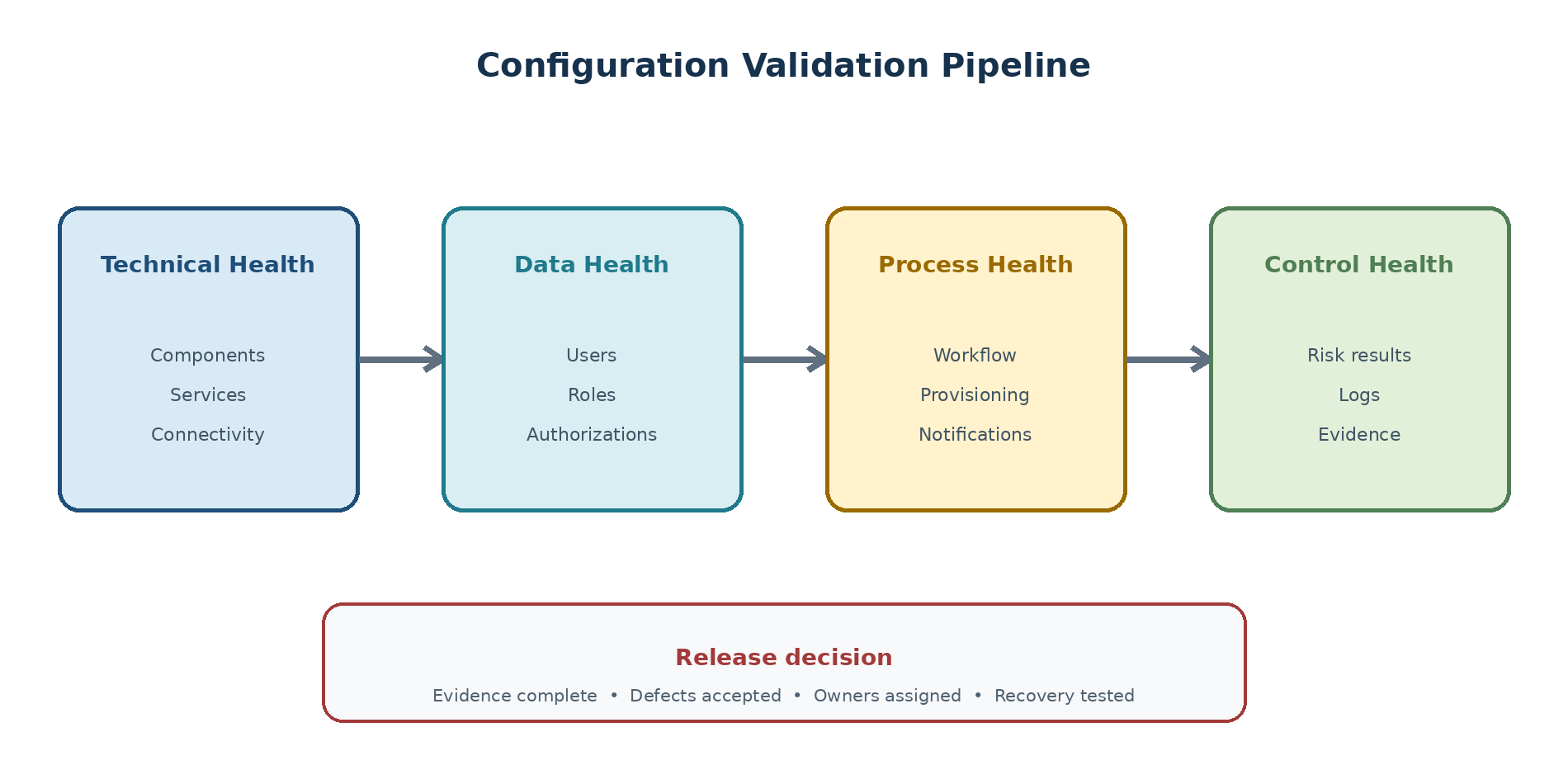
Figure 2. Original diagram: SAP Access Control prerequisite validation flow.
System Time-Zone Validation
Why Time Consistency Matters
SAP Access Control correlates requests, approvals, synchronization records, target-system transactions, usage records, privileged sessions, and audit logs. If the operating system, database, ABAP application, clients, or managed systems interpret time differently, selection windows can miss records or display misleading timestamps. In severe cases, a log collection appears successful but returns no entries for the expected period.
Run SAP Time-Zone Checks
Record the operating-system and database time-zone configuration for the central and managed systems.
In each relevant SAP client, check System > Status and note the displayed system time zone and current application time.
Run transaction STZAC to review the system time-zone configuration. Do not save changes during an assessment.
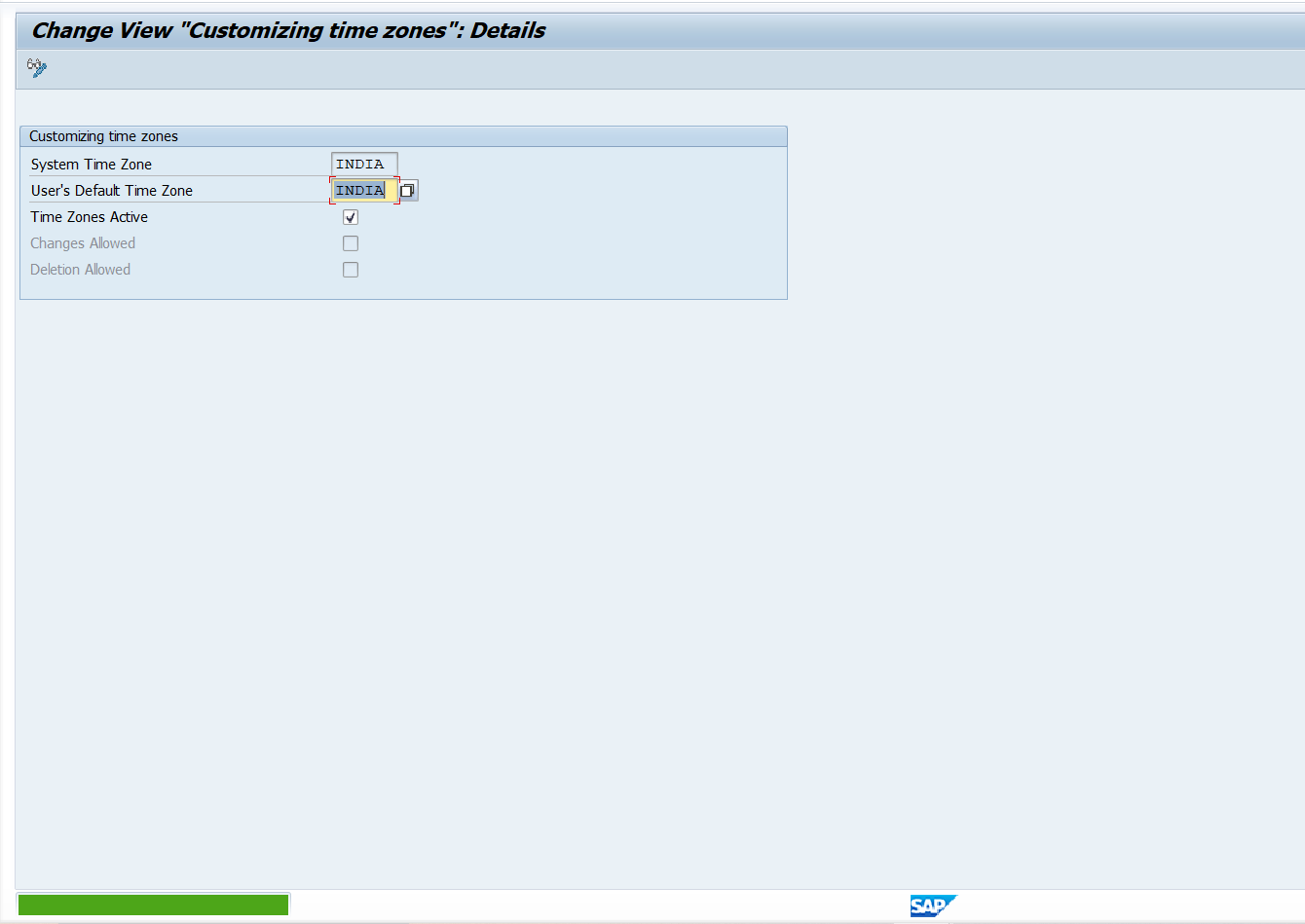
Use transaction SA38 to execute report TZCUSTHELP and review time-zone Customizing consistency.
Use transaction SA38 to execute report RSDBTIME to compare database and application time information where applicable.
Use transaction SE37 to test function module TZ_SYSTEM_GET_TZONE and record the returned system time zone.
Use transaction SA38 to execute report TZONECHEC where available for the release.
Compare results across the central SAP Access Control system, every plug-in client, the database, and the operating system, including daylight-saving rules.
| Original screenshot required: Non-production SAP GUI evidence showing STZAC and the output of one approved time-zone diagnostic report for both the central and a managed system. |
| Publishing detail | Guidance |
| Caption | SAP Access Control prerequisite time-zone validation |
| Alt text | SAP STZAC and time-zone diagnostic output used before SAP GRC implementation |
| Mask before publishing | System ID, client, host, user, database host, company name, and any internal time-zone policy notes |
Correct a Time-Zone Mismatch
| High-impact change: Never change a productive system time zone as an isolated GRC fix. Time changes can affect jobs, interfaces, business documents, queues, certificates, audit evidence, and database behavior. The Basis, database, operating-system, application, integration, and business teams must approve one coordinated plan. |
Identify whether the mismatch is in the operating system, database, SAP system, client Customizing, or daylight-saving rules.
Assess affected jobs, interfaces, audit records, business processing, and recovery requirements.
Schedule the correction during low activity with a tested backout plan.
Align the operating system and database first where the approved platform procedure requires it.
Maintain the approved SAP system time zone through STZAC and validate every relevant client.
Restart application instances when required by the approved procedure.
Run the diagnostic checks again and perform a controlled log-collection or synchronization test.
Validate the Result
Central and managed systems report the intended time zone and consistent current time.
Database, operating system, ABAP application, and clients agree on the conversion rules.
A test transaction created in the managed system appears in the correct SAP Access Control selection window.
Scheduled jobs start at the expected local or UTC time and show no unexpected gaps.
The change record contains before-and-after evidence, approvals, restart confirmation, and business validation.
Installation and Update Preparation
Use PAM and Maintenance Planner
The Product Availability Matrix is the authoritative starting point for release type, maintenance duration, supported upgrade paths, database and operating-system combinations, and related platform availability. Maintenance Planner uses the registered system landscape and selected target to calculate the installable stack and dependencies. Use both: PAM answers whether the design is supported; Maintenance Planner helps calculate what must be installed.
Prepare the Stack and Download Basket
Ensure the source system data and installed components are current in the landscape-management source used by Maintenance Planner.
Select the correct system and start a new installation, update, or upgrade transaction for the approved SAP Access Control target.
Choose the target central component, support-package level, UI content, and applicable managed-system plug-ins.
Resolve dependency and compatibility messages; do not force an unsupported stack to satisfy a schedule.
Review the calculated stack XML and download basket with Basis, GRC, security, infrastructure, and application owners.
Download media and current installation notes through authorized channels, verify integrity, and store them in the controlled build location.
Freeze the approved stack baseline and require change control for later component substitutions.
| Original screenshot required: Maintenance Planner transaction summary showing the approved target stack and calculated components for a non-production SAP Access Control system. |
| Publishing detail | Guidance |
| Caption | Approved Maintenance Planner stack for SAP Access Control |
| Alt text | Maintenance Planner component calculation for SAP Access Control prerequisites |
| Mask before publishing | Customer and installation numbers, S-user, SID, hostnames, download URLs, basket IDs, project names, and internal comments |
Define Installation Responsibilities
| Role | Prerequisite responsibility |
| SAP Basis | System build, Maintenance Planner, media, add-ons, support packages, backups, restart, and technical validation |
| GRC functional | Capability scope, component use, configuration dependencies, test design, and acceptance |
| SAP security | Installer access, technical users, authorization design, secure evidence, and segregation of duties |
| Infrastructure/DB | Supported platform, sizing, storage, high availability, backup, monitoring, and time alignment |
| Business control owners | Risk, workflow, privileged-access, review, and evidence requirements |
| Change management | Approvals, transports, cutover, training, support, and handover |
Complete the Prerequisite Gate
Commercial entitlement and user-population assessment approved.
Product system registered and valid platform license confirmed or planned.
Workload-based sizing and infrastructure design approved.
Central component, plug-ins, UI components, and target releases validated in PAM and Maintenance Planner.
Time-zone checks completed across all in-scope systems.
Technical users, routes, certificates, and security responsibilities approved.
Stack, media, backups, test plan, rollback, and installation window ready.
Sizing and Capacity Planning
Choose the Sizing Approach
Sizing translates business workload into CPU, memory, database, storage, I/O, and network requirements. SAPS is a hardware-independent measure used to compare SAP processing capacity, but an SAPS estimate is not the complete infrastructure design. Initial sizing uses standard assumptions for a new implementation; expert sizing uses customer-specific volumes, custom content, measurements, and workload behavior; and a going-live or production validation exercise checks whether the implemented design remains adequate as real data and concurrency become visible.
Use the current SAP Access Control sizing guide as the calculation basis. Engage an experienced sizing team when the ruleset, workflow, custom development, connected-system count, data volume, or availability design differs materially from the standard assumptions.
Collect Sizing Inputs
| Workload area | Representative sizing inputs |
| Repository data | Systems, users, roles, profiles, authorization objects, permissions, and organizational values |
| Risk analysis | Ruleset size, permission-level rules, users or roles per run, concurrent ad hoc analyses, batch frequency |
| Access requests | Requests per day, line items, systems per request, workflow paths, approvers, attachments, and peak periods |
| Emergency access | Firefighter users or roles, sessions, activity volume, log collection, review frequency, and retention |
| Role governance and reviews | Roles, methodology stages, campaigns, reviewers, decisions, reminders, and remediation volume |
| Integration and retention | Synchronization windows, network latency, history, attachments, logs, archive, backup, and growth |
Model Workload Peaks
Average volume can hide the real constraint. Model joiner waves, reorganizations, quarterly reviews, audit requests, month-end privileged activity, mass role analysis, and simultaneous background jobs. Identify which workloads can run sequentially, which overlap, and which require parallel processing. Use the official SAP sizing guide and, for complex or customized workloads, an expert sizing exercise.
| Workload to quantify | Planning measure |
| User and role synchronization | Objects per connected system, frequency, runtime window, and delta/full behavior |
| Batch user and role risk analysis | Objects per run, ruleset complexity, permission-level rules, frequency, and overlap |
| Real-time risk analysis | Maximum concurrent analyses and average users, roles, or profiles per analysis |
| Access requests and approvals | Requests per day, peak hour, roles and systems per request, attachments, and MSMP path complexity |
| Role import and role governance | Back-end sync or file volume, role searches, generation, methodology, and approval activity |
| Emergency access | Firefighter IDs, concurrent sessions, activity records, log collection, review, and retention |
| Reporting | Single-user and aggregate reports, selection range, concurrency, export volume, and response target |
| Parallel versus sequential load: Do not add every workload as though it runs at the same time. Size concurrent tasks together and schedule sequentially compatible jobs apart where operationally acceptable. For example, repository synchronization and a large batch risk analysis may be designed as sequential windows, while business requests and ad hoc analyses continue during normal hours. |
Plan Growth and Retention
Forecast connected-system and user growth for the planning horizon.
Define retention and archiving by data class rather than one global period.
Reserve capacity for remediation projects, reanalysis, upgrades, and campaign peaks.
Measure production response time, job duration, database growth, and queue age after go-live.
Establish thresholds that trigger tuning, scheduling changes, cleanup, or capacity review.
Security and Compliance Planning
Define Administrative Access
Separate configuration, workflow administration, connector administration, role maintenance, emergency-access ownership, log review, and audit reporting where practical. Use named users, least privilege, controlled transports, privileged-access procedures, and periodic review. Avoid using broad shared administrator accounts for routine operation.
Protect Technical Connections
Use dedicated identities with only the permissions required for the connector purpose.
Protect passwords, certificates, SNC or TLS material, and rotation procedures.
Restrict source systems, destinations, clients, network routes, and service endpoints.
Log authentication and authorization failures without exposing secrets.
Test expiry, lock, password rotation, certificate renewal, and target unavailability.
Plan Logging and Audit Evidence
Define which request, workflow, risk, mitigation, role, provisioning, synchronization, emergency-session, review, and administrative records must be retained. Assign owners for evidence extraction and access. Evidence should show not only that a decision was recorded but also that the target-system change occurred and exceptions were resolved.
Project Delivery Model
Organize Workstreams
| Workstream | Core responsibility |
| Business controls | Risks, rules, owners, approval policy, mitigation, reviews, and acceptance |
| SAP GRC functional | Application design, configuration, workflow, rules, jobs, and reporting |
| SAP security | Target roles, authorizations, remediation, technical users, and testing |
| SAP Basis and infrastructure | Installation, patching, connectivity, transports, performance, backup, and monitoring |
| Identity and integration | Identity sources, directories, HR events, interfaces, SSO, and provisioning dependencies |
| Change and operations | Training, support model, procedures, cutover, hypercare, and improvement |
Plan Project Phases
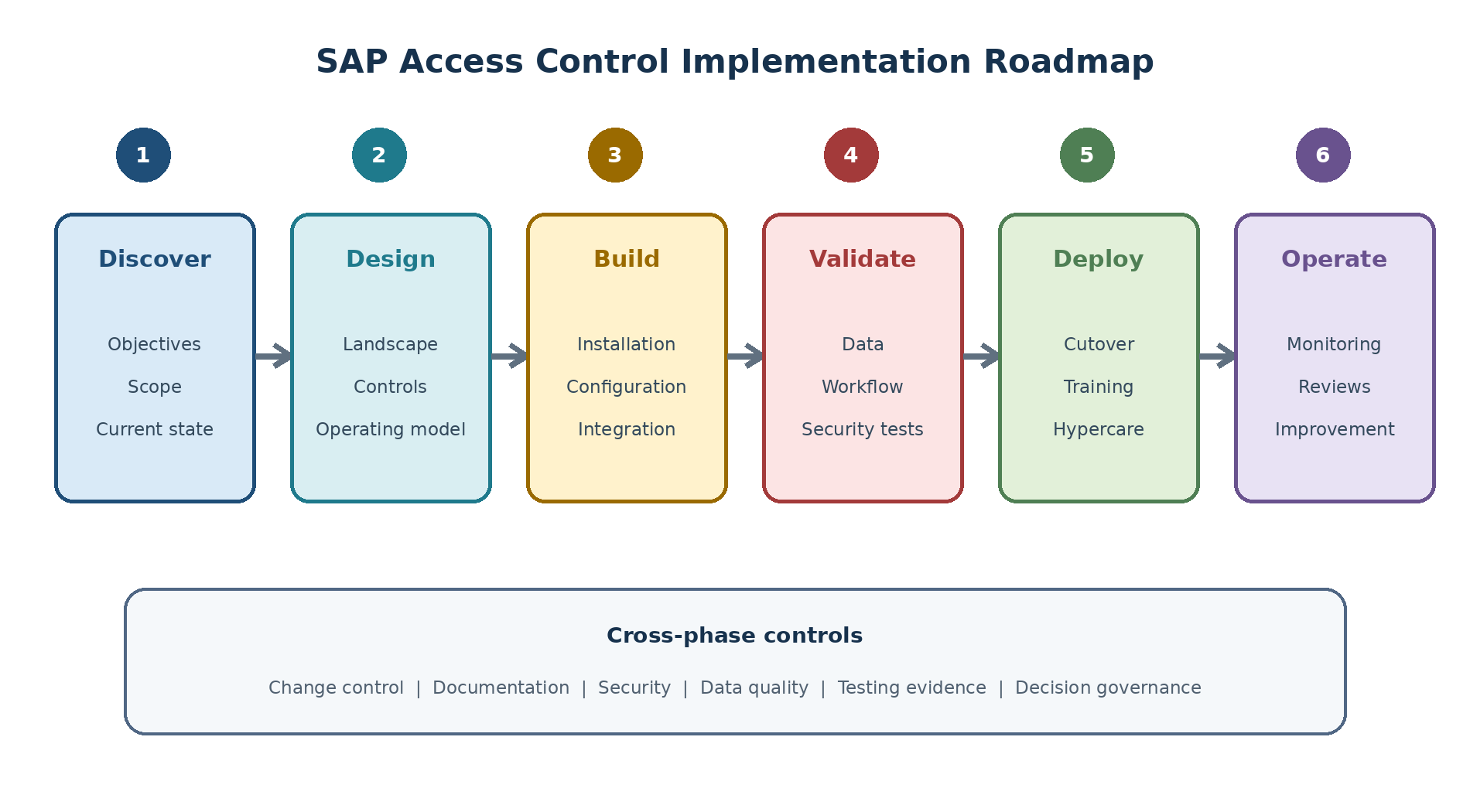
Figure 3. Original diagram: SAP Access Control implementation roadmap.
Phases may overlap, but decisions must have gates. Discovery should establish scope and current state; design should approve the operating model and architecture; build should create controlled configuration; validation should prove technical and business behavior; deployment should execute cutover and adoption; operation should monitor and improve the control system.
Control Changes and Transports
Create a transport matrix before configuration. Identify what is transportable, what is environment-specific, what requires post-import activation, and what must be manually maintained with dual control. Define package strategy, request ownership, import sequence, dependency checks, rollback, evidence, and emergency-change handling. Never assume every rule, workflow object, connector setting, owner assignment, job, or endpoint moves in the same way.
Testing and Acceptance
Build the Test Strategy
Unit testing of configuration, rules, agents, services, and connectors.
System integration testing across requests, analysis, provisioning, jobs, email, and logs.
Security testing for authorization boundaries and technical users.
Performance and volume testing for synchronization, analysis, campaigns, and workflow peaks.
Failure and recovery testing for unavailable targets, expired credentials, stuck workflow, and partial provisioning.
Regression testing after support-package, plug-in, ruleset, or workflow changes.
Define Entry and Exit Criteria
| Gate | Minimum evidence |
| Ready for integration test | Approved design, stable build, test data, interfaces available, unit defects within tolerance |
| Ready for business acceptance | End-to-end tests passed, role and ruleset baseline approved, critical defects closed |
| Ready for production | Cutover rehearsal, support readiness, security approval, monitoring active, rollback decision defined |
| Exit hypercare | Stable service levels, manageable defect backlog, documented handover, business owner acceptance |
Prepare Business Acceptance
Business acceptance must use realistic decisions, not only happy-path navigation. Test role additions and removals, SoD conflicts, mitigated risks, rejected requests, delegated approvers, expired access, emergency sessions, review rejection and target removal, invalid data, and unavailable systems. Retain test evidence that maps each approved requirement to its result.
Cutover and Operational Readiness
Prepare the Cutover Plan
Freeze or control configuration and ruleset changes.
Complete transports and environment-specific maintenance in the approved sequence.
Run required repository, authorization, and organizational synchronization.
Validate owners, agents, email, jobs, connectors, provisioning, and emergency logging.
Load or confirm production data using reconciled counts and exception reports.
Execute smoke tests, business validation, communications, and go/no-go decision.
Activate hypercare monitoring and record every deviation with an owner.
Design Support and Monitoring
Define Level 1, functional, technical, security, infrastructure, and business-control responsibilities. Monitoring should cover job completion, data freshness, connector failures, workflow age, provisioning exceptions, emergency-log collection, review deadlines, database growth, response time, certificates, and technical-user validity. Each alert requires a threshold, owner, response target, and runbook.
Plan Training and Adoption
Role-based training for requesters, approvers, risk owners, role owners, controllers, reviewers, and administrators.
Short decision guides that explain what evidence and rationale are expected.
Practice cases for rejection, escalation, mitigation, privileged access, and remediation.
Communication of support channels, service levels, planned outages, and policy changes.
Adoption measures such as completion, decision quality, cycle time, and recurring errors.
Practical Implementation Scenario
Global Rollout Context
A company plans to govern three SAP S/4HANA production systems and one legacy SAP ERP system across two regions. It wants risk analysis and access requests first, followed by emergency access and periodic reviews. The current approval process uses email, the role catalog contains duplicates, and risk ownership is incomplete.
Recommended Phased Approach
Complete current-state assessment, owner assignment, role cleanup priorities, licensing confirmation, and architecture approval.
Build a representative pilot using one region and one S/4HANA system; validate synchronization, rules, workflow, provisioning, and support.
Remediate high-impact rules and role issues before expanding automated provisioning.
Roll out ARA and ARM by system with reconciled data and a repeatable connector onboarding checklist.
Introduce EAM only after firefighter ownership, log collection, review, and escalation are proven.
Launch periodic reviews after reviewer data and removal follow-up are reliable.
Readiness Decision
| Decision | Status example | Required action |
| Proceed | Critical prerequisites complete and residual risks accepted | Approve build or cutover gate |
| Proceed with conditions | Noncritical gaps have owners, dates, and workarounds | Track conditions at every governance meeting |
| Do not proceed | Unsupported stack, unresolved security issue, unreliable data, or no accountable owner | Close blockers and repeat readiness review |
Common Planning Failures
Typical Failure Patterns
Treating installation completion as implementation success.
Automating access before roles, rules, and ownership are ready.
Sizing only by user count and ignoring batch peaks, logs, reviews, and retention.
Assuming a connector supports every required capability.
Leaving licensing, PAM, plug-in, time-zone, or security validation until build.
Testing only happy paths and not proving target-system results.
Launching reviews without accurate reviewers or enforced remediation.
Skipping operational monitoring, runbooks, and handover.
Preventive Actions
Use signed decision records, scope and compatibility matrices, data-quality gates, a workload-based sizing workbook, control ownership, traceable requirements, end-to-end negative testing, cutover rehearsals, and operational acceptance. A gap may be accepted only by an authorized owner who understands its impact, duration, compensating action, and closure date.
Content Coverage Validation
Source Concept Coverage
| Reference concept family | Coverage in this chapter |
| Licensing and user requirements | Commercial scope, user populations, SAP product-system registration, SLICENSE platform-key procedure, and evidence |
| System sizing | Sizing approaches, SAPS context, connected systems, users, roles, profiles, rules, workflows, FFIDs, concurrent analyses, jobs, storage, and growth |
| Time-zone prerequisites | OS, database, application and client alignment; STZAC; TZCUSTHELP; RSDBTIME; TZ_SYSTEM_GET_TZONE; TZONECHEC; correction and validation |
| Central components | Standalone and embedded GRCFND_A planning with release-specific validation |
| Managed-system plug-ins | GRCPINW, GRCPIERP, HR/non-HR scope, installation dependency, and capability validation |
| User-interface and other integration components | SAP Fiori UI content, SAP_UI dependencies, HANA/portal history, cloud and non-SAP adapters |
| Implementation preparation | PAM, Maintenance Planner, calculated stack, security, testing, transport, cutover, and operational readiness |
Version-Dependent Items
Portal navigation, product SKUs, license metrics, component names, plug-in releases, support-package prerequisites, SAP Fiori packaging, Maintenance Planner output, operating-system/database support, report availability, and SAP Notes can change. Validate them on the implementation date against the signed commercial agreement, SAP for Me, PAM, Maintenance Planner, the current SAP Access Control guides, and relevant SAP Notes or KBAs. Historical names are included only so project teams can interpret older landscapes and documentation; they are not a substitute for a current calculation.
Summary
Key Takeaways
Implementation planning starts with control outcomes and accountable ownership.
Register the correct product system and validate the ABAP platform license through SLICENSE before relying on the build.
Current licensing, PAM, component, plug-in, UI, and platform facts require manual verification.
Time-zone consistency must be proven across the operating system, database, central application, clients, and managed systems.
Sizing must include data volume, concurrency, job sequence, workflow complexity, logs, campaigns, and growth.
Security, evidence, testing, transport, cutover, monitoring, and adoption are part of the product design.
A phased rollout with explicit readiness gates reduces risk and creates a repeatable deployment model.
SEO and Publishing Metadata
| Publishing field | Recommendation |
| SEO title | SAP Access Control 12.0 Prerequisites: Licensing, Sizing, Components, and Plug-Ins |
| URL slug | /sap-access-control-prerequisites-implementation-planning/ |
| Meta description | Prepare SAP Access Control 12.0 with licensing and SLICENSE checks, workload sizing, time-zone validation, GRC components, plug-ins, PAM, and Maintenance Planner. |
| Primary keyword | SAP Access Control prerequisites |
| Secondary keywords | SAP GRC licensing; SAP Access Control sizing; GRCFND_A; GRCPINW; GRCPIERP; SAP GRC time zone check |
| Long-tail keywords | SAP Access Control 12.0 prerequisites step by step; how to check SAP GRC license in SLICENSE; SAP GRC plug-in requirements; SAP Access Control sizing inputs |
| Search intent | Technical preparation, prerequisite validation, and implementation planning |
| Suggested schema markup | TechArticle, HowTo, Article, BreadcrumbList |
| Internal-link suggestions | SAP GRC foundations; SAP Access Control post-installation setup; connector setup; ARA ruleset design; MSMP workflow |
| Image caption suggestions | SAP Access Control prerequisite validation flow; implementation roadmap; landscape decision map |
| Image alt-text suggestions | Original colour diagrams explaining SAP Access Control prerequisites, components, system landscape, sizing, and implementation phases |
Authoritative Reference Suggestions
| | |
03_SAP-Access-Control-Initial-Setup-and-Post-Installation-Revised
Introduction
Purpose
Post-installation configuration turns an installed SAP Access Control system into a usable governance platform. The work includes validating the software stack, activating client and web services, establishing baseline Customizing, preparing roles and connectors, loading repository data, enabling workflow and notifications, scheduling jobs, transporting changes, and proving an end-to-end control process.
This chapter presents a controlled sequence rather than a copied installation checklist. It explains why each layer is required, how to validate it, and which settings must be verified for the actual support package and landscape.
Learning Objectives
Identify the technical and functional layers of initial setup.
Execute post-installation work in dependency order.
Differentiate transportable configuration from environment-specific maintenance.
Validate services, connectors, synchronization, workflow, jobs, and notifications.
Troubleshoot failures without changing unrelated settings.
Scope and Version Context
Examples refer to SAP Access Control 12.0. Exact IMG nodes, delivered BC sets, roles, services, workflow templates, parameters, plug-ins, and jobs can vary by support package and activated capability. Use the current SAP Administrator Guide, configuration guides, SAP Notes, and IMG documentation for the installed level. Never activate every delivered object simply because it exists.
| Production protection: SAP documentation warns that BC-set activation is intended for a non-production Customizing client. Review activation logs and overwrite behavior, test in development, transport approved results, and follow your change process. |
Setup Strategy
Understand the Configuration Layers
| Layer | Purpose | Typical evidence |
| Technical baseline | Components, clients, services, destinations, certificates, and runtime health | Component list, service tests, connectivity results |
| Foundation configuration | Application activation, common parameters, business processes, owners, and baseline content | Approved Customizing records and transport requests |
| Integration and data | Connectors, repository objects, authorizations, organization, usage, and logs | Job logs, counts, samples, and reconciliation |
| Process runtime | Workflow, tasks, events, number ranges, provisioning, email, and deadlines | Test request, work item, notification, and provisioning result |
| Operations | Schedules, monitoring, support, retention, recovery, and documentation | Job catalogue, alerts, runbooks, and acceptance |
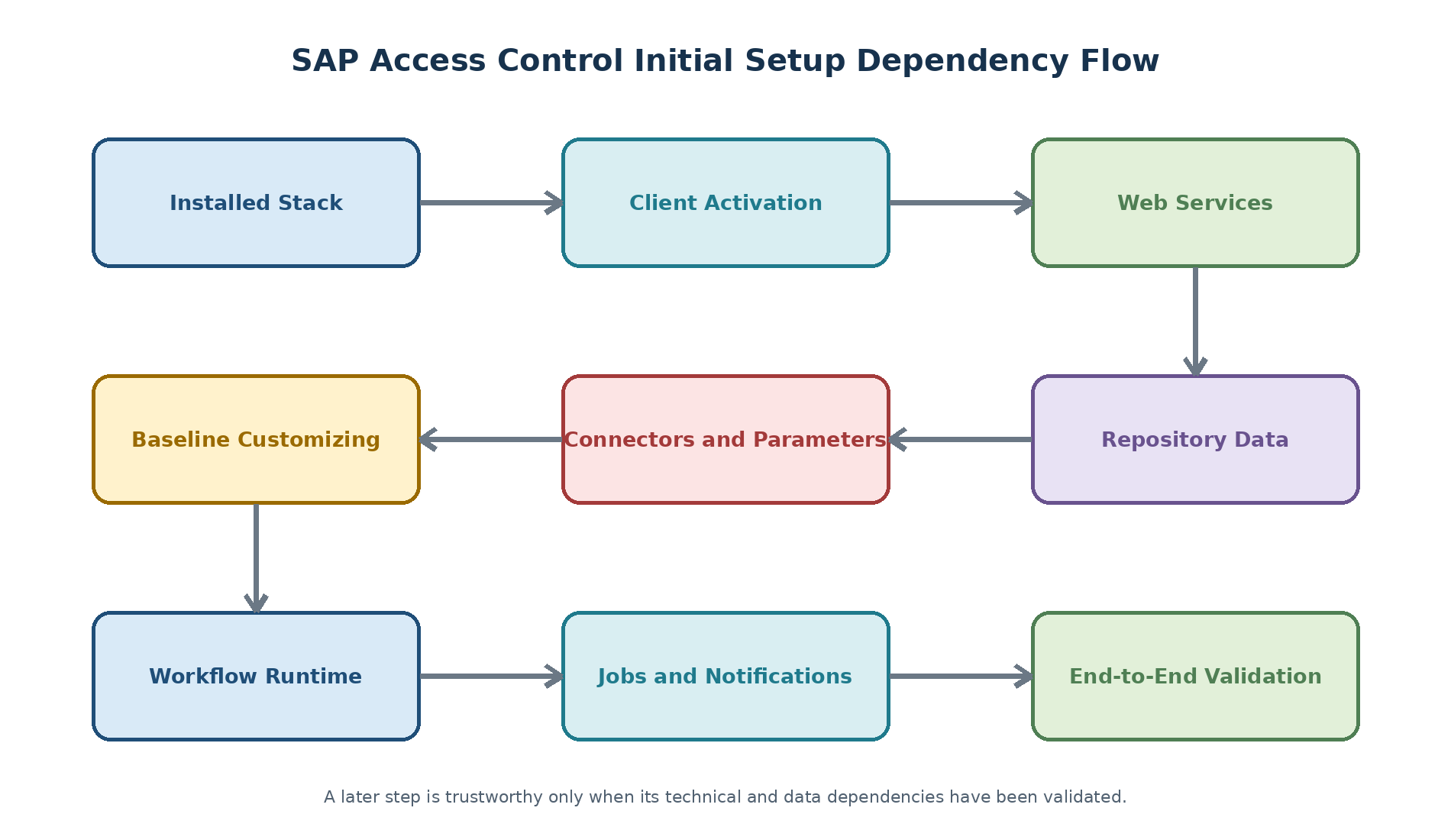
Define the Execution Order
Figure 1. Original diagram: SAP Access Control initial setup dependency flow.
Prepare the Configuration Workbook
Requirement and business owner.
IMG path, transaction, parameter, or technical object.
Development value and environment-specific value.
Transport request or manual deployment step.
Prerequisite, validation method, expected result, and evidence link.
Rollback or correction method and accountable support owner.
Post-Installation Quick Checks
Verify Installed Components
Confirm the approved SAP Access Control add-on, support-package level, underlying ABAP platform, UI component, and managed-system plug-ins against the build plan. Useful technical checks may include System > Status and component information tools such as SPAM or SAINT, but installation approval must be based on Maintenance Planner output, installation logs, PAM compatibility, and required SAP Notes.
Confirm Client and System Readiness
| Check | Why it matters |
| Correct client role and change options | Customizing and repository changes must occur in the intended client under change control. |
| Logical system and transport route | Incorrect identities or routes can break workflow, interfaces, and deployment. |
| Background and update processing | Jobs, workflow, synchronization, and logs depend on healthy technical processing. |
| User and authorization baseline | Configuration users require controlled access; business users need tested roles. |
| Backup and recovery point | A recoverable baseline is needed before large activations or initial loads. |
Check Time and Core Technical Services
Validate application, database, operating-system, and connected-system time and time-zone behavior. Then confirm RFC, HTTP(S), Internet Communication Manager, update tasks, workflow runtime, spool if used, email prerequisites, DNS, certificates, and required network routes. A successful logon alone does not prove that background or callback processing works.
Activate the Application Baseline
Activate Applications in the Client
Open transaction SPRO in the approved Customizing client.
Navigate to the current SAP Access Control activation activity under Governance, Risk and Compliance.
Review which licensed applications are required in this client.
Record existing values, activate only approved applications, and assign the change to the correct transport.
Log off and on where necessary, then confirm that expected IMG and application functions are available.
| Version check: The exact IMG wording can change. Use the documentation attached to the IMG activity and the Administrator Guide for the installed support package. |
Activate Required ICF Services
Use transaction SICF to activate only the service branches required by the approved user experience and integration design. Access Control web scenarios commonly depend on selected services beneath the bc, public, and grc branches, while SAP Fiori scenarios also require the exact OData and launchpad services delivered for the installed level. Services are often inactive after a fresh installation or upgrade.
Run transaction SICF in the central SAP Access Control system.
Search for the exact approved service path rather than activating a broad tree from memory.
Confirm the service handler, logon procedure, security requirement, and owning application.
Right-click the selected node and choose Activate Service.
Choose the activation scope deliberately, record the service path, and save evidence.
Right-click the active service and choose Test Service; validate the result through the intended user route.
| Original screenshot required: SICF showing one approved SAP Access Control service selected with its activation status and service path. |
| Publishing detail | Guidance |
| Caption | Approved ICF service activation for SAP Access Control |
| Alt text | SICF tree showing an active SAP Access Control web service |
| Mask before publishing | System ID, client, hostname, port, user ID, internal URL, and customer-specific service aliases |
Understand SICF Activation Choices
| SICF choice | Effect | Use with care |
| Yes | Activates only the selected service or node | Use when the exact service is known and child services are not required |
| Yes with subnodes | Activates the selected node and included subordinate services | Review every child first; broad activation can expose unnecessary endpoints |
| Info | Displays service information | Use to confirm handler, package, and purpose before change |
| Cancel | Leaves the activation unchanged | Use when scope, security, or ownership is unclear |
| Test Service | Starts a test through the configured HTTP route | A browser response still requires authorization and functional validation |
| Deactivate Service | Disables the selected active service | Assess dependent applications and obtain change approval first |
Configure Persistent ICM Services
Transaction SMICM can create HTTP, HTTPS, or SMTP listeners for an immediate test, but a manually created service is not persistent across an application-server restart. Productive listeners must be defined in the approved instance or default profile and coordinated with network, security, Web Dispatcher, load balancer, and certificate configuration.
Run transaction SMICM and choose Goto > Services, or use Shift+F1.
Confirm whether the required protocol and port already exist. Duplicate listeners can prevent startup.
For a temporary non-production test, use Service > Create and maintain the approved protocol, port, and timeout values.
Run transaction RZ10 and select the approved DEFAULT or instance profile in Extended maintenance mode.
Create an unused parameter such as icm/server_port_<n> with the required protocol, port, TIMEOUT, and PROCTIMEOUT values. A representative HTTP format is PROT=HTTP,PORT=<approved_port>,TIMEOUT=300,PROCTIMEOUT=300.
Save and activate the profile through change control, then restart the affected instance when required.
After restart, return to SMICM and confirm that the listener is active and bound to the intended port.
| Infrastructure dependency: Port numbers, TLS termination, certificates, host names, and firewall rules must come from the Basis, network, and security design. Do not copy a port from another landscape. Timeout values such as 300 seconds are historical implementation examples, not universal performance recommendations. |
Validate HTTP and Web Dynpro Runtime
Confirm the service resolves through the intended host, proxy, Web Dispatcher, or load balancer.
Check TLS certificate chain, protocol, redirect, cookie, and logon behavior.
Verify that the application opens with a least-privileged test role.
Review ICM, gateway, system, security, and browser logs for failures.
Test from the user network path, not only from the application server.
Establish Initial Customizing
Review SAP Reference IMG
Treat the IMG as a configuration map, not a to-do list. Mark each activity as required now, required later, optional, not applicable, or pending design. Read the IMG documentation, prerequisites, transport behavior, and related parameter dependencies before changing values.
Select Relevant SAP Access Control BC Sets
BC sets can provide delivered baseline content for applications, workflows, role management, and other functions. Before activation with tools such as SCPR20, confirm that the BC set matches the installed release and intended capability, compare its contents with existing values, choose the approved overwrite strategy, activate in a suitable non-production Customizing client, and review every warning or error in the activation log.
| BC-set family | Representative delivered names | Planning decision |
| Access request | GRAC_ACCESS_REQUEST_APPL_MAPPING; GRAC_ACCESS_REQUEST_EUP; GRAC_ACCESS_REQUEST_PRIORITY; GRAC_ACCESS_REQUEST_REQ_TYPE | Activate only the request content required by the approved ARM design |
| Simplified request display | GRAC_DT_REQUEST_DISPLAY_SECTIONS; GRAC_DT_REQUEST_FIELD_LABLES; GRAC_DT_REQUEST_PAGE_SETTINGS | Review field labels and page behavior before activation |
| Risk rulesets | GRAC_RA_RULESET_COMMON; S4HANA_CORE; S4HANA_FIORI; S4HANA_ALL; SAP_BASIS; SAP_HR; SAP_R3; SAP_CRM; SAP_SRM; HANA; JDE; ORACLE; PSOFT and other delivered variants | Choose only the target applications and ruleset families in scope; involve risk owners |
| Business role management | GRAC_ROLE_MGMT_LANDSCAPE; GRAC_ROLE_MGMT_METHODOLOGY; GRAC_ROLE_MGMT_PRE_REQ_TYPE; GRAC_ROLE_MGMT_ROLE_STATUS; GRAC_ROLE_MGMT_SENTVITY; GRAC_ROLE_SEARCH_CONFIGURATION | Align with the customer role methodology and naming standards |
| Workflow and emergency access | GRC_MSMP_CONFIGURATION; GRAC_SPM_CRITICALITY_LEVEL | Validate MSMP and EAM design before loading defaults |
| Naming note: Delivered names can contain historical spellings such as FIELD_LABLES or SENTVITY. Use the exact technical name shown in the installed system. Do not rename or correct a delivered object based only on display text. |
Activate and Validate BC Sets
Run transaction SCPR20 in the approved development Customizing client.
Enter or select one approved BC set and review its documentation, overall view, where-used list, consistency check, key-conflict check, and comparison with Customizing where applicable.
Choose Activate or press F7. Activate each BC set separately.
On the activation options screen, select the approved overwrite behavior. Overwrite All Data can replace earlier values and therefore requires explicit approval.
Use Default mode unless the installed-level documentation or project procedure requires another supported mode.
Execute the activation and assign resulting Customizing changes to the correct transport request.
Open Activation Logs or press Ctrl+F2. Green means successful, yellow requires review, red indicates a failed item that must be corrected.
Retain the pre-comparison, activation options, full log, transport, validation results, and owner approval.
| SCPR20 function | Typical use |
| Overall View (F6) | Review tables and configuration content |
| Display Documentation (Ctrl+F1) | Read the delivered purpose and prerequisites |
| Where-used List (Ctrl+F6) | Identify dependent or related BC sets |
| Consistency Check (Shift+F1) | Detect object and activation issues |
| Key conflict check (Ctrl+Shift+F12) | Identify conflicting keys before activation |
| Compare with Customizing (Ctrl+F9) | See differences from current table values |
| BC Set comparison (Ctrl+F7) | Compare delivered or candidate BC sets |
| Activation Logs (Ctrl+F2) | Review current and historical results |
| Decision | Recommended treatment |
| New implementation with no customer baseline | Activate only approved BC sets after content review and retain logs. |
| Existing implementation or upgrade | Compare first; protect customer values and follow upgrade guidance. |
| BC set for a future capability | Do not activate until the capability design and ownership are approved. |
| Activation warning | Assess field-level impact; do not classify all warnings as harmless. |
| Activation error | Stop dependent configuration, correct the cause, and retest in the same controlled path. |
Maintain Foundational Business Data
Business processes and subprocesses used by the risk model.
Organizational attributes and mappings required by workflows or analysis.
Request priorities, types, statuses, reasons, and other approved reference values.
Owners, approvers, coordinators, controllers, and backup assignments.
Naming standards, validity rules, retention choices, and operating calendars.
Configure Managed-System Plug-In Settings
Maintain Plug-In Connector Parameters
After GRCPINW and, where required, GRCPIERP are installed, maintain the connector relationship in every managed plug-in system. The two baseline parameters distinguish the local managed-system destination from the destination that points back to the central SAP Access Control system.
| Parameter | Purpose | Value to validate |
| 1000 - Plug-in connector | Identifies the local RFC connection for the managed plug-in system | The approved local destination for the current system/client |
| 1001 - GRC connector | Identifies the RFC connection from the managed system to central SAP Access Control | The approved central GRC destination and client |
Open the plug-in Customizing activity for Access Control configuration parameters in the managed system.
Confirm that parameters 1000 and 1001 are available for the installed plug-in level.
Maintain the exact RFC destination names approved in the connector design.
Save the settings using the correct transport or controlled environment procedure.
Test both directions with the intended technical users and representative remote functions.
Maintain Optional Risk Terminator User Exits
Risk Terminator can trigger real-time risk analysis during supported PFCG role maintenance and SU01, SU10, or SU12 user changes. Its plug-in user-exit configuration is optional; skip it when Risk Terminator is not part of the approved design.
| Exit name | Delivered function/value | Purpose |
| SAP_AFTER_PROF_GEN | /GRCPI/GRIA_AFTER_PROF_GEN | Runs the delivered integration after profile generation |
| SAP_BEFORE_PROF_GEN | /GRCPI/GRIA_BEFORE_PROF_GEN | Runs the delivered integration before profile generation |
| SAP_EXIT_USERS_SAVE | /GRCPI/GRIA_EXIT_USERS_SAVE | Runs the delivered integration during supported user-save processing |
| SAP_SINGLE_USERPROF | /GRCPI/GRIA_SINGLE_USERPROFS | Controls delivered single-user profile behavior; validate allowed NO/YES/X semantics for the installed level |
Log on to the managed SAP ERP or SAP S/4HANA plug-in system.
Run SPRO and navigate to Governance, Risk and Compliance (Plug-In) > Access Control > Maintain User Exits for Plug-In Systems.
Choose New Entries and maintain only the exits required by the approved Risk Terminator design.
Use the exact delivered function-module names for the installed plug-in level.
Save through change control and test a non-production role or user change with a known risk.
| Do not enable blindly: User exits execute inside sensitive role and user maintenance. An incorrect value can disrupt administration or create unexpected analysis behavior. Confirm compatibility, authorizations, failure handling, and rollback before activation. |
Validate Plug-In Configuration
Both RFC directions use the intended client and least-privileged technical identities.
Parameter 1000 resolves to the local managed-system connector and 1001 to central Access Control.
Repository and authorization reads return a controlled sample.
Optional Risk Terminator exits execute only in the approved transactions and produce the expected warning or decision path.
Application logs, RFC errors, dumps, and authorization checks are clean after the test.
Prepare Roles and Administrative Access
Review Delivered Role Families
SAP-delivered roles help identify required applications and authorization objects, but they should be copied into the customer namespace and redesigned according to least privilege. Remove unused menu content and authorizations, maintain organizational values, generate profiles, test with representative users, and document role ownership.
| Role family | Representative delivered roles | Typical use |
| Base and navigation | SAP_GRAC_BASE; SAP_GRAC_NWBC; SAP_GRAC_END_USER | Baseline application, Business Client navigation, or end-user home-page access |
| Access requests | SAP_GRAC_ACCESS_REQUESTER; SAP_GRAC_ACCESS_APPROVER; SAP_GRAC_ACCESS_REQUEST_ADMIN | Request submission, approval, and administration |
| Risk and controls | SAP_GRAC_RISK_ANALYSIS; SAP_GRAC_RISK_OWNER; SAP_GRAC_RULE_SETUP; SAP_GRAC_CONTROL_OWNER; SAP_GRAC_CONTROL_MONITOR; SAP_GRAC_CONTROL_APPROVER; SAP_GRAC_ALERTS | Risk analysis, rules, mitigation controls, ownership, monitoring, approval, and alerts |
| Business role management | SAP_GRAC_ROLE_MGMT_ADMIN; SAP_GRAC_ROLE_MTMT_DESIGNER; SAP_GRAC_ROLE_MGMT_ROLE_OWNER; SAP_GRAC_ROLE_MGMT_USER | Role methodology, design, ownership, and business-user activities |
| Emergency access | SAP_GRAC_SPM_FFID; SAP_GRAC_SUPER_USER_MGMT_ADMIN; SAP_GRAC_SUPER_USER_MGMT_CNTLR; SAP_GRAC_SUPER_USER_MGMT_OWNER; SAP_GRAC_SUPER_USER_MGMT_USER | FFID identification, administration, control review, ownership, and firefighter use |
| Administration and reporting | SAP_GRAC_SETUP; SAP_GRAC_REPORTS; SAP_GRAC_DISPLAY_ALL; SAP_GRAC_ALL | Setup, reporting, read-only audit, or broad emergency administration |
| Least-privilege warning: SAP_GRAC_ALL and other broad delivered roles should not become routine business-user roles. Separate configuration, approval, ownership, monitoring, reporting, and emergency administration according to the control model. |
Generate Delivered Role Profiles
Run transaction SUPC in the central SAP Access Control system.
Choose the required role-selection scope. Avoid selecting every role in the client without review.
Enter one approved delivered role or use multiple selection for the reviewed role list.
Select automatic profile generation only for roles approved for generation.
Execute, review the generation log, and resolve authorization-menu or profile errors before assignment.
Copy Roles into the Customer Namespace
Run transaction PFCG and enter the delivered role to be used as a source.
Confirm the source role and choose Copy, or press Shift+F11.
Enter the approved Z or Y role name in the copy dialog.
Open the copied role, remove unused menu items and authorizations, maintain organizational values, and document the owner.
Generate the profile, run authorization tests including denied actions, and capture the change in the correct transport.
Repeat individually for each approved role; role copies are not a substitute for a role-design review.
Create Technical and Business Role Models
| Role population | Access design focus |
| Configuration administrators | Separated Customizing, workflow, connector, rule, and job responsibilities |
| Operational support | Display, monitoring, retry, administration, and controlled correction functions |
| Business approvers and owners | Only the inbox, decisions, reports, and objects relevant to their accountability |
| Auditors | Read-only evidence with appropriate data scope and no approval or administration authority |
| Technical users | Communication or system-user type, minimum permissions, no interactive use unless explicitly required |
Validate Authorization Boundaries
Test both allowed and denied actions. Confirm that a role owner cannot silently change risk configuration, a workflow administrator cannot approve business access, a controller cannot administer their own emergency assignment, and an auditor cannot modify evidence. Use SU53, authorization traces, application logs, and role comparison as appropriate, while avoiding excessive production tracing.
Define Business Processes and Subprocesses
Create Business Processes
Business processes, subprocesses, and related functional areas provide shared classification for risks, roles, requests, and governance reporting. Define them from the approved business model before building rules or workflow logic.
Run transaction SPRO.
Navigate to Governance, Risk and Compliance > Access Control > Maintain Business Process and Subprocesses.
Choose New Entries for the business-process level.
Maintain a stable business-process key and a clear description aligned with the enterprise process taxonomy.
Save the entries in the correct Customizing transport.
Create Subprocesses
Select one maintained business process.
Open the Business Subprocess level.
Choose New Entries and enter the subprocess key and description.
Repeat for every approved subprocess under that process.
Review naming, ownership, duplicates, and downstream use before transport.
Validate Shared Reference Data
Every subprocess belongs to the intended parent business process.
Keys and descriptions are consistent with the ruleset and role methodology.
No duplicate local terms represent the same business activity.
Risk owners and functional owners approve the classification.
Transport import preserves the keys required by dependent rules and workflows.
Configure Connectors and Parameters
Create and Test Technical Destinations
Create the approved technical destination using the protocol and security model from the architecture. For RFC-based SAP systems, SM59 is commonly used. Test connection, logon, and a representative authorized function. A green connection test does not prove that repository synchronization, provisioning, or log collection has sufficient authorization.
Maintain Connector Definitions
Open the current connector-maintenance activity in SPRO.
Register the destination under the correct connector type and application purpose.
Maintain connection settings, groups, mappings, language, and scenario-specific options required by design.
Assign only the capabilities that the target and plug-in combination supports.
Execute a small controlled synchronization or read test and reconcile the result.
Document credential ownership, monitoring, expiry, and recovery.
Set Parameters with Change Control
Configuration parameters influence request behavior, risk analysis, provisioning, emergency access, role management, workflow, reviews, and performance. Maintain a parameter register containing ID, application area, default, approved value, reason, owner, dependencies, test case, transport behavior, and effective date. Do not copy a parameter list from another customer without requirement validation.
Initialize Repository and Authorization Data
Plan Synchronization Sequence
| Sequence | Purpose |
| 1. Repository objects | Establish systems, roles, profiles, actions, and related metadata. |
| 2. Authorization content | Load role and user authorization details used for analysis. |
| 3. Users and organization | Provide identities, assignments, managers, and organizational context. |
| 4. Usage or activity where applicable | Support usage-informed decisions and emergency-access reporting. |
| 5. Batch analysis or derived data | Create risk results only after prerequisite source data is current. |
Run Initial Data Loads
Use the supported synchronization activities and schedule full or incremental runs according to the scenario. Initial loads should be performed in a controlled window with baseline counts, runtime monitoring, background capacity, and clear retry rules. Avoid running overlapping full loads and risk-analysis jobs unless sizing and sequence have been tested.
Reconcile and Troubleshoot Data
Compare source and SAP Access Control counts by system and object type.
Sample roles, users, profiles, authorization values, validity dates, and organizational assignments.
Check job logs, application logs, dumps, system logs, RFC errors, and authorization failures.
Resolve excluded or unsupported objects explicitly instead of treating count differences as automatic defects.
Repeat only the failed or affected layer, then document the final reconciliation.
Prepare Workflow Runtime
Prepare WF-BATCH and Background Capacity
SAP Access Control uses the ABAP workflow foundation for requests, approvals, governance maintenance, reviews, and emergency-access processes. A dedicated workflow runtime user and sufficient background capacity must exist before automatic workflow Customizing can complete reliably.
| Prerequisite | Implementation guidance |
| WF-BATCH user | Create as a non-dialog/system user according to the installed-level workflow guide and security policy |
| Workflow authorization | Historical guides reference SAP_BC_BMT_WFM_SERV_USER and required S_RFC, S_RFCACL, and S_RFC_TT permissions; design a least-privileged customer role instead of assigning unrestricted access permanently |
| Temporary broad profiles | Older setup procedures may reference SAP_ALL and SAP_NEW for initial technical setup; any temporary assignment requires approval, monitoring, expiry, and removal after validation |
| Background work processes | Review rdisp/wp_no_btc and the total instance work-process design with Basis; do not change one parameter without capacity analysis |
| System administrator | Assign the approved workflow administrator and ensure ownership is not tied to a personal account |
Run Automatic Workflow Customizing
Run transaction SWU3, or use SPRO > Governance, Risk and Compliance > General Settings > Workflow > Perform Automatic Workflow Customizing.
Review the five displayed areas: runtime environment, definition environment, additional settings and services, task classification, and guided procedures.
Expand every required area and read the status and documentation before executing changes.
Right-click a required activity and choose Execute Activity or Redo Automatic Customizing.
For the local workflow destination, create or validate WORKFLOW_LOCAL_<client>. If manual creation is required, use SM59 with connection type L and the approved WF-BATCH client/logon design.
Validate the workflow system administrator, active plan version, event processing, and required scheduled jobs. Only one plan version can be active; older procedures commonly activate plan version 01.
Treat a red Guided Procedures node as potentially not applicable when SAP Process Control content is not installed; verify rather than forcing activation.
Repeat verification until every required item has a successful status and every accepted exception has an owner and reason.
| Original screenshot required: SWU3 showing successful required checks, the local workflow destination, and one documented not-applicable item in a non-production client. |
| Publishing detail | Guidance |
| Caption | Completed automatic workflow Customizing for SAP Access Control |
| Alt text | SWU3 workflow setup checks for SAP Access Control initial configuration |
| Mask before publishing | System ID, client, RFC destination, host, workflow user, administrator, internal URLs, and customer-specific task names |
Test the Workflow Runtime
In SWU3, choose Start Verification Workflow.
Accept event-linkage activation only when it matches the approved workflow setup.
Open the recipient workflow inbox and confirm that the verification work item is created.
Execute or complete the test item and confirm status, container data, timestamps, and technical user.
Review workflow logs and background processing for errors.
Classify General Tasks
General tasks can be executed by any suitable workflow user unless agent restrictions are imposed elsewhere. Classify only the delivered tasks required by the selected scenarios and verify the security impact. Historical Access Control setup guides identify the following reusable task groups; confirm them for the installed support package.
| Task purpose | Representative task IDs |
| Document-processing tasks | TS70008298; TS71007944; TS71007945; TS71007946; TS71007954 |
| Form-processing tasks | TS70008112; TS70008113; TS70008114; TS70008115 |
Schedule Workflow Technical Jobs
| Workflow function | Representative reports/jobs | Validation |
| Missed deadlines | SWWDHEX / RSWWDHEX | Overdue work items are detected and processed |
| Work items with errors | SWWERRE / RSWWERRE | Errored items are found for controlled administration |
| Condition evaluation | SWWCOND | Rule and work-item conditions are monitored |
| Event queue | Scheduled through the configured RFC/event setup | Queued events are delivered without an increasing backlog |
| Clearing | SWWCLEAR | Obsolete technical tasks are cleared according to policy |
| Shared-memory container update | SWFSLSDLEX / RSWFSLSDLEX | Definition-enhancement buffers are refreshed across application servers; interval can be reviewed through SWPA |
Automatic Customizing may propose a short interval such as three minutes. Choose intervals from request volume, deadline requirements, background capacity, and monitoring evidence; do not adopt a historical default without a load assessment.
Perform Task-Specific Customizing
In SPRO, open General Settings > Workflow > Perform Task-Specific Customizing.
Expand the GRC node and open Assign Agents for GRC-AC.
Review each selected task and its current agent assignment.
Use Attributes to classify an approved generic task as General Task and set the required classification value for the installed level.
If application folders are missing, run report RS_APPL_REFRESH in SE38 or SA38, then reopen the overview.
Retest inbox visibility using users with and without the intended authorization.
Activate Event Linkages
In task-specific Customizing, open Activate Event Linkage for every required workflow template item.
Open the linkage properties.
Set the approved receiver/linkage status so the linkage is active and shows no unresolved errors.
Set error feedback to the supported option that does not silently disable a required linkage.
Save and repeat for every in-scope workflow template.
Where task-specific Customizing is unavailable or the plug-in layout requires it, use SWE2 to review the relevant ABAP class event linkages and activate them under change control.
| Linkage protection: An inactive linkage prevents workflow start; an overly broad or incorrectly repaired linkage can trigger unintended workflows. Record the object, event, receiver, status, error behavior, transport method, and test result. |
Assign Agents with Plug-In Scenarios
Run transaction PFTC.
Choose Standard Task and enter the approved task number.
Open the task in display/change mode as authorized.
Navigate to Additional Data > Agent Assignment > Maintain.
Choose Attributes, set the approved General Task behavior and classification, and transfer the change.
Repeat only for the task IDs required by the selected Access Control processes.
| Process area | Representative delivered tasks/templates |
| Access request and approval | TS76307918, TS76308013, TS76308021, TS76308026; WS76300056 |
| Role approval and review | TS76307944, TS76307966, TS76308056; WS76300080, WS76300086 |
| User and SoD review | TS76307964; WS76300082, WS76300081 |
| Risk, function, and mitigation | TS76308029, TS76308038, TS76308057; WS76300084, WS76300085, WS76300088, WS76300087 |
| Emergency access review | TS76308028; WS76300089, WS76300107 |
Activate Workflow Templates
Run transaction SWDD.
Enter one approved WS template number in the workflow information area.
Review the definition, errors, binding, and agent dependencies.
Choose Activate and confirm an active version is created.
Repeat for every in-scope template, then execute a representative start event and review the workflow log.
Configure Access Request Number Ranges
Run SPRO and navigate to Governance, Risk and Compliance > Access Control > User Provisioning > Maintain Number Range Intervals for Provisioning Requests.
Select number-range object GRACREQNO.
Choose Change and create the approved From and To interval for the current environment.
Confirm that the interval does not overlap and supports expected growth.
Open the number-range activation activity under User Provisioning and mark the intended range Active. Only one range should be active for request numbering.
Create a controlled test request and confirm that a unique number is assigned without an interval error.
Maintain Common Configuration Parameters
Understand Parameter Groups
Common parameters influence shared Access Control behavior, while component-specific parameters are maintained for ARA, ARM, EAM, BRM, reviews, and other scenarios. Record the delivered default, approved value, owner, dependency, test case, and transport behavior before changing a parameter.
Configure Change-Log Parameters
| Parameter | Delivered purpose |
| 1001 | Enable function change logging |
| 1002 | Enable risk change logging |
| 1003 | Enable organization-rule logging |
| 1004 | Enable supplementary-rule logging |
| 1005 | Enable critical-role change logging |
| 1006 | Enable critical-profile logging |
| 1007 | Enable ruleset change logging |
| 1008 | Enable role change logging |
| Audit recommendation: Enable the logs required by policy and audit scope, then test retention, access, performance, and reporting. Logging is useful only when the organization can protect, monitor, review, and retain the resulting evidence. |
Configure Workflow Parameters
| Parameter range | Purpose |
| 1061-1064 | Enable or disable mitigation-control maintenance, mitigation assignment, risk-maintenance, and function-maintenance workflows |
| 1101-1109 | Control create, update, or delete approval requests for risks, functions, and mitigation assignments |
| 1110-1112 | Set default request priorities for risk, function, and mitigation-assignment workflow requests |
| 1113 | Maintain the sender user for Access Control request emails, commonly the approved workflow technical user |
| 2051 | Validate an access-request user ID against configured search data sources |
| 3022-3023 | Maintain the request type and priority used for role approval |
Configure Performance and General Parameters
| Parameter | Purpose and caution |
| 1120 | Batch size for batch risk analysis; tune from measured runtime, memory, work processes, and database behavior |
| 1121 | Batch size for user synchronization |
| 1122 | Batch size for role synchronization |
| 1123 | Batch size for profile synchronization |
| 2050 | Enable real-time LDAP search for access-request users when the directory integration is approved |
| 2401 | Allowlisted attachment extensions, maintained as a controlled comma-separated list; validate security scanning and content handling |
| 2402 | Display the change-delegation link under the supported single-application condition |
Validate and Transport Parameter Changes
Export or record the current parameter values before change.
Change one approved parameter group at a time in development.
Execute the functional, negative, security, audit, and performance tests affected by the parameter.
Capture the setting in the correct transport when supported, or document environment-specific maintenance.
Import in sequence and compare the target values after import.
Monitor logs, job runtime, workflow behavior, and user impact during the agreed observation period.
Configure SAPconnect Email
Open and Approve the SMTP Route
SAP Access Control uses the SAP email framework for workflow notifications, but delivery depends on an external SMTP relay and the organization messaging service. The infrastructure team must approve the source host, destination relay, port, encryption, authentication or relay rule, sender domain, recipient scope, and firewall path.
Figure 2. Original diagram: SAP Access Control notification delivery flow.
Maintain Persistent SMTP Profile Parameters
Run transaction RZ10 and select the approved instance profile in Extended maintenance.
Create an unused icm/server_port_<n> entry for SMTP.
Maintain a value such as PROT=SMTP,PORT=<approved_port>,TIMEOUT=<approved_timeout>,PROCTIMEOUT=<approved_processing_timeout> according to the network and capacity design.
Save and activate the profile through change control.
Restart the affected instance when required, then confirm the SMTP listener in SMICM. A temporary SMICM listener can support a non-production test but does not survive restart.
Create the Inbound SMTP System User
Run transaction SU01.
Create a dedicated non-dialog/system user such as the customer-approved SMTP service ID.
Assign only the SAPconnect authorizations required for the chosen inbound scenario. Older guides reference profile S_A.SCON; validate and replace broad profiles with an approved role where possible.
Maintain secure credential ownership and rotation if a password is required by the selected service design.
Ensure workflow recipients have valid email addresses in their SU01 address data or the authoritative identity source.
Configure and Activate the SAPconnect Service
Run transaction SICF and locate the SAPconnect SMTP service/virtual host for the installed release.
Open Display SMTP Host and switch to approved edit mode.
On Host Data, verify that the virtual SMTP server and profile-parameter number match the related virtual-host and ICM design.
On Logon Data, maintain the approved client and SMTP service user.
On Handler List, verify delivered handler class CL_SMTP_EXT_SAPCONNECT where applicable.
Save, then activate the SMTP host.
Test the inbound route only if inbound email processing is in scope; otherwise keep unnecessary inbound exposure disabled.
| Original screenshot required: SICF SMTP host data and handler list for an approved non-production SAPconnect service. |
| Publishing detail | Guidance |
| Caption | SAPconnect SMTP virtual host configuration |
| Alt text | SICF SAPconnect SMTP host with logon data and handler configuration |
| Mask before publishing | System ID, client, host, port, service user, password status, domain, internal URLs, and company data |
Configure SCOT Outbound and Inbound Flow
Run transaction SCOT.
Maintain the default domain through Settings > Default Domain and ensure it aligns with approved sender and user email domains.
Create or open the SMTP node and maintain the approved mail host and mail port.
Enable the Internet address type and restrict the accepted address area. A wildcard allows all addresses and therefore requires explicit security approval.
Maintain supported outbound conversion and routing options, then save.
If inbound processing is required, configure the inbound domain, recipient mapping, service user, and routing according to the messaging design.
Schedule SAPconnect Jobs
In SCOT, choose Job > Create.
Enter the controlled job name.
Select the approved send program such as SAP&CONNECTALL or SAP&CONNECTINT for internet email according to the installed release.
Run once immediately for a controlled test, then schedule the approved recurring interval. A one-minute interval is a historical example; select the interval from notification service levels and system load.
Monitor the job in SM37 and the send requests in SOST.
Test End-to-End Email Delivery
Create a harmless workflow or test message from the intended sender identity.
Confirm the message appears in the SAP send queue and is released by the scheduled job.
Verify relay acceptance, mailbox delivery, sender and recipient addresses, subject, language, and timestamps.
Open the included action link through the real user network and confirm correct host routing and authorization.
Test an invalid recipient and relay failure to confirm monitoring and retry behavior.
Retain SCOT/SOST evidence without exposing personal email addresses or internal hosts.
Schedule Jobs and Notifications
Create the Job Catalogue
| Job category | Planning detail |
| Synchronization | Object, connector, full or incremental mode, predecessor, frequency, and reconciliation |
| Workflow | Event processing, deadlines, clearing, escalations, and technical user |
| Risk and rules | Generation, batch analysis, alerts, and dependency on current data |
| Emergency access | Session and activity log collection, notification, review, and retention |
| Reviews and maintenance | Campaign generation, reminders, escalation, remediation, and closure |
| Housekeeping | Logs, obsolete technical data, archiving, spool, and monitoring retention |
Configure Email and Notifications
Coordinate SAPconnect, SMTP, sender identity, domains, TLS, relay authorization, templates, languages, links, and background jobs with the Basis and messaging teams. Test both delivery and the destination reached by the link. Never publish or email sensitive risk details, credentials, or customer data beyond the approved audience.
Monitor Background Processing
Job status, start delay, runtime, cancellation, and recurrence.
Data timestamp and last successful connector execution.
Workflow queue age, deadlines, event errors, and stuck work items.
Provisioning and notification exceptions with retry count.
Database growth, spool, application logs, and retention thresholds.
Transport and Environment Management
Classify Configuration by Movement Type
| Movement type | Examples | Control |
| Transported Customizing | Application settings, reference values, workflow or rules where supported | Package, request, peer review, import sequence, and evidence |
| WorkBench or generated object | BRFplus, workflow definitions, classes, enhancements, or generated content as applicable | Object ownership, activation, dependency, version, and regression test |
| Environment-specific maintenance | RFC destinations, URLs, clients, technical users, schedules, secrets, and some connector values | Protected manual procedure or approved deployment automation |
| Business master data | Owners, reviewers, firefighter assignments, mappings, and campaign data depending on design | Governed load, approval, reconciliation, and retention |
Plan Import and Post-Import Tasks
Verify prerequisites and dependent transports.
Import in the approved sequence and review return codes and logs.
Complete environment-specific values without copying secrets from development.
Activate or regenerate objects that require post-import processing.
Schedule or adjust jobs and validate technical users.
Run smoke tests for service, connector, workflow, and one business scenario.
Record evidence and obtain environment acceptance.
Protect Production-Specific Values
Prevent transports or client copies from overwriting production URLs, destinations, clients, schedules, sender addresses, credentials, number ranges, owners, or retention values. Use transport checks, client-comparison procedures, protected tables where appropriate, and a post-import verification list.
End-to-End Validation
Execute Layered Validation
Figure 3. Original diagram: SAP Access Control configuration validation pipeline.
Run a Controlled Business Scenario
Create or select a test user and approved target role.
Confirm the role and user are present in synchronized repository data.
Submit an access request with required attributes and justification.
Run risk analysis and verify the result against a known expectation.
Route to the correct approver and test approval plus rejection or return behavior.
Provision the approved change and confirm the target-system assignment.
Verify audit history, notification, logs, and later removal or expiry.
Collect Acceptance Evidence
Approved configuration workbook and transport history.
Component, service, destination, connector, and job validation results.
Source-to-target data reconciliation and explained exceptions.
Workflow, risk, approval, provisioning, notification, and target confirmation.
Authorization negative tests and security sign-off.
Known defects, accepted residual risks, runbooks, and operational owner acceptance.
Troubleshooting
Use a Dependency-Based Method
Start with the earliest failed dependency. Confirm system and client, software level, authorization, service, destination, connector, source data, job, workflow, and business configuration in that order. Record one hypothesis and one controlled change at a time. Multiple simultaneous changes make the root cause difficult to prove and can weaken audit evidence.
Common Setup Problems
| Symptom | Likely areas to check |
| Application or tile does not open | ICF/OData service, role, catalog or navigation, host routing, certificate, browser console |
| Connector test works but synchronization fails | Technical-user authorization, plug-in, connector purpose, job variant, source data, runtime limit |
| Risk result is empty or unexpected | Repository freshness, authorization sync, ruleset generation, organizational values, analysis options |
| Request does not start workflow | Workflow runtime, event linkage, task activation, MSMP path, agents, number range, request data |
| Approval completes but access is absent | Provisioning configuration, connector, target authorization, queue, logs, manual provisioning design |
| Email is missing or link fails | SAPconnect, SMTP job, template, recipient data, URL generation, proxy or launchpad route |
Recovery and Retest
Correct the smallest affected layer, clean or reprocess only the impacted transaction according to the supported procedure, and rerun the original test plus a regression case. If a BC set, workflow, ruleset, or synchronization load changed shared data, assess downstream impact before declaring recovery.
Practical Setup Scenario
Scenario Context
A development SAP Access Control system has been installed and one SAP S/4HANA quality system will be used as the first managed target. The project initially needs ARA and ARM. EAM, BRM, periodic reviews, HR triggers, and Fiori expansion are intentionally deferred.
Controlled Execution Plan
Verify components, client, transports, time, services, and recovery baseline.
Activate only Access Control applications and services required for the approved ARA and ARM user experience.
Review and activate only relevant baseline content in development, then inspect logs.
Create customer roles and one least-privileged connector user.
Configure the connector and run repository plus authorization synchronization.
Configure one MSMP request path, number range, workflow runtime, email, and jobs.
Execute an end-to-end request with known clean and conflicting role cases.
Transport approved configuration to quality and repeat reconciliation and business acceptance.
Expected Result
The system can analyze a known access risk, route a request to the intended approver, provision or reject according to the decision, retain evidence, and expose failed processing to support. Deferred capabilities remain inactive and are documented in the roadmap rather than partially configured.
Content Coverage Validation
Source Concept Coverage
| Reference concept family | Coverage in this chapter |
| Quick checks | Central ABAP platform and GRCFND_A baseline, UI content, managed-system plug-ins, clients, transports, time, and technical services |
| Application and service activation | SPRO client activation, SICF service choices, ICM/SMICM listeners, persistent RZ10 parameters, and runtime validation |
| BC sets | Delivered Access Control families, selection, SCPR20 activation options, logs, comparisons, conflicts, transport, and validation |
| Plug-in settings | Parameters 1000/1001, optional Risk Terminator user exits, RFC and functional validation |
| Delivered roles and business reference data | Role families, SUPC generation, PFCG customer copies, least privilege, business processes, and subprocesses |
| Initial workflow foundation | WF-BATCH, capacity, SWU3, SM59 logical destination, general tasks, technical jobs, task-specific Customizing, SWE2/PFTC/SWDD, templates, and GRACREQNO |
| Common parameters | Change-log, workflow, performance, LDAP, attachment, delegation, validation, and transport controls |
| SMTP route, RZ10/SMICM, SU01 service user, SICF host, SCOT node and domain, SAPconnect jobs, SOST, and end-to-end test | |
| Operational completion | Connectors, synchronization, transports, monitoring, troubleshooting, scenario validation, and acceptance evidence |
Version-Dependent Items
Component levels, IMG labels, delivered BC sets, role content, task and workflow-template IDs, plug-in exits, profile names, parameter semantics, report availability, SAPconnect handler details, SAP Fiori packaging, and recommended job intervals can change by support package and landscape. Verify every technical object against the installed system, current SAP Help, Maintenance Planner, PAM, SAP Notes, IMG documentation, and customer security standards before production use.
Summary
Key Takeaways
Initial setup is a dependency chain, not a collection of unrelated transactions.
Activate only approved applications, services, BC sets, tasks, and capabilities.
Delivered roles and content require customer-specific security and business validation.
Connector success must be proven with representative synchronization and provisioning behavior.
Workflow, jobs, email, number ranges, events, and monitoring must be tested together.
Transport design and environment-specific protection are essential before production.
End-to-end evidence is the final proof that configuration supports the intended control.
SEO and Publishing Metadata
| Publishing field | Recommendation |
| SEO title | SAP Access Control 12.0 Post-Installation Configuration: Complete Step-by-Step Guide |
| URL slug | /sap-access-control-post-installation-configuration/ |
| Meta description | Configure SAP Access Control 12.0 after installation with SPRO, SICF, RZ10, BC sets, plug-ins, roles, SWU3 workflow, parameters, SCOT email, and validation. |
| Primary keyword | SAP Access Control post-installation configuration |
| Secondary keywords | SAP GRC initial setup; SAP Access Control BC sets; SAP GRC SWU3 workflow setup; SAPconnect SCOT configuration; GRC plug-in parameters |
| Long-tail keywords | SAP Access Control 12.0 initial configuration steps; SAP GRC post installation checklist; configure WF-BATCH and GRACREQNO; SAP GRC email configuration step by step |
| Search intent | Technical setup, detailed configuration procedure, and troubleshooting |
| Suggested schema markup | TechArticle, HowTo, Article, BreadcrumbList |
| Internal-link suggestions | Implementation prerequisites; connector configuration; synchronization jobs; MSMP design; Access Risk Analysis setup |
| Image caption suggestions | SAP Access Control setup dependency flow; SAPconnect notification flow; configuration validation pipeline |
| Image alt-text suggestions | Original colour diagrams for SAP Access Control post-installation dependencies, workflow email delivery, and end-to-end validation |
Authoritative Reference Suggestions
| | |
04_SAP-Access-Control-Common-Configuration-and-Connectors-Revised
Introduction
Purpose
Connectors allow SAP Access Control to obtain identity, role, authorization, usage, and log information from managed systems and, where supported, to provision approved changes. A reliable connector is not a single SM59 entry. It is a controlled chain of destination, connector definition, grouping, scenario assignment, mappings, parameters, plug-in functions, jobs, security, and monitoring.
Learning Objectives
Explain the connector configuration layers and their dependencies.
Create and validate technical destinations and connector definitions.
Design connector groups, scenarios, mappings, and user data sources.
Schedule synchronization and analysis jobs in a safe sequence.
Troubleshoot security, data, and performance problems systematically.
Scope and Version Context
Examples focus on SAP Access Control 12.0 and SAP ABAP managed systems. Supported protocols, plug-ins, connector types, non-SAP adapters, cloud integrations, IMG paths, parameters, and available jobs vary by release. Confirm every target through the current PAM, configuration guide, plug-in documentation, and SAP Notes before build.
| Design rule: Never label a connector as simply “working.” Record which capabilities have been tested: repository read, authorization read, provisioning, usage, emergency logs, HR data, and any application-specific function. |
Connector Design Fundamentals
Understand the Configuration Layers
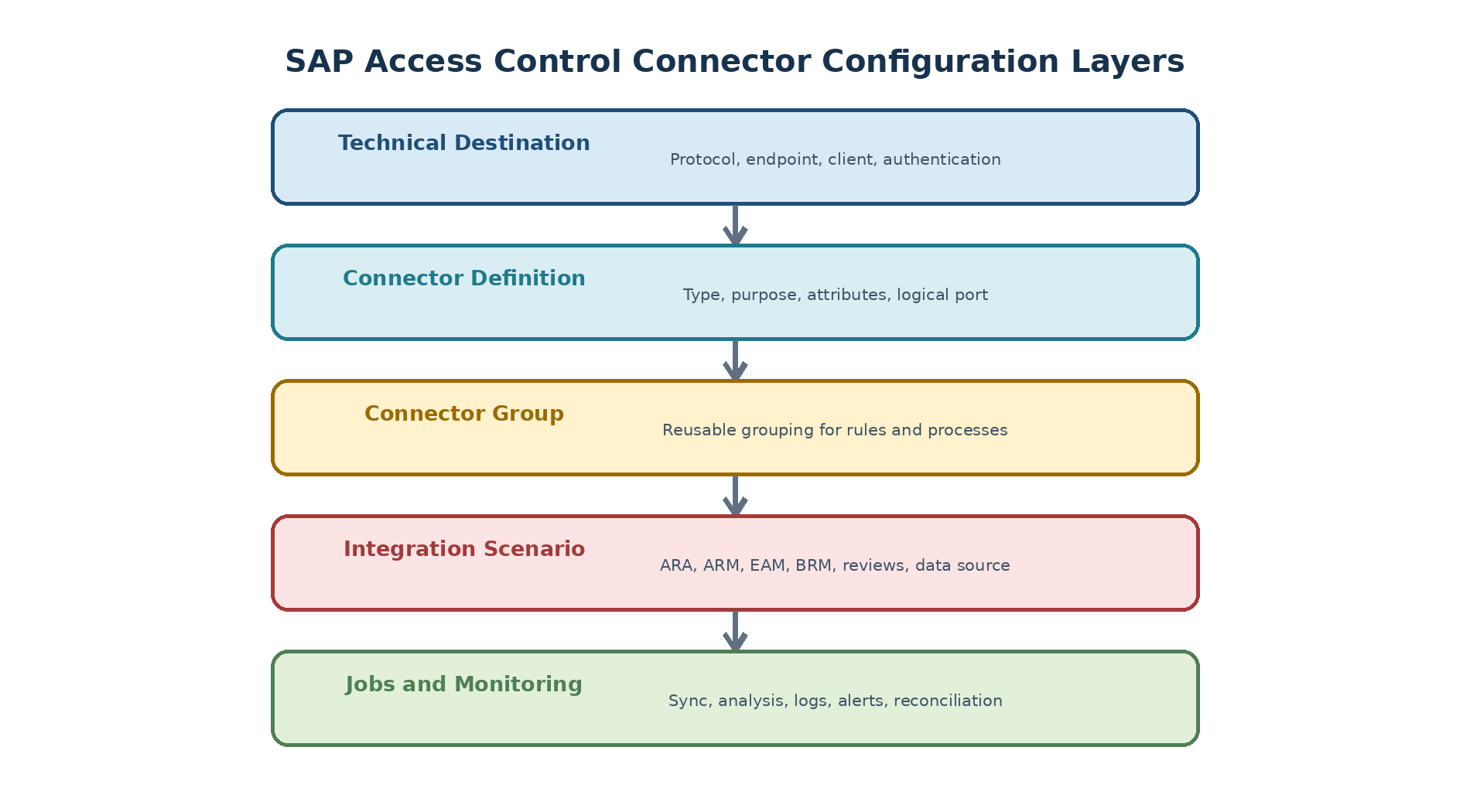
Figure 1. Original diagram: SAP Access Control connector configuration layers.
Choose Connector Capabilities
| Capability | Required proof |
| Repository synchronization | Representative users, roles, profiles, and metadata are loaded and reconciled. |
| Authorization synchronization | Expected role and user permissions are available for analysis. |
| Provisioning | Approved add, remove, lock, unlock, or validity change reaches the target and is confirmed. |
| Usage or activity | Expected usage data is collected with correct time and retention. |
| Emergency access | Assignment and session or activity logs are captured according to the selected model. |
| Identity data source | User search and detail fields come from the intended authoritative source. |
Create a Connector Inventory
Connector name, system ID, client, environment, region, and owner.
Target product, release, plug-in, protocol, endpoint, and network path.
Technical identity, credential owner, rotation, authorization role, and expiry.
Enabled capabilities, connector group, scenarios, mappings, and data-source priority.
Full and incremental jobs, schedule, dependencies, retention, and monitoring.
Test evidence, known limitations, support team, and recovery procedure.
Technical Destinations
Select the Supported Connection Method
SAP ABAP targets commonly use an RFC destination, while other supported targets may use HTTP(S), OData, database, web-service, cloud, or adapter-based mechanisms. The connector design must match the target capability and supported integration. Do not select a protocol only because a basic network connection is possible.
Create an SAP ABAP RFC Destination
Prepare dedicated communication users in the central and managed systems. Avoid permanent SAP_ALL or SAP_NEW; build the minimum S_RFC, S_RFCACL, and application permissions required by the tested functions.
Open transaction SM59 in the SAP Access Control system.
Choose Create and enter a clear customer destination name such as <SID>CLNT<client>.
Select connection type 3 - ABAP Connection.
On Technical Settings, maintain the approved application host or message-server/logon-group details, system number, and gateway settings.
On Logon & Security, maintain the target client, language, communication user, authentication, and SNC settings where required.
Save, then execute Connection Test, Remote Logon/Logon Test, and Authorization Test as applicable.
Create and test the reverse destination in the managed system when the chosen Access Control scenario requires two-way communication.
| Original screenshot required: SM59 showing the approved destination type and successful connection or authorization test for a non-production target. |
| Publishing detail | Guidance |
| Caption | Validated SAP Access Control RFC destination |
| Alt text | SM59 screen showing a successful RFC destination test |
| Mask before publishing | System ID, client, hostname, IP address, user ID, SNC name, message server, gateway, and internal destination naming |
Test Beyond Basic Connectivity
Connection test proves network reachability, not business authorization.
Logon test proves authentication, not every required function.
A representative sync test proves read behavior for a defined object sample.
A provisioning test proves change authorization and target confirmation.
Failure tests prove lock, expiry, timeout, retry, alert, and recovery behavior.
Connect an SAP HANA Database
Direct SAP HANA governance requires the supported SAP GRC integration delivery unit or current replacement, database users and roles, an ABAP database connection, and a logical Access Control connector. Historical Access Control 12.0 procedures use SAP HANA Studio and SAP Notes 2589878 and 2487192; verify the currently supported tool and plug-in before installation.
Download the approved SAP HANA integration package through SAP for Me using the licensed installation and current SAP Note guidance.
Import the delivery unit into the intended SAP HANA database using the supported administration tool and review deployment logs.
Create the database technical user and assign only the delivered/custom roles required for repository reads, analysis, provisioning, or emergency access in scope.
In the central ABAP system, run transaction DBCO and create the approved database connection using the correct HANA database host, port, user, and secure credential handling.
Test the database connection and resolve network, driver, authentication, schema, or privilege errors.
In SM59, create connection type L - Logical Destination using the same approved connector identity as the DBCO connection where required by the integration design.
Save and validate a representative database read before enabling Access Control scenarios.
| Version-dependent integration: SAP HANA Studio delivery-unit deployment is a historical procedure. Current SAP HANA revisions may use different lifecycle tools and supported integration packages. Confirm the current SAP Note, PAM, plug-in documentation, and security guide. |
Connect an SAP Enterprise Portal
SAP Enterprise Portal integration uses HTTP/web-service and SPML connections rather than an ABAP type-3 RFC. This scenario is lifecycle-dependent and should be implemented only when the customer portal release and GRC portal content remain supported.
Install the approved GRC portal business package/content and deploy the required Access Control web services according to the portal release documentation.
In SM59, create a type G - HTTP Connection to External Server for the portal web-service endpoint. Maintain the target host, service number, path prefix, logon, and TLS settings.
Create the separate SPML connection needed for supported Access Request Management user provisioning.
Create or validate the logical port with the supported tool. Historical procedures use LPCONFIG with proxy class CO_GRAC_AD_AUTH_MGM_WEBSERVICE and a logical port such as LP_GRACEP.
Maintain the approved default port and web-service path suffix for the deployed binding.
Use the approved SAP Access Control portal system alias and align technical users/roles in the central and portal systems.
Test the web service, SPML schema retrieval, user search, and one controlled provisioning action.
Connection Types and Connector Definitions
Maintain Connection Types
Connection types categorize supported target behaviors and are used by connector definitions, groups, scenarios, rules, and mappings. Prefer SAP-delivered types when they match the target. Create customer types only when the integration design requires a distinct supported behavior and its lifecycle is owned.
Define Connectors
Open SPRO and navigate to the current Access Control activity for maintaining connectors and connection types.
Select the correct connection type.
Register the tested technical destination or logical endpoint as a connector.
Maintain required logical port or adapter data where applicable.
Save, transport supported settings, and record environment-specific values.
Validate the connector with one supported business function.
Validate Connector Attributes
| Attribute | Validation question |
| Target connector | Does the value point to the intended environment and client? |
| Connection type | Does it represent the supported target technology and object model? |
| Logical port or endpoint | Is it required, active, secured, and environment-correct? |
| Language and path | Will descriptions and HR or organization data resolve correctly? |
| Capability flags | Are only tested scenarios enabled? |
| Ownership | Who approves, monitors, rotates, and retires this connector? |
Connector Groups and Scenarios
Design Connector Groups
Connector groups let related systems share rules, mappings, defaults, or role-management behavior. Group by a meaningful common authorization model, not merely by region or naming convenience. Systems with different transaction models, organizational values, or rule content may require separate groups even when both are SAP S/4HANA.
Assign Connectors to Groups
Create or select the approved connector group.
Add only connectors with compatible object and rule behavior.
Confirm development, quality, and production grouping follows the ruleset and transport design.
Assign group ownership and document exceptions.
Test a group-based search or analysis without crossing unintended systems.
Configure AUTH PROV ROLMG and SUPMG
| Integration scenario | Component use | Typical connector decision |
| AUTH | Access Risk Analysis | Development for role-level design analysis and production for user-level analysis, according to scope |
| PROV | Access Request Management provisioning | Production is normally required; development and quality are added only for approved request/provisioning tests |
| ROLMG | Business Role Management | A development connector is commonly selected for controlled role creation and generation |
| SUPMG | Emergency Access Management | Production connectors used by the approved centralized or decentralized firefighter model |
Run SPRO and open Common Component Settings > Integration Framework > Maintain Connection Settings.
Enter one work area such as AUTH and proceed.
Select the required subscenario.
Open Scenario-Connector Link and choose New Entries.
Add only the target connectors that support the selected component and environment purpose.
Save and repeat for PROV, ROLMG, and SUPMG as required. The SAP Process Control AM scenario is not an Access Control requirement.
Configure Web-Service Scenario Classes
Web-service and SPML-based targets require both connector links and the supported adapter classes. Historical portal integrations use the following mappings; verify them for the installed support package.
| Scenario | Connection type | Representative class |
| AUTH | SPML1 | CL_GRAC_AD_AUTH_MGMT_IDM_OB |
| AUTH | WS | CL_GRAC_AD_AUTH_MGMT_WS |
| ROLMG | SPML1 | CL_GRAC_AD_ROLE_GENERATION_RFC |
| ROLMG | WS | CL_GRAC_AD_ROLE_GENERATION_WS |
| PROV | SPML1 | CL_GRAC_AD_ACCESS_MGMT_IDM_OB |
| PROV | WS | CL_GRAC_AD_ACCESS_MGMT_WS |
Connector Settings and Parameters
Maintain Connector-Specific Settings
Connector settings define how a target participates in application processes. Maintain only the attributes required by the chosen capabilities, including target system, source system, path or organization information, provisioning behavior, and scenario-specific flags. An incorrect source/target relationship can return plausible but wrong data.
Select the Correct Application Type
The application type tells Access Control what kind of repository and provisioning behavior to expect. Select the type that matches the supported target; a convenient but incorrect type can make searches or synchronizations appear successful while returning incomplete objects.
| ID | Application type | ID | Application type |
| 01 | SAP | 11 | Other |
| 02 | Enterprise Portal | 12 | LDAP |
| 03 | User Management Engine | 13 | SAP SRM |
| 04 | SAP CRM | 15 | SAP GRC |
| 05 | SAP MDM or MDG | 16 | JD Edwards |
| 06 | SAP Business Intelligence | 17 | SAP HANA |
| 07 | Business Roles | 18 | Identity Management or IAG integration |
| 08 | Oracle | 19 | SuccessFactors Employee Central |
| 09 | PeopleSoft | ||
| 10 | Legacy |
Maintain Configuration Parameter Groups
Access Control organizes common settings into parameter groups. Use the IMG documentation for the installed release and maintain only approved values; the inventory below prevents a group from being overlooked during design review.
| Group | Configuration area | Group | Configuration area |
| 01 | Access Risk Analysis | 14 | User Access Review |
| 02 | Access Request Management | 15 | Role Reaffirmation |
| 03 | Business Role Management | 16 | SoD Review |
| 04 | Emergency Access Management | 17 | Organization Rules |
| 05 | Workflow | 18 | Mitigation Controls |
| 06 | Risk Analysis | 19 | User Provisioning |
| 07 | Role Management | 20 | Password or authentication |
| 08 | User or identity data | 21 | Notifications |
| 09 | Connector or integration | 22 | Background processing |
| 10 | Repository synchronization | 23 | Performance |
| 11 | Usage and logs | 24 | Reporting |
| 12 | Review and certification | 25 | Integration services |
| 13 | Access certification | 26 | Other cross-component settings |
| Do not infer semantics from the number: Group labels and individual parameters can vary with support package and activated components. Confirm each parameter in the current IMG activity before changing it. |
Document Version-Dependent Values
| Manual verification required: Parameter availability and semantics can change by support package. Use current IMG documentation and SAP Help, and retest after upgrades or master-note corrections. |
Actions and Field Mapping
Assign Actions 0001 to 0005
Action assignments tell a connector group which system should execute a particular technical activity.
| Action ID | Purpose |
| 0001 | Role generation |
| 0002 | Role risk analysis |
| 0003 | Authorization maintenance |
| 0004 | Provisioning |
| 0005 | HR triggers |
Select One Default Connector per Action
Open SPRO and navigate to the Access Control activity for assigning connector-group actions.
Select the connector group and required action ID.
Choose the connector that is approved to perform that action in the relevant environment.
Mark only one connector as the default for the same group and action.
Save and test the action from the consuming component.
Document fallback and recovery behavior if the default connector is unavailable.
Map Business and Technical Fields
| Mapping area | Examples |
| Identity | User ID, first name, last name, email, employee type, manager |
| Organization | Company, business unit, department, location, cost center |
| Role and system | Role name, connector, validity, environment, business role |
| Directory or HR technical | Attribute name, table or infotype field, transformation, default |
| Governance | Owner, approver, request type, reason, priority, risk context |
Validate Mapping Behavior
Test complete, missing, duplicate, and conflicting records.
Confirm transformations preserve case, length, characters, leading zeros, and dates.
Verify source priority and fallback with traceable sample users.
Ensure sensitive attributes are not exposed to unauthorized requesters.
Retest mapping after HR, directory, target, or support-package changes.
User Data Sources
Design Data-Source Priority
User search and user detail can come from different sources. Define an authoritative priority by attribute and process. A higher-priority source should not silently fall back to outdated data without monitoring. Decide how terminated, future, contingent, duplicate, and service identities are represented.
Configure Search Detail and Authentication Sources
Open the IMG activity for maintaining data sources under Access Control common settings.
Maintain the ordered User Search sources used to locate requesters, beneficiaries, managers, and approvers.
Maintain the ordered User Detail sources used to enrich a selected identity.
Maintain the User Authentication source only when the approved design requires Access Control to authenticate through that source.
Define intentional fallback order and avoid circular or duplicate source resolution.
Test an active employee, future employee, contingent worker, terminated user, service ID, missing user, and duplicate user.
Configure an SAP HR Source
Confirm the supported GRCPINW or GRCPIERP plug-in level for the connected HR release.
Create and test the dedicated HR RFC connector with least-privileged personnel-data access.
Maintain the HR connector in User Search, User Detail, and authentication lists only where the design requires it.
Select the approved organizational Path ID and validate manager and organizational relationships.
Map required personnel attributes and apply privacy restrictions.
Test current, future-dated, terminated, and concurrent-employment records.
Configure an LDAP Source
Create the supported LDAP or directory connection and require protected transport.
Maintain the service identity with read access limited to the required directory branches and attributes.
Define base DN, search scope, filter, paging, timeout, and unique login attribute.
Map identity, email, manager, organization, status, and other approved fields.
Add the LDAP source to the required User Search, User Detail, or authentication source list in the intended priority.
Test ambiguous names, special characters, large result sets, disabled accounts, missing manager references, and connection failure.
Handle Missing and Conflicting Data
| Condition | Controlled response |
| User missing in primary source | Stop or use an explicitly approved fallback; alert the data owner. |
| Different manager values | Apply documented source authority and retain the discrepancy. |
| Duplicate identity | Prevent ambiguous request or provisioning until resolved. |
| Required field blank | Reject, route for correction, or apply an approved default. |
| Stale source | Block high-risk automation or display a freshness warning according to policy. |
Plug-In and Managed-System Readiness
Confirm Plug-In Compatibility
Verify the managed-system release, SAP Access Control support package, plug-in component, support-package level, required Notes, and enabled functions through current SAP documentation and Maintenance Planner. A plug-in that supports repository reads may still require different components or corrections for HR or emergency-access functions.
Secure the Technical User
Use a dedicated communication or system identity for the defined purpose.
Assign minimum remote-enabled functions and authorization objects.
Prevent interactive use unless explicitly approved.
Protect credentials or SNC certificates and monitor expiry.
Review assignments and usage periodically; remove obsolete connectors promptly.
Validate Remote Functions
Test the exact remote functions used by the selected jobs and provisioning actions. Use SU53 and controlled authorization tracing on the managed system when required. Avoid solving failures with SAP_ALL or permanent broad roles; identify the missing permission and validate the delivered or approved authorization model.
Synchronization Jobs
Plan the Dependency Sequence
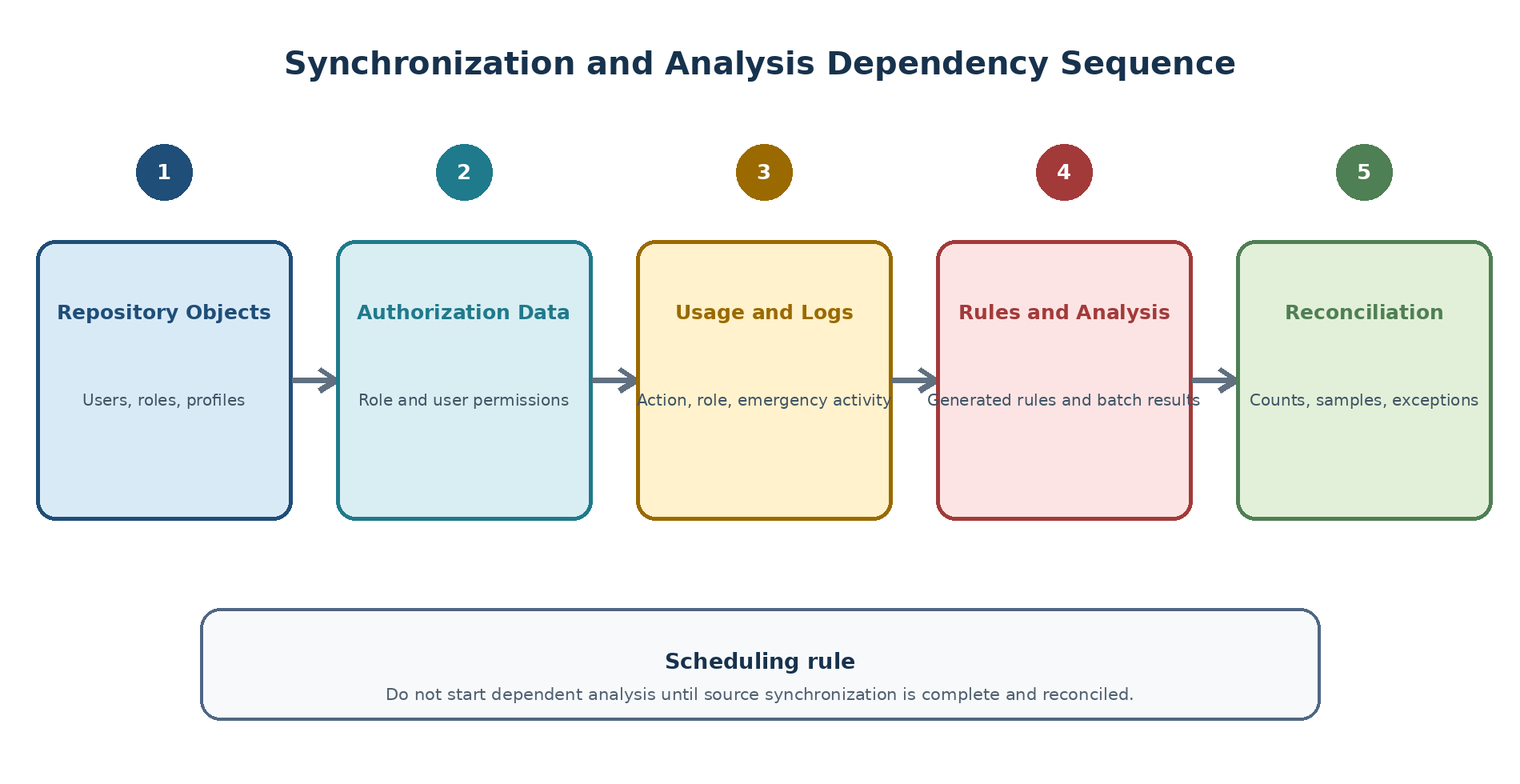
Figure 2. Original diagram: SAP Access Control synchronization and analysis dependency sequence.
Run Authorization Synchronization
Open the Access Control synchronization activity or its supported background report.
Select the connector or connector group, object scope, and full or incremental mode.
Run first in foreground with a narrow test scope when practical.
Schedule the approved variant after authorization changes and before dependent risk analysis.
Review job log, application log, remote errors, object counts, and sample authorization values.
Run Repository Object Synchronization
Repository synchronization imports supported users, roles, profiles, and related metadata. Schedule it whenever repository changes must be reflected, then reconcile additions, updates, locks, and deletions before downstream analysis or provisioning relies on the result.
Run Action and Role Usage Synchronization
Confirm the managed-system plug-in, usage retention, and technical authorization.
Schedule action-usage synchronization for the reporting period required by role design and risk review.
Schedule role-usage synchronization where the connected target and component support it.
Check time zone, last-run pointer, filters, source retention, and record counts.
Validate representative usage against the managed system before using it to remove access.
Run Emergency Access Log and Master Data Synchronization
Use GRAC_SPM_LOG_SYNC_UPDATE to synchronize Emergency Access Management activity logs according to the review SLA. Use GRAC_SPM_SYNC for firefighter master-data synchronization where required by the chosen centralized or decentralized model. Reconcile session IDs, time zones, controller assignments, missing logs, and failures immediately.
Reconcile Job Results
Record start, finish, status, package, connector, and processing mode.
Compare source and target counts plus representative samples.
Explain filtered, unsupported, deleted, and locked objects.
Check application logs, background logs, dumps, RFC errors, and authorization failures.
Confirm the data timestamp before analysis or review campaigns start.
Analysis and Operational Jobs
Run Batch Risk Analysis
Schedule GRAC_BATCH_RISK_ANALYSIS only after current repository and authorization data is reconciled. Maintain connector, user or role scope, analysis type, rule set, exclusion behavior, and full or delta mode in a controlled variant. Review job and application logs, counts, stale results, and representative risks; technical completion is not risk acceptance.
Generate Alerts and Rules
Run GRAC_GENERATE_RULES after an approved ruleset change so the runtime representation matches the governed rule content. Run GRAC_ALERT_GENERATION after the data it evaluates is current. Validate recipients, duplicates, thresholds, failed notifications, and traceability to the underlying risk or event.
Schedule Email Reminders
Use GRFNMW_BATCH_EMAIL_REMINDER for supported workflow reminders. Define the process, due-date logic, recipient, escalation, frequency, duplicate suppression, sender, and error handling. Test in non-production and avoid a schedule that floods approvers or overlaps heavy batch processing.
Fetch the IDM Schema
For supported identity-management integration, run GRAC_SCHEMA_UPDATE to retrieve and refresh the external schema. Validate the connector and inspect the schema buffer table GRACIDMSCHEABUF. Compare expected attributes and data types before activating mappings; an unexpected refresh can invalidate provisioning fields.
Parallel Processing and Performance
Set Up Background Work Processes
Ask SAP Basis to size and monitor background capacity before enabling parallel jobs. Review rdisp/wp_no_btc and the actual application-server distribution; change profile parameters only through the approved RZ10 lifecycle, restart procedure, and capacity test.
Maintain Parallel-Processing Parameters
Reserve capacity for dialog, workflow, provisioning, and operational jobs.
Limit parallel packages per application server and batch class according to Basis design.
Avoid overlapping full synchronization, batch analysis, campaigns, and log collection.
Monitor work processes, RFC resources, memory, CPU, database, network, and queues.
Define a safe rollback to lower concurrency if response time or failures increase.
Distribute Jobs for Parallel Processing
Maintain the supported server group and use BANK_MAP_PP_START where the delivered procedure calls for parallel-process distribution. Validate that packages are restartable and that failures are visible; never assume every Access Control report supports the same parallel framework.
Tune Using Evidence
| Measure | Interpretation |
| Objects per package | Too small increases overhead; too large increases memory, timeout, and retry impact. |
| Parallel workers | Higher is useful only while source, network, database, and work processes scale. |
| Elapsed and CPU time | Faster elapsed time with excessive CPU may harm other workloads. |
| Error and retry rate | Increasing errors indicate saturation, authorization, timeout, or data issues. |
| Data freshness SLA | The goal is a reliable control window, not maximum technical throughput. |
Security and Transport
Protect Credentials and Trust
Use encrypted communication where supported, dedicated identities, controlled secret or certificate stores, rotation, expiry monitoring, restricted gateways and endpoints, and auditable emergency procedures. Connector passwords must not be placed in documents, transport descriptions, screenshots, variants, or email.
Move Configuration Safely
Transport connector types, groups, mappings, and supported Customizing according to the tested route. Maintain destinations, clients, endpoints, technical users, credentials, schedules, and other environment-specific values through protected post-import steps. Run smoke tests after every import.
Review Connector Access
Periodically review connector ownership, enabled scenarios, technical-user roles, destination security, last successful use, certificates, jobs, data retention, and downstream consumers. Retire obsolete connectors with evidence that jobs, mappings, rules, workflows, and secrets were removed or disabled.
Monitoring and Troubleshooting
Monitor Connector Health
Destination reachability and authentication.
Technical-user lock, validity, password, certificate, and authorization.
Last successful full and incremental synchronization.
Data counts, freshness, growth, and unresolved reconciliation differences.
Job cancellation, runtime, queue, retry, dump, and application-log errors.
Provisioning failure, missing logs, and stale analysis results.
Diagnose Common Failures
| Symptom | Check first |
| SM59 test fails | Network route, host, gateway, client, authentication, SNC/TLS, target availability. |
| SM59 succeeds but sync fails | Plug-in, technical authorization, connector definition, job variant, remote function, data volume. |
| Objects are missing | Filters, object type support, source data, incremental pointer, authorization, deletion behavior. |
| Provisioning fails | Scenario, action mapping, target connector, technical role, lock, queue, application log. |
| Wrong user details | Data-source priority, field mapping, fallback, duplicate identity, source freshness. |
| Job is slow | Package size, parallelism, overlap, RFC latency, database, ruleset, work processes. |
Recover Without Data Confusion
Stop dependent jobs and record the last trustworthy data timestamp.
Correct the smallest failed layer.
Run a limited test for the affected connector and object type.
Choose full or incremental recovery according to supported behavior.
Reconcile counts and samples before releasing analysis or provisioning.
Restart dependent jobs in sequence and document the incident.
Practical Connector Scenario
Scenario Context
A company connects one SAP S/4HANA quality client for ARA and ARM. It requires repository and authorization synchronization plus approved role provisioning. HR, EAM, usage, BRM, and non-SAP integration are deferred.
Configuration Sequence
Confirm compatible plug-in, network route, time, and least-privileged technical role.
Create and test the RFC destination.
Define the connector under the approved SAP S/4HANA connection type.
Assign it to a group aligned with the S/4HANA ruleset model.
Map only ARA and ARM integration scenarios and required provisioning actions.
Run repository then authorization synchronization and reconcile samples.
Generate rules, analyze known clean and conflicting roles, and test one add plus one remove.
Schedule monitored jobs and transport the controlled configuration to the next environment.
Acceptance Result
The connector returns current role and authorization data, produces the expected risk result, provisions only approved changes, exposes failures to monitoring, and has documented ownership, security, scheduling, reconciliation, and recovery. Deferred capabilities remain disabled.
Content Coverage Validation
Source Concept Coverage
| Required concept | Where covered |
| ABAP, HANA, and portal technical connections | Technical Destinations |
| Connector types, definitions, groups, and scenario links | Connection Types; Connector Groups and Scenarios |
| Application types and parameter groups 01-26 | Connector Settings and Parameters |
| Actions 0001-0005 and field mapping | Actions and Field Mapping |
| User Search, User Detail, authentication, HR, and LDAP | User Data Sources |
| Repository, authorization, usage, EAM, analysis, alert, reminder, and schema jobs | Synchronization Jobs; Analysis and Operational Jobs |
| Background work processes and parallel distribution | Parallel Processing and Performance |
Version-Dependent Items
Before implementation, verify current SAP Notes, the Product Availability Matrix, plug-in compatibility, supported connection tools, delivered class names, IMG labels, program variants, and parameter semantics. Historical names are retained here only when they help an administrator recognize an existing landscape.
Summary
Key Takeaways
A connector is a multi-layer integration, not only a destination.
Capability-specific testing is required for every target.
Connector groups and scenarios must reflect compatible authorization and process behavior.
Mappings and data-source priority directly influence approvals and provisioning.
Synchronization and analysis must follow a reconciled dependency sequence.
Parallelism should be tuned from measurements while protecting shared capacity.
Security, transport, monitoring, retirement, and recovery are part of connector design.
SEO and Publishing Metadata
| Publishing field | Recommendation |
| SEO title | SAP Access Control Connector Configuration and Synchronization Guide |
| URL slug | /sap-access-control-connector-configuration/ |
| Meta description | Configure SAP Access Control connectors, groups, mappings, data sources, plug-ins, synchronization jobs, parallel processing, security, and troubleshooting. |
| Primary keyword | SAP Access Control connector configuration |
| Secondary keywords | SAP GRC connector setup; GRC synchronization jobs; connector groups; SAP GRC SM59 |
| Long-tail keywords | how to configure SAP Access Control connector; SAP GRC repository authorization sync; SAP Access Control connector troubleshooting |
| Search intent | Configuration, integration, operations, and troubleshooting |
| Suggested schema markup | TechArticle, HowTo, Article, BreadcrumbList |
| Internal-link suggestions | Post-installation setup; ARA configuration; ARM provisioning; EAM log synchronization; SAP GRC jobs |
| Image caption suggestions | Connector configuration layers; synchronization dependency sequence |
| Image alt-text suggestions | Original color diagrams for SAP Access Control connector setup and job sequencing |