
BASIS - Week 1 Foundations Architecture and Core Operations / ABAP Repository Dictionary Transport and RFC Integration
Result :
ABAP Repository Dictionary Transport and RFC Integration
Introduction
Purpose
This chapter explains how development objects are defined, grouped, recorded, transported and connected to remote systems in an AS ABAP landscape. For a BASIS administrator, these topics are operational rather than purely developer-facing. A table activation can affect runtime objects and database structures; an incorrectly released transport can break a dependency chain; an import with return code 8 can leave an application inconsistent; and an RFC destination can expose credentials or enable unintended remote execution. The administrator therefore needs enough repository and Dictionary knowledge to preserve system integrity while coordinating with ABAP, functional, security and database teams.
Who Should Read This Chapter
The chapter is intended for SAP BASIS administrators, technical operations engineers, ABAP support engineers and project team members who release or import changes, troubleshoot transport and RFC failures, or validate Dictionary objects after an upgrade, refresh or deployment. It is written for both beginners and experienced administrators: each procedure identifies prerequisites, tool, action, expected result and validation evidence.
Learning Objectives
- Distinguish application data, client-dependent Customizing, cross-client Customizing and Repository objects.
- Explain domains, data elements, tables, technical settings, foreign keys, views, search helps and lock objects in SE11.
- Relate packages, object directory entries, developer tasks and parent transport requests.
- Trace a change from DEV creation through release, export, QAS import, validation and controlled PRD import.
- Interpret transport return codes and correlate import logs, activation errors, missing objects and sequence problems.
- Configure and test RFC destinations without exposing credentials, and select the correct monitor for sRFC, tRFC, qRFC or bgRFC.
- Use evidence-first troubleshooting and confirm recovery with the original business or technical test.
Scope and Version Context
The source training material uses classic R/3 terminology and tools. Current AS ABAP and SAP S/4HANA systems retain the central concepts but may add ADT in Eclipse, enhanced CTS, ChaRM, gCTS, cloud restrictions or bgRFC. Transaction availability, authorization design and exact screen labels vary by release. This chapter explains the stable architecture and identifies where administrators must verify release-specific behavior in SAP Help, system documentation and approved operating procedures.
SAP Data and Repository Architecture
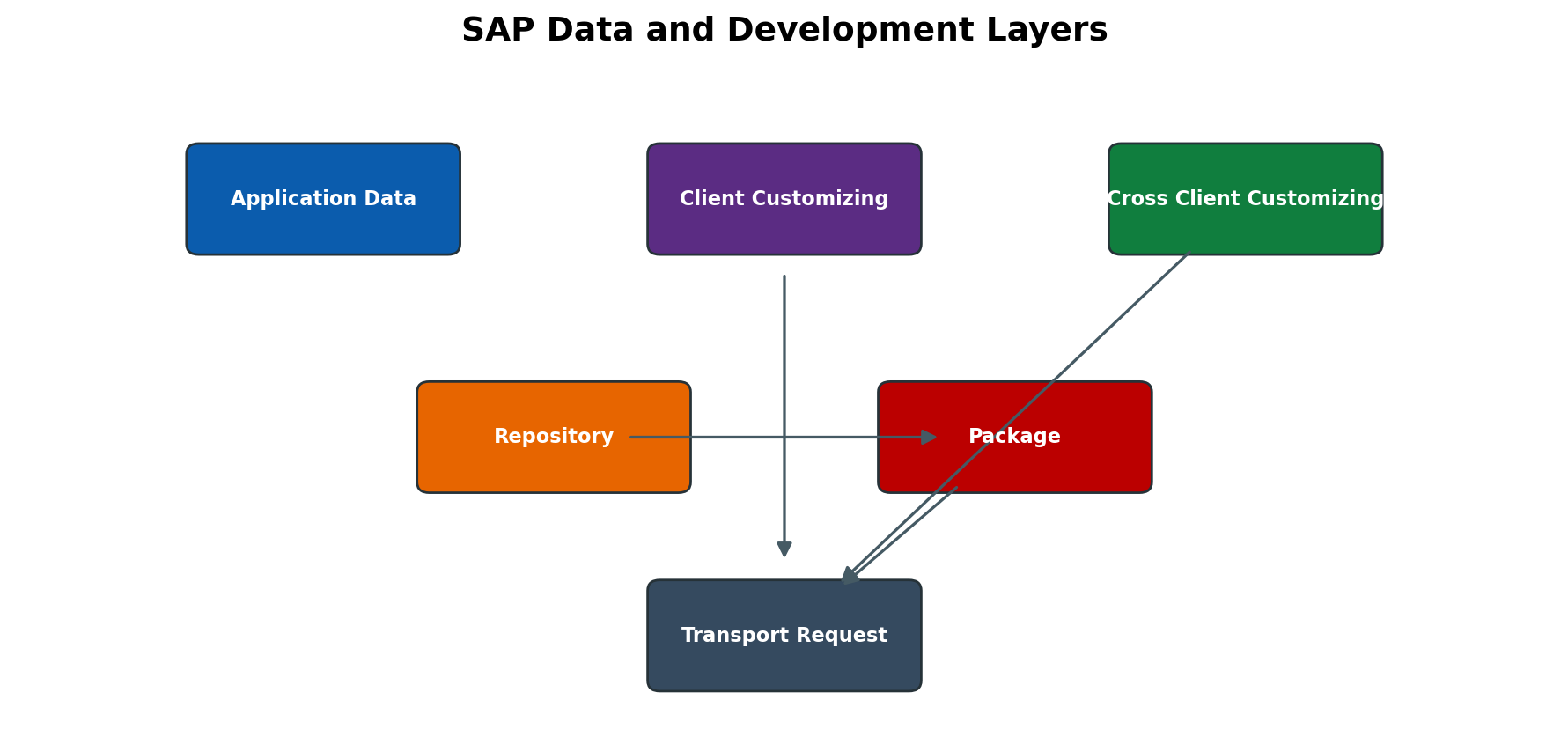
Figure 3.1 SAP data and development layers
Client Dependent and Client Independent Data
Client-dependent records contain the client field MANDT as part of their key and are logically separated inside one SAP system. Business documents, master data and most Customizing settings are normally client-dependent. Cross-client Customizing and Repository definitions are shared by every client in the same system. A change made to a client-independent table definition, program or function module therefore becomes visible system-wide after activation, even if the developer logged on to only one client.
Transport behavior follows the object category, not merely the transaction used. A Customizing transaction can maintain both client-dependent and cross-client settings. Before opening a client or allowing changes, inspect the table delivery class, client dependency, maintenance category, object type and change options in SCC4. Do not assume that a change is isolated because it was entered in a non-production client.
Repository Customizing and Application Data
| Data category | Typical examples | Client scope | Change and transport meaning |
| Application data | Sales orders, accounting documents, material stocks | Usually client dependent | Created by business transactions; normally not transported as configuration. |
| Client-dependent Customizing | Company codes, plants, document types | One client | Recorded in Customizing requests when automatic recording is active. |
| Cross-client Customizing | Selected system-wide control settings | All clients | High impact; requires cross-client change authorization and careful target validation. |
| Repository | Programs, classes, DDIC objects, screens, function modules | All clients | Recorded mainly in Workbench requests and transported through the landscape. |
| Generated or runtime object | Activated loads and database runtime definitions | System-wide runtime | Derived from source definitions; activation/import must create a consistent runtime version. |
Repository Changes Enhancements and Modifications
Customer development creates objects in the customer namespace, normally beginning with Z or Y, or in an assigned registered namespace. An enhancement uses a released enhancement technique so that customer logic remains separated from the SAP standard. A modification changes an SAP-owned object and creates an adjustment burden during upgrades or support package imports. BASIS administrators should not approve a transport only because it is technically releasable; the owner must identify whether it is custom development, enhancement, correction or modification and whether SPAU, SPDD or retrofit implications exist.
Repository access is controlled by developer and object authorizations, system change options and package settings. Production should normally remain closed for direct repository changes. Emergency repairs must use an approved procedure, retain evidence, be back-ported to the development track and avoid creating a production-only version that the next import overwrites.
ABAP Dictionary
Dictionary Object Model
The ABAP Dictionary is the central definition layer for persistent and reusable data structures. It stores semantic attributes, technical attributes and relationships used by ABAP programs, screens, Open SQL, foreign-key checks, search helps and database-independent access. SE11 is the classic entry point. Modern development may use ADT, but activation still has system-wide dependency and runtime consequences.
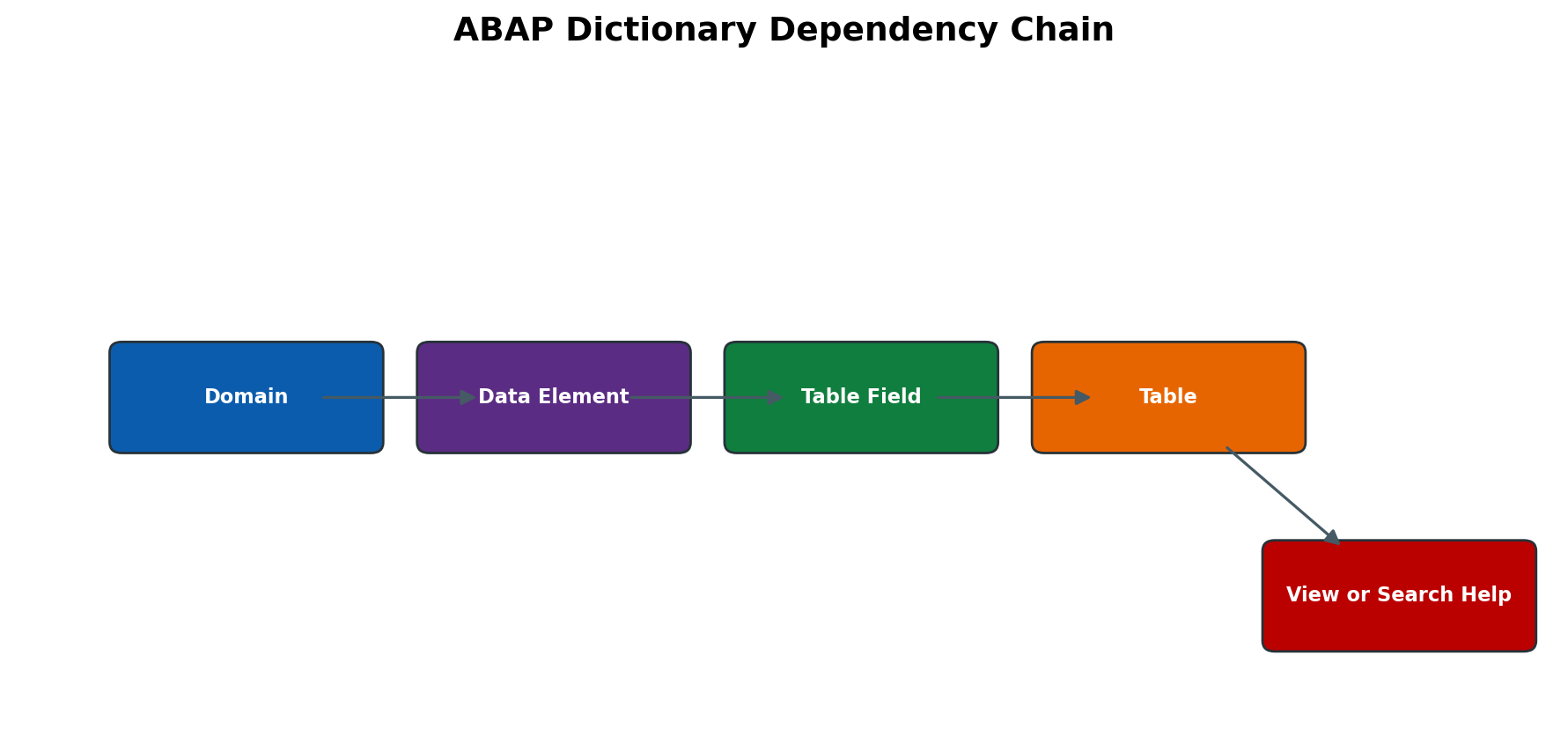
Figure 3.2 ABAP Dictionary dependency chain
Domains and Data Elements
A domain defines the technical value range: data type, length, decimal places and optional fixed values or value table. A data element adds business semantics such as field labels and documentation, then refers to a domain or uses a built-in type. Table fields normally refer to data elements so that length and meaning remain consistent. Changing a domain can affect every dependent field, structure, table, view, search help, screen and interface. Always use the where-used list and dependency analysis before activation.
Safe Domain or Data Element Review
- 1. Open SE11 in display mode and select Domain or Data Type as appropriate.
- 2. Enter the object name and confirm the active version, package and original system.
- 3. Review technical attributes, value range, fixed values and documentation.
- 4. Run the where-used list for data elements, table fields and program references.
- 5. If a change is proposed, record affected tables/interfaces and agree a test and rollback plan before edit mode.
- 6. After transport, compare active versions and execute representative input, search-help and interface tests.
Transparent Tables and Technical Settings
A transparent table has a corresponding database table and an active runtime object. Its field sequence, key definition, data types, delivery class, maintenance setting and enhancement category govern both application behavior and administration. Technical settings influence data class, size category, buffering and logging. These values are not cosmetic: an unsuitable buffering choice can return stale data, and a wrong size estimate can affect space planning on releases where the parameter remains relevant.
| Attribute | Administrative question | Risk if incorrect |
| MANDT field | Is the table client dependent and is MANDT first in the key? | Cross-client visibility or incorrect access assumptions. |
| Delivery class | Is the content application, Customizing, system or temporary data? | Wrong client-copy or transport behavior. |
| Table maintenance | Is display or maintenance allowed and through which controlled tool? | Unauthorized direct maintenance. |
| Buffering | Is data stable enough, and how is invalidation handled? | Stale reads, swaps or unnecessary database load. |
| Logging | Is table logging required and is system logging configured? | Missing audit evidence or avoidable overhead. |
| Enhancement category | Can structures be appended safely? | Activation errors or incompatible enhancements. |
Foreign Keys and Check Tables
A foreign key in the ABAP Dictionary describes a semantic relationship between a foreign-key table and a check table. It can drive input checks and F4 help, but it is not automatically equivalent to a database-enforced referential constraint. Cardinality documents the expected relationship. The field assignment must use compatible types and the client field must be mapped correctly. When troubleshooting rejected input, distinguish a Dictionary check, application validation and a database constraint rather than assuming they are the same layer.
Views Search Helps and Lock Objects
Dictionary views combine or expose table data for a defined purpose. Classic database views, projection views, maintenance views and help views have different rules; modern releases also use CDS entities outside the classic SE11 model. A search help defines an F4 selection method, parameters, import/export behavior and optional search-help exit. A lock object defines the key used by the enqueue service and generates ENQUEUE_ and DEQUEUE_ function modules. Changing a lock key can alter concurrency behavior across applications, so the application owner must approve and regression-test it.
Activation and Runtime Objects
Saving creates or changes an inactive source definition. Activation performs consistency checks, creates an active version and, for database-relevant objects, aligns the runtime definition with the database. Activation can fail because of dependent inactive objects, incompatible field changes, database conversion requirements, missing includes, namespace issues or locks. SE11 utilities and SE14 may be involved in controlled database adjustment, but SE14 actions can be destructive or long-running and must never be used as a trial-and-error repair in production.
Activation Evidence
- Exact object name, type, package, original system and transport request.
- Activation log and first error, not only the final follow-on messages.
- Active and inactive version comparison.
- Where-used list and dependent inactive objects.
- Database object state where relevant, including SE14 status and database alerts.
- Application test demonstrating that the corrected object works and preserves existing data.
ABAP Workbench and Package Management
SE80 SE38 SE37 and Supporting Tools
SE80 organizes repository objects by package, program, function group, class and other object sets. SE38 executes or maintains executable programs where authorized. SE37 displays and tests function modules, including RFC-enabled attributes. SE24 supports classes, SE93 transaction codes, SE51 screens and SE41 menus. Administrators normally use display, version, object directory and transport functions; they should avoid editing code unless that is explicitly part of their role.
Packages and Object Directory Entries
Every transportable repository object has an object directory entry that records package and original system. The package determines transport layer and therefore the consolidation route. The local package $TMP creates non-transportable local objects. Moving an object between packages can change its transport behavior and dependency context. Before release, confirm that the package, transport layer and target route match the intended landscape and that no required object remains in $TMP.
Object Activation Syntax and Dependency Checks
A request can be released while some objects are inactive or dependencies are stored in another unreleased request. A clean release therefore requires more than a green task status. Developers should activate the complete object set, perform syntax and extended checks appropriate to the change, run unit or application tests, and identify dependent transports. BASIS validates request metadata, object list, sequence and target route; it does not replace functional approval.
Transport Organizer and Change Lifecycle
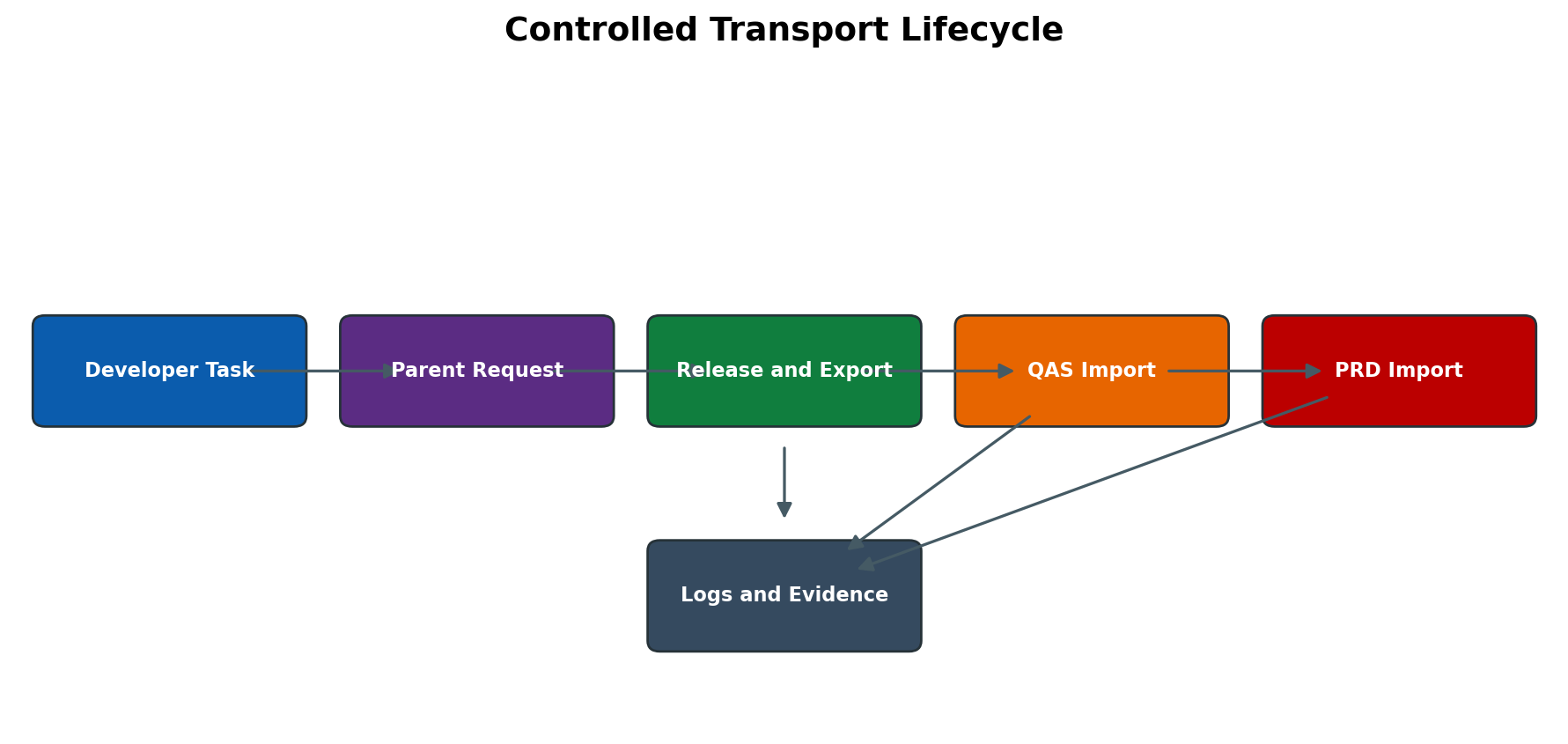
Figure 3.3 Controlled transport lifecycle
Requests Tasks and Object Lists
A transport request is the parent container for a change. One or more user tasks collect object changes. The developer releases each task first, which transfers its object entries to the parent request; the request owner then releases the parent. SE09 focuses on Workbench requests and SE10 provides a broader organizer view, although screen behavior varies. A task and its parent have different numbers and statuses. Supplying the task number to an import team is a common operational mistake because only the released parent request is exported and imported.
Workbench and Customizing Requests
Workbench requests normally contain client-independent repository objects and use the package transport layer to determine their route. Customizing requests normally contain table keys for client-specific configuration and are imported into a target client. Transport of copies creates a snapshot for a defined target without releasing the original request and is useful for controlled testing, but it does not replace final release. Relocation and repair requests have special ownership or correction purposes and must be used only with a clear landscape design.
Local Objects and Transportable Packages
Objects assigned to $TMP are local and do not enter the normal transport route. This is suitable for temporary experiments, not productive developments. Reassigning an object later requires an object-directory change and a transport request. Check that related objects are collected together: a program transported without its table, message class, authorization object, transaction code or dependent function group can import successfully at file level yet fail at runtime.
Release Export and Files
Releasing the parent request triggers export processing. The transport tools create a cofile containing control and log information and a data file containing exported objects, normally under the common transport directory. The request then appears in the import queue of routed targets after route/buffer processing. Export failure can result from inactive objects, file-system capacity or permission issues, tp/R3trans problems, database errors or transport-directory connectivity. Record the complete export log before repeating any action.
STMS Import Queue and Import Execution
STMS shows the transport domain, systems, routes and import queues. The import queue is an ordered view of requests waiting for a target. Before import, verify target SID and client, request number and description, owner, approvals, predecessor requests, import options, planned window and rollback/recovery approach. Import-all and unconditional modes can affect far more than one request and must not be chosen merely to bypass an error.
Standard Import Control
- 1. Confirm the approved request list and target system/client against the change record.
- 2. Refresh the STMS import queue and verify each request exists only once in the expected sequence.
- 3. Review request attributes, object list, dependencies, previous import history and known cross-system requirements.
- 4. Confirm system health, database space, transport directory access, background/update capacity and active maintenance window.
- 5. Select only the approved request or controlled queue scope and use only documented import options.
- 6. Monitor tp and R3trans phases; retain action, return code and detailed logs.
- 7. Perform technical validation, then obtain application/functional validation before continuing to production.
- 8. Update the transport tracker with actual time, result, evidence and any follow-up.
Return Codes Logs and Evidence
| Return code | General meaning | Required response |
| 0 | Completed without reported errors | Perform technical and business validation; RC 0 does not prove functional correctness. |
| 4 | Completed with warnings | Read the exact log and decide whether warnings are expected and approved; never auto-ignore. |
| 8 | Errors occurred and one or more objects/actions failed | Stop dependent imports where appropriate, identify first root error, correct cause and re-import only under an approved plan. |
| 12 | Fatal error; processing could not continue | Investigate tool, database, filesystem, configuration or severe object error before any retry. |
| 16 or higher | Serious internal or environment failure | Treat as critical; preserve logs and involve SAP/OS/DB specialists as required. |
The overall return code is a summary. Open the detailed import log and identify the first meaningful error by phase, client and object. Later errors may only be consequences. Correlate STMS logs with tp system log, transport tool logs, dumps in ST22, system log SM21, update records SM13, database alerts and file-system status. A green queue icon or RC 0 cannot replace application validation.
Transport Sequence Dependencies and Overtakers
Sequence matters when one request depends on objects or configuration from another. Overtaking occurs when a later version of an object reaches a target before an earlier dependent request, or when parallel project tracks import different versions. Importing the missing predecessor may not repair the system if it overwrites a newer version. Compare object versions, request timestamps, dependency list and target history. Coordinate retrofit or correction with owners instead of manipulating queue order without impact analysis.
RFC Architecture and Administration
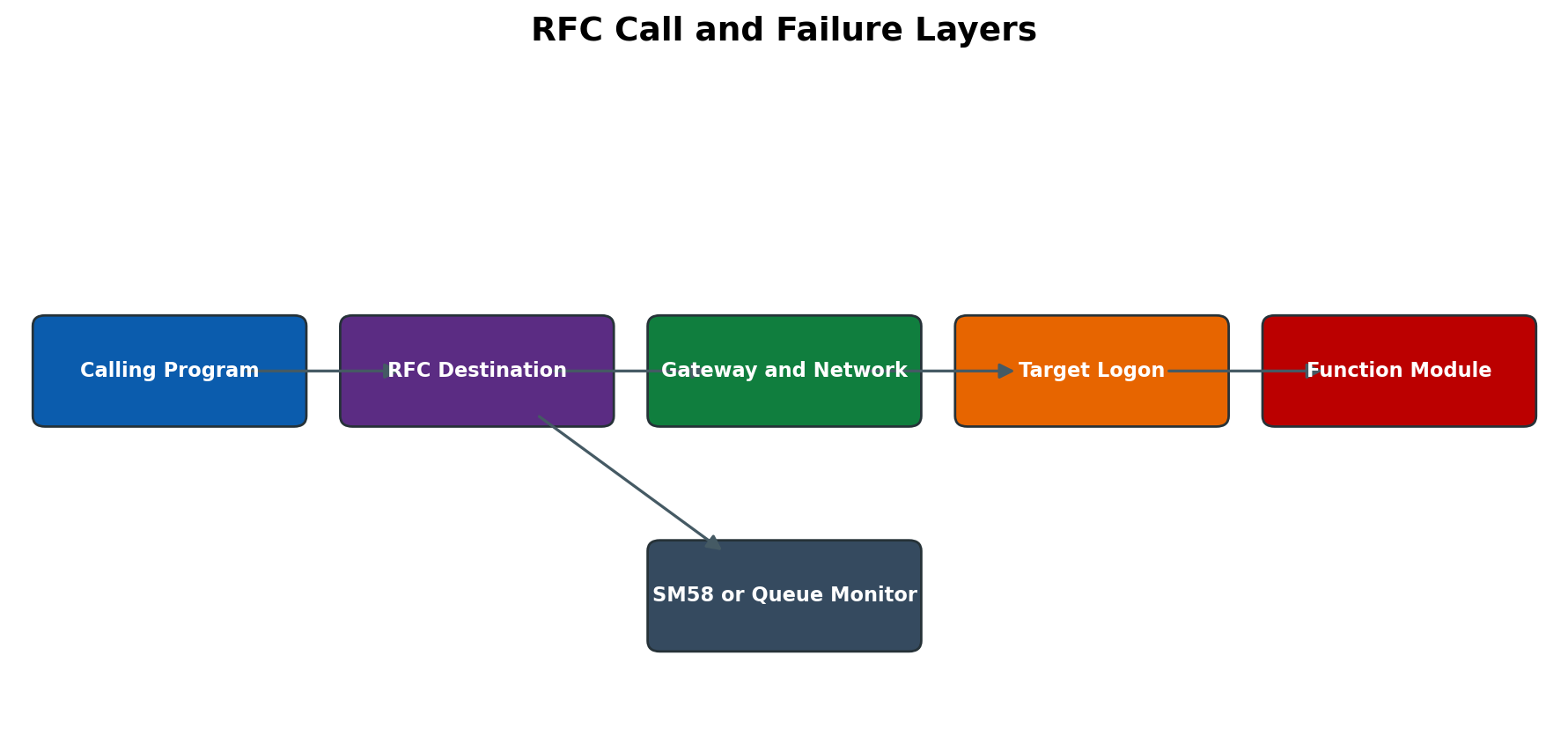
Figure 3.4 RFC call and failure layers
SM59 Destination Types and Connection Layers
An RFC destination is a named connection definition. Common destination types include ABAP connections, TCP/IP connections to registered or started external programs, HTTP connections and logical destinations. Exact types depend on release. For an ABAP destination, connection testing proves network and gateway reachability; authorization testing proves logon and basic remote access; a functional test proves the intended function and business context. Passing one test does not prove all layers are correct.
| Layer | Evidence | Common failure |
| Destination definition | Target host, system number, message server/group, SNC/TLS and Unicode settings | Wrong endpoint, obsolete load-balancing group or copied destination after refresh. |
| Network and gateway | Connection test, gateway trace, DNS and route checks | Firewall, DNS, service-port or gateway registration problem. |
| Authentication | Authorization test and target security log | Locked/expired user, wrong client, missing SNC trust or invalid secret. |
| Authorization | SU53 or trace in target, role review | Logon succeeds but remote function is not authorized. |
| Application function | Controlled end-to-end test and application log | Wrong parameters, disabled function, data/configuration inconsistency or target application error. |
Synchronous Asynchronous Transactional and Queued RFC
sRFC waits for the remote result and propagates communication or system failures to the caller. aRFC starts work asynchronously and may run in parallel; the target generally must be available when called unless another persistence mechanism is used. tRFC records a logical unit so it can retry after temporary communication failure; SM58 is the primary classic monitor. qRFC adds named queues and ordering; SMQ1 monitors outbound queues and SMQ2 inbound queues. bgRFC is the newer framework for transactional or queued units and is monitored with SBGRFCMON. Do not delete or unlock units simply to clear a monitor: preserve payload/owner evidence and confirm business consistency.
Gateway Security Trusted RFC and Credentials
RFC administration is security-sensitive. Use technical users with least privilege, appropriate user type, controlled password or SNC/certificate handling, and no shared dialog credentials. Trusted RFC removes repeated password authentication for permitted users but does not mean unrestricted access; trust relationships and S_RFCACL require strict governance. TCP/IP registered programs must be protected by gateway ACL files and registration rules. Never expose passwords in screenshots, tickets, transport documentation or this tutorial.
RFC Monitoring and Recovery
- SM59: destination configuration and layer-specific tests.
- SM58: transactional RFC LUWs waiting or in error.
- SMQ1 and SMQ2: outbound and inbound qRFC queues, queue names, status and first blocked unit.
- SBGRFCMON: bgRFC units, destinations and queues, subject to S_BGRFC authorization.
- SMGW: gateway connections, logged-on clients and registered programs; intervention can affect many sessions.
- ST22 and SM21: ABAP dumps and system events associated with remote execution.
- SLG1 or application-specific monitor: business processing result after technical communication succeeds.
Integration Technologies Beyond Basic RFC
RFC is the technical call mechanism behind many SAP integrations, but it is not the complete integration model. A BASIS administrator must identify the business delivery guarantee, serialization requirement, retry owner and reconciliation method before choosing a monitor or restarting work. A green SM59 connection test proves only a limited layer; it does not prove that an IDoc posted, a BAPI committed or a queued unit preserved sequence.
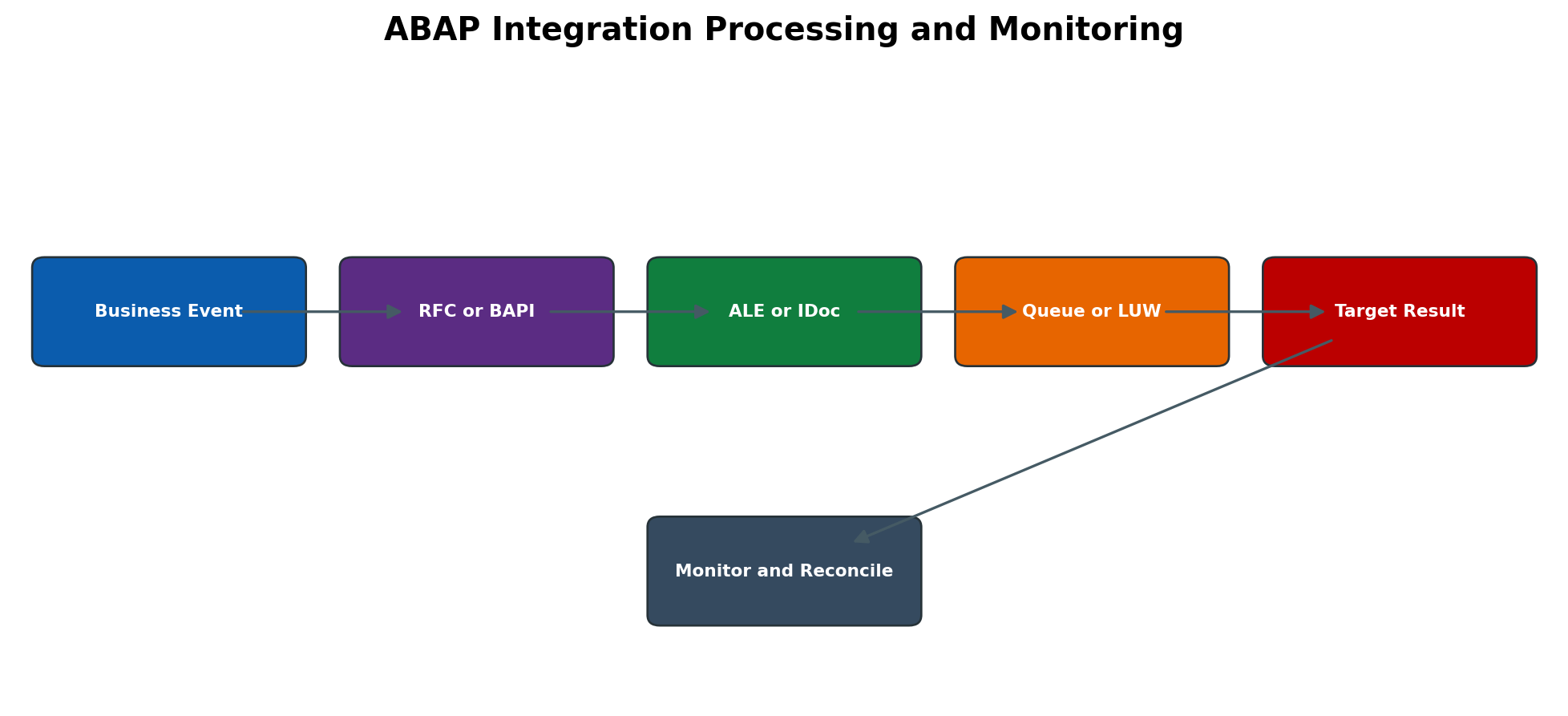
Figure 3.5 ABAP integration processing and monitoring
RFC Enabled Function Modules and BAPIs
An RFC-enabled function module can be called from another SAP system or an external RFC client when the destination, gateway, authentication and authorization permit it. SE37 displays the processing type and interface. A Business Application Programming Interface is a released business-oriented interface, commonly implemented through function modules or classes, with defined structures and return messages. Not every RFC-enabled function is a released BAPI, and a successful technical call does not automatically commit business data.
Many write-oriented BAPI scenarios require explicit transaction handling such as a commit or rollback through the supported application design. The calling program must interpret the RETURN structure, protect against duplicate submission and reconcile the resulting business key. BASIS validates connectivity, runtime, destinations and technical users; the application team owns payload semantics and business consistency.
Safe BAPI or RFC Function Test
- 1. Confirm that testing is approved and use a non-production client with non-sensitive test data.
- 2. In SE37 display the exact function module and verify whether it is RFC enabled and whether it is released for the intended use.
- 3. Review importing, exporting, changing and table parameters; never guess mandatory business values.
- 4. Confirm the technical user has only the required S_RFC and business authorizations.
- 5. Execute a read-only test first where possible; record return messages and target logs.
- 6. For a write test, use the application-approved commit and rollback behavior and verify the created object exactly once.
- 7. Remove test data only through the supported application process and retain evidence.
ALE IDoc and EDI Processing
Application Link Enabling distributes business messages between logical systems. The message path can include a distribution model, message type, basic type or extension, partner profile, port, RFC destination and inbound process code. EDI scenarios can add middleware or partner translation. The IDoc control record identifies sender, receiver, message type and direction; data records carry the payload; status records preserve processing history.
Use WE02 or WE05 to inspect IDoc status, BD87 for controlled reprocessing when the application procedure permits it, WE20 for partner profiles, WE21 for ports and BD64 for the distribution model. Common outbound statuses include generated, passed to port and error; inbound statuses distinguish technical receipt from application posting. Exact status numbers and meanings must be interpreted in the system release and application context. Never delete or mass-reprocess IDocs merely to make a monitor green.
IDoc Failure Investigation Sequence
- 1. Record IDoc number, direction, message type, partner, status, timestamp and business key.
- 2. Open WE02 or WE05 and read the newest status plus the first causal error.
- 3. For outbound processing, inspect partner profile, port, RFC destination and tRFC entry where applicable.
- 4. For inbound processing, inspect process code, application log, authorization, locks, update records and target dumps.
- 5. Determine whether the business document already exists before reprocessing.
- 6. Correct the owning configuration or application cause; use BD87 only with the application owner and a controlled selection.
- 7. Reconcile the IDoc status with the actual business document and downstream acknowledgement.
Batch Input and SM35
Batch input records SAP screen flows for controlled background or foreground processing. A session can be created by a migration or interface program and processed in SM35. It depends on transaction screens, field names, user authorizations and application validations, so GUI or transaction changes can break an old recording. Batch input is useful for supported mass entry but is less robust than a released API when screen behavior changes.
In SM35, select the exact session and review creator, client, transaction count, date and status. Process a failed session in foreground or display-error mode only in a safe client so the failing screen and message can be observed. Do not repeat a partially processed financial or master-data session without determining which transactions posted. Preserve the session log before deletion or reorganization.
OLE and Frontend Dependent Integration
Object Linking and Embedding historically allowed SAP GUI applications to automate desktop programs such as spreadsheet software. This processing depends on a compatible Windows frontend, installed desktop application, local security policy and interactive user session. It is unsuitable for unattended application-server background processing and is fragile across frontend upgrades. Prefer supported server-side APIs, file interfaces or current integration services for new designs, and document OLE as a release- and frontend-dependent legacy mechanism where it remains in use.
Transaction and Navigation Reference
The following paths provide an operational starting point. Menu labels differ by release and authorization; validate in the target system before production use.
| Task | Navigation | Expected evidence |
| Display Dictionary object | SE11 -> choose object type -> enter name -> Display | Active version, package, fields, technical settings and dependencies. |
| Review transport request | SE10 or SE09 -> Display -> enter request/user/status -> Expand tasks and object list | Parent request, task owners, target, status and complete object list. |
| Check import queue | STMS -> Overview -> Imports -> choose target system -> Display import queue | Correct target, queue order, request metadata and import history. |
| Read transport logs | STMS import queue -> select request -> Logs | Phase logs, first warning/error, return code and affected objects. |
| Check RFC destination | SM59 -> expand destination type -> select destination -> Technical Settings and Logon Security | Endpoint, target client/user method and security configuration. |
| Test RFC layers | SM59 -> Connection Test -> Authorization Test -> approved functional test | Network response, authenticated target identity, least-privilege function result. |
| Monitor tRFC and qRFC | SM58 for tRFC; SMQ1 outbound qRFC; SMQ2 inbound qRFC | TID or queue, first failing unit, status text and retry ownership. |
| Inspect IDoc | WE02 or WE05 -> selection -> Status records | Control data, chronological status and application error. |
| Process batch input | SM35 -> select session -> Process or Log | Session status, failing transaction/message and posted-count evidence. |
STMS Route and Import Administration
Transport routes are normally maintained centrally in the TMS domain controller. Consolidation routes move changes from a development system to a consolidation target; delivery routes forward imported changes to follow-on systems. Changes to the route configuration affect queue population and target determination for the whole landscape and must be distributed and activated through approved TMS administration.
Review or Change a Transport Route Safely
- 1. Open STMS in the domain controller and choose Overview -> Transport Routes.
- 2. Switch to display mode first and record the current configuration and domain status.
- 3. Confirm the source system, transport layer, consolidation target and any delivery route.
- 4. Check that every affected system is active in the domain and that shared transport-directory communication is healthy.
- 5. If a route change is approved, enter change mode and modify only the documented route or layer assignment.
- 6. Run the configuration check, save and distribute/activate the configuration according to the release procedure.
- 7. Verify target queues with a harmless approved test request before depending on the new route.
- 8. Update the landscape diagram, operating procedure and rollback record.
Return Code 8 Recovery Workflow
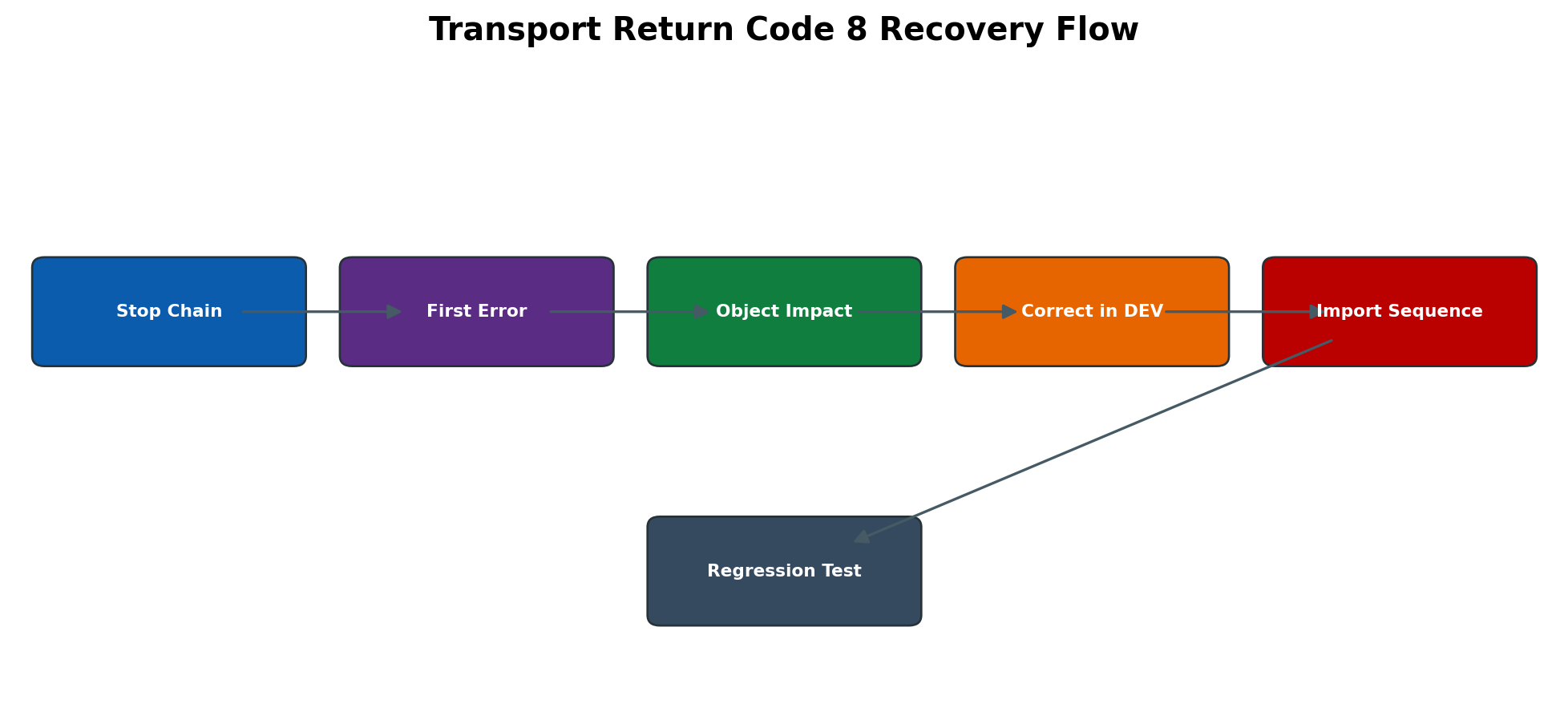
Figure 3.6 Transport return code 8 recovery flow
RC 8 means at least one import action ended with an error. It does not identify the cause by itself and does not prove that every object failed. The target can contain a partially imported state. The safest response is to preserve logs, stop dependent movement when necessary, find the first causal error and determine which objects activated before planning correction.
- 1. In STMS select the request and open the detailed logs for the target system and client.
- 2. Start with the earliest failing phase or object; later activation errors may only be consequences.
- 3. Record affected object names, return codes, timestamps and whether target versions changed.
- 4. Check missing predecessors, inactive Dictionary objects, syntax errors, locks, database conversion status, filesystem/tool errors and authorizations.
- 5. Do not solve the problem with unconditional import modes until overwrite and downgrade risks are understood.
- 6. Correct source objects in DEV or repair the approved environmental cause; release the prerequisite or correction request.
- 7. Import in the agreed sequence, then re-read all phase logs and compare object versions.
- 8. Run ST22, SM21 and application validation plus regression and negative tests before releasing subsequent transports.
Detailed Technical Reference
Repository Metadata and Transport Tables
The Repository is represented by metadata as well as source objects. TADIR is the object directory and identifies an object by program ID, object type and object name, together with package and original-system information. E070 stores transport request and task header information, while E07T contains request descriptions. E071 stores object-list entries and E071K stores transported table keys for applicable Customizing or table-content objects. These tables are useful for controlled analysis, but they are not a supported substitute for SE09, SE10, SE03 and CTS APIs. Never update CTS control tables directly.
A transport object key is commonly expressed as PGMID, OBJECT and OBJ_NAME. For example, R3TR TABL identifies a complete Dictionary table object at the main-object level. LIMU entries can represent subobjects. Understanding main and subobjects helps explain why a request may show several entries for one development. Administrators should not manually remove entries simply because they look duplicated; use Transport Organizer functions and involve the developer if object recording is unclear.
| Technical item | Purpose | Safe administrative use |
| TADIR | Object directory with package and original-system ownership | Confirm transportability and ownership; use SE03 or repository tools for supported changes. |
| E070 and E07T | Request/task header, status, owner, target and description | Correlate request metadata when organizer display or reporting is needed. |
| E071 | Object list by PGMID, object type and name | Identify repository objects included in the request. |
| E071K | Key entries for transported table content | Understand the exact client/table keys collected in a Customizing request. |
| TRDIR | ABAP program directory metadata | Support program status/type analysis; do not change directly. |
| DD02L DD03L DD04L | Dictionary metadata for tables, fields and data elements | Read through SE11/DDIC tools whenever possible; direct table interpretation is release-sensitive. |
Dictionary Activation Internals
Dictionary activation creates a consistent active definition and related runtime metadata, historically including the nametab used by the ABAP runtime. For a new transparent table, activation also creates the database object. For a changed table, the system determines whether a direct database ALTER is sufficient or whether a database conversion is necessary. Conversions can create temporary objects, copy data and require significant space and time. Large productive tables therefore require downtime/online-change planning appropriate to the release and database.
Activation order follows dependencies. A domain must be active before the dependent data element can be fully activated; the data element must be available before table fields; tables must be active before many views, lock objects or generated maintenance components. Mass activation during an import attempts to resolve such dependencies, but a missing prerequisite in another request can still produce a chain of errors. Diagnose the first missing or inactive object rather than activating unrelated objects repeatedly.
Field Change Impact Examples
| Change | Potential impact | Required checks |
| Increase character length | Database alteration or conversion; interface layout change | Dependent structures, IDocs/files, indexes, custom code, storage and regression tests. |
| Reduce length or decimals | Data truncation or conversion failure | Existing maximum values, reconciliation, explicit business approval and recovery copy. |
| Change key fields | Index/uniqueness and application access behavior | Duplicate analysis, foreign keys, locks, performance, downtime and full regression. |
| Change data element only | Labels/semantics or technical attributes may propagate | Where-used list, screens, search helps, interfaces and translations. |
| Enable buffering | Possible stale data or invalidation load | Read/write pattern, table size, generic key design, ST02 behavior and application suitability. |
| Change delivery class | Client copy and transport-content behavior | Data ownership, SCCL/SCC9 impact, Customizing process and audit requirements. |
Table Buffering Models
Single-record buffering stores entries addressed by a complete key and is suitable for stable tables with repeated individual reads. Generic buffering groups records by a leading part of the primary key; the generic key must match application access patterns. Full buffering stores the full table and is appropriate only for small, rarely changed tables. Buffering is bypassed by specific Open SQL patterns and can be disabled by technical conditions. ST02 helps observe buffer quality and swaps, but a high hit ratio alone does not prove that the design is correct.
When a buffered table changes, SAP invalidation mechanisms coordinate instances, but there can be a short synchronization interval. Business-critical, frequently updated or very large tables are generally poor buffering candidates. Never enable buffering only to hide expensive SQL. Confirm access pattern with SQL/workload evidence, application ownership and SAP guidance.
Transport Routes and Target Determination
A transport domain has one domain controller that owns central TMS configuration. Consolidation routes normally move Workbench changes from a development system to a quality system. Delivery routes move tested changes onward, commonly from QAS to PRD. Transport layers connect packages to consolidation routes. A request target is derived when the request is created; changing routes later does not safely repair every open request. Route changes require landscape-wide review, distribution and verification in STMS.
Customizing requests can have a target based on the configured route and client process. Target-group and extended transport-control designs may distribute requests to multiple systems or clients. Administrators must follow the actual landscape design instead of assuming DEV to QAS to PRD. Before import, compare the request target, queue system, client, project track and retrofit requirements.
Transport Files and Tool Chain
Classic CTS uses the common transport directory, typically /usr/sap/trans on UNIX-like platforms or an equivalent shared path. The cofiles directory stores control/log information and the data directory stores exported data files. Buffer files represent import queues. Log directories contain action, system and transport-tool output. tp orchestrates transport control and calls R3trans for database-level export/import work. R3trans also produces a trans.log or specified log during direct diagnostic tests.
A filesystem check must cover capacity, inode availability where applicable, mount state, ownership/permissions, latency and visibility from all participating hosts. Manual file copying can break ownership, naming, synchronization or audit history. Use supported TMS functions and documented disaster-recovery procedures. When the common directory is unavailable, pause imports and exports until shared access is consistently restored.
Important Import Phases
Exact phases vary by request and release, but logs commonly show object import, Dictionary activation, distribution/generation steps, after-import methods and execution of transport-related XPRA or conversion activities. A request may import source data successfully and fail later during activation or after-import processing. The phase name and first object error are therefore essential evidence. Long-running phases should be monitored with the corresponding job, work process, database activity and system log rather than cancelled only because elapsed time is high.
Transport Options and Their Risk
| Option category | Why it may be used | Risk and control |
| Import again | Repeat a previously imported request after a controlled correction | Can overwrite newer versions; compare import history and object versions first. |
| Ignore predecessor | Proceed despite sequence information | Can create missing dependency or downgrade; use only with documented dependency proof. |
| Overwrite originals | Import objects whose original system differs | Can violate ownership and complicate future corrections; requires architecture approval. |
| Overwrite unconfirmed repairs | Replace repaired objects in the target | May destroy emergency correction; confirm back-port and version baseline. |
| Ignore invalid component/version checks | Exceptional compatibility handling | May import unsupported content; use only with vendor/release-specific justification. |
| Client-specific selection | Direct table-content import to an intended client | Wrong client can alter configuration; verify client and change record twice. |
Transport of Copies and Test Cycles
A transport of copies collects the current versions of selected objects and sends them to a specified target without releasing the original development request. It supports iterative testing while the main request remains open. Because it is a snapshot, later changes in the original request are not automatically included. Before final release, compare the approved object set and repeat complete tests. Do not import the test copy into production as a replacement for the governed final request.
Repairs Relocations and Original System
A repair records a correction to an object whose original system is elsewhere. Relocation requests can move object ownership or a package. These are not ordinary change requests. They affect future recording, version control and transport behavior. Use SE03 and CTS procedures only as part of an approved landscape or system-copy activity. After a system refresh, verify system change options and original-system assumptions before developers begin work.
RFC Destination Types in Practice
| Type or model | Typical use | Primary checks |
| ABAP connection | SAP-to-SAP RFC using application server or load balancing | SID/client, host or message server/group, system number, SNC/logon, connection and authorization tests. |
| TCP/IP registered server | External program registers at SAP gateway with a program ID | Program ID, gateway host/service, reginfo/secinfo, external service and registration uniqueness. |
| TCP/IP started program | Gateway starts an external executable | Executable/path, host permissions and command security; often more restricted operationally. |
| HTTP connection | HTTP(S) call to external or ABAP service | Host/port/path, proxy, TLS trust, authentication, timeout and application response. |
| Logical destination NONE | Execute RFC-enabled function in same system/context semantics | Authorization and application behavior; it is not a network test. |
| Load-balanced ABAP destination | Resolve through message server and logon group | Message server host/service, group membership, instance health and SMLG design. |
RFC Call Semantics and Transaction Boundaries
A synchronous call returns results or an exception directly to the caller and can hold a dialog work process while the target responds. Long timeouts therefore create visible SM50/SM66 waits. An asynchronous call decouples execution but does not automatically provide durable exactly-once processing. tRFC persists the call under a transaction ID and retries; the application must still be designed so repeated technical delivery does not create inconsistent business results. qRFC serializes units by queue name and is useful where business order matters.
A successful technical RFC only confirms that the call could execute at the communication layer. COMMIT behavior, update tasks and application documents on the target follow the called implementation. When recovering failed RFCs, determine whether the target performed partial work before returning an error. Reconciliation must use business keys and application logs, not only queue disappearance.
RFC Timeout Load and Resource Effects
RFC performance problems may be caused by the caller, network, gateway, target logon, target work-process capacity, locks, database waits or remote application code. A higher timeout can hide but not correct the bottleneck. Compare caller work processes, destination response, gateway connections, target SM50/SM66, STAD/ST03N, SQL evidence and external-service monitoring for the same interval. For parallel RFC, also verify server group configuration and resource limits so one workload cannot consume all dialog capacity.
System Refresh and Copy Considerations
After a system copy or refresh, RFC destinations may point to production, technical users may be invalid, logical-system names can be duplicated and transport configuration can reflect the source. A post-copy plan must review SM59 destinations, trusted relationships, qRFC/tRFC queues, ALE logical systems, background jobs, interfaces, printers, TMS membership and outbound communication controls. Temporarily disabling or redirecting interfaces must be documented and reversed only after controlled testing.
Transport domain membership and system identity must be repaired through supported STMS procedures; copying transport tables or profiles from another SID is unsafe. Confirm that the refreshed system cannot send production business messages before releasing users.
Request Status and Ownership Controls
A modifiable task accepts new object entries. After task release, its entries are consolidated into the parent request and the task cannot be edited normally. Releasing the parent starts export and changes the request into an exported/released state. The exact status codes shown internally are less important than the supported organizer status and logs. Never manipulate request status in tables to reopen or bypass a failed release.
The request owner coordinates completeness; individual task owners remain responsible for their changes. Before an employee leaves a project or a user is locked, review open tasks and transfer responsibility through supported Transport Organizer administration. A request owned by an inactive user can still contain critical objects and locks. Changing an owner does not provide technical or functional approval.
Object Locks and Parallel Development
When an object is edited, the Transport Organizer records it in a task and may lock it against conflicting changes in another request. Parallel projects can still create version conflicts through separate systems, retrofit tracks or repairs. An object lock should be released by completing or reorganizing the responsible change, not by deleting lock information directly. Use SE03 functions with clear ownership and impact analysis if an object must be reassigned.
Before merging parallel work, compare versions and functional intent. The newest timestamp is not necessarily the correct version. A retrofit can require manual reconciliation, syntax checks and regression tests. The final transport must include dependent Dictionary and authorization objects, not only the program where the conflict was visible.
Version Management and Target Comparison
ABAP version management helps compare active, transport and historical versions. Use it to answer which change request introduced a difference, whether an emergency correction was overwritten and whether QAS or PRD contains the intended source. Version comparison is evidence, not an automatic merge tool. Generated programs and some object types have special behavior, and target comparison depends on RFC connectivity and authorization.
Version Investigation Procedure
- 1. Identify the exact object type/name and systems that disagree.
- 2. In the appropriate Workbench tool, open version management in display mode.
- 3. Record the active version, author, request and timestamp for each relevant system.
- 4. Compare source lines or object attributes and identify the business change represented by each version.
- 5. Check STMS import history to establish the sequence that produced the target state.
- 6. Agree the intended final version with the developer and functional owner.
- 7. Create a controlled correction in DEV, test it and transport it normally; avoid production-only edits.
- 8. After import, repeat the comparison and original regression tests.
Client Specific Customizing Recording
Whether Customizing changes are recorded depends on client role and SCC4 settings. In an automatic recording client, supported maintenance transactions prompt for a Customizing request and record table keys. In a no-automatic-recording client, changes may remain local and require a separate capture approach. Production clients should normally prohibit Customizing changes except under tightly controlled emergency procedures. Cross-client object and repository change options are separate controls and carry wider impact.
A table maintenance dialog can update more than one table or execute application logic. Do not infer the full transport content from the screen name. Review the request key list, compare configuration in the target and use the functional test. Some configuration is generated, transported through dedicated objects or distributed by application-specific tools rather than ordinary table-key transport.
Transport Validation Matrix
| Stage | BASIS validation | Developer or functional validation | Evidence |
| Before release | Correct request/task, route, object list, active objects, dependency order | Unit test, peer review, configuration completeness | Change record, test result, object/dependency list. |
| After export | Accepted export log, files and target queue entry | Confirm final released scope | SE09/SE10 and export log. |
| Before QAS import | Target/client/window/options, health and predecessor requests | Test data/users and expected scenario ready | STMS queue screenshot or recorded metadata. |
| After QAS import | Return code, activation, dumps, logs, jobs/interfaces | Functional, integration, authorization and regression tests | Import logs and signed test result. |
| Before PRD import | Approved QAS result, sequence, recovery and communications | Business approval and cutover readiness | CAB/change approval and final transport list. |
| After PRD import | System health, object versions, interfaces and monitoring | Business smoke test and reconciliation | Production validation and closure record. |
RFC Security Design Checklist
- Use a dedicated technical identity; do not store a personal dialog user in a shared destination.
- Choose a non-dialog user type suitable for the integration and organizational policy.
- Grant only required RFC function groups/functions and business authorizations.
- Prefer SNC, TLS or approved secure channels where supported; validate certificate lifecycle and hostname trust.
- Protect passwords/secrets in secure administration processes and rotate them without unmanaged outages.
- Restrict trusted RFC with S_RFCACL and explicit trust design; never treat trust as a convenience shortcut.
- Protect registered server programs with gateway reginfo/secinfo rules and unique program IDs.
- Define destination owner, monitoring, expiry/rotation, refresh behavior and decommission responsibility.
- Test from every relevant application server when routing, firewall or local configuration can differ.
- Retain connection metadata and result, but never copy the password or secret into tickets/screenshots.
RFC Failure Classification Matrix
| Observed symptom | Likely layer | First checks | Do not do |
| Partner not reached or timeout | Network, gateway, endpoint or target capacity | SM59 connection test, DNS/port, SMGW, target instance and work processes | Increase timeout indefinitely or restart all instances. |
| Name or service unknown | DNS or service resolution | Destination host/service, OS resolution, message server service | Replace hostname with an unmanaged IP without design approval. |
| Logon failure | Client, user, secret, SNC or user status | Target client/user lock/validity, SNC mapping, security log | Put a personal password in the destination. |
| No RFC authorization | Target authorization | SU53/trace for technical user and exact remote function | Assign SAP_ALL as a permanent fix. |
| SYSTEM_FAILURE | Remote ABAP/application error | Exception text, target ST22/SM21/application log | Retry repeatedly without checking partial business work. |
| COMMUNICATION_FAILURE | Connection ended during call | Gateway/network trace, target availability and timeout | Assume the target performed no work. |
| Queue SYSFAIL | Remote or application error in first queued unit | Queue long text, target dump/log and predecessor order | Delete the entire queue to make the monitor green. |
Production Import Readiness Checklist
- Approved transport list contains parent request numbers, descriptions, owners and sequence.
- All QAS imports have accepted logs and completed functional/regression evidence.
- No unresolved RC 4 warning, RC 8 error or inactive object remains in the scope.
- Downtime, user lock, job/interface pause and communication requirements are confirmed.
- Database/log/filesystem capacity and backup/recovery readiness match the risk.
- Required BASIS, developer, functional, security, database and business contacts are available.
- Post-import actions such as activation, cache cleanup, job scheduling or RFC enablement are documented.
- Rollback is technically realistic; where rollback is not simple, a forward-fix and data-recovery plan exists.
- Monitoring and smoke-test steps have named owners and acceptance criteria.
- Closure requires technical health and business confirmation, not only STMS completion.
Safe Administration Procedures
Inspect an SE11 Table Safely
Prerequisite: display authorization, exact table name and a business reason. Avoid broad data display in production and respect sensitive-data controls.
- 1. Start SE11, select Database table, enter the exact name and choose Display.
- 2. Confirm description, package, original system and active status.
- 3. Review fields, key order, data elements, domains and client field.
- 4. Review delivery and maintenance settings, technical settings, buffering and logging.
- 5. Use where-used and dependency functions without activating or changing the object.
- 6. If data display is approved, restrict selection and row count; do not export sensitive data casually.
- 7. Document only metadata needed for the incident and record the validation conclusion.
Create and Transport a Dictionary Table
Prerequisite: approved design, customer namespace, developer authorization, package/transport route, data classification, sizing, test plan and owner. This is a training procedure; production creation is not permitted.
- 1. In DEV, open SE11 and create the customer table with a meaningful description.
- 2. Define MANDT first when client dependency is required; define key fields before non-key fields.
- 3. Use approved data elements/domains or create dependencies in the same coordinated change set.
- 4. Maintain delivery class, display/maintenance setting and enhancement category.
- 5. Maintain technical settings, including data class, sizing and buffering decision based on access pattern.
- 6. Save to the correct transportable package and assign to the developer task under the approved parent request.
- 7. Run consistency checks and activate. Read the complete activation log.
- 8. Create test data only in the approved development client and execute positive, negative and authorization tests.
- 9. Check request object list for table definition and all dependent objects; release only after peer/functional approval.
- 10. Import to QAS in sequence, verify active status/database object, then execute regression and business tests.
Release and Export a Transport
- 1. Open SE09 or SE10 and locate the exact parent request.
- 2. Confirm request type, target, owner, description, project reference and object list.
- 3. Confirm all objects are active and dependent requests are identified.
- 4. Release each user task; resolve locks, inactive objects or ownership issues rather than forcing release.
- 5. Release the parent request once approvals are recorded.
- 6. Monitor export and read logs; confirm cofile/data-file processing and target queue availability.
- 7. Record request number, timestamp, return code and evidence in the tracker.
Import and Validate in QAS
- 1. Open STMS in QAS, refresh the queue and select the approved parent request.
- 2. Review request attributes, sequence, predecessors and import history.
- 3. Confirm target client and import options; do not use unconditional modes without a documented reason.
- 4. Start or schedule the import in the approved window and monitor the job/log.
- 5. Read all phases and the overall return code; investigate every RC 4 warning and stop on unapproved RC 8 or higher.
- 6. Validate SE11/SE80 object activation, dumps, system log and affected technical services.
- 7. Have the functional owner execute the original scenario and regression test.
- 8. Record evidence and only then approve progression to production.
Create and Test an SM59 Destination
- 1. Obtain approved endpoint, connection type, client/logon method, security requirement and technical owner.
- 2. Create or copy the destination only in the intended system; remove stale endpoints and credentials after system refresh.
- 3. Maintain technical settings such as target host/system number or message server/group.
- 4. Configure SNC/TLS and logon settings according to security policy; use a dedicated least-privilege technical user.
- 5. Save securely and run Connection Test. Record response and failure layer without exposing secrets.
- 6. Run Authorization Test and confirm target user/client. Investigate missing S_RFC or business authorization in the target.
- 7. Run a controlled functional test using a safe read-only or application-approved function.
- 8. Confirm target logs, monitoring and alerting; document owner, password/certificate rotation and decommission process.
Analyze Failed tRFC and qRFC
- 1. Record source/target system, client, destination, queue or transaction ID, timestamp, function and business impact.
- 2. For tRFC use SM58; for qRFC use SMQ1/SMQ2; use SBGRFCMON only for bgRFC units.
- 3. Read status text and first error. Check whether the destination itself passes connection and authorization tests.
- 4. Check target ST22, SM21, locks, update/application logs and system availability at the same timestamp.
- 5. Contact the application owner before manual execution, unlock, reorganization or deletion because duplicate or out-of-sequence processing may result.
- 6. Correct the root cause, then reprocess through the approved monitor function.
- 7. Validate that the unit disappears or reaches the expected status and that the business document exists exactly once.
Troubleshoot an Import Return Code 8
- 1. Open STMS -> Overview -> Imports, select the target and locate the failed parent request.
- 2. Open request logs and capture the first failing phase, object and exact message.
- 3. Compare request order and prerequisites; check SE11 or SE80 active state and ST22/SM21 at the failure time.
- 4. Decide whether the target is partially changed and pause dependent imports.
- 5. Correct the source in DEV or the verified technical dependency; do not edit production as a shortcut.
- 6. Release and import the prerequisite/correction in the approved order.
- 7. Validate active versions, runtime health and the original functional scenario.
- 8. Document the root cause, affected objects, recovery order and prevention.
Validate an ALE IDoc End to End
- 1. Confirm sender, receiver, logical systems, message type, business key and expected direction.
- 2. In the sender, locate the IDoc in WE02/WE05 and review control and status records.
- 3. Verify partner profile, port and RFC destination without exposing credentials.
- 4. Check SM58 or qRFC monitor if the IDoc uses those transfer layers.
- 5. In the receiver, confirm inbound status, process code execution and application logs.
- 6. Verify that the target business document exists once and matches the source.
- 7. Test one controlled failure and recovery path if this is an implementation validation.
- 8. Record technical and business reconciliation evidence.
Analyze a Failed SM35 Session
- 1. Open SM35 in the correct client and select the exact session by name, creator and date.
- 2. Review the processing log and identify the first failed transaction/message.
- 3. Determine how many transactions posted successfully and whether repeating them would create duplicates.
- 4. Process only a controlled test in foreground or display-errors mode to reveal the failing screen/field.
- 5. Correct authorization, master data, screen mapping or application prerequisite through its owner.
- 6. Restart or create a corrected session according to the program design; do not blindly re-run completed transactions.
- 7. Reconcile posted records, retain the session log and reorganize only under retention policy.
Security and Operational Controls
Separate development, release, import and approval duties where practical. Restrict S_TRANSPRT, S_CTS_ADMI, S_DEVELOP, S_RFC, S_RFCACL and gateway administration according to role. Production imports must be traceable to an approved change and should use controlled technical accounts. Direct table maintenance, emergency repository changes, transport deletion and RFC credential changes require explicit authorization and evidence.
Screenshots must mask user IDs where sensitive, hosts, IP addresses, destination credentials, SNC names and business data. Logs can contain SQL, paths, parameters or payload identifiers, so attach them only to approved support channels. Retain enough evidence to reconstruct what was imported or reprocessed without copying confidential payloads unnecessarily.
Common Errors and Solutions
Detailed Error Resolution Runbooks
Dictionary Object Does Not Activate
Symptom: SE11 or import log reports activation failure; the active version remains old or no runtime object is generated.
Likely causes: Inactive/missing dependency, incompatible domain change, duplicate field, database adjustment requirement, namespace/authorization issue or object lock.
Detailed diagnosis: Record object and first activation error. Compare active/inactive versions, check where-used/dependencies and transport sequence. Inspect SE14 status only in display first; correlate ST22, SM21 and DB alerts.
Corrective solution: Activate prerequisites in the correct request/order. Correct the definition through the owner. Use controlled SE14 adjustment only after backup/impact review and with an approved recovery plan.
Validation: Object is active, runtime/database status is consistent, no data loss occurred, dependent programs activate and the original application test passes.
Table Exists in SE11 but Database Object Is Inconsistent
Symptom: SE11 definition appears active but access dumps or SE14 shows a mismatch.
Likely causes: Interrupted conversion, failed import activation, database error, unsupported field change or manual database alteration.
Detailed diagnosis: Preserve dump and import logs. Compare Dictionary and database status, determine whether data conversion is pending and assess table size/criticality.
Corrective solution: Follow the approved database-adjustment procedure; involve ABAP/DB teams. Never delete/recreate a populated table as a shortcut.
Validation: SE14/SE11 are consistent, row counts and key data are preserved, SQL access and business transactions succeed.
Object Missing After Transport
Symptom: Import completed but a program, table, message, transaction or dependency is absent in QAS.
Likely causes: Object was in $TMP, not recorded, stored in another unreleased request, task not released, wrong target route or filtered transport.
Detailed diagnosis: Compare DEV package/object directory and request object list. Search related open requests and import history. Confirm parent request rather than task number.
Corrective solution: Assign object to the correct transportable package/request, activate, test and release a controlled follow-up request with dependencies.
Validation: Object and dependencies exist/activate in target; versions match intended source and functional test passes.
Transport Export Fails
Symptom: Parent release ends with export error or request does not reach target queue.
Likely causes: Inactive object, transport directory full/unavailable, permission problem, tp/R3trans failure, DB error or route configuration.
Detailed diagnosis: Read export log from the first failing phase. Check transport filesystem capacity/permissions, tool versions, system log, DB health and route.
Corrective solution: Correct the environmental or object cause, then repeat export through supported transport tools. Avoid manually copying files unless formal recovery procedure requires it.
Validation: Export finishes with accepted RC, files are present, target queue contains the request and logs are retained.
Import Return Code 4
Symptom: STMS reports warnings.
Likely causes: Already-existing object, deleted/nonexistent object, table-content warning, inactive dependent object or expected noncritical condition.
Detailed diagnosis: Open detailed logs and classify every warning by object and phase. Compare with change documentation and target state.
Corrective solution: If expected, document approval. If not, correct the dependency/configuration and re-import only where justified.
Validation: No unexplained warnings remain and technical plus business validation succeeds.
Import Return Code 8
Symptom: One or more transport actions failed.
Likely causes: Missing prerequisite, syntax/activation error, object lock, DDIC conversion failure, authorization, DB error or wrong sequence.
Detailed diagnosis: Stop dependent imports as appropriate. Identify the first root error, affected objects and whether partial activation occurred. Check ST22, SM21, SE11/SE80 and DB evidence.
Corrective solution: Correct the cause in DEV or environment, create/release the proper correction, and re-import in approved sequence. Do not use overwrite modes to conceal the issue.
Validation: All intended objects are active, logs show accepted result, versions are correct and regression tests pass.
Transport Return Code 12 or Higher
Symptom: Import/export stops with fatal processing or tool error.
Likely causes: Transport control failure, inaccessible directory, database outage, tool mismatch, severe syntax/runtime issue or damaged files.
Detailed diagnosis: Preserve complete tp/R3trans logs. Check file integrity, filesystem, database, kernel/tool versions, TMS configuration and concurrent maintenance.
Corrective solution: Restore the failed infrastructure/tool condition or obtain SAP guidance. Re-run only after understanding partial effects and recovery order.
Validation: Transport tool health is normal, a controlled retry completes and system/application validation confirms consistency.
Wrong Transport Sequence or Overtaker
Symptom: Target contains an unexpected object version or later request fails on a missing predecessor.
Likely causes: Manual queue reordering, parallel project tracks, transport of copies, retrofit gap or incomplete dependency list.
Detailed diagnosis: Compare request/object versions and timestamps in DEV/QAS/PRD. Identify which request introduced each version and whether importing an older request would downgrade it.
Corrective solution: Agree a consolidated correction or retrofit. Import the approved final version with required prerequisites; do not blindly import every historical request.
Validation: Target versions match the approved baseline and both changed and dependent scenarios pass.
SM59 Connection Test Fails
Symptom: Destination cannot establish a network/gateway connection.
Likely causes: Wrong host/system number, DNS/firewall issue, gateway down, registered program missing, TLS/SNC problem or target outage.
Detailed diagnosis: Confirm destination type and endpoint. Check DNS/route/port, target instance and gateway, SMGW/trace and security handshake at the same time.
Corrective solution: Correct endpoint/network/security configuration through owners. Restart or re-register only the affected approved component.
Validation: Repeated connection tests succeed from intended application servers and monitoring shows stable connectivity.
SM59 Authorization Test Fails
Symptom: Connection succeeds but logon or authorization fails.
Likely causes: Wrong client/user/secret, locked or expired user, missing SNC mapping, missing S_RFC or target role.
Detailed diagnosis: Check target user status without exposing the secret. Correlate security log/SU53 or trace for the technical user and exact function group.
Corrective solution: Unlock/rotate credential through approved process or grant least-privilege authorization after owner approval.
Validation: Authorization and controlled functional tests pass; no excessive role was added and credential rotation is documented.
tRFC Entries Remain in SM58
Symptom: Transactional RFC LUWs remain in error or retry status.
Likely causes: Target unavailable, destination/authentication failure, remote dump, lock/update error or application data inconsistency.
Detailed diagnosis: Record TID, destination, function, timestamp and error. Check SM59 plus target ST22/SM21/application log. Determine idempotency before retry.
Corrective solution: Correct target or data cause, then execute/reprocess approved LUWs. Never delete financial/integration LUWs merely to clear SM58.
Validation: LUWs process, target business result exists exactly once and source/target reconciliation is complete.
qRFC Queue Is Stopped or SYSFAIL
Symptom: SMQ1 or SMQ2 queue does not progress; later units wait behind the first error.
Likely causes: Remote failure, application exception, missing dependency, serialization conflict, deliberate lock or resource problem.
Detailed diagnosis: Record queue name/direction and first unit. Read status long text; inspect target dumps/logs and predecessor queues.
Corrective solution: Correct the first unit cause and restart/unlock through approved controls. Deletion requires application-owner confirmation and reconciliation plan.
Validation: Queue drains in order, no duplicates or gaps exist, and related business documents reconcile.
Registered RFC Program Not Available
Symptom: TCP/IP destination reports program not registered.
Likely causes: External program stopped, wrong program ID/gateway, network path or gateway ACL rejection.
Detailed diagnosis: Verify SM59 program ID and gateway. In SMGW check registered clients and gateway security trace. Confirm external service state with owner.
Corrective solution: Start/re-register the authorized program with matching ID and correct gateway; update ACL through controlled change if justified.
Validation: Program remains registered, connection and functional tests pass, and unauthorized registrations are not permitted.
Request Is Missing from the STMS Import Queue
Symptom: A released request does not appear in the expected target queue.
Likely causes: Wrong route or transport layer, buffer not updated, export incomplete, incorrect target, transport directory inconsistency or request is only a task/transport of copies for another target.
Detailed diagnosis: Confirm the released parent request and export log. Review route and target attributes, cofile/data-file presence and queue/buffer status. Compare with the last request that followed the same route.
Corrective solution: Correct the route/export or add the request to the buffer only through the approved TMS procedure. Avoid copying files manually or importing to an unintended SID.
Validation: The request appears once in the correct target queue with correct metadata and predecessor order.
Transport Tool Cannot Read Cofile or Data File
Symptom: tp or R3trans reports that transport information or a file cannot be read.
Likely causes: Missing/damaged file, wrong permissions or ownership, full/unmounted transport filesystem, inconsistent shared path or manual file handling.
Detailed diagnosis: Record exact file/request and tool log. Check filesystem mount, capacity, ownership, permissions and whether export created both control and data files.
Corrective solution: Restore the authoritative file or repeat a valid export after fixing the infrastructure. Use supported transport recovery and verify checksums/ownership; do not fabricate control files.
Validation: tp can read the request, queue metadata is correct and a controlled import reaches an accepted result.
Trusted RFC Logon Is Rejected
Symptom: A trusted destination connects but rejects trust or user mapping.
Likely causes: Trust relationship not configured both ways, wrong system ID/client, missing S_RFCACL, user mismatch, expired configuration or system copy changed identity.
Detailed diagnosis: Confirm destination type and target identity, inspect trust configuration and authorization trace for the exact caller. Review recent refresh/copy events.
Corrective solution: Re-establish only the approved trust relationship and least S_RFCACL values. Prefer explicit controlled identities where trust is unnecessary.
Validation: Approved mapped users connect without password while unrelated systems/users remain rejected.
RFC Call Times Out Although Connection Test Works
Symptom: SM59 connection test is green but the application call times out.
Likely causes: Long remote execution, exhausted work processes, network idle timeout, large payload, lock/database wait or application deadlock.
Detailed diagnosis: Correlate source timeout with target SM50/SM66, STAD/ST03N, ST22, SM21, locks, DB waits and network devices. Identify whether the remote function is still running.
Corrective solution: Correct the slow target/application cause or redesign package size/asynchronous processing. Change timeouts only with evidence and end-to-end owner approval.
Validation: Functional calls finish within the service target, no orphaned execution remains and load is stable.
IDoc Remains in Error After Connectivity Is Restored
Symptom: RFC works again but an IDoc stays in an error status.
Likely causes: Application validation, partner profile/process code issue, master data, authorization, duplicate check or unreprocessed tRFC/queue dependency.
Detailed diagnosis: Read IDoc status history and application log, then check SM58/qRFC and target dump/update evidence. Confirm whether the document already posted.
Corrective solution: Fix the first application/configuration cause and reprocess with BD87 or the application-supported tool using a narrow selection.
Validation: IDoc reaches the intended final status and business reconciliation shows exactly one target result.
SM35 Session Repeats Already Posted Transactions
Symptom: A batch-input restart creates duplicate or conflicting attempts.
Likely causes: Session was partially processed and restarted without posted-record analysis; transaction is not idempotent.
Detailed diagnosis: Review session log line by line, identify completed transactions and reconcile document keys in the application.
Corrective solution: Create a corrected residual session or use supported restart behavior that excludes successful entries. Reverse duplicates only through business-approved procedures.
Validation: Every intended record exists once, residual errors are resolved and session status/log agree with business totals.
Gateway Rejects a Registered Server Program
Symptom: TCP IP destination shows registration denied or program unavailable.
Likely causes: Program ID mismatch, wrong gateway host/service, reginfo/secinfo rule, external service stopped or network restriction.
Detailed diagnosis: Compare SM59 settings with external program startup. In SMGW review registered clients and security trace; correlate gateway trace without exposing secrets.
Corrective solution: Start the authorized service with the approved program ID/gateway or change the ACL through security review. Never disable gateway security globally.
Validation: Only the authorized program registers and repeated connection plus functional tests succeed.
Transport Imported to the Wrong Client
Symptom: Customizing request was imported into an unintended client.
Likely causes: Incorrect import target, ambiguous change record, manual execution or automation mapping error.
Detailed diagnosis: Stop dependent imports, preserve STMS logs and identify table-key objects and business changes applied. Assess whether cross-client objects were also included.
Corrective solution: Use application-approved reversal/correction or restore strategy. Do not delete customizing rows directly. Correct automation/approval mapping before retry.
Validation: Wrong-client effects are removed or formally accepted, correct client is validated and future execution enforces target checks.
Diagnostic Decision Process
- 1. Define the failing object/request/destination, source and target system/client, timestamp and business impact.
- 2. Classify the layer: Dictionary activation, repository/package, export, import, network/gateway, authentication, authorization, queue or application logic.
- 3. Preserve the original log, return code, object list, queue/TID and screenshots before intervention.
- 4. Find the first meaningful error and correlate it with STMS, SE11/SE80, ST22, SM21, SM59, SM58, SMQ1/SMQ2, SBGRFCMON or database evidence.
- 5. Determine whether processing is partial and whether retry can duplicate, overwrite, downgrade or reorder business work.
- 6. Correct the root cause using the owning team and approved change/recovery process.
- 7. Repeat the smallest safe technical test and then the original business scenario.
- 8. Document cause, action, result, remaining risk and preventive improvement.
Practical Scenario
Table Change Transport and RFC Integration Failure
A development changes a Z interface table and an RFC-enabled function. The transport imports to QAS with RC 8. SE11 shows the table inactive, while SM58 begins collecting failed calls to the QAS destination. The first import error shows that a new data element is missing because it remains in a separate unreleased developer task. Repeatedly executing SM58 would not help and could create duplicate application work after the table is repaired.
Controlled Response
- 1. Pause dependent transports and automatic/manual RFC reprocessing.
- 2. Record the failed request, object list, import log, table state, SM58 TIDs and business impact.
- 3. Locate the missing data element in DEV and confirm its package, task and dependency relationship.
- 4. Activate and test the complete Dictionary/function set, then release the prerequisite or consolidated correction through approval.
- 5. Import in the corrected order and confirm SE11 table/database consistency plus function activation.
- 6. Test SM59 layers, then reprocess selected SM58 LUWs with the application owner.
- 7. Reconcile target records to confirm each logical transaction was posted once.
- 8. Update dependency documentation and release checklist so future requests include coupled DDIC objects.
Expected Results and Validation
- All repository and Dictionary objects are active and assigned to the correct transportable package.
- Transport logs show an accepted result with no unexplained warnings or errors.
- QAS object versions match the approved DEV baseline.
- RFC connection, authorization and functional tests pass without exposing credentials.
- SM58 or queue backlog clears in controlled order and business reconciliation confirms no duplicates.
- The original interface and regression scenarios complete successfully.
- The change record contains request numbers, evidence, approvals, validation and preventive action.
Summary
ABAP Repository administration connects development governance with runtime stability. The Dictionary defines reusable semantics and database-relevant structures; packages and object directory entries determine transportability; tasks and requests record changes; CTS exports and imports them through the landscape; and RFC destinations connect processing across system boundaries. Reliable administration comes from understanding these dependencies, preserving evidence, controlling sequence and validating the business result rather than treating a green icon as proof of success.
Key Takeaways
- Repository and most Dictionary objects are client independent, so an activation affects every client in the system.
- A domain or data-element change can affect many tables, screens and interfaces; always check dependencies.
- The developer task is released before the parent request; the parent request is the importable unit.
- RC 4 requires review, RC 8 requires root-cause correction, and RC 12 or higher requires serious tool/environment investigation.
- Never solve sequence problems with uncontrolled queue reordering or overwrite options.
- SM59 tests separate connection, logon/authorization and application behavior.
- Use SM58 for tRFC, SMQ1/SMQ2 for qRFC and SBGRFCMON for bgRFC.
- Deleting queues or LUWs can create lost or duplicate business transactions; involve the application owner.
- Every fix ends with technical validation, the original business test and documented evidence.
Content Coverage Validation
This chapter covers the source topics on R/3 data structure, Repository development, transports, ABAP Dictionary, table relationships, Workbench tools and RFC communication, expanded for current BASIS administration. It includes SE11, SE80, SE38, SE37, SE09, SE10, STMS, SM59, SM58, SMQ1, SMQ2, SBGRFCMON and SMGW; detailed lifecycle procedures; security and production controls; return-code interpretation; and error-resolution runbooks. Release-specific screens and newer development models must still be checked against the installed SAP release and approved operating standards.