
BASIS - Week 1 Foundations Architecture and Core Operations / SAP Structured Troubleshooting and Support Operations
Result :
SAP Structured Troubleshooting and Support Operations
Introduction
Purpose
This chapter explains how an SAP BASIS team handles technical incidents from the first user report through stabilization, evidence collection, diagnosis, recovery, SAP Note implementation, vendor escalation and root-cause closure. It turns individual transactions and logs into a repeatable support process.
The main principle is to protect the system and the evidence before making changes. A fast workaround is useful only when business consistency is preserved, the action is authorized and the team can prove that service has recovered.
Who Should Read This Chapter
The chapter is intended for SAP BASIS administrators, production-support engineers, technical leads, service managers, database and infrastructure teams, interface owners and project members who participate in incident or problem resolution.
Learning Objectives
After completing this chapter, the reader should be able to create a useful incident record, prioritize and communicate impact, gather reliable SAP evidence, diagnose by technical layer, perform safe recovery, evaluate and implement SAP Notes, prepare a strong SAP support case, complete root-cause analysis and maintain reusable runbooks.
The practical outcomes are:
- Convert a vague complaint into a measurable incident record
- Preserve reliable logs dumps traces and processing evidence
- Diagnose frontend runtime interface database and host layers
- Recover jobs queues updates locks and services without damaging data
- Implement SAP Notes through controlled testing and transport
- Prepare complete SAP support and root-cause packages
Scope and Version Context
The process applies broadly to AS ABAP and SAP S/4HANA operations. Exact tools, portals and support workflows vary by release, database and support contract. Classic SAP GUI transactions remain useful, while SAP for Me, SAP Cloud ALM, SAP Focused Run, Solution Manager or enterprise ITSM tools may manage cases and monitoring in newer environments.
Never follow an old Note, command or recovery step without checking applicability to the installed release and component level. Production control actions require the organization's approval, backup, rollback and security procedures.
Use a Structured Troubleshooting Method
Stabilize Before Deep Analysis
When production service is at risk, first prevent further damage. Pause unsafe follow-up jobs, protect files and logs, preserve affected records and confirm whether a supported failover or workaround exists. Stabilization does not mean hiding the error; it creates a controlled state for diagnosis.
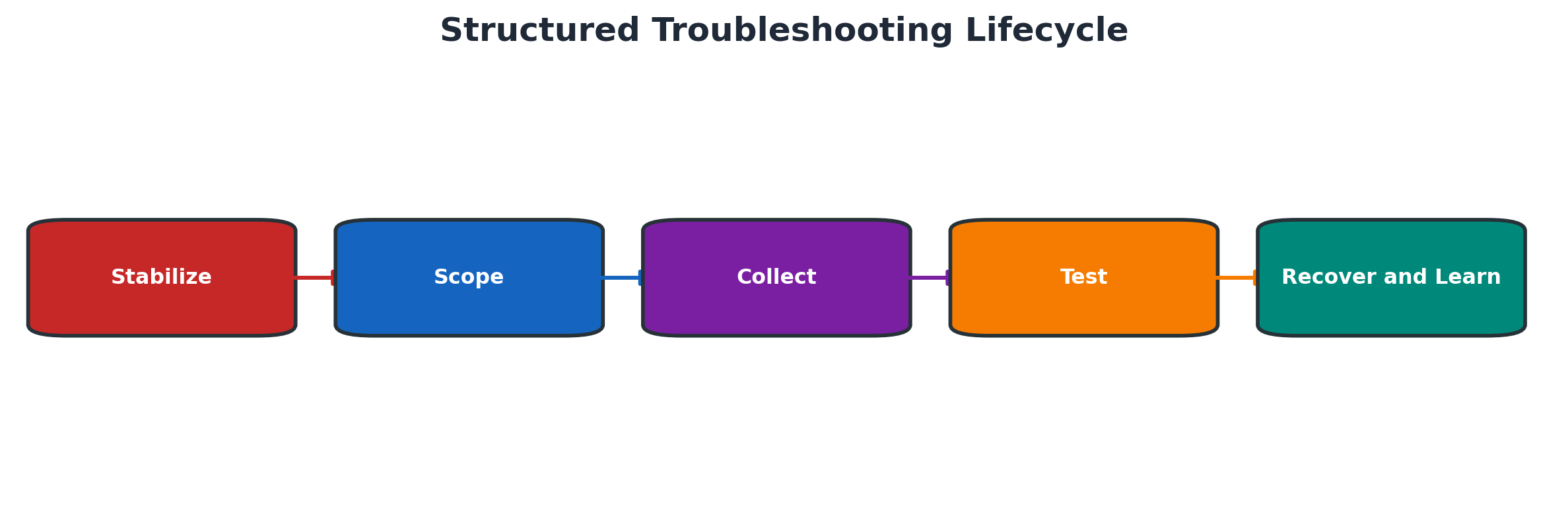
Figure 9.1 Structured troubleshooting lifecycle
Define Scope Time and Impact
Record the exact start time with timezone, affected system and client, users, transactions, jobs, interfaces and business process. Decide whether the problem affects one user, one application path, one instance or the whole system. Scope determines which evidence is useful.
Use the same incident facts across every team.
| Field | Question | Example evidence |
| Time | When did the first failure occur and in which timezone? | Alert and first log entry |
| Scope | One user transaction instance or whole system? | User list and server comparison |
| Impact | Which business process and deadline are affected? | Blocked orders or interface backlog |
| Change | What changed before the symptom? | Transport certificate restart or patch |
| Workaround | Can service continue safely? | Approved alternate path |
Build and Test a Hypothesis
A hypothesis links evidence to a possible cause and predicts what another observation should show. Test the smallest safe assumption first. Change one variable at a time so the result can confirm or reject the hypothesis.
Preserve Evidence and Maintain a Timeline
Keep a chronological record of symptoms, alerts, changes, commands, restarts, job actions, owner decisions and results. Save relevant logs before rotation. A reliable timeline is essential when multiple teams work in parallel or the problem later becomes a formal root-cause review.
Incident Intake and Prioritization
Create a Useful Incident Record
A useful ticket contains SID, client, environment, timestamp, timezone, transaction or job, affected users, error text, reproducible steps, expected result, actual result, frequency and screenshots or correlation identifiers. Avoid statements such as system slow without measurements.
Classify Severity and Business Impact
Priority should reflect business impact and urgency, not technical interest. Record whether production is unavailable, a critical process is blocked, a workaround exists, data integrity is at risk and how many users or locations are affected. Follow the service agreement for severity changes.
Priority combines impact, urgency and available workaround.
| Factor | Assessment question | Evidence |
| Availability | Is production or a critical service unavailable? | Monitoring and user confirmation |
| Business deadline | Is a time-critical process blocked? | Cutoff or regulatory deadline |
| User scope | How many users sites or interfaces are affected? | Affected population |
| Data risk | Could retry or workaround corrupt or duplicate data? | Application-owner assessment |
| Workaround | Is a safe tested alternative available? | Documented successful use |
Assign Technical Ownership
One incident coordinator owns the timeline and communication while technical owners investigate their layers. Clearly assign BASIS, application, database, operating system, network, security, interface or vendor actions. Parallel work needs defined boundaries to prevent conflicting changes.
Communicate During an Incident
Updates should state current impact, confirmed facts, actions completed, next action, owner and next update time. Separate evidence from assumptions. Do not announce a root cause until it is tested and supported.
Collect Evidence from the SAP System
System Log and Short Dumps
Use SM21 for technical system events and ST22 for ABAP terminations. Filter the exact incident interval and relevant instance, user or error. Capture the first meaningful error, not only the last secondary message. Dump keywords, program and source position can guide application analysis or a Note search.
Developer Traces and Work Process Evidence
Use ST11 or approved operating-system access for developer traces such as dispatcher, work process, gateway and message-server files. Correlate trace timestamp and process ID with SM50 or SM66. Increase trace levels only for a targeted component and defined duration because traces can affect performance and consume disk space.
Jobs Updates Locks and Queues
Use SM37 for job status and log, SM13 for updates, SM12 for logical locks, SM58 for transactional RFC, SMQ1 and SMQ2 for qRFC, and SMGW for gateway activity where relevant. Preserve status, destination, function or queue, time and first error before restarting or deleting anything.
Choose the tool from the processing type.
| Area | Primary tool | Protect before action |
| Background job | SM37 | Job log spool variant and partial output |
| Update | SM13 | Update key status and business object |
| Logical lock | SM12 | Owner client argument and related update |
| tRFC | SM58 | Destination function LUW and first error |
| qRFC | SMQ1 or SMQ2 | Queue name sequence and first blocked LUW |
| Gateway | SMGW | Connection registered program and security context |
Configuration and Change Evidence
Compare the failure with recent transports, profile changes, certificates, RFC destinations, kernel or support-package changes, network rules, database maintenance and job schedule changes. Use approved change records and system history instead of relying on memory.
Diagnose by Technical Layer
Frontend Network and Logon Layer
Confirm whether the user can resolve the host, reach the SAP service and log on through the expected route. Compare SAP GUI, web, Fiori and direct application-server behavior when applicable. Check SAP Logon configuration, message server or Web Dispatcher path, certificates, proxy and network events without exposing credentials.
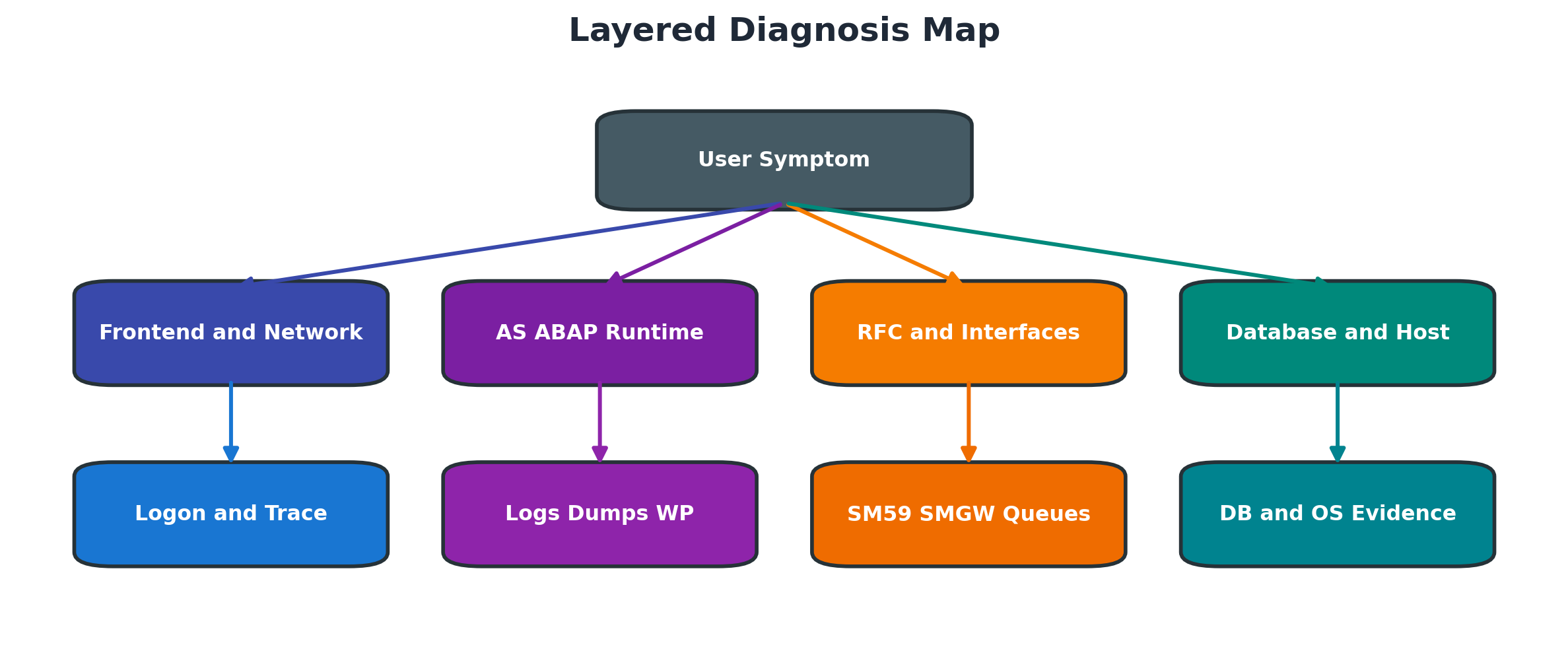
Figure 9.2 Layered diagnosis map
Application Server and ABAP Layer
Check instance availability, work-process saturation, dumps, system log, update failures, locks and workload. If one instance differs from others, compare profiles, kernel level, operation mode and recent restarts. For a custom-program failure, involve the application owner with exact input and dump evidence.
RFC Gateway and Interface Layer
Use SM59 connection and authorization tests only with approved technical users. Review SMGW and gateway traces for registration or security failures, SM58 for tRFC retries and SMQ1 or SMQ2 for queue serialization. Validate destination host, service, SNC or TLS, logon method and certificate chain.
Database Operating System and Storage Layer
Confirm database availability, space and log capacity, blocked sessions, backup or recovery activity and major alerts. Correlate SAP database time with expensive statements and database waits. Review CPU, memory, paging, disk latency, filesystem capacity and mount health for the same time interval.
Apply Safe Recovery Actions
Choose Recovery Before Change
Recovery restores service using a known supported action; tuning or configuration change alters the environment. Prefer the smallest reversible action that addresses the confirmed failure. Record preconditions, owner, risk, expected result and backout.
Restart Jobs Updates and Queues Safely
A canceled job may be rescheduled only after understanding whether partial processing occurred. Failed updates require application-specific validation before reposting. tRFC and qRFC retries must preserve sequence and avoid duplicate business documents. Always reconcile counts and downstream results.
Use this recovery gate:
- Preserve the current technical status and first error.
- Confirm whether partial business processing occurred.
- Identify application owner and sequence dependency.
- Correct the confirmed technical cause.
- Choose supported restart, repeat or reprocessing function.
- Release a small controlled unit where possible.
- Reconcile document counts and downstream effects.
- Process remaining backlog and monitor recurrence.
Control Processes Locks and Services
Cancel a work process or remove a lock only after confirming owner, business state and update risk. An instance or service restart affects users and buffers and may move load elsewhere. Use the approved stop and start sequence, drain traffic where possible and validate dependent interfaces afterward.
Before a control action:
- Confirm affected SID, client, instance and process.
- Record user, program, action, elapsed time and related lock or update.
- Assess data-integrity and user impact.
- Obtain the required technical and business approval.
- Define rollback or recovery if the action fails.
- Execute the smallest supported action.
- Validate application, interfaces and users afterward.
- Attach before-and-after evidence to the incident.
Rollback and Backout Decisions
Rollback should have clear triggers, commands, owners and time limits. For a transport or parameter change, confirm whether reverse transport, restored file, previous value or system recovery is the supported method. Do not improvise database changes to undo application behavior.
Work with SAP Notes and Corrections
Search and Evaluate SAP Notes
Search with exact error ID, message class and number, program, component, release and keywords. Read symptoms, cause, prerequisites, validity, correction instructions, side effects and related Notes. Confirm software component and support-package level before treating a Note as applicable.
Use Note Assistant with SNOTE
SNOTE downloads, checks and implements eligible ABAP corrections and records processing status. Ensure Note Assistant itself is current according to applicable SAP guidance, verify digital-signature and download prerequisites where required, and use authorized RFC or support connectivity.
Implement Test and Transport Corrections
Implement first in the approved development or correction system. Review changed objects and manual activities, resolve prerequisites, create or assign a transport, perform syntax and activation checks, then test the original symptom and regression paths. Move through the landscape using normal transport governance.
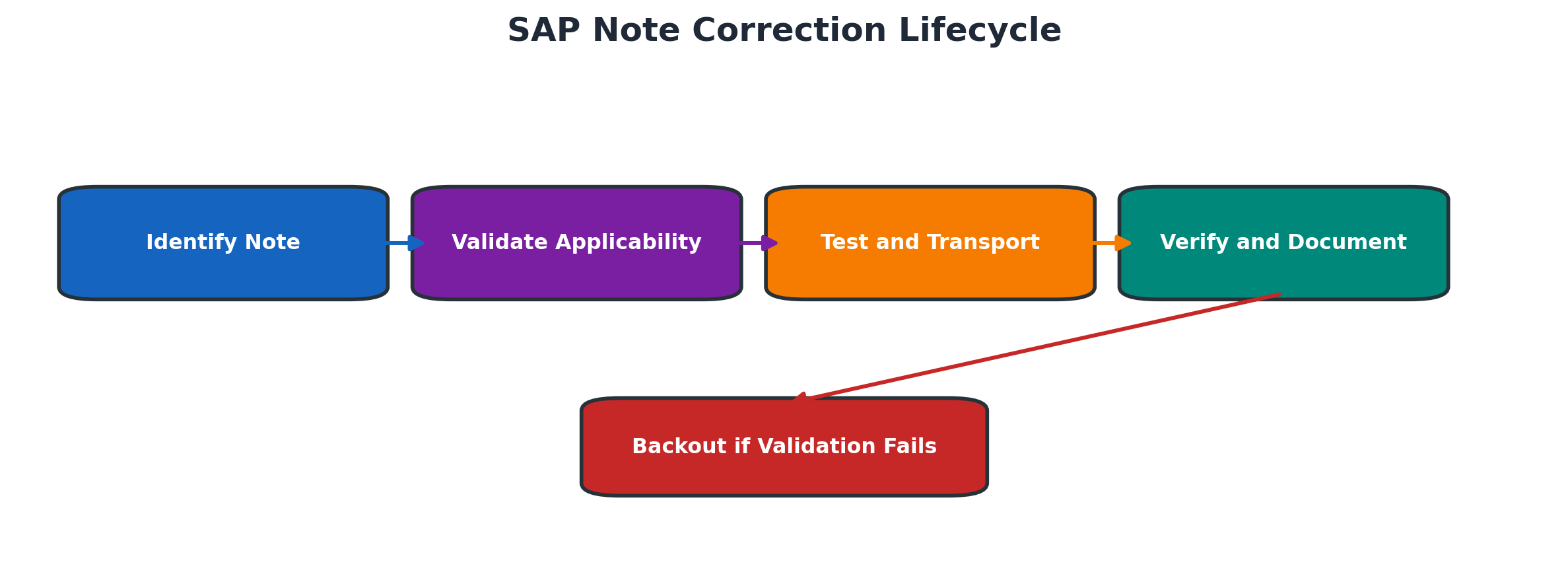
Figure 9.3 SAP Note correction lifecycle
Use this correction sequence:
- Confirm symptom and Note applicability.
- Review prerequisites, manual steps and side effects.
- Implement in the approved development or correction system.
- Review changed objects, syntax and activation.
- Test the original symptom and regression paths.
- Assign the approved transport and document manual activities.
- Move through QAS and production governance.
- Validate, monitor and update the incident or known error.
Handle Prerequisites Obsolete Notes and Conflicts
Implement prerequisite Notes in the documented sequence. An obsolete Note may be included in a support package or replaced by another correction. For modification conflicts, compare object versions and involve development or upgrade owners; do not force an automatic correction over customer changes.
Escalate to SAP Support
Decide When a Support Case Is Required
Open a case when standard documentation and internal analysis do not resolve a reproducible product issue, a vendor correction is required, or the business impact needs SAP assistance. Continue stabilization and evidence collection while the case is active.
Escalate with evidence when:
- A reproducible SAP product error remains after standard diagnosis
- A vendor correction or interpretation is required
- A critical production issue needs contractual SAP assistance
- Internal teams cannot safely determine the next action
- SAP-requested trace or remote analysis is required
Prepare the Technical Case Package
Provide a concise problem statement, business impact, environment, release and component level, exact timestamps, reproducible steps, expected and actual results, error text, evidence, analysis already completed, recent changes and a named technical contact. Attach only relevant sanitized files.
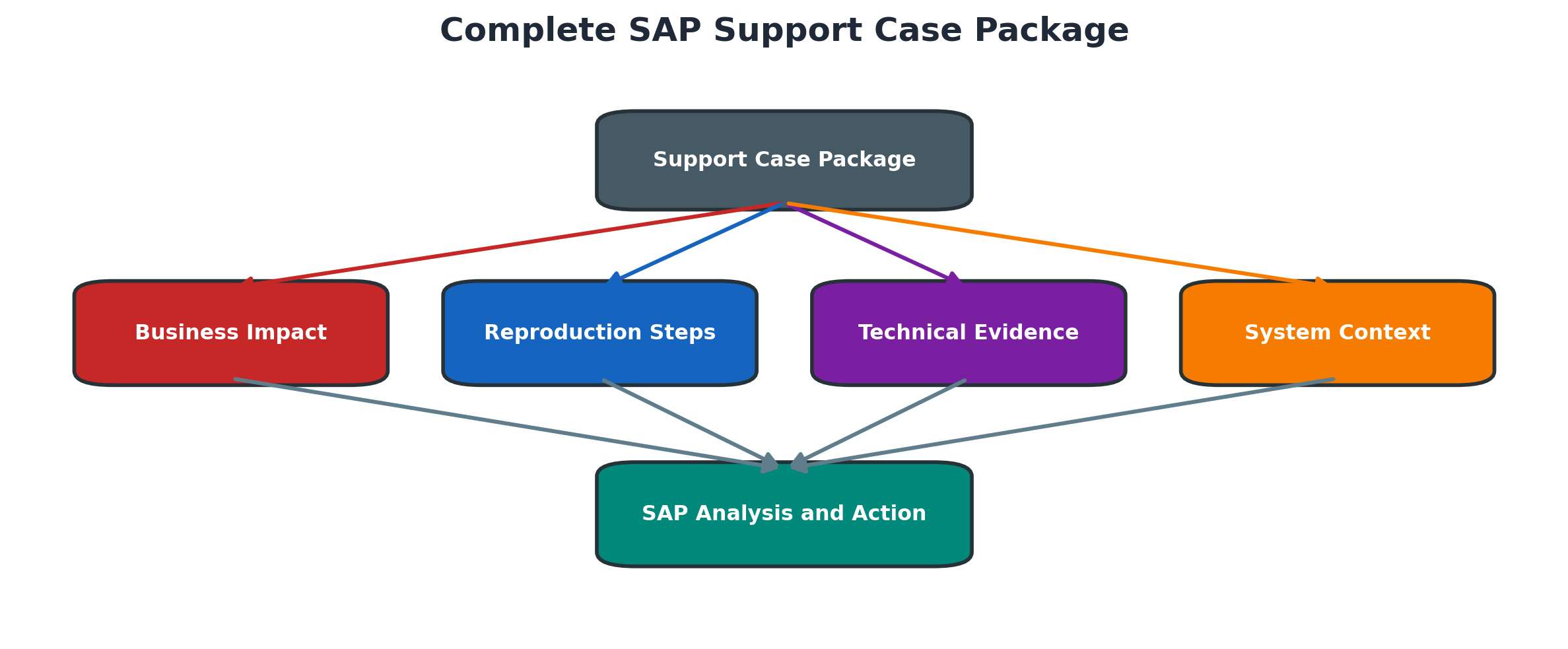
Figure 9.4 Complete SAP support case package
Select Component Priority and Business Impact
Choose the closest product component so the case reaches the correct team. Select priority according to contractual definitions and clearly explain production impact, affected process, users, deadlines and workaround. Do not use the highest priority when the documented criteria are not met.
Remote Support and Secure Access
Remote access must be time-bound, approved and limited to the required system and function. Use named support users or controlled technical access, secure connectivity, logging and credential handling. Close the connection and review access after the activity.
Track Responses and Validate Closure
Answer vendor questions with the same identifiers and timeline. Record corrections, Notes and recommendations in the incident. Before closing, reproduce the original case, confirm the business result, monitor for recurrence and ensure temporary access or traces are removed.
Problem Management and Root Cause Analysis
Move from Incident to Problem
An incident restores service; a problem record investigates why it happened and how recurrence will be prevented. Create a problem for major incidents, repeated issues, unknown causes, risky workarounds or material control failures.
Build a Technical Timeline
Combine monitoring alerts, ticket updates, change records, jobs, logs, dumps, traces and team actions in one timezone. Mark confirmed facts, gaps and clock differences. The sequence often reveals whether a change preceded the failure or whether a symptom was only detected later.
Normalize all evidence to one timeline.
| Time | Source | Confirmed event | Action or interpretation |
| T0 | Change record | Certificate or transport completed | Potential change point |
| T1 | Monitoring | First failure detected | Start of observed impact |
| T2 | SAP logs | First causal error | Technical evidence |
| T3 | Incident record | Stabilization action | Risk contained |
| T4 | Validation | Business processing restored | Recovery confirmed |
Use Root Cause and Contributing Factors
State the technical condition that directly produced the failure and the evidence that proves it. Then identify contributing factors such as missing monitoring, weak testing, capacity pressure, unclear ownership or an outdated runbook. Avoid blaming individuals.
Create Corrective and Preventive Actions
Corrective actions remove the direct cause. Preventive actions improve detection, testing, capacity, automation, documentation or governance. Each action needs an owner, due date, success measure and closure evidence.
Operational Handover and Knowledge
Create a Troubleshooting Runbook
A runbook should define trigger, scope questions, tools, exact filters, safe actions, escalation points, rollback, validation and evidence. Keep variable values such as SID or destination as placeholders and test the runbook in a non-production or controlled setting.
A usable runbook contains:
- Trigger and affected service.
- Scope and impact questions.
- Tools, filters and required evidence.
- Known safe recovery steps.
- Stop conditions and actions requiring approval.
- Escalation owners and vendor component.
- Rollback and validation procedure.
- Version owner and review date.
Maintain Known Errors and Workarounds
A known-error record describes the confirmed cause, affected versions, detection method, safe workaround, permanent fix and limitations. Review it after upgrades because an old workaround may become harmful or unnecessary.
Handover Across Shifts and Teams
Handover must include current impact, timeline, confirmed and rejected hypotheses, active changes, traces, pending vendor questions, access expiration and next checkpoint. The receiving engineer should be able to continue without repeating risky actions.
Measure Support Quality
Useful measures include time to acknowledge, stabilize and restore; recurrence; percentage of cases with complete evidence; failed change rate; runbook usage; and overdue preventive actions. Metrics should improve service, not encourage premature ticket closure.
Security Audit and Production Controls
Least Privilege for Diagnostic Tools
Transactions that expose dumps, traces, users, destinations or operating-system details require controlled display access. Separate routine diagnostics from powerful control functions such as process cancellation, lock deletion, RFC credential maintenance and service restart.
Protect Logs Dumps and Traces
Diagnostic files can contain user IDs, document numbers, SQL text, paths, hostnames, payloads or personal data. Collect the minimum required, mask publication copies, encrypt transfers where required and store evidence only in approved locations.
Emergency Actions and Approval
Emergency access and break-glass actions must be justified, time-bound, logged and reviewed. Record approver, executor, exact command or transaction, before-and-after state and business validation.
Evidence Retention and Auditability
Retain incident evidence according to security, privacy, legal and operational policy. Ensure ticket links, attachments, change records, transports, Notes and approvals remain traceable after staff or vendor access is removed.
Common Errors and Solutions
Logs Dumps and Trace Errors
Preserve the earliest relevant evidence and use the correct system time and component.
The first causal message and correct timeline matter more than log volume.
| Error or symptom | Likely cause | Diagnostic action and solution | Validation |
| SM21 shows no relevant entry | Wrong instance time filter or event recorded elsewhere | Confirm timezone and incident interval, search all relevant instances and correlate ST22, ST11 and external logs. | The event is found or the evidence gap is documented. |
| ST22 dump already expired | Retention period elapsed or wrong system | Use exact user and timestamp in related logs, job spool or monitoring history and preserve future dumps earlier. | A sufficient timeline is reconstructed. |
| Developer trace rotates | High activity or small trace file limit | Copy the relevant approved segment promptly, avoid broad trace increase and preserve process and timestamp correlation. | Required trace evidence remains readable. |
| Trace creates performance overhead | Trace scope or level is too broad | Stop the trace, confirm filesystem capacity and repeat only for a narrow user, process and duration. | Normal trace level and performance return. |
| Different systems show different times | Host clocks or timezone interpretation differ | Normalize the timeline to one timezone and correct approved time synchronization. | Logs correlate consistently across systems. |
| Only secondary errors are analyzed | First failure was missed after retries | Work backward from the earliest timestamp and identify the first causal message. | Hypothesis explains later errors as consequences. |
RFC Queue Job and Update Errors
Protect processing sequence and business consistency before repeating technical work.
Never repeat processing until sequence and partial completion are understood.
| Error or symptom | Likely cause | Diagnostic action and solution | Validation |
| SM58 entries keep failing | Destination network authorization certificate or remote error | Preserve first error, test destination safely, correct root cause and execute controlled retry. | New and retried LUWs complete once. |
| qRFC queue remains stopped | Serialized predecessor failed or queue was manually stopped | Inspect first blocked LUW and queue status; correct cause and restart in order. | Queue drains without sequence violation. |
| Job restarted but duplicates data | Partial business processing was not assessed | Stop repeats, reconcile output and use application restart logic or documented variant recovery. | Counts and business documents reconcile. |
| Update termination in SM13 | Application database resource or consistency failure | Correct the cause and involve application owner before any repost, especially for V1 updates. | Business object is complete and no duplicate update exists. |
| Lock returns after deletion | Active transaction or unresolved update recreates it | Identify owner and related processing instead of repeatedly deleting the lock. | Owning transaction ends and lock clears normally. |
| Gateway registration rejected | secinfo reginfo program ID or network mismatch | Validate registered program, gateway ACL and approved host; change only reviewed rule. | Registration succeeds for the intended program only. |
SAP Note and Support Case Errors
Applicability, complete context and controlled testing determine support quality.
Applicability and complete evidence prevent unsafe corrections and support delay.
| Error or symptom | Likely cause | Diagnostic action and solution | Validation |
| SNOTE says Note not applicable | Release or support package differs or correction is included | Check component and Note validity, related or successor Notes and installed package level. | Correct guidance matches the system level. |
| Prerequisite Note missing | Required correction sequence was skipped | Download and assess prerequisites, test order in development and transport together as approved. | SNOTE status and tests complete successfully. |
| Correction conflicts with modification | Customer code or previous correction changed the object | Compare versions and involve development or upgrade owner; do not force overwrite. | Merged object activates and regression tests pass. |
| Support case routed incorrectly | Product component or symptom classification is wrong | Use dump package and application area to refine component and update the case clearly. | Correct SAP team accepts ownership. |
| SAP asks repeatedly for basic data | Case lacks reproduction context or system details | Provide concise steps, timestamps, release, evidence, changes and contact in one package. | Analysis proceeds without repeated intake questions. |
| Case closed before business validation | Technical test passed but end-to-end process was not checked | Reopen or continue incident validation, test business flow and monitor backlog or recurrence. | Business owner confirms full recovery. |
Diagnostic Decision Process
Classify the symptom, preserve evidence and route it to the smallest owning layer.
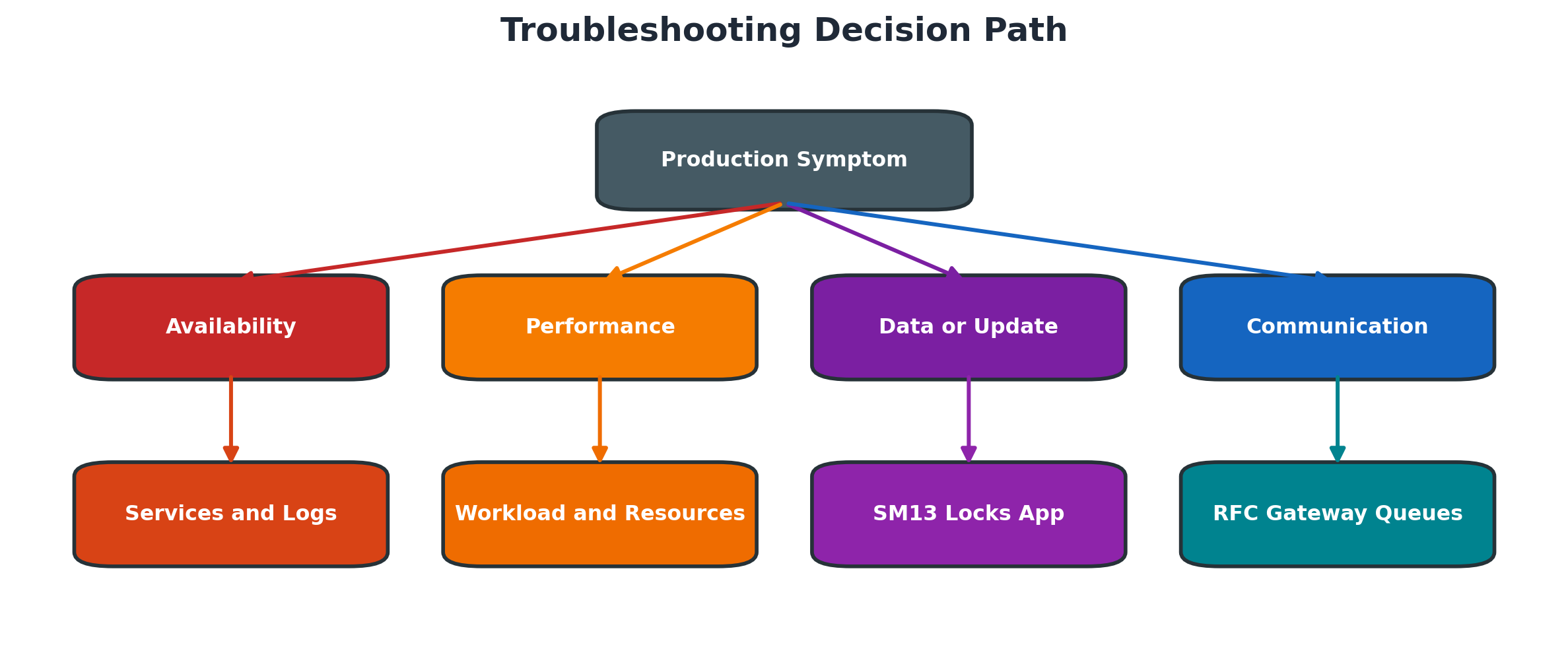
Figure 9.5 Troubleshooting decision path
Use this diagnostic order:
- Stabilize service and prevent unsafe retries.
- Record exact time, scope, impact and recent changes.
- Preserve the first error and affected processing state.
- Classify availability, performance, data or communication failure.
- Correlate SAP, interface, database and host evidence.
- Test one evidence-backed hypothesis at a time.
- Apply the smallest supported reversible recovery.
- Validate business consistency and create preventive actions.
Detailed Technical Reference
Incident Evidence Contract
A support ticket becomes technically actionable only when it identifies the affected system and client, business process, user or technical identity, exact action, expected result, actual result, first observed time, last known good time, reproducibility, scope, business impact and recent change. Record timestamps with date, seconds and time zone. “It failed this morning” cannot be correlated reliably across SAP, middleware, database, operating-system and cloud logs.
Start with the first failure, not the loudest repeated message. Later dumps, canceled jobs and queue errors may be consequences. Preserve the original error text, message class/number, runtime error, application log object/subobject, job/step, transaction ID, RFC TID or queue name where available. Build a timeline before changing trace levels, restarting services or reprocessing work.
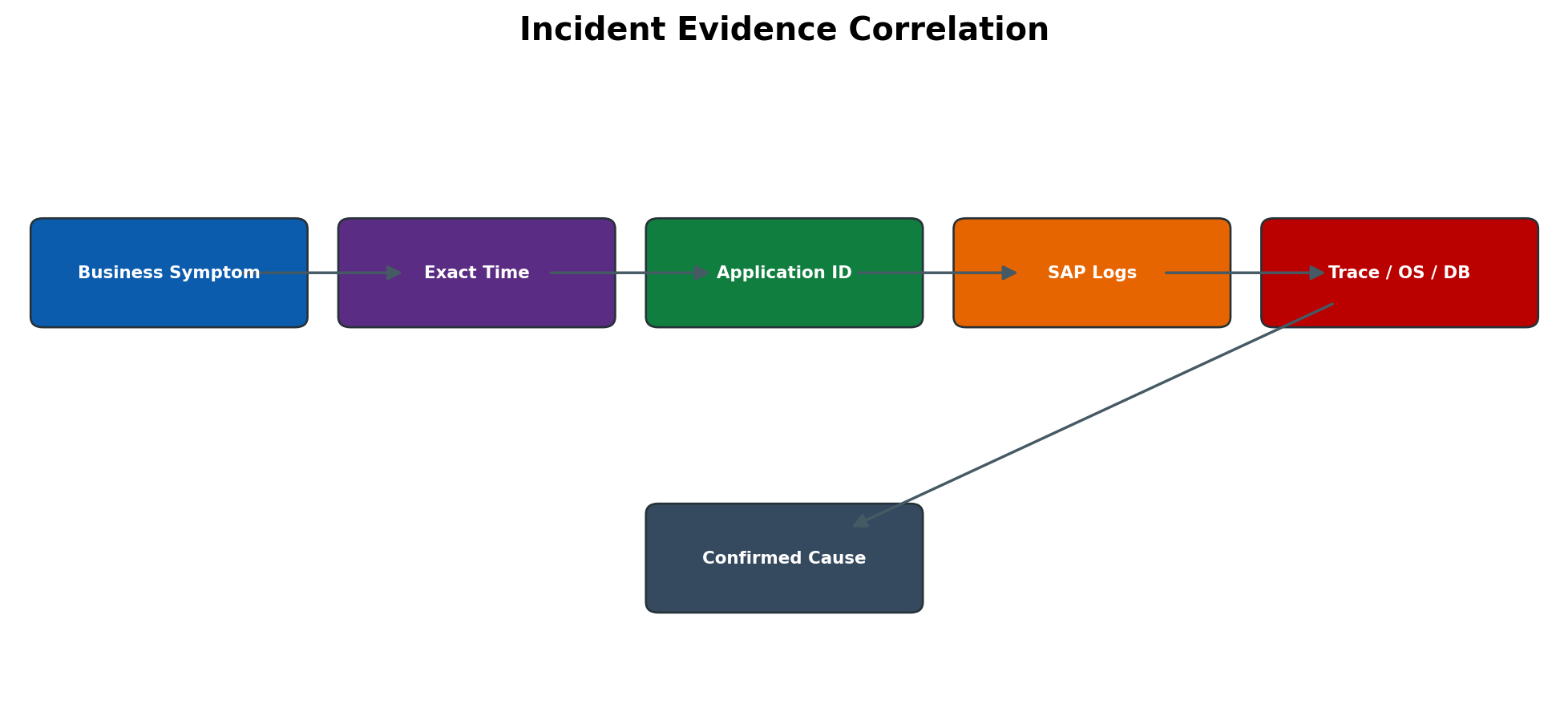
Figure 9.6 Incident evidence correlation
Logs Dumps Traces and Application Evidence
SM21 records selected system events; it is not a complete application log. ST22 explains ABAP terminations and includes error analysis, call stack, source extract and environment. ST11 displays developer traces such as dispatcher, work-process, gateway and message-server files. SLG1 contains application logs only when the application writes them. A clean SM21 does not prove that an application request succeeded.
SM50 gives a local-instance process snapshot and SM66 a system-wide view. SM37 provides background job status, steps, job log and spool. SM13 covers update requests; SM12 covers logical locks. Use exact timestamps and server/instance names to cross-reference evidence. Retention differs: a trace can wrap, a dump can expire, and job/spool cleanup can remove the strongest evidence.
Trace escalation must be narrow and reversible. Record the original level, target user/component, start time, reproduction count, file-size guardrail and stop time. High trace levels can expose credentials, personal data, business keys and payloads and can consume filesystems. Deactivate immediately after one controlled reproduction and review attachments before external transfer.
tRFC qRFC Gateway and RFC Semantics
SM58 monitors transactional RFC LUWs that could not be completed. A TID protects transactional delivery, but it does not make every called application function harmless to repeat. “Execute LUW” is safe only after the destination problem is removed and the owning application confirms retry semantics. Repeated entries usually mean the dependency remains broken or the receiver rejects the transaction.
SMQ1 monitors outbound qRFC queues and SMQ2 inbound queues. qRFC adds serialization through queue names; an earlier failed LUW can block later business messages. Statuses and actions vary by release and scheduler configuration, but states such as SYSFAIL, RETRY, STOP or waiting require the queue detail and first failing LUW to be examined. Deleting or manually unlocking a queue can break sequence and business completeness.
SM59 validates destination configuration, network reachability and logon depending on destination type. A connection test proves only the tested layer; it may not invoke the business function, authorization, payload, commit or downstream resource. SMGW and gateway traces help diagnose registrations, partner connections and gateway security. reginfo/secinfo govern external program registration and start/access rules; changes require security review and reload/restart behavior appropriate to the release.
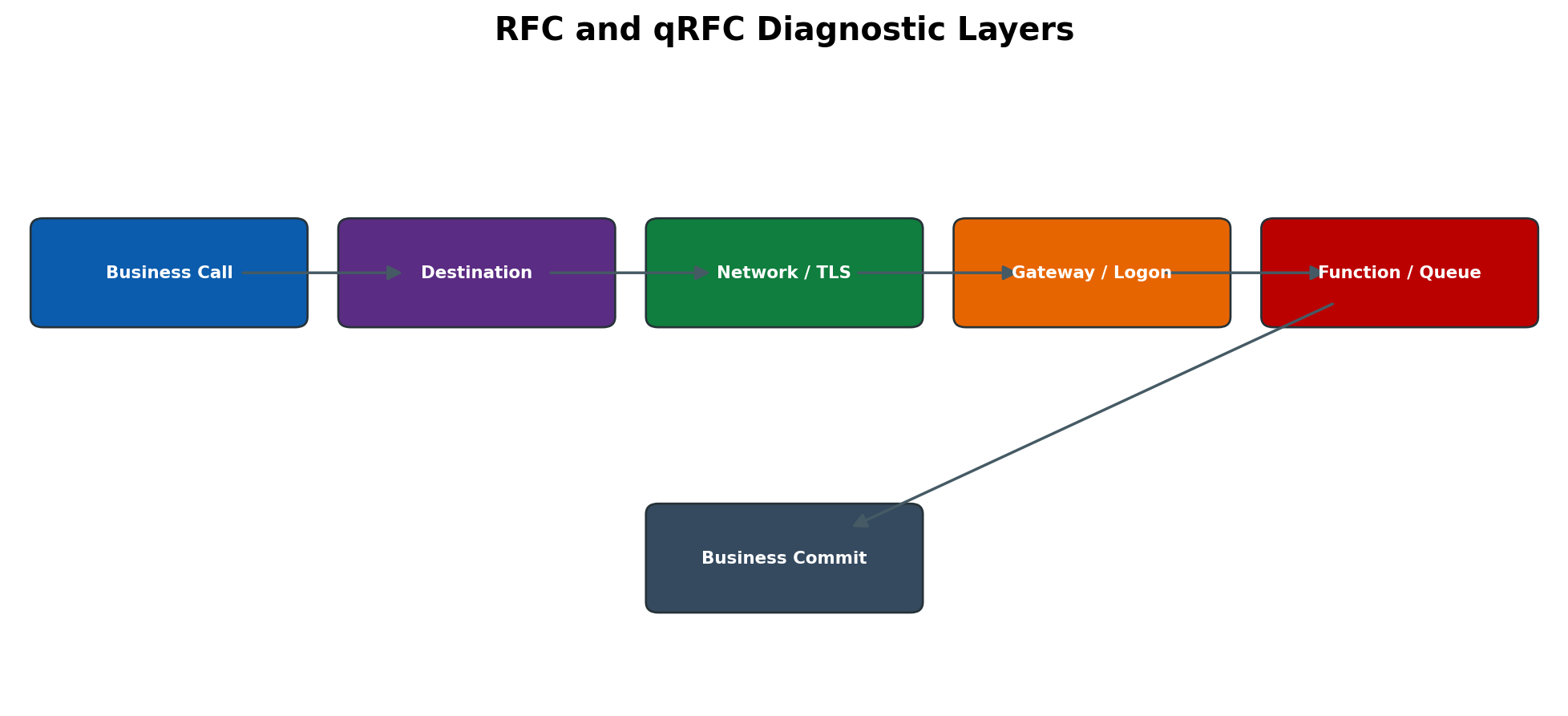
Figure 9.7 RFC and qRFC diagnostic layers
Certificate and Trust Diagnosis
After certificate renewal, separate endpoint identity, certificate chain, validity, trust, hostname/SNI and application authentication. STRUST shows PSEs, certificate list and validity, but the relevant PSE depends on the communication path. Importing a server certificate into an unrelated PSE changes nothing; importing a leaf without its required issuer chain can leave validation broken.
Correlate SM59 tests with SMICM/ICM or gateway evidence and the remote endpoint. Check Not Before/Not After in a common time zone, subject alternative names, issuer chain, PSE assignment, client-certificate requirement and whether the service/process reloaded the changed PSE. Do not disable verification as a production workaround. Restore the previous approved certificate/trust state only when it remains valid and rollback is authorized.
SAP Note Lifecycle and Transport Control
An SAP Note is not automatically applicable because its symptom looks similar. Verify product component, release, support-package level, software-component version, language, prerequisite and referenced Notes, correction validity, manual activities, side effects and whether the Note is obsolete or included in a later support package. Read the complete Note in the current support portal and capture the version/date used for the decision.
SNOTE downloads and evaluates correction instructions for supported ABAP Notes. Typical flow is SNOTE → Download SAP Note → display processing status/prerequisites → Implement SAP Note → review objects and transport → complete documented manual activities → test. Screens and download mechanisms vary by release and connectivity. Conflicts, modified objects or missing prerequisites need developer/application ownership; do not force an implementation.
Rollback is Note-specific. “Reset SAP Note implementation” may reverse correction-instruction changes only when supported; it may not reverse manual customizing, database conversion, generated objects or business data created afterward. Preserve pre-change versions, transport identifiers, manual activities and a technically proven backout. Import and test through the landscape according to change control rather than applying independently in production.
Safe Recovery and Exit Criteria
Recovery is not the same as root-cause correction. Restarting a process, repeating an LUW, releasing a queue or rerunning a job can restore service while leaving the trigger unchanged. Before action, preserve evidence, confirm the dependency is healthy, identify duplicate/business-posting risk, obtain application ownership, define rollback and select a small controlled recovery unit.
Close technical recovery only when the business transaction is reconciled, new work flows, backlog drains at an expected rate, no fresh dump/log/trace error appears, downstream systems confirm receipt, monitoring remains stable for an agreed observation window and ownership accepts the result. Record what was not validated and create follow-up problem/change records.
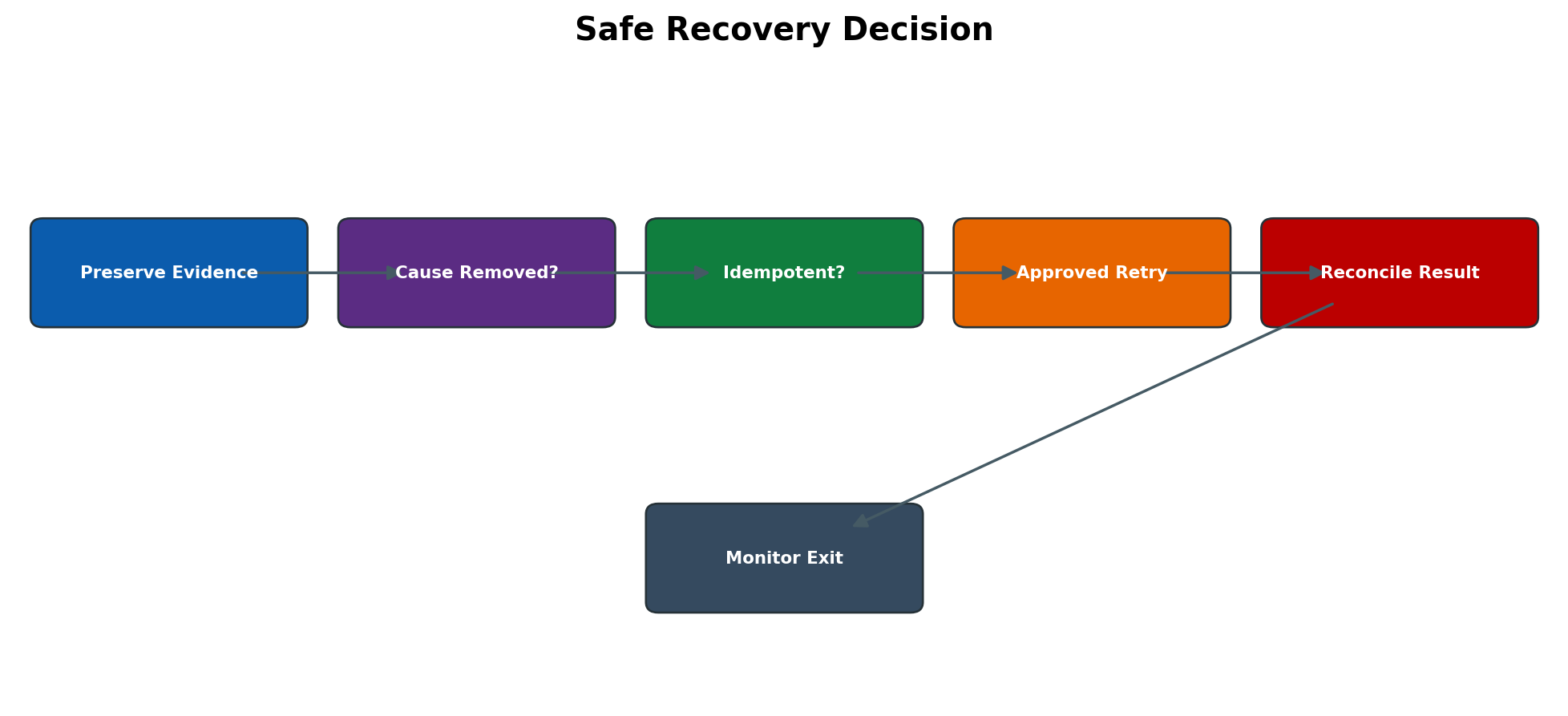
Figure 9.8 Safe recovery decision
Expanded Operational Procedures
Build an Incident Evidence Package
- 1. Record SID/client, system role, SAP/software component and kernel where relevant, affected business process, exact action, expected versus actual result, scope, impact, first failure, last success and time zone.
- 2. Capture the original message text and identifiers. Reproduce only if safe; record whether every user, one client, one instance, one destination or one data set is affected.
- 3. SM21 → exact incident window → preserve relevant events. ST22 → open the first representative dump. SLG1 → use the owning application object/subobject and external ID where known.
- 4. Collect dependent evidence: SM37 job and step/log/spool; SM13 update; SM12 lock; SM58 TID; SMQ1/SMQ2 queue; SM50/SM66 process; ST11 component trace; database/OS/middleware event.
- 5. Build a UTC-normalized timeline distinguishing observation, hypothesis, action and result. Link every proposed cause to evidence and list contradictory facts.
- 6. Redact secrets and personal/business data, record checksums or file names as required, store through the approved ticket/evidence channel and state retention/owner.
Analyze an RFC Failure End to End
- 1. Identify synchronous, tRFC or qRFC behavior; sender, receiver, destination, function/interface, exact timestamp, TID/queue and business document. Stop repeated manual retries.
- 2. SM59 → open destination → verify target, type, gateway/server, logon/security and timeouts without exposing credentials → run only the appropriate connection/logon test.
- 3. For tRFC use SM58; for qRFC use SMQ1 outbound and SMQ2 inbound. Open the oldest failed LUW and record status, error, function and retry history.
- 4. Check SMGW/gateway trace, ST11, SM21 and receiver-side application/system logs at the same time. For HTTP/TLS-backed paths, correlate ICM/SMICM and STRUST evidence.
- 5. Correct the first failed layer: DNS/network, certificate chain, gateway rule/registration, credentials/authorization, receiver availability, function error or application data.
- 6. With application approval, retry one LUW/queue unit. Reconcile the business object at sender and receiver, then release controlled backlog and monitor throughput/errors.
Recover a Stuck qRFC Queue Safely
- 1. SMQ1 or SMQ2 → filter the exact queue/destination and open the queue. Preserve queue status, first failing LUW, function, timestamp and error; note later blocked LUWs.
- 2. Determine whether STOP is administrative, RETRY is scheduled, SYSFAIL is application failure or the destination/scheduler is unavailable. Confirm status meaning in the installed release.
- 3. Correlate receiver logs, dumps, application log, SM59 and infrastructure evidence. Remove the root dependency before queue action.
- 4. Ask the business/application owner whether processing is ordered and idempotent and whether the first LUW may already have partially posted. Do not delete it to free later entries.
- 5. Use the supported activate/unlock/execute action for one controlled LUW or queue after authorization. Observe receiver commit and queue status.
- 6. Reconcile sequence and document counts, release remaining backlog gradually, monitor queue age/throughput and create a problem record if the failure recurs.
Evaluate and Implement an SAP Note
- 1. Search the current SAP support source using exact error, component, release and support-package level. Read symptom, cause, solution, validity, prerequisites, references, manual activities and attachments.
- 2. System → Status and package/component information → prove applicability. In SNOTE download/display the Note and evaluate processing status, correction instructions and object conflicts.
- 3. Identify prerequisite Notes/support packages and modified/custom objects. Obtain application/development/security approval and define tests, transport route and rollback limitations.
- 4. Implement first in development through SNOTE where supported. Assign the approved transport; complete manual pre/post activities exactly and record them outside the transport if required.
- 5. Perform unit, regression, authorization and interface tests; inspect dumps/logs and object versions. Import through quality/preproduction under change control.
- 6. After production import, execute the defined validation, monitor recurrence and update the case/change record. Reset only when supported and reverse manual activities through an approved backout.
Open a High Quality SAP Support Case
- 1. Select the most specific component and verify contract/system/product assignment. State one concise technical problem and business impact; do not combine unrelated symptoms.
- 2. Provide landscape and version, SID/client role, reproducible steps, expected/actual result, exact timestamps/time zone, first failure/last success, scope and recent changes.
- 3. Attach minimal relevant dumps, logs, traces, job/queue/TID identifiers and screenshots after redaction. Explain each attachment and preserve full evidence internally.
- 4. List troubleshooting already performed, exact outcomes and safe reproduction availability. State workarounds and why impact remains. Set priority according to documented business impact and support rules.
- 5. If remote access is needed, use the approved SAP support connection, named/temporary user, least privilege and bounded time window. Share credentials only through the authorized secure mechanism.
- 6. Maintain an action timeline, answer requests with new evidence, validate proposed correction in lower system where possible, then close only after business confirmation. Disable temporary access and archive the solution.
Complete RCA and Prevent Recurrence
- 1. Separate trigger, root cause, contributing conditions and impact. “Job failed” is an event; ask what technical condition caused it and why controls did not prevent or detect it.
- 2. Construct a timestamped sequence from first change or precursor through detection, response, recovery and validation. Cite evidence for every causal statement.
- 3. Use repeated why/cause-tree analysis across application, configuration, infrastructure, process and people without assigning blame. Record evidence that disproves alternate hypotheses.
- 4. Define corrective action for the defect, preventive action for recurrence, and detective action for earlier alerting. Give each an owner, due date, risk, test and rollback.
- 5. Update monitors, runbooks, certificate/credential calendars, queue/job checks, change templates and knowledge articles. Test the runbook with a qualified operator.
- 6. Measure recurrence, alert lead time, recovery time and backlog/business reconciliation at the next comparable event. Close the problem only after effectiveness review.
| Tool / object | Primary purpose | Minimum evidence | Critical caution |
| SM21 | System log | Exact window, instance, message/severity | Not a complete application audit log. |
| ST22 | ABAP short dump | Runtime error, time, user/server, program, stack/error analysis | One dump may be a downstream symptom. |
| ST11 | Developer traces | Component file, process, timestamp, first error | Trace can wrap and contain sensitive data. |
| SLG1 | Application log | Object/subobject, external ID, time, message | Only applications that write logs appear. |
| SM37 | Background jobs | Job/step, program/variant, log/spool, status/time | Rerun can duplicate business processing. |
| SM13 / SM12 | Updates / locks | Update key/status/error; lock owner/object/time | Delete/repeat only with application confirmation. |
| SM58 | tRFC LUWs | TID, function, destination, error, retry time | Manual execute can duplicate side effects. |
| SMQ1 / SMQ2 | Outbound / inbound qRFC | Queue, head LUW, status, error, sequence | Deletion can break serialization. |
| SM59 / SMGW | RFC destination / gateway | Destination type/test; connection/registration/trace | Test success does not prove business commit. |
| STRUST / ICM | PSE and TLS path | PSE, chain, validity, hostname/time, handshake error | Do not disable validation or import into wrong PSE. |
| SNOTE | SAP Note processing | Note version/status, prerequisites, objects, transport/manual steps | Reset may not undo manual or data changes. |
| SAP support case | Vendor escalation | Component, impact, reproduction, versions, evidence, actions | Use secure transfer and time-bound access. |
Expanded Error and Solution Runbooks
User Error but No ST22 Dump
Symptom: the user sees an error or failed business action, but ST22 is empty. Likely causes: handled ABAP message, application-log error, authorization failure, HTTP/RFC/middleware rejection, frontend issue or failure in another system. Diagnosis: capture exact message ID/time/action; check SLG1, SU53/authorization trace under approved scope, SM21, job/RFC/queue and remote logs. Solution: correct the confirmed layer rather than searching only for dumps. Validation: the same action completes and its business result is present.
Required Dump or Trace Has Expired
Symptom: ticket arrives after ST22 retention or trace rotation. Cause: late reporting or aggressive housekeeping. Diagnosis: check job logs, spool, application logs, monitoring events, backups and peer-system evidence; do not invent the missing cause. Solution: arrange one safe controlled reproduction with narrow trace and preserve immediately. Validation: evidence package contains timestamp-correlated data and retention/alerting is improved.
Trace Becomes Too Large or Noisy
Symptom: filesystem grows or useful events are buried after trace activation. Cause: broad component/user scope, high level or long window. Diagnosis: record file growth and active trace settings. Solution: stop trace, restore original level, secure/rotate using supported procedure and repeat with exact user/process and one action. Validation: filesystem is stable and the reduced trace contains the target event.
SM58 Entries Return After Execute LUW
Symptom: manual execution temporarily clears or recreates failed tRFC LUWs. Causes: destination/receiver still unavailable, logon/authorization failure, application exception or scheduled retry. Diagnosis: open oldest TID and correlate SM59, gateway and receiver logs. Solution: remove the underlying cause and retry one approved LUW. Validation: the LUW disappears, receiver business object exists once and new calls complete.
SMQ1 or SMQ2 Queue Stays in SYSFAIL RETRY or STOP
Symptom: one queue blocks later messages. Causes: application exception, communication failure, scheduler/registration issue or administrative stop. Diagnosis: inspect queue head/status/error and receiver-side evidence. Solution: repair cause; activate or execute through supported action with business approval—never delete merely to unblock. Validation: sequence is preserved, backlog drains and object counts reconcile.
SM37 Job Rerun Creates Duplicate Business Results
Symptom: canceled/failed job is restarted and documents are posted twice. Cause: the first run committed partial packages although final status was canceled. Diagnosis: review job step/log/spool, update/RFC logs and application document keys. Solution: reconcile committed scope and restart only with application-supported restart point/variant. Validation: no duplicate keys, missing package is completed and totals balance.
SM13 Update Is Repeated Unsafely
Symptom: an update error is repeated but produces inconsistent or duplicate results. Cause: update logic or dependent posting partly completed. Diagnosis: inspect update modules/error and corresponding document/lock/log records. Solution: application owner decides supported repeat, correction or document reversal; fix original dump/database/authorization issue first. Validation: update clears and business consistency reports pass.
Stale SM12 Lock Removed but Problem Continues
Symptom: lock is deleted yet users remain blocked or inconsistency follows. Causes: active owner still processing, repeated lock recreation, DB/application lock elsewhere or unfinished update. Diagnosis: identify lock object/argument/owner/time and correlate process, update and business document. Solution: end/repair owner safely; remove only proven orphan through authorization. Validation: business transaction and lock lifecycle are normal.
SM59 Test Works but Business RFC Fails
Symptom: connection/logon test is green but application call fails. Causes: missing function authorization, payload/data error, different technical user/path, timeout, queue serialization, remote application exception or commit failure. Diagnosis: capture real function/TID/queue and receiver log. Solution: correct business-call layer. Validation: actual interface message posts and is reconciled—not only the test.
Certificate Renewed but RFC Still Fails
Symptom: new certificate is visible yet handshake or call fails. Causes: wrong PSE, missing issuer chain, hostname mismatch, Not Before clock issue, peer trust not updated, client certificate mapping or process cache not reloaded. Diagnosis: compare endpoint chain/hostname/time with STRUST PSE and handshake trace. Solution: install complete approved chain in correct trust context and reload/restart only as documented. Validation: handshake, SM59 and real business call all succeed.
SNOTE Says Note Cannot Be Implemented
Symptom: Note is not applicable, has prerequisite/conflict or correction cannot be imported. Causes: wrong release/SP, Note already included/obsolete, missing prerequisite, modified object or incompatible correction. Diagnosis: compare installed component/version and SNOTE log/object status with current Note text. Solution: use the correct successor/support package/prerequisites or resolve modification with development ownership. Validation: clean lower-system implementation and regression test.
SAP Support Requests More Information
Symptom: case cycles through requests for logs, reproduction or business impact. Cause: incomplete component/version/timeline or attachments without explanation. Diagnosis: compare case against the evidence contract. Solution: provide one structured update with exact timestamps/time zone, steps, versions, impact, recent changes, identifiers, annotated attachments and remote-access window. Validation: SAP can reproduce/analyze without another basic-data request.
Practical Scenario
Outbound RFC Fails After a Certificate Change
Shortly after a planned certificate renewal, an outbound HTTPS or secure RFC integration begins failing. Business messages accumulate, repeated retries do not succeed and no application transport was moved. The BASIS engineer freezes uncontrolled retries, records the first failure time and affected destination, preserves SM59 test output, queue or tRFC status and relevant ICM, gateway or security traces.
The investigation confirms a certificate-chain or trust mismatch on one side of the connection. The team validates the new chain and endpoint identity, updates the approved trust configuration, tests the destination, releases a small controlled message set and then processes the backlog in the required order.
Resolve the integration safely:
- Stop uncontrolled retries and preserve queue order.
- Record change completion and first failure timestamps.
- Capture SM59 result and affected destination.
- Preserve queue or SM58 state and relevant security or communication trace.
- Validate endpoint identity, certificate chain, validity and approved trust.
- Correct the owning trust configuration through change control.
- Test connectivity and one controlled business message.
- Release backlog in order and reconcile end-to-end processing.
Expected Results and Validation
The connection and authorization tests succeed, new messages complete, queued items are processed without duplicates or sequence errors, monitoring returns to normal and the incident timeline links the certificate change, technical evidence, recovery action and preventive certificate-expiry control.
Summary
Reliable SAP troubleshooting is evidence-led and business-safe. The administrator establishes scope and a time-normalized timeline, correlates application identifiers across logs, dumps, traces, RFC or queue records and infrastructure, proves the first failed layer, and recovers only after duplicate and sequence risk are understood. SAP Notes and vendor escalation follow the same discipline: applicability, controlled change, secure evidence, validation, rollback limits and monitored exit criteria.
Key Takeaways
Structured troubleshooting protects evidence, business consistency and change control while reducing recovery time. Scope and timestamp decide which logs and tools matter.
SAP Notes and vendor support are most effective when applicability, reproduction, system context and prior analysis are clear. A resolved incident becomes lasting improvement only after root cause and preventive actions are completed.
Retain these support habits:
- Protect the system and evidence before changing anything
- Write tickets with time scope impact and reproduction
- Use the first causal error rather than the last secondary symptom
- Repeat jobs updates and queues only after consistency checks
- Treat SAP Notes as controlled code changes
- Close incidents after technical and business validation
Content Coverage Validation
This chapter independently covers troubleshooting method, incident intake, evidence, layered diagnosis, recovery, SAP Notes and SNOTE, SAP support escalation, root-cause analysis, runbooks, handover, security and production controls.
The organization, wording, procedures, tables and diagrams are original. Legacy SAPNet concepts were translated into a current support-operations workflow without copying source figures, screenshots or text.