
BASIS - Week 1 Foundations Architecture and Core Operations / SAP Data Archiving and Data Lifecycle Management
Result :
SAP Data Archiving and Data Lifecycle Management
Introduction
Purpose
This chapter explains how SAP BASIS and application teams control data growth through archiving, retention and technical housekeeping. It connects archiving objects, SARA, write and delete processing, archive storage, read access, ILM controls and recovery evidence into one practical lifecycle.
The key principle is that archiving is not the same as deletion. Data must be selected according to business rules, written completely, stored safely, verified, deleted from the database only through the supported program and remain retrievable for its required retention period.
Who Should Read This Chapter
The chapter is intended for SAP BASIS administrators, application owners, data-volume-management teams, database and storage engineers, records managers, auditors and project members who plan or operate archiving and housekeeping.
Learning Objectives
After completing this chapter, the reader should be able to explain archiving objects and phases, operate SARA, plan selection and sequence, validate archive files before deletion, configure read access, distinguish residence from retention, understand ILM controls and diagnose common write, delete, storage and retrieval failures.
The practical outcomes are:
- Select supported archiving objects from data-growth evidence
- Operate preprocessing write delete and postprocessing phases
- Verify files and storage before database deletion
- Configure and test retrieval with archive indexes
- Apply retention legal-hold and ILM controls
- Diagnose write delete storage and read failures safely
Scope and Version Context
Concepts apply broadly to AS ABAP and SAP S/4HANA, but available objects, preprocessing steps, storage interfaces, ILM functions and database behavior depend on release and application.
Always use the current object documentation, legal requirements and approved retention schedule. Test in a representative non-production environment and never delete database rows directly as a substitute for archiving.
Data Lifecycle Administration
Why Data Lifecycle Matters
Operational data grows through transactions, logs, interfaces and technical history. Uncontrolled growth increases backup size, recovery time, storage cost and the duration of upgrades or system copies. It can also make reports and administration slower.
Lifecycle management keeps required data available while moving eligible historical data out of the online database under controlled rules.
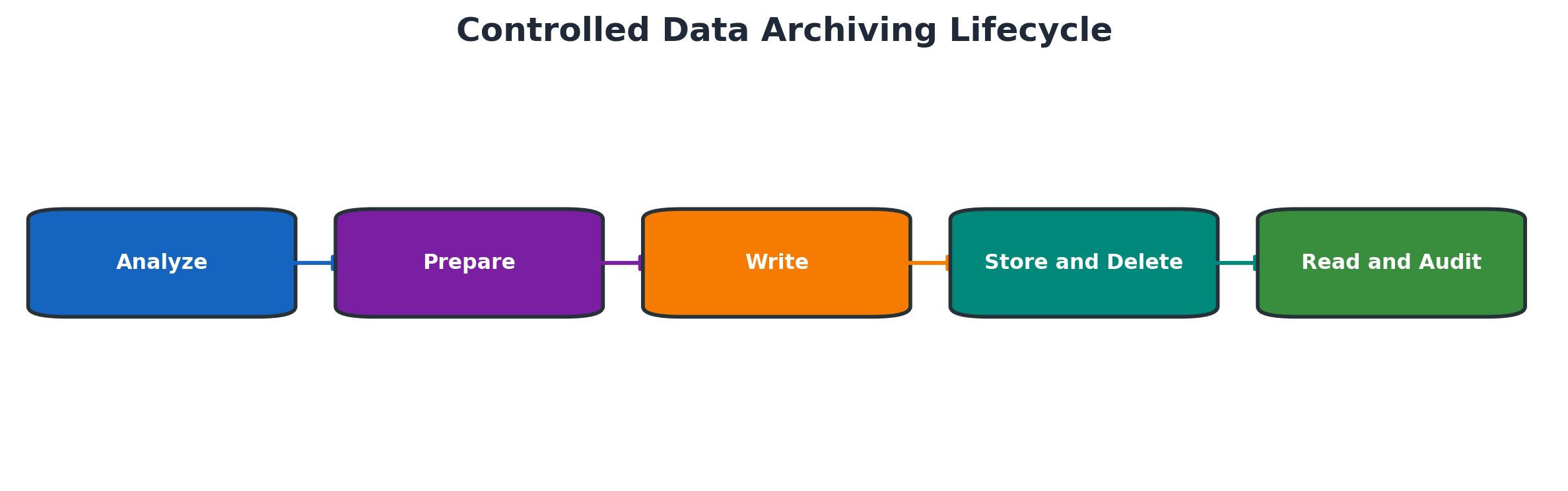
Figure 7.1 Controlled data archiving lifecycle
Data Growth and Business Value
Not every large table is an archiving problem. First identify which business objects create the growth, how frequently old data is read, whether legal retention applies and whether the application offers a supported archiving or deletion object.
Measure table size, row growth, document age and dependency data. A one-time snapshot is less useful than a trend.
Evaluate benefit and constraints before selecting an object.
| Input | Question | Evidence |
| Growth trend | Which tables and business objects drive growth? | Table and row history |
| Business age | How old is eligible completed data? | Document dates and status |
| Read frequency | How often is historical data accessed? | Usage and business interviews |
| Retention | How long must data remain available? | Approved retention schedule |
| Recovery | Can files and indexes be restored and read? | Tested recovery evidence |
Roles and Responsibilities
Application owners define completion criteria, business residence and validation. BASIS coordinates jobs, files, storage and monitoring. Database teams assess growth and space. Records, legal and privacy teams define retention and holds. Security governs access to archive administration and content.
Evidence and Change Control
Each production cycle needs approved object, selection, date range, variants, job window, storage destination, recovery approach and validation owner. Retain session logs, file identifiers, counts, errors and business sign-off.
SAP Data Archiving Fundamentals
Archiving Objects
An archiving object groups the programs, tables and rules needed to archive a business object. It can include preprocessing, write, delete, read, reload or postprocessing functions depending on the application.
Use object documentation to understand prerequisites and dependent objects. Table size alone does not identify the correct object.
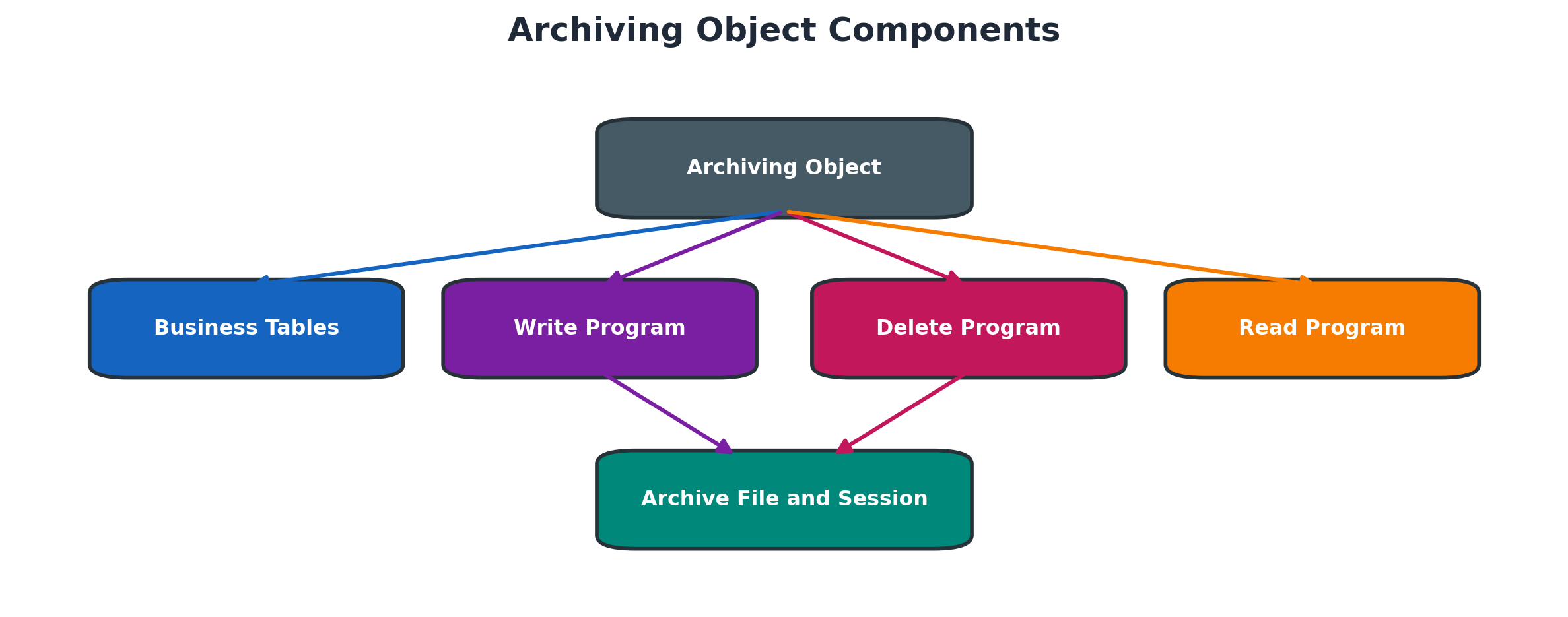
Figure 7.2 Archiving object components
Write Delete and Read Phases
The write phase reads eligible database records and creates archive files. The delete phase uses successfully written files to remove corresponding online records through the supported application logic. Read functions retrieve archived information without restoring it to normal online tables.
Separating write and delete protects data: a database record should not be removed unless the archive file is complete, accessible and eligible for deletion.
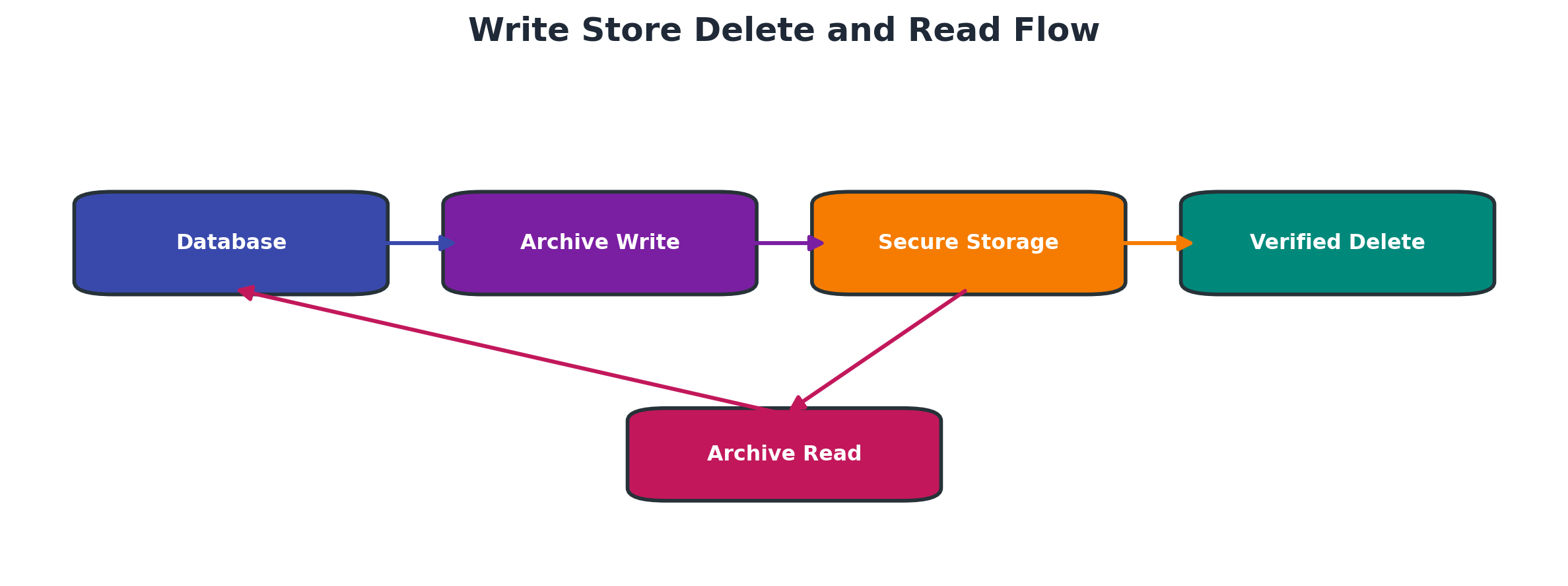
Figure 7.3 Write store delete and read flow
Archive Files and Sessions
SARA records archiving sessions and file status. One session can create multiple files. File size and limits depend on configuration and release. Session status must be interpreted before starting follow-up processing.
Customizing and Technical Prerequisites
Prerequisites can include document completion, residence time, application status, preprocessing, customizing, logical file paths, storage repository, archive information structures and authorizations. Missing prerequisites should be resolved before a production cycle.
Archiving with SARA
SARA Administration
SARA is the central transaction for application data archiving. Select the archiving object, review object-specific documentation and configuration, create controlled variants and monitor management information.
Object-specific screens differ. Do not copy selection variants between environments without checking dates, organizational values and file settings.
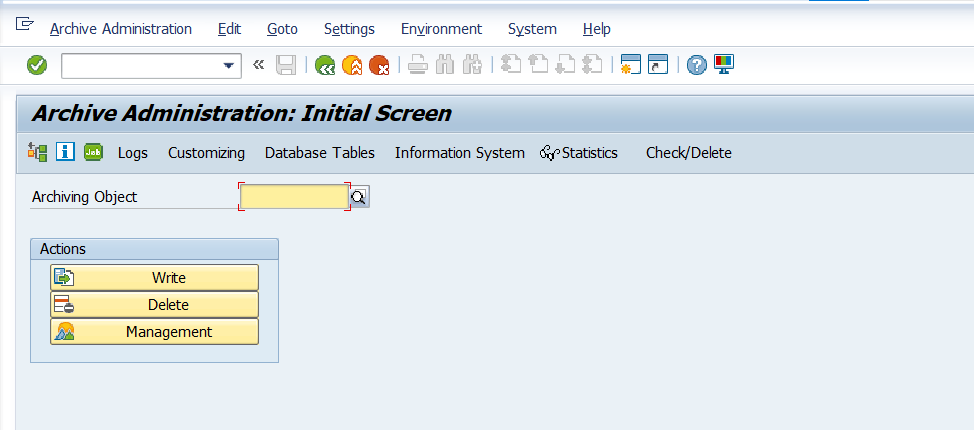
Screenshot 7.1 - SARA Object Administration
Preprocessing and Selection
Some objects require preprocessing to mark, summarize or prepare eligible records. Selection should start with a small, old, completed population whose business dependencies are understood.
Use residence rules and business status rather than a date alone. Open documents, incomplete flows and legal holds must remain online or protected as designed.
Selection must combine technical and business eligibility.
| Check | Why it matters | Validation |
| Document status | Open processes should not be archived | Only completed eligible records selected |
| Residence time | Recent data may need to remain online | Cutoff follows approved rule |
| Dependencies | Related objects can block or lose navigation | Sequence and prerequisites confirmed |
| Legal hold | Held data must not be destroyed | Hold population excluded or protected |
| Variant scope | Wrong company or dates can affect large populations | Peer-reviewed production variant |
Write Phase
The write program creates archive files and logs object counts, files and errors. Monitor background job, spool, application log, filesystem or repository capacity and file status.
A finished job requires validation of counts and file accessibility. Do not infer success solely from SM37 status.
Viewing and Validating a SARA Write Session
- Log on to the SAP ABAP system.
- Execute transaction SARA.
- Enter the required archiving object.
- Select Management from the application toolbar.
- Locate and select the completed write session.
- Open the session details.
- Verify the session status, write job, file count, object count and timestamps.
- Review the job log and spool for errors or warnings.
- Confirm that the archive files were created and are accessible.
- Record the validation results.
The delete program processes verified archive files and removes matching database records. Run it only after storage and recovery conditions are met. Monitor deletion logs, database resources and application locks.
A failed delete must be diagnosed from session and job evidence. Do not manually mark files or remove records to force completion.
Use this delete gate:
- Confirm write session completed without unresolved errors.
- Verify every intended archive file exists and is accessible.
- Confirm required storage transfer and integrity status.
- Reconcile written object counts with session logs.
- Confirm retention and legal-hold rules allow database removal.
- Start the supported delete program with approved scheduling.
- Monitor job, locks, database load and delete log.
- Validate counts, online absence and archived retrieval.
Postprocessing and Indexing
Postprocessing can update statistics, create archive indexes or complete object-specific cleanup. Archive Information System structures may need building so business users can find archived documents efficiently.
Accessing Archived Data
Archive Information System
The Archive Information System uses archive information structures to index selected fields from archived files. Structures must be activated and filled according to object and retrieval needs.
Archive Explorer and Indexes
Archive Explorer can search available archive indexes. Missing results may mean the file is absent, the information structure was not filled, the selection is wrong or application authorization blocks access.
Application Read Programs
Many applications provide archive-aware display transactions or reports. Retrieval testing should use known archived documents and confirm fields, attachments, relationships and performance.
Document Relationships and Retrieval
A business document may depend on related objects archived separately. Plan sequences and indexes so navigation remains meaningful. Document the expected user route for online and archived records.
Storage and Retention
Content Repositories and Archive Storage
Archive files may remain on a controlled filesystem temporarily or be stored through supported content or archive interfaces. The destination must provide availability, integrity, retention and recovery suitable for the data class.
Filesystem and Storage Controls
Logical file names and paths should resolve consistently on relevant hosts. Monitor capacity, permissions, mounts and transfer status. Protect files from unauthorized modification or deletion.
Retention Rules and Legal Holds
Residence time describes how long data remains online before archiving eligibility. Retention time describes how long records must be preserved before final disposition. A legal hold can suspend normal destruction for specified data.
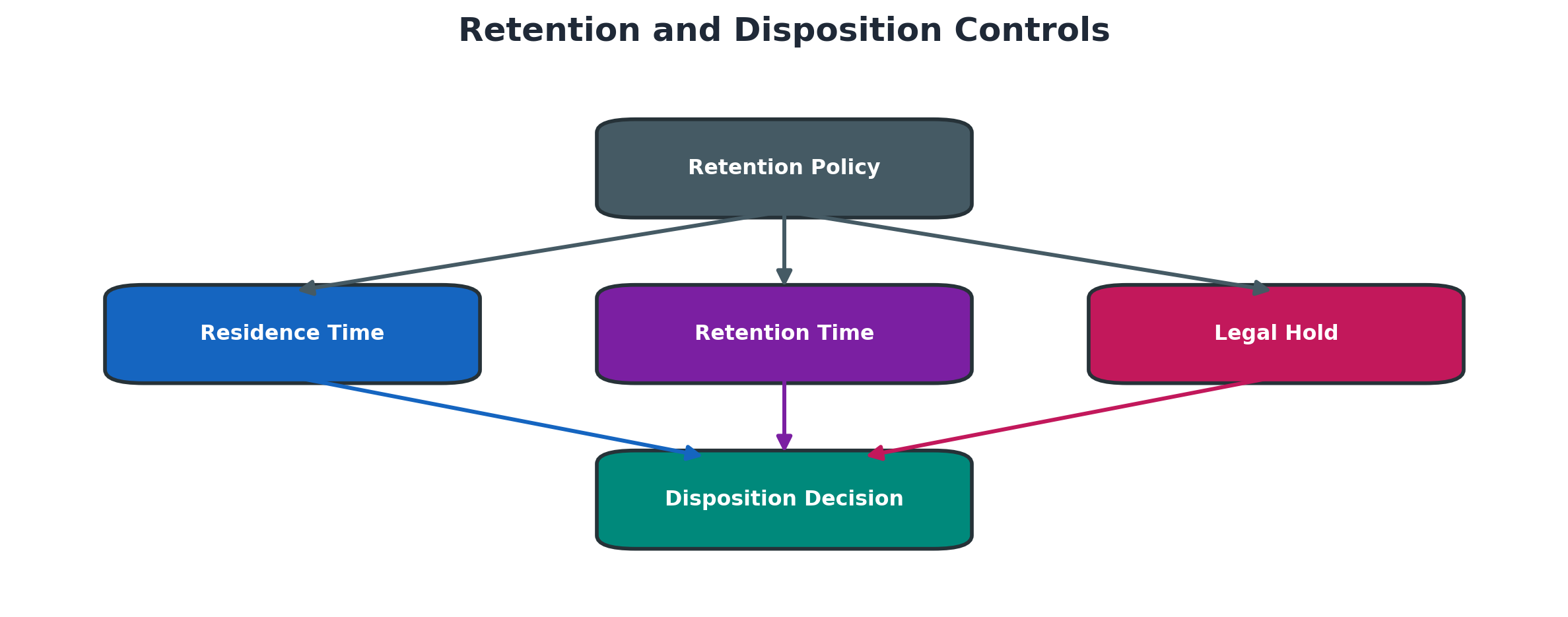
Figure 7.4 Retention and disposition controls
SAP Information Lifecycle Management
SAP ILM extends archiving with policies, retention management, legal holds and controlled destruction where supported. Policy design requires legal and records-management ownership, not only technical configuration.
Note: ILM policy screens depend on the activated SAP ILM components, configured audit areas, ILM objects and user authorizations. Policy configuration should be reviewed only in an authorized training or non-production system.
Planning and Performance
Data Analysis and Object Selection
Use supported volume analysis, table trends and application knowledge to rank objects by benefit and feasibility. Estimate eligible rows, archive-file volume, database reduction and future growth.
Dependencies and Archiving Sequence
Business objects can reference one another. Follow object documentation and application sequence so predecessor or dependent data remains consistent and retrievable.
Batch Windows and Parallelism
Size the write and delete workload from tested throughput, database load, storage performance and business windows. Parallelism can improve duration but may increase locks, I/O and database pressure.
Database Space Reorganization
Deleting rows does not always return storage to the operating system. Database statistics, compression and reorganization are separate database activities requiring platform-specific planning.
Testing and Business Validation
Test selection, runtime, file creation, storage, deletion, read access, reporting and recovery. Business owners should validate both expected archived records and records that must remain online.
Housekeeping and Technical Data
Application Logs and Job History
Application logs and job history need retention-driven reorganization. Preserve evidence required for support, audit and business operations before cleanup.
Spool TemSe and Batch Input
Spool, TemSe and batch-input data use their own standard cleanup tools. They are housekeeping areas, not necessarily application archiving objects.
IDocs Workflows and Interface Data
IDocs, workflow items and interface logs often have completion and dependency prerequisites. Archive or delete only with the application-specific supported program and reconciliation.
Basis Table Growth Review
Review large Basis and application tables as trends. Confirm the owning component and supported mechanism before acting; generic SQL deletion can damage referential and audit integrity.
Detailed Technical Reference
ADK Architecture and Archive Object Definition
The Archive Development Kit provides the technical framework used by many classic SAP data archiving objects. An archiving object groups the application tables and programs required to select, write, delete and read a consistent business object. Transaction AOBJ displays or maintains object definitions depending on authorization and release. The definition can include write, delete, reload, preprocessing, postprocessing and read programs plus customizing and exit points. Production administrators normally analyze the definition and execute through SARA; they do not change SAP-delivered definitions without an approved development requirement.
An archiving object is not identical to a database table. One business document may span header, item, status, change, relationship and application-specific tables. Deleting a large table directly would break document consistency and supported read access. The object’s application checks decide eligibility, for example business completion, residence time, settlement, document flow, legal requirements and dependent-object status. A technically old record is not necessarily archivable.
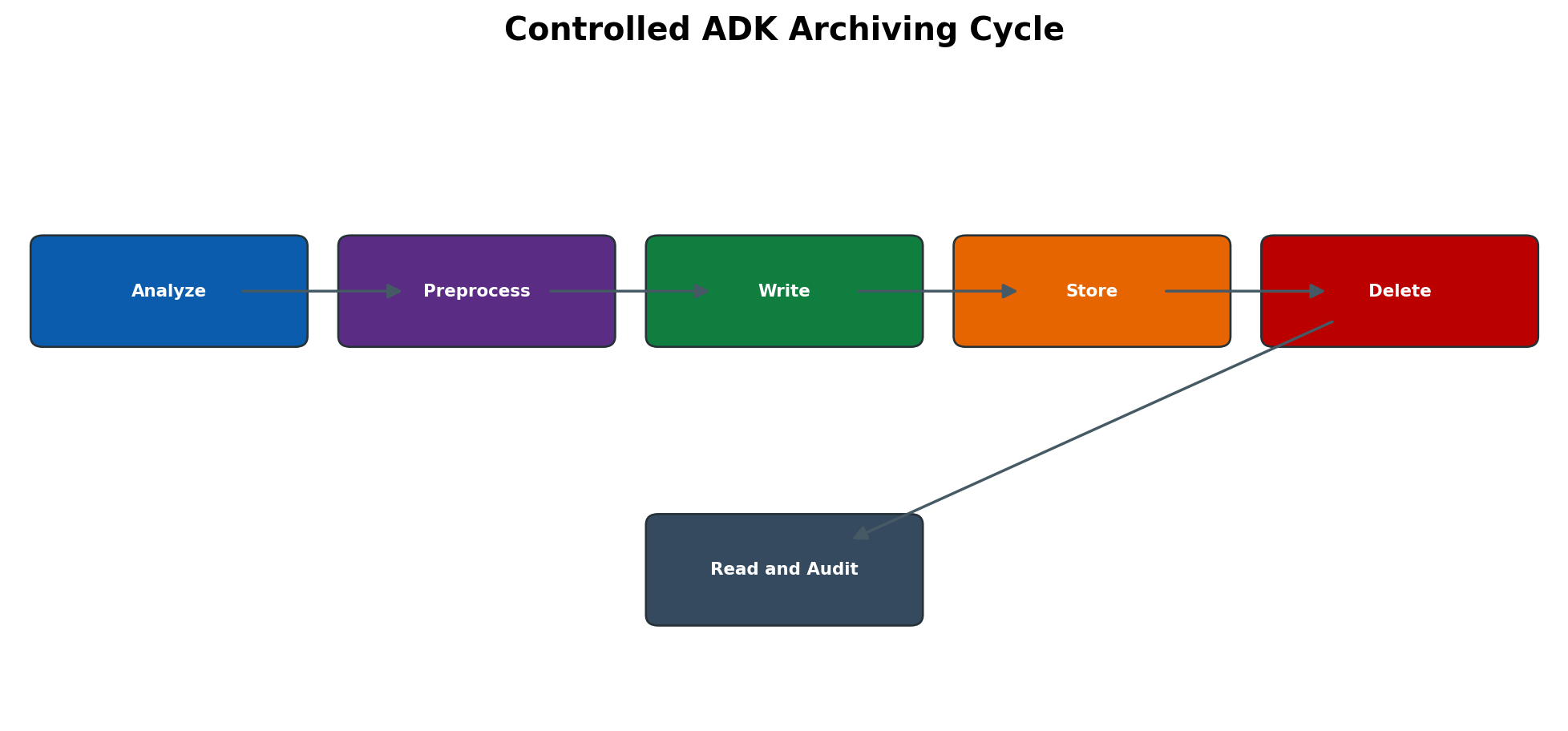
Figure 7.6 Controlled ADK archiving cycle
Core Technical Objects
- SARA is the central administration transaction for object-specific archiving customizing, write, delete, storage and management functions.
- AOBJ provides technical information about an archiving object and its assigned programs.
- SARI administers the Archive Information System and archive infostructures used for indexed access.
- FILE and logical file/path configuration may participate in archive file placement when the architecture uses filesystem paths.
- SM37 supplies job status and job logs; ST22, SM21 and application logs correlate program or infrastructure failures.
- Archive administration tables such as ADMI_RUN and ADMI_FILES are diagnostic references whose exact fields and related tables are release-dependent; never maintain them directly.
SARA Customizing Jobs Sessions and Statuses
SARA separates customizing from execution. Object-specific customizing defines technical settings such as logical file name/path, archive-file size, delete-job behavior, content repository or storage integration, variants and sequencing. Execution functions schedule background jobs. The archiving session connects write files, delete activity and administrative status. A green write job alone does not authorize deletion; verify file completeness, storage status, session log and business sample.
Typical flow is: create an approved write variant, schedule the write job, inspect job and archive logs, store the completed file if storage-before-delete is required, schedule deletion only for verified files, then build indexes or postprocess as designed. Some objects require preprocessing before write or postprocessing afterward. Some support interruption/restart behavior, while others require application-specific recovery. Follow object documentation rather than assuming every object has the same buttons or sequence.
Status Interpretation
- Write job finished: selection and archive-file creation ended technically; business completeness and file readability still require validation.
- File stored: the configured content repository acknowledged storage; recovery and retrieval must still be tested.
- Deletion completed: eligible database records associated with the archive file were deleted through the object delete program.
- Interrupted/incomplete session: preserve logs and files; determine the last consistent phase before restart or cleanup.
- Accessible/indexed: read program or Archive Information System can locate the archived object using the required index/infostructure.
Archive File Naming Storage and Verification
Archive files are controlled application artifacts, not ordinary temporary files. Their administrative record, logical name, physical location, size, session, storage status and checksum or repository evidence must remain consistent. Manual rename, move or OS deletion can make an otherwise valid archive inaccessible or can leave SAP administration pointing to missing content. Use supported storage and archive-management functions.
Storage before deletion reduces the risk that the only archive copy exists on an application-server filesystem. The content repository must be reachable from the executing server, support required retention and immutability controls, and be included in backup and disaster-recovery tests. A successful HTTP/storage return code is not enough: sample retrieval through SAP must prove that the stored file can be found, authorized, opened and interpreted.
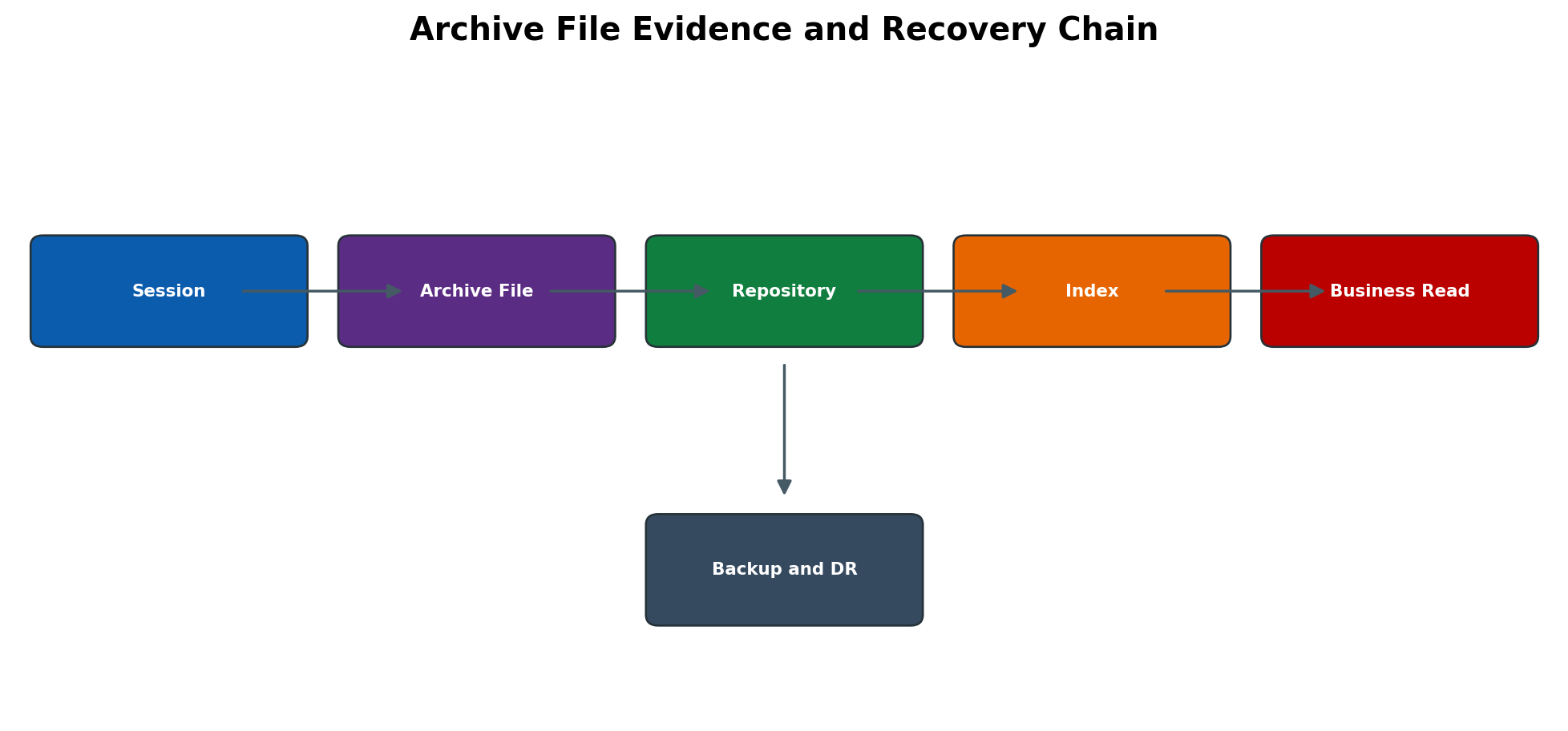
Figure 7.7 Archive file evidence and recovery chain
Archive Information System and Infostructures
The Archive Information System builds searchable index structures over archived data. An archive infostructure is based on a field catalog and determines which key fields are available for selection. Activating a structure defines it for use; filling it processes relevant archive files and creates index entries. Indexes improve search but consume database space, so only fields required for audit and business retrieval should be selected.
SARI is used to manage infostructures, activation, fill status and related administration. Archive Explorer can display indexed data according to object and structure. A read failure can therefore originate in four different layers: archive file missing/unreadable, repository unavailable, infostructure absent/unfilled, or application read program/authorization issue. Rebuilding an index cannot repair a damaged archive file.
ILM Objects Policies and Legal Holds
SAP Information Lifecycle Management adds policy-driven retention and destruction capabilities. Depending on product and release, ILM objects, audit areas, policies, retention rules, residence rules and storage systems determine when data may be archived, retained or destroyed. The technical team implements approved legal/business rules; it must not invent retention periods. Rule evaluation depends on time references and condition fields that must be tested with boundary dates.
A legal hold overrides normal destruction for data within its scope. Holding data is not the same as retaining every related artifact forever; scope, start/end, responsible legal authority and release procedure must be documented. Destruction is irreversible and must be separated from routine archiving authorization. Before executing destruction, run simulation where supported, review the selected population, confirm holds and preserve audit evidence.
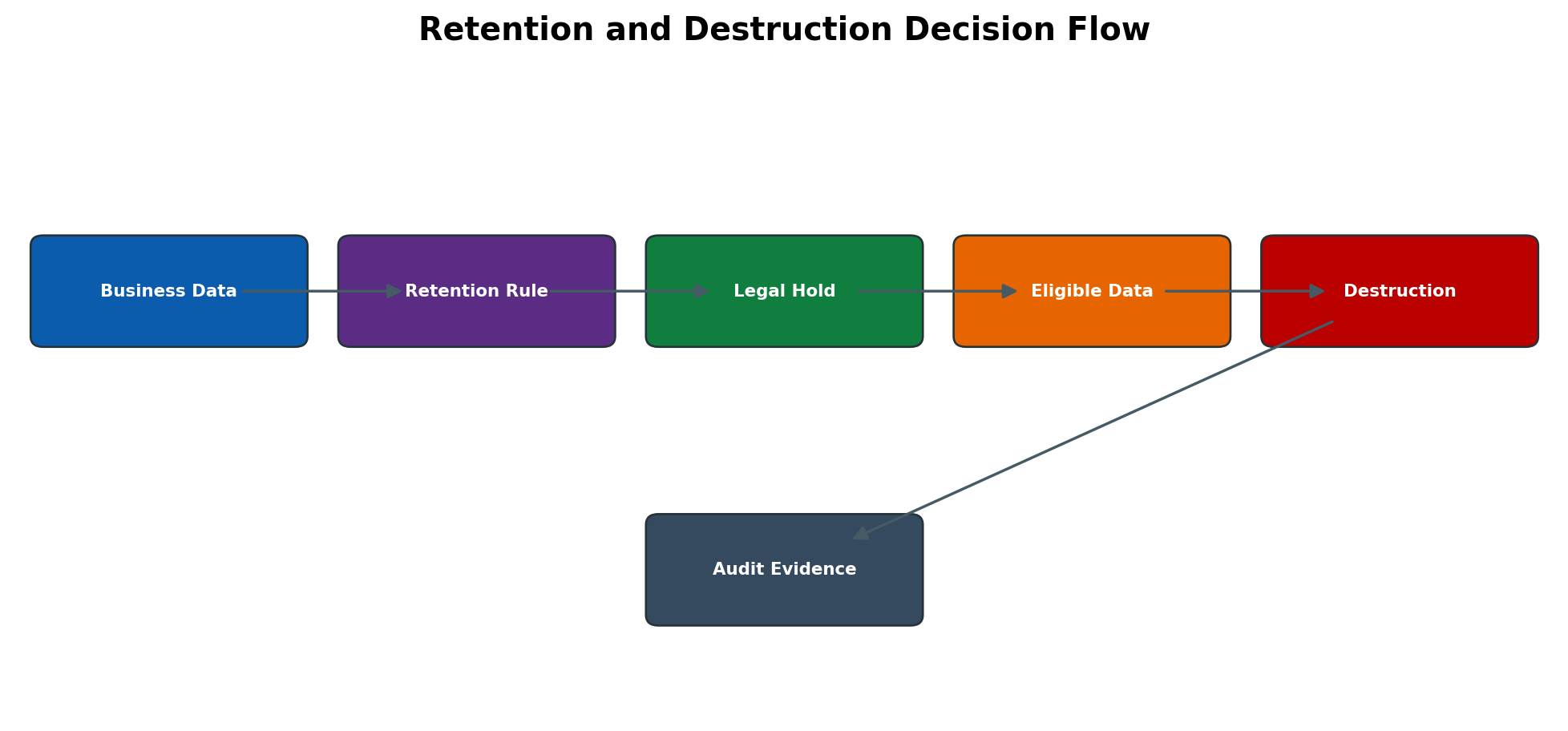
Figure 7.8 Retention and destruction decision flow
Database Reorganization and Space Reclamation
Archiving reduces logical row counts only after delete programs commit successfully. It does not automatically shrink database files or reduce allocated storage. The database may reuse freed blocks internally, and statistics, indexes or table partitions may need release-appropriate maintenance. HANA, Oracle, SAP ASE and other databases have different reclaim, partition and reorganization options. BASIS and DBA teams must measure before and after using database-native and SAP monitoring tools.
Do not judge success only by filesystem size. Validate application table row counts/growth trends, used space, free reusable space, index size, backup volume and query performance. Reorganization can require extra temporary space, logging, runtime and exclusive locks, so it is a separate planned change after archiving—not an automatic last step in the SARA job.
Archiving Authorization and Sensitive Data
Archiving authorizations must separate configuration, write, delete, storage, read and ILM destruction where feasible. Archive files contain the same sensitive business and personal data as the source database and may bypass row-level application views if access is too broad. Protect content repositories, filesystem paths, index tables, read programs, exports and backup copies with least privilege, encryption and audited administration.
A user able to read archived documents may see historical data that current organizational roles no longer permit. Test authorization behavior through the actual archive read transaction and representative organizational values. Mask sensitive content in screenshots and tickets. Never attach archive files to ordinary e-mail or support cases unless approved secure transfer is used.
System Copy Upgrade and Disaster Recovery Impact
A system copy can reproduce archive administration records without copying the external repository or filesystem content. It can also point a refreshed non-production system to a production repository. Post-copy controls must validate logical paths, repository destinations, credentials, network routes, read access and prevention of destructive operations against production content. Use isolated test repositories where required.
Before an upgrade, identify active archiving sessions, object-specific changes, custom write/read programs, infostructures and repository interfaces. Complete or safely pause cycles and test representative reads after upgrade. Disaster recovery must restore the SAP database state and archive repository to a mutually consistent point. A database restore without matching archive content can make deleted business data unavailable.
Expanded Administration Procedures
Perform an Archiving Readiness Assessment
- 1. Identify top-growing application tables using database/SAP growth evidence and map them to business processes. Do not select an archiving object from table name alone.
- 2. Use application documentation and AOBJ/SARA to identify the supported archiving object, dependent objects, preprocessing requirements, write/delete/read programs and restrictions.
- 3. Meet business, legal, records, security and application owners to approve residence/retention, closed-document criteria, legal holds, retrieval SLA and evidence retention.
- 4. Measure candidate volume with analysis or test-mode programs where supported. Define variants by organizational scope and time window; start with a small representative package.
- 5. Validate content repository, logical file/path, storage-before-delete setting, backup/DR, SARI/index plan, authorizations, job window, spool/log retention and monitoring.
- 6. Document rollback/recovery limits. Before deletion, rollback means stopping after write or restoring verified files; after deletion, recovery depends on reload support or full application/database recovery and must not be assumed.
Run a Controlled Write Store and Delete Cycle
- 1. SARA → enter approved archiving object → Customizing. Display and verify logical file/path, file size, storage, delete settings and object-specific controls; do not change production during execution.
- 2. Choose Write → maintain/select approved variant → Start Date → schedule in a controlled window. Record generated job name and session.
- 3. SM37 → monitor the exact write job → open Job Log and Spool. In SARA Management, verify session status, file count, record/object totals and absence of incomplete files.
- 4. If storage-before-delete is required, store the files through the configured repository function. Confirm repository acknowledgement and perform a sample read from stored content.
- 5. SARA → Delete → select only the verified session/files → schedule delete program. Monitor job, archive log, database errors and application locks.
- 6. Reconcile written versus deleted objects according to object logic. Test online data for recent records and archive retrieval for sampled old records. Record performance, space reuse and exceptions.
Build and Validate an Archive Infostructure
- 1. Identify required business search fields and approved archive object. Avoid selecting unnecessary sensitive fields or creating an index almost as large as the source data.
- 2. SARI → choose the object/field catalog → define or select the infostructure → activate according to change and transport rules.
- 3. Select archive files/sessions and start the fill function as a background job. Monitor SM37 and SARI administration log.
- 4. Reconcile processed files, index records and fill status. Investigate excluded or failed files before declaring completeness.
- 5. Use Archive Explorer or the application read path with known archived document keys. Test permitted and prohibited users.
- 6. Measure index growth and query response. Document ongoing fill/rebuild procedure and include the structure in upgrade and recovery tests.
Recover from an Incomplete Archiving Session
- 1. Stop automatic successor/delete scheduling and preserve SARA, SM37, spool, system/application and repository logs. Record object, session, file, job and timestamps.
- 2. Determine the last completed layer: preprocessing, write file creation, file close, storage transfer, database delete, postprocessing or index fill.
- 3. Check SARA Management for incomplete/invalid files and storage status. Never rename, edit or delete the physical archive file manually.
- 4. Correct the underlying issue such as space, repository, authorization, variant, application lock, dump or database error. Consult object documentation for supported restart/continue/cleanup behavior.
- 5. Restart only the supported failed phase or a small controlled package. Do not rerun write and delete blindly because duplicate files or inconsistent session evidence may result.
- 6. Validate database and archive counts, sample online/archived reads, storage status and indexes. Document the recovery and preventive change.
Validate Archive Recovery in Disaster Recovery
- 1. Define an isolated recovery test with a database backup timestamp and the matching archive repository/files. Record recovery-point and recovery-time objectives.
- 2. Restore the SAP database and required application configuration to the test environment. Connect only to the isolated or approved recovery repository.
- 3. Validate archive administration records and repository/file availability for sessions before and after the backup point.
- 4. Execute representative application read and SARI/Archive Explorer searches for archived documents across multiple objects and dates.
- 5. Test authorization, legal hold/retention enforcement and content integrity. Confirm that non-production cannot delete or alter productive archives.
- 6. Record missing dependencies, actual recovery time and corrective actions; update backup sequencing and DR runbooks.
| Area | Tool or object | Required evidence | Unsafe assumption |
| Object definition | AOBJ | Programs, tables/dependencies, customizing and read/reload support | One large table equals one archiving object. |
| Administration | SARA | Object, variant, session, job, file, write/store/delete status | Finished write means database deletion is safe. |
| Job analysis | SM37 | Job log, spool, program, variant, server and timestamps | A green job proves business completeness. |
| Archive index | SARI / infostructure | Activation, filled files, record counts and retrieval test | Rebuilding an index repairs a missing archive file. |
| File/storage | Logical path, repository, archive management | File size, closed status, storage receipt, sample read and DR copy | OS-visible file alone is a valid recoverable archive. |
| ILM | ILM object, policy, hold | Rule version, time reference, legal approval and simulation | Old data can be destroyed after a generic age threshold. |
| Database | DB growth/space tools | Rows, used/reusable space, indexes, backup and performance before/after | Archiving automatically shrinks database files. |
| Security | Roles and repository ACL | Separate write/delete/read/destruction access and audit trail | Archived data is less sensitive than online data. |
Practical Administration Procedures
Plan an Archiving Cycle
A cycle begins with business eligibility, retention approval and tested recovery, not with starting a job.
Plan the cycle in this order:
- Identify growth and the supported archiving object.
- Confirm business owner, residence, retention and legal holds.
- Read object prerequisites and dependency sequence.
- Estimate eligible rows, files, runtime and storage.
- Prepare small test variants and expected counts.
- Test write, storage, delete, retrieval and recovery.
- Approve production window, monitoring and rollback gates.
- Record cycle evidence and recurring schedule.
Execute and Validate Write and Delete
Treat write, storage verification and delete as independent gates. Preserve counts and file status at each gate.
Execute through explicit gates:
- Run preprocessing and verify eligible population.
- Start write and monitor job, application log and storage capacity.
- Reconcile selected, written and rejected counts.
- Verify files, checksum or integrity evidence and repository access.
- Approve the delete gate only when recovery conditions are met.
- Run delete and monitor database and application impact.
- Reconcile delete counts and refresh required indexes or statistics.
- Test online absence and archive-aware retrieval.
Retrieve an Archived Business Object
Retrieval testing proves that the archive remains useful and authorized after database deletion.
Validate retrieval as follows:
- Choose a known document from the archived selection.
- Confirm archive session and file availability.
- Confirm the required information structure is active and filled.
- Search through Archive Explorer or the application read path.
- Validate header, items, relationships and attachments as applicable.
- Confirm authorization and response time.
- Repeat with a document that must remain online.
- Record business-user sign-off.
Respond to an Archive Storage Issue
Stop follow-up deletion when archive integrity or accessibility is uncertain. Protect evidence and involve the storage owner.
Protect data first:
- Stop or prevent follow-up delete processing.
- Record affected object, session, files, timestamps and repository messages.
- Confirm source archive files remain protected.
- Check logical path, mount, repository, certificate, capacity and authorization.
- Coordinate recovery with storage and content-repository owners.
- Verify file integrity and successful read after correction.
- Resume only the supported storage and delete workflow.
- Document cause, exposure and preventive monitoring.
Security Audit and Recovery Controls
Authorizations and Segregation
Separate variant preparation, production execution, storage administration and final destruction where policy requires. Restrict SARA, file access and ILM policy maintenance.
Sensitive Archived Content
Archived files can contain personal, financial and business-sensitive data. Encrypt and restrict access according to policy and ensure indexes do not expose more data than required.
Backup Restore and Disaster Recovery
Archive repositories, metadata, configuration and keys must be included in backup and disaster-recovery design. Test restoration and reading, not only file presence.
Production Governance
Use approved cycles, monitored jobs, documented exception handling and business sign-off. Destruction after retention expiry requires explicit policy and legal-hold checks.
Common Errors and Solutions
Write Phase Errors
Start with object, variant, session, job log and first rejected business object.
Use the first write or rejection error to direct diagnosis.
| Error or symptom | Likely cause | Diagnostic action and solution | Validation |
| No records selected | Selection too narrow residence time not met or business status incomplete | Validate variant dates and organizational scope, then review object prerequisites and eligible status. | A test run selects only the approved population. |
| Write job canceled | Lock memory authorization program or database issue | Read job and application logs, preserve session evidence and correct the first technical cause. | Write completes with reconciled counts and files. |
| Archive file cannot be created | Logical path permission mount or capacity problem | Resolve logical filename, host path, ownership and free-space issue before retry. | File is created on the approved destination. |
| Too many objects rejected | Dependent documents or application status prevent archiving | Analyze rejection log and complete or archive prerequisite objects in supported sequence. | Rejected population falls to understood exceptions. |
| Write runtime exceeds window | Selection volume I/O or parallelism not sized | Measure throughput, reduce package scope or tune supported parallel processing. | Cycle completes inside the approved window. |
Delete and Storage Errors
Confirm file status and storage accessibility before any repeat or deletion action.
Never bypass file verification to force database reduction.
| Error or symptom | Likely cause | Diagnostic action and solution | Validation |
| Delete job does not start | Automatic delete disabled or storage prerequisite incomplete | Check object customizing, session and stored-file status; start only through supported control. | Eligible stored files enter delete processing. |
| Delete job cancels | File inaccessible lock database or application error | Verify exact file and session, job log, locks and database health before controlled retry. | Delete count reconciles with written objects. |
| File storage fails | Repository connection certificate capacity or authorization issue | Test repository and transfer status with the storage owner; retain source file until verified. | Stored file is readable and integrity is confirmed. |
| Database size does not shrink | Deleted space remains allocated or indexes need maintenance | Confirm row reduction, update statistics and plan platform-specific reorganization separately. | Database metrics reflect expected logical and physical result. |
| Archive file missing | Manual move cleanup mount or repository mapping error | Stop deletion, locate authoritative copy and restore access using documented recovery. | File is accessible and matches session metadata. |
Read ILM and Housekeeping Errors
Separate file availability, index, authorization, policy and application-read causes.
Separate availability, index, authorization and policy causes.
| Error or symptom | Likely cause | Diagnostic action and solution | Validation |
| Archived document not found | Index not built wrong structure selection or file unavailable | Confirm session and file, fill correct information structure and retry application read. | Known archived document is returned. |
| User cannot read archive | Missing application or archive authorization | Capture authorization evidence and grant only approved read scope. | Approved user reads; unapproved user remains blocked. |
| ILM destruction blocked | Retention not expired or legal hold applies | Review policy object, origin and hold; do not bypass governance. | Disposition occurs only when legally eligible. |
| Housekeeping job removes too much | Retention variant or selection is incorrect | Stop schedule, assess recoverability and correct approved retention and variant. | Future runs preserve required evidence. |
| Archive read is slow | Large index missing index or storage latency | Review information structure, query selection and repository performance. | Retrieval meets the agreed response target. |
Diagnostic Decision Process
Preserve session and file evidence, identify the failed phase and correct only its owning layer.
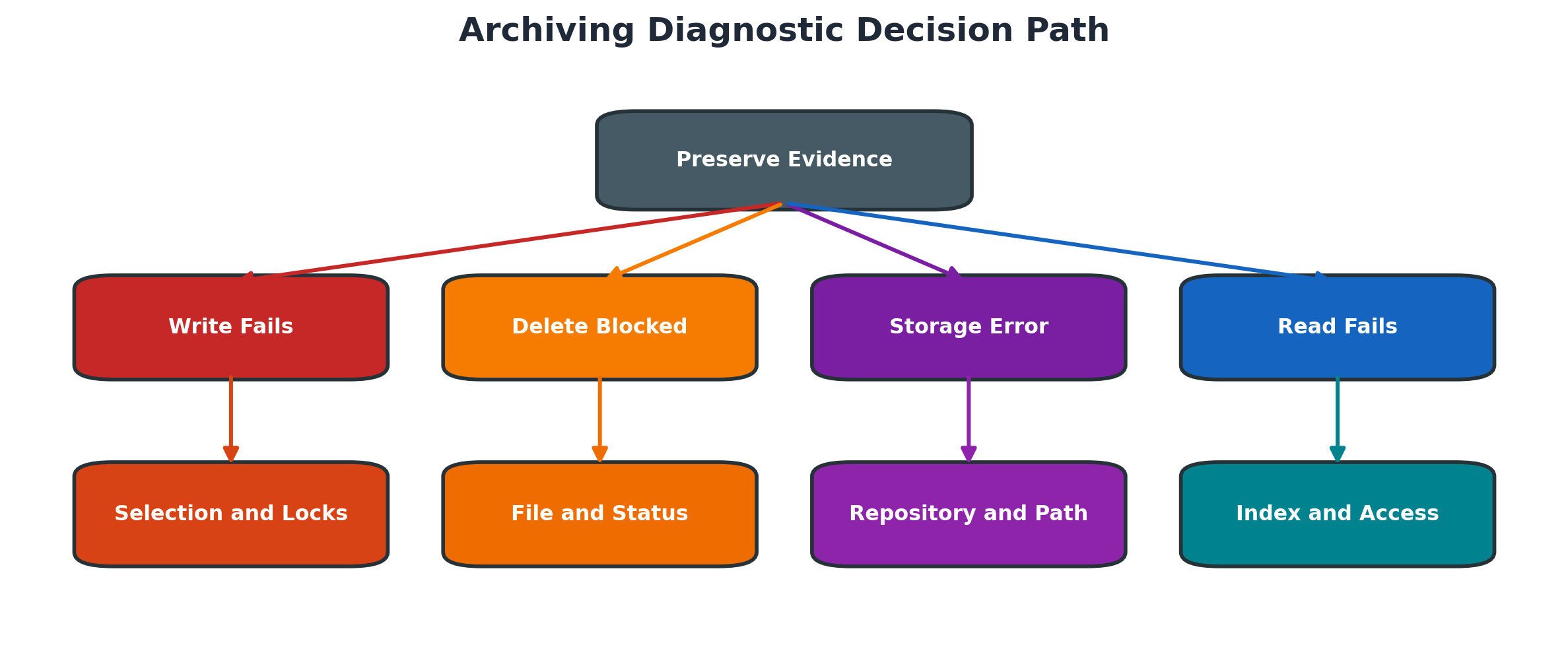
Figure 7.5 Archiving diagnostic decision path
Use this diagnostic order:
- Record object, session, phase, job, file and timestamp.
- Preserve job logs, application logs, session status and repository messages.
- Determine whether selection, write, storage, delete, index or read first failed.
- Compare configuration and results with the latest successful cycle.
- Verify prerequisites, locks, paths, capacity, repository and authorizations.
- Correct only the owning layer and protect existing archive files.
- Retry through the supported SARA or ILM process.
- Reconcile counts and test business retrieval.
Archive File Created but Cannot Be Stored
Symptom: write finishes, but storage status fails or remains pending. Likely causes: repository unavailable, certificate/credential failure, network/DNS issue, unsupported content server state or authorization. Diagnosis: preserve SARA session/file and repository/HTTP evidence; confirm file is closed and local capacity is safe. Solution: restore the repository path and retry only the supported storage action. Validation: storage acknowledgement and sample SAP retrieval succeed before deletion.
Delete Job Finishes but Table Size Does Not Fall
Symptom: records were deleted yet allocated database size is unchanged. Cause: freed blocks remain reusable inside the database, indexes dominate size, statistics are stale or physical reclaim was not performed. Diagnosis: compare row counts, used versus allocated space and DB-specific segment/partition data. Solution: plan supported statistics/reorganization or reclaim only when justified. Validation: reusable space, growth trend and application performance meet target.
Archived Document Is Missing from Search
Symptom: SARA shows a successful archived file but business search returns nothing. Causes: infostructure inactive/unfilled, wrong selection key, application read configuration, authorization or missing repository content. Diagnosis: prove file/session, test direct object read, check SARI fill status and trace authorization. Solution: fill/rebuild the correct structure or repair the failing read layer. Validation: known keys return the document for an authorized user.
Archive File Exists but Is Unreadable
Symptom: management lists the file, but display/read fails. Causes: truncated/corrupt file, manual move, repository mismatch, incompatible restore or missing metadata. Diagnosis: preserve file and logs, compare administrative and physical size/location, test repository access and another file from the session. Solution: restore a verified consistent copy or use SAP-supported recovery; do not edit the archive file. Validation: repeated sample reads and integrity checks pass.
Archiving Selects No Data
Symptom: write job finishes with zero eligible objects. Causes: residence time not met, business status incomplete, preprocessing absent, wrong organizational/date variant, dependent object or legal/ILM rule. Diagnosis: use object analysis/test logs and sample document status. Solution: correct business prerequisites or approved selection; never bypass application consistency checks. Validation: test selection returns expected candidates and excludes recent/open records.
Delete Job Cancels with Locks or Database Error
Symptom: write file is valid but delete cancels. Causes: active business locks, update workload, database space/log pressure, authorization or program dump. Diagnosis: correlate job log with ST22, SM21, SM12 and database evidence at the same timestamp. Solution: correct the dependency and restart the supported delete phase for verified files. Validation: counts reconcile and online/archive reads are consistent.
ILM Destruction Is Blocked
Symptom: data appears old enough but destruction does not select it. Causes: retention not expired, legal hold, wrong time reference, policy not active or required archiving/retention step incomplete. Diagnosis: evaluate the applicable ILM object/policy and hold scope for sample keys. Solution: correct governance/configuration only with legal approval; do not remove holds for technical convenience. Validation: eligible test data is selected while held data remains protected.
Nonproduction System Points to Production Archive
Symptom: after refresh, test reads or jobs access the production repository. Cause: copied repository, logical path or credential configuration. Diagnosis: stop archiving/destruction jobs and verify destinations, URLs, logical paths and repository IDs. Solution: isolate or redirect to approved test storage and reset credentials. Validation: test cannot alter production content and representative local reads work.
Housekeeping Job Deletes Required Evidence
Symptom: job/spool/application logs needed for audit or recovery are unavailable. Cause: retention variants were shorter than business/audit requirements or selected the wrong client/status. Diagnosis: identify deleted scope and remaining backups. Solution: recover evidence if supported, correct retention ownership and test housekeeping variants. Validation: new housekeeping removes only eligible data and audit samples remain available.
Practical Scenario
Archive Write Succeeds but Delete Does Not Start
A production archive write job finishes and creates two files, but no delete job starts. The session shows written files, and the database still contains the selected documents.
The administrator does not manually delete data. They verify object configuration, file status and storage callback and discover that automatic deletion is allowed only after successful storage, while the repository transfer remains incomplete. Storage connectivity is corrected, the files are stored and verified, and the delete phase is started through the supported SARA process.
Resolve the case safely:
- Confirm the write job and session completed.
- Reconcile object and file counts.
- Check whether automatic delete requires storage completion.
- Inspect repository transfer and callback status.
- Correct repository connectivity without moving or deleting source files manually.
- Verify stored files are accessible and readable.
- Start delete through the supported session control.
- Validate database removal and archived retrieval.
Expected Results and Validation
The archive session shows stored and deleted status as designed, write and delete counts reconcile, known documents are readable from the archive, ineligible documents remain online and database growth monitoring reflects the expected reduction.
Summary
SAP data archiving is a controlled application lifecycle, not a database deletion shortcut. A reliable cycle starts with business and legal eligibility, writes complete archive files, verifies protected storage, deletes only the records linked to verified files, and proves authorized retrieval. SARI indexes, ILM policies, database reorganization, security and disaster recovery are connected controls that must be tested and evidenced separately.
Key Takeaways
Archiving is a controlled lifecycle of eligibility, write, storage, verification, delete and retrieval. Each phase has separate evidence and approval.
Retention, legal holds, security and recovery are part of the technical design; database size reduction alone is not a sufficient success criterion.
Retain these lifecycle habits:
- Select archiving objects from business ownership and growth evidence
- Treat write storage delete and retrieval as separate gates
- Never delete online data before archive integrity is verified
- Plan dependency sequence and retention before production execution
- Test archive reads and recovery regularly
- Keep legal holds security and audit evidence in the lifecycle
Content Coverage Validation
This chapter independently covers archiving objects, SARA, preprocessing, write and delete phases, archive files, information structures, retrieval, storage, retention, ILM, performance, housekeeping, security and recovery.
The structure, wording, procedures, tables and diagrams are original. Source topics were expanded into a modern lifecycle tutorial, and no source screenshot or figure was copied or traced.