
BASIS - Week 1 Foundations Architecture and Core Operations / System Installation and Lifecycle Administration
Result :
System Installation and Lifecycle Administration
Introduction
Purpose
This chapter explains how a BASIS administrator plans, provisions, configures and validates an SAP system throughout its technical lifecycle. It connects installation tools, operating system and database prerequisites, profiles, start services, operation modes and maintenance activities into one controlled administration model.
The central principle is that a technically completed installer step is not the end of the activity. A usable SAP system requires verified processes, database connectivity, profiles, file systems, network services, security controls, logon tests and recoverability.
Who Should Read This Chapter
The chapter is intended for SAP BASIS administrators, infrastructure and database specialists, technical project members and support engineers who participate in new installations, system rebuilds, instance maintenance or lifecycle changes.
Learning Objectives
After completing this chapter, the reader should be able to prepare installation inputs, explain SWPM execution, interpret profiles, perform controlled startup and shutdown, configure operation modes, plan a kernel update and diagnose common provisioning and startup failures.
The practical outcomes are:
- Prepare installation architecture and prerequisite inputs
- Monitor SWPM and use logs for safe recovery
- Distinguish default start and instance profile behavior
- Start and stop systems in dependency order
- Configure and validate operation modes
- Plan kernel maintenance and diagnose lifecycle failures
Scope and Version Context
The source material describes older R/3 installation and instance concepts. Modern provisioning commonly uses Software Provisioning Manager, SAP Host Agent, SAP Start Service and release-specific Maintenance Planner or installation media. Exact screens and supported paths depend on the product, database, operating system and target release.
Always use the current product guide, supported tool version and organization change procedure. Historical commands and parameter examples are useful for concepts but are not a substitute for the current installation or update guide.
Lifecycle Administration Framework
Lifecycle Phases
Technical lifecycle work can be divided into planning, prerequisite preparation, provisioning, configuration, validation, operation, maintenance and retirement. Each phase creates dependencies for the next, so incomplete host or database preparation usually appears later as an installer or startup error.
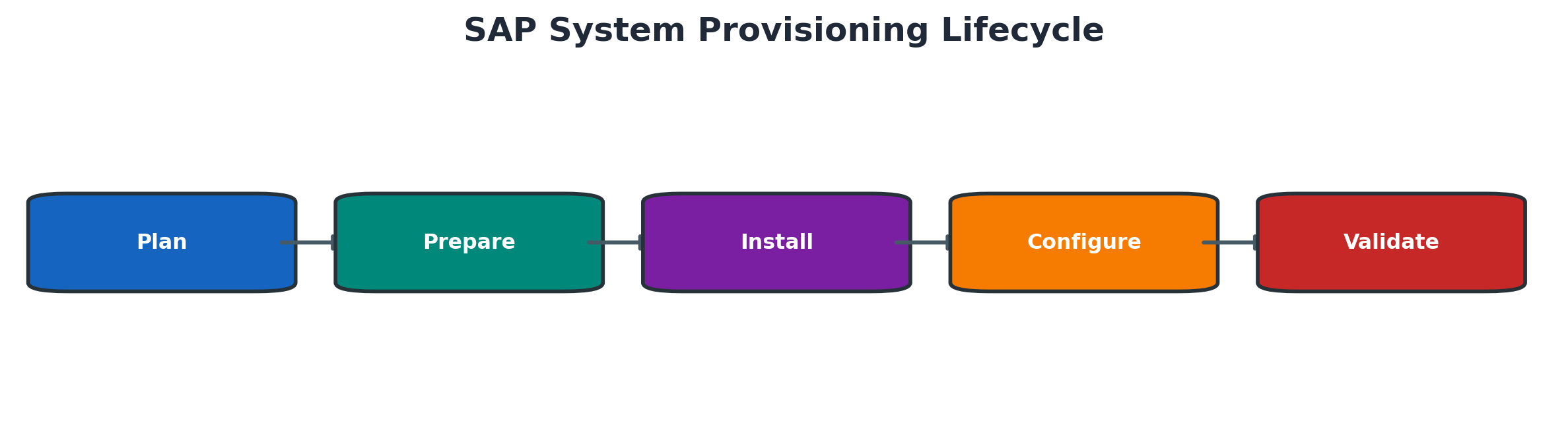
Figure 4.1 SAP system provisioning lifecycle
Roles and Responsibilities
BASIS coordinates the SAP procedure and validates the application layer. Operating system, database, network, storage, security and backup teams own their respective services. Clear ownership is essential because a single installation can cross all of these boundaries.
Change Windows and Evidence
Before execution, record the approved scope, tool and media versions, hosts, SID, instance numbers, database, ports, file systems, service users, backups and rollback or recovery approach. During the activity, preserve installer logs, timestamps and deviations. Afterward, capture technical and business validation.
Installation Planning
Sizing and Architecture Inputs
Sizing defines expected CPU, memory, storage and workload characteristics. Architecture planning converts that demand into system roles, hosts, instances, database layout and availability design. Development sizing assumptions should not be reused for production without review.
Confirm whether the design includes embedded or separate application servers, ABAP Central Services, enqueue replication, Web Dispatcher, additional dialog instances or other product components.
These inputs must be agreed before provisioning begins.
| Input | Decision required | Primary owner | Validation evidence |
| Product and release | Exact SAP product target release and components | Solution architecture | Approved architecture and compatibility |
| Workload and sizing | CPU memory storage growth and concurrency | Architecture and infrastructure | Sizing result and capacity allocation |
| System landscape | SID clients roles routes and environments | BASIS and project | Landscape design and naming review |
| Availability | Recovery objectives clustering and replication | Infrastructure and business | Approved HA and DR design |
| Security | Accounts ports certificates and hardening | Security and platform | Security design and access approval |
Host Network and Storage Readiness
Hostnames, forward and reverse name resolution, static addressing where required, time synchronization, ports and firewall rules must be consistent. Storage must meet capacity, performance, mount and ownership requirements for SAP binaries, instance directories, shared global paths, database files, backups and the transport directory.
Operating System and Database Prerequisites
Use the supported operating system and database combinations for the exact SAP product release. Required packages, kernel settings, limits, users, groups and database parameters must be applied through the approved baseline.
A prerequisite check should confirm not only that a package exists, but that its version, architecture and dependent library are correct. Database readiness includes software, instance state, connectivity, users, storage and recovery design.
Media Maintenance Planner and Stack Inputs
Installation media must match the target product, release and database. Verify download completeness and checksums where provided. For maintenance or conversion, Maintenance Planner commonly supplies a stack definition and download plan that must match the system and intended target.
Do not mix media from unrelated tool or product levels. Record the SWPM, kernel and database client versions used so the build can be reproduced and supported.
Installation with Software Provisioning Manager
SWPM and SAPinst Concepts
Software Provisioning Manager provides guided procedures for installation, system copy and selected lifecycle tasks. The installer runs a defined procedure, collects parameters, performs checks and executes phases while writing detailed logs.
SAPinst is the execution framework behind many SWPM procedures. Tool behavior and available options depend on the SWPM version and selected product definition.
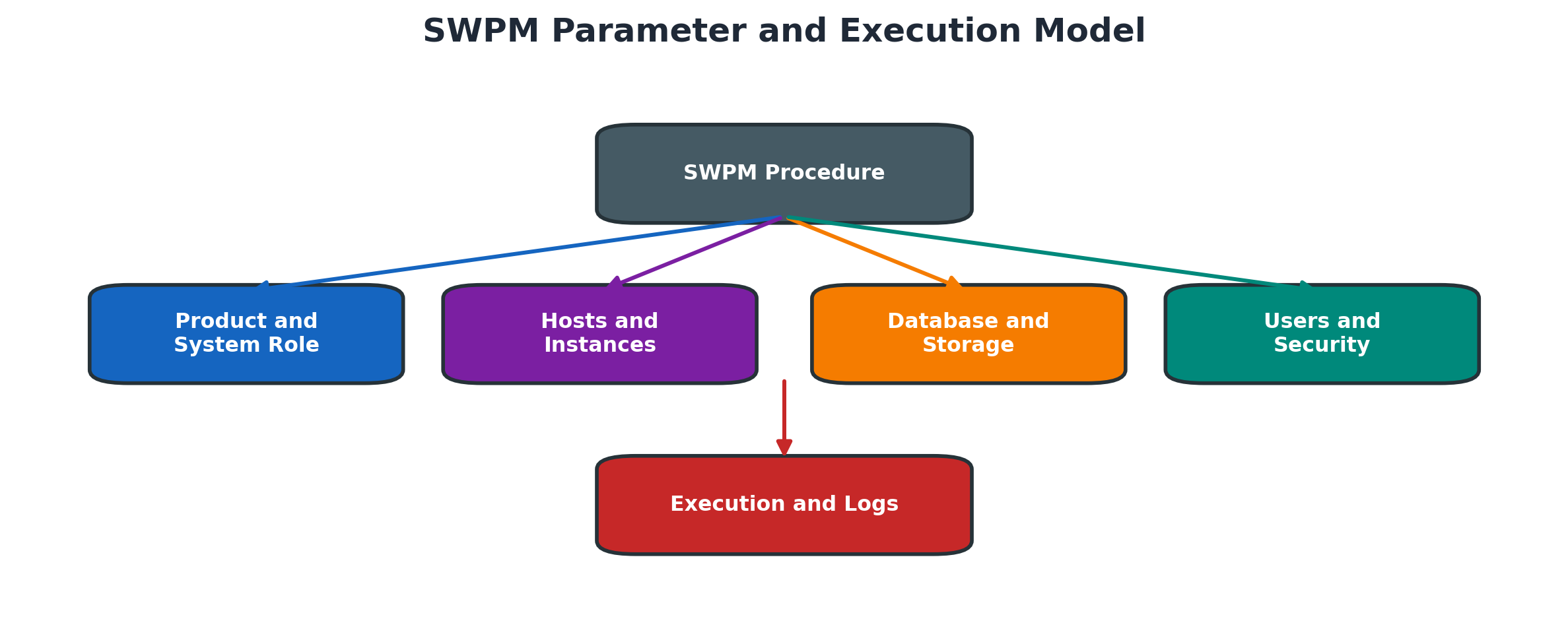
Figure 4.2 SWPM parameter and execution model
Parameter Collection
Parameter values include SID, host roles, instance numbers, ports, paths, database information, users, passwords and product-specific settings. Use an approved parameter sheet and validate naming collisions before execution.
Instance numbers must not conflict with existing services. Paths should be explicit and accessible to the required operating system users. Credentials must be handled securely and never copied into screenshots or general documents.
SWPM Parameter Summary
Before starting the installation, SWPM displays a summary of the selected parameters. The administrator should review every value carefully before continuing.
| Parameter | Example Value | Validation |
| Selected product | SAP S/4HANA | Confirm the correct product and release |
| System ID (SID) | XXX | Use a valid three-character SID |
| Database type | SAP HANA | Confirm the selected database platform |
| ASCS instance number | 0 | Verify that the instance number is available |
| PAS instance number | 1 | Confirm the application server instance |
| Host role | Application Server | Verify the assigned system role |
| Installation path | /usr/sap/<SID> | Confirm sufficient space and permissions |
Note: The values shown above are examples only. Actual values depend on the selected SAP product, database platform and system architecture. Passwords, hostnames, IP addresses, user IDs and customer-specific information must never be included in published documentation.
Caption: Example of the key parameters reviewed in the SWPM Parameter Summary.
Execution Monitoring
Monitor the current phase, elapsed time, host resources and related services without interrupting a healthy long-running step. A phase can legitimately take time during database creation, import, load, generation or registration.
If progress appears stopped, review the current log timestamp, process activity, database work and resource use before canceling. Repeated clicks or forced termination can make recovery more difficult.
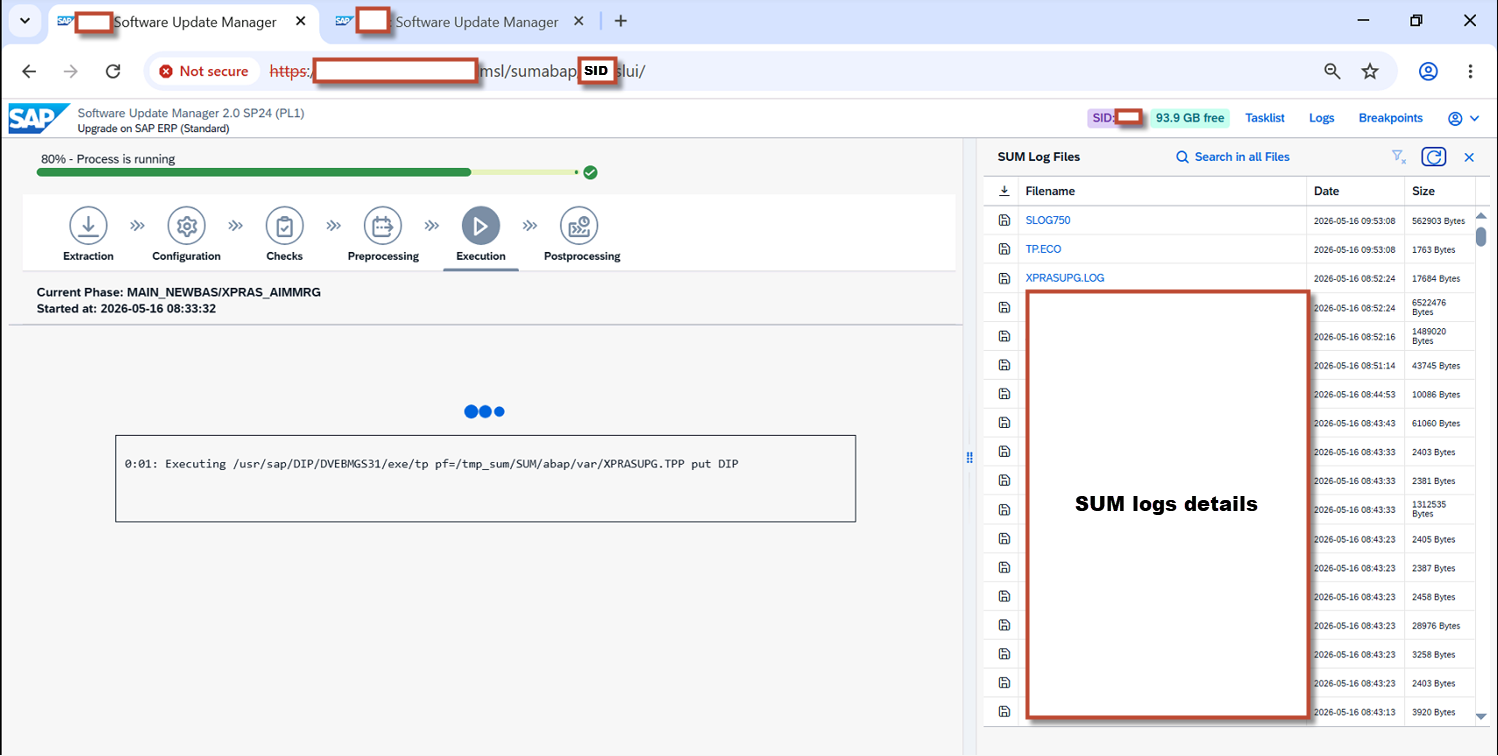
Screenshot 4.2 - SWPM Execution Progress
Installation Logs and Recovery
SWPM writes summary and detailed logs in its working directory. The useful error is often earlier than the final failure message. Record the phase, exact timestamp and first technical cause.
Correct the prerequisite or environmental cause, then use the supported retry or continue function. Do not delete the work directory or edit installer state files unless an official procedure explicitly requires it.
Post Installation Validation
Post-installation work includes checking all expected instances and processes, database connectivity, profiles, licenses, time, file systems, transport configuration, client strategy, secure communications, backup integration and monitoring. A controlled SAP GUI or application test confirms that the technical stack can serve a real request.
A new system is ready only after every required layer is checked.
| Layer | Validation | Evidence |
| Operating system | Users limits services mounts time and resources | Platform checklist |
| Database | State connectivity backup and monitoring | Database health and backup result |
| SAP instances | Expected processes and registration | sapcontrol and SM51 evidence |
| Application | Logon safe transaction jobs update and spool basics | Controlled test record |
| Security | Licenses roles secure connections and credential handling | Security approval |
| Operations | Monitoring transport backup and support ownership | Handover checklist |
Profiles and Instance Configuration
Default Start and Instance Profiles
The default profile supplies system-wide parameters. Instance profiles hold parameters for a specific instance. Depending on release and architecture, start-related information may be maintained in profiles and consumed by SAP Start Service.
Parameter precedence and profile naming must be understood before a change. A correct value in the wrong profile may have no effect or may affect more instances than intended.
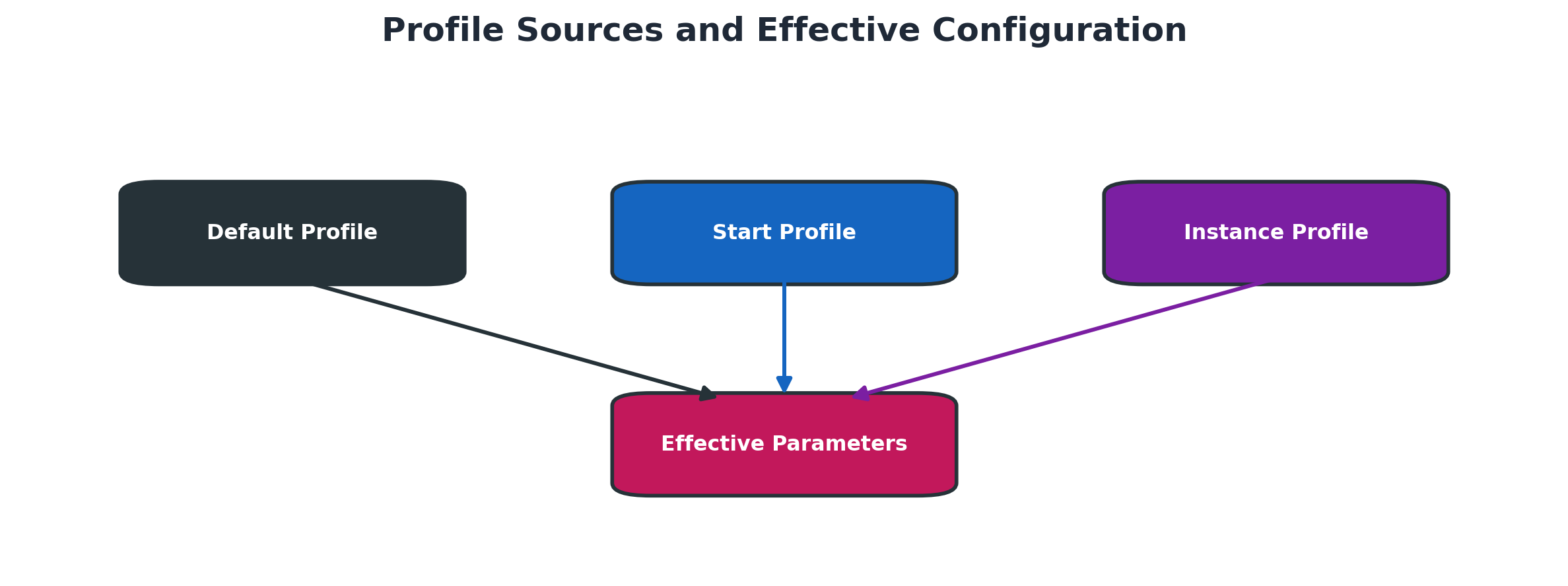
Figure 4.3 Profile sources and effective configuration
Static and Dynamic Parameters
Dynamic parameters can be changed at runtime when the release supports it, but the active change may not survive a restart unless the profile is updated. Static parameters require a restart before the new value becomes effective.
RZ11 shows parameter attributes and current values. Never assume a parameter is dynamic simply because the screen allows display or documentation access.
RZ10 and RZ11 Administration
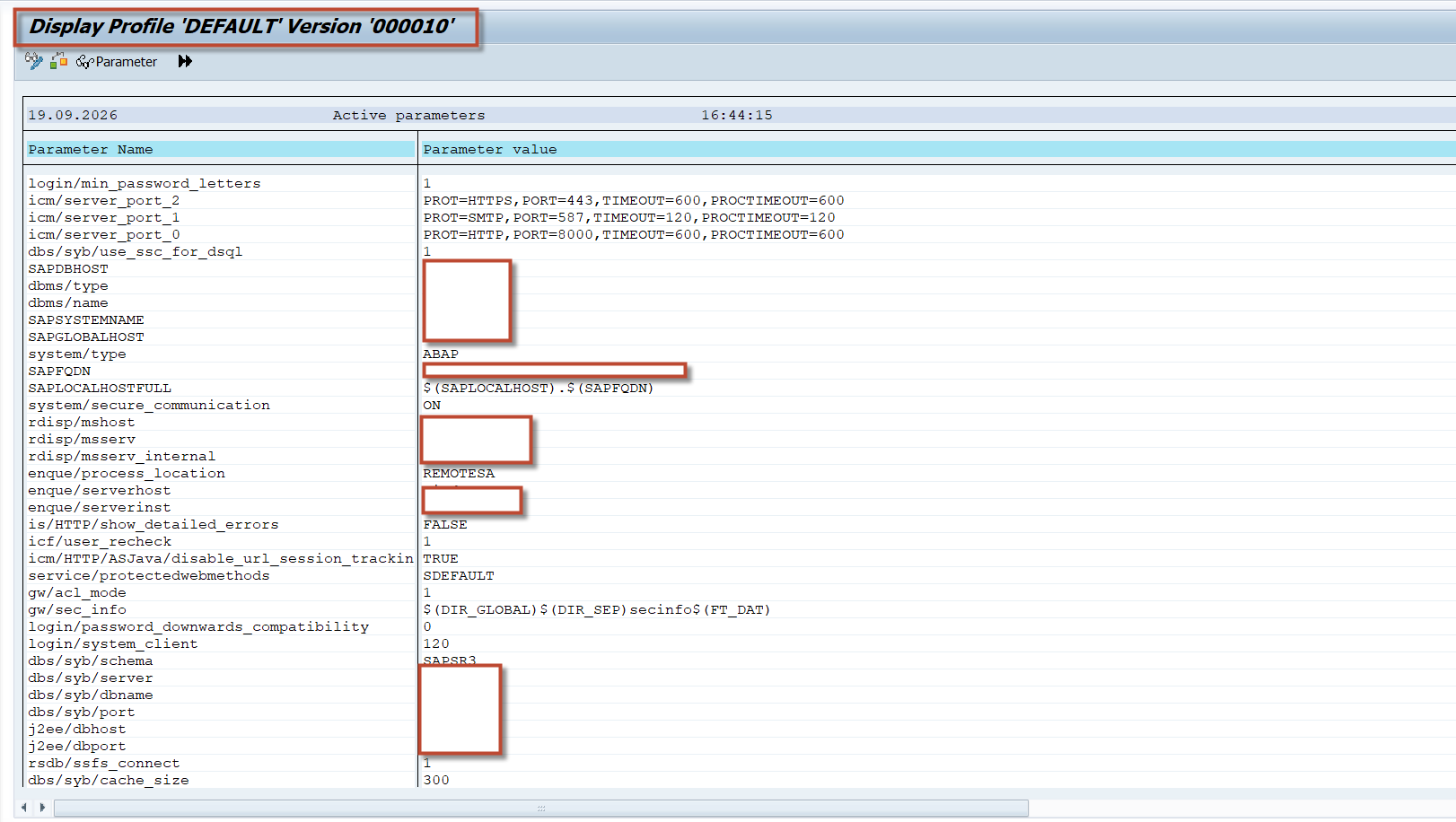
RZ10 manages profile versions stored in the SAP system and supports checks and activation. RZ11 displays parameter documentation, current values and change capability. The operating system profile files and the database-stored profile versions must remain aligned through the supported process.RZ10
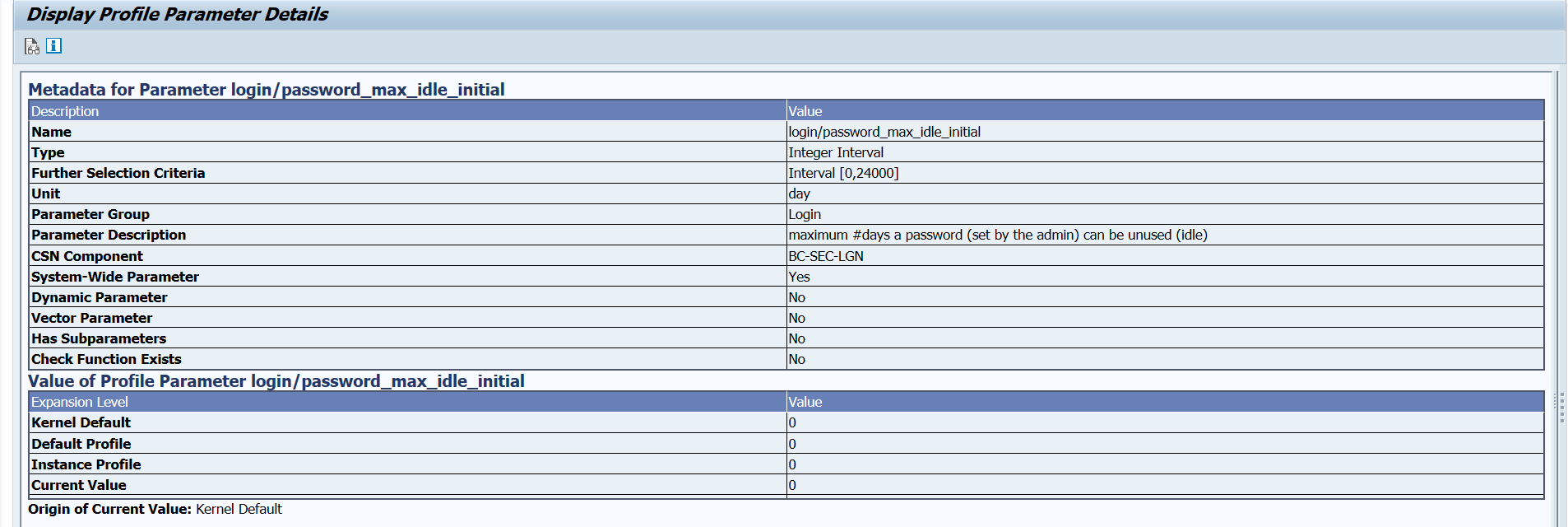
RZ11
Screenshot 4.3 - RZ11 Parameter Details
Safe Parameter Change Procedure
A parameter change needs a defined problem statement, current value, proposed value, affected instances, memory or resource impact, restart requirement and rollback value. Test in a lower environment where possible and compare the effective value after activation or restart.
Starting and Stopping SAP Systems
Startup Dependencies
The database and required infrastructure must be ready before application instances can complete startup. Central services must be available for instance registration and lock services. Application servers then start their configured processes and register with the system.
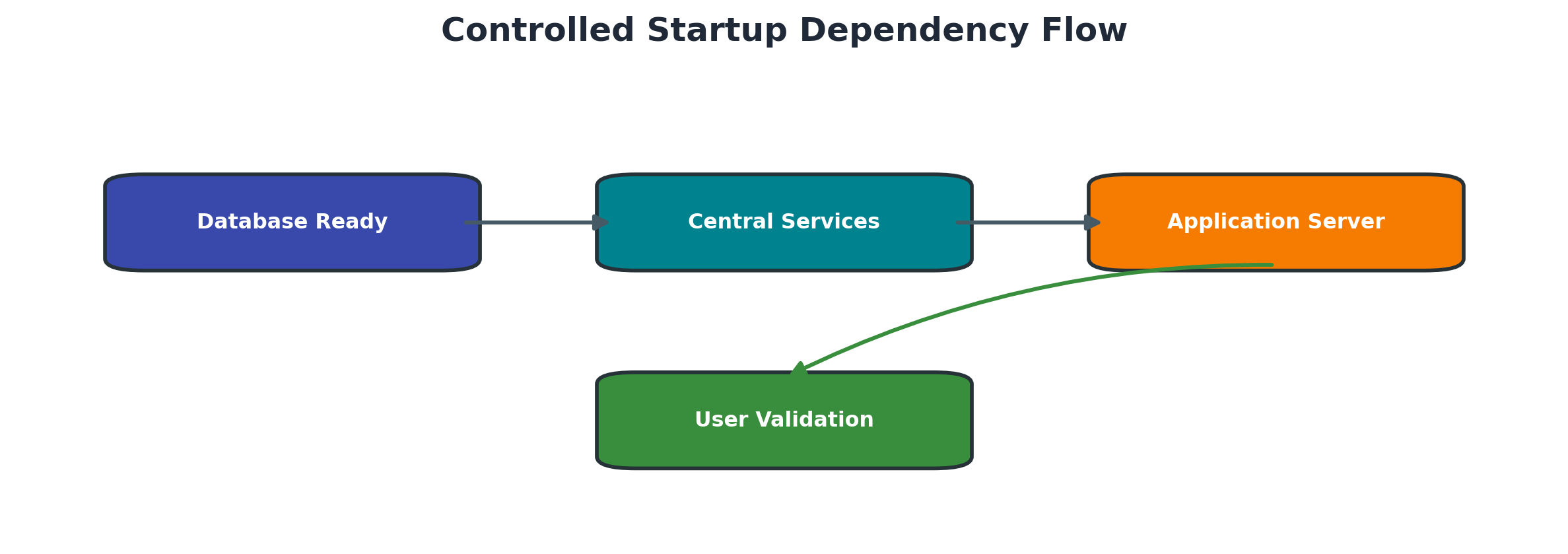
Figure 4.4 Controlled startup dependency flow
Controlled Startup
Use the approved control interface such as SAP Management Console, sapcontrol or the supported platform procedure. Start components in the architecture-specific dependency order and monitor status rather than launching duplicate start requests.
Controlled Shutdown
Before shutdown, confirm approvals, users, jobs, interfaces, updates and business impact. Stop application activity cleanly, allow processes to end, and verify that the system reached the expected state. Database shutdown should follow only when included in the approved scope.
SAP Host Agent and Start Service
SAP Host Agent supports host-level monitoring and lifecycle functions. SAP Start Service manages instance start, stop and status operations and exposes web service methods used by management tools. Their health, permissions and secure communication affect remote administration.
Startup and Shutdown Validation
Validate process states, instance registration, developer traces, system log, database connectivity and a safe application logon. After shutdown, confirm that expected SAP processes are stopped and that no uncontrolled orphan process remains.
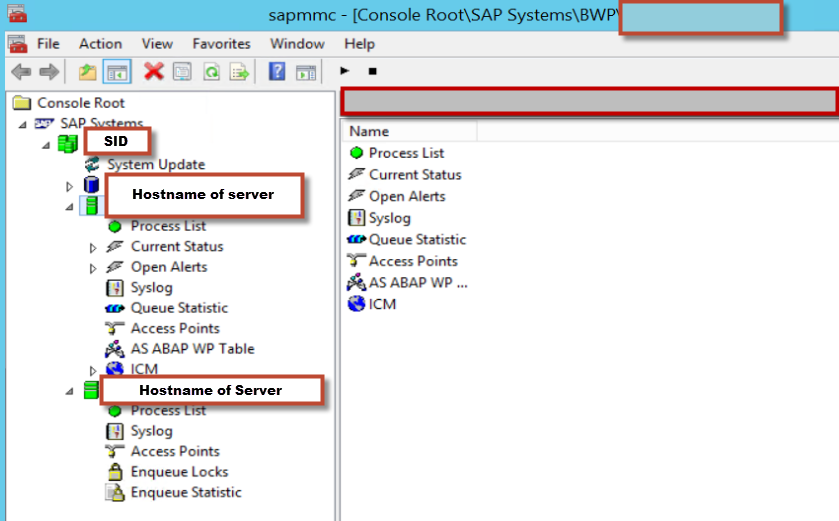
Screenshot 4.4 - SAP Management Console Process List
Operation Modes and Work Process Distribution
Operation Mode Design
Operation modes allow the configured work process distribution to change by time period without changing the total process count of the instance. A common design shifts capacity between dialog and background processing according to workload windows.
Operation modes redistribute a fixed instance process total.
| Mode | Typical emphasis | Example use | Validation |
| Day | More dialog capacity | Interactive business hours | Dialog queue and response remain healthy |
| Night | More background capacity | Batch processing window | Jobs start and dialog minimum remains safe |
| Peak event | Temporary measured distribution | Period end or planned event | Queues resources and end time monitored |
RZ04 Configuration
RZ04 defines operation modes and instance-specific work process distributions. The sum and permitted process-type changes must match the technical configuration. Design modes from measured workload, not from a generic template.
SM63 Timetable
SM63 schedules operation mode changes. The timetable should cover the required calendar period and align with business hours, batch windows and special events. Missing or expired scheduling can leave the system in an unintended mode.
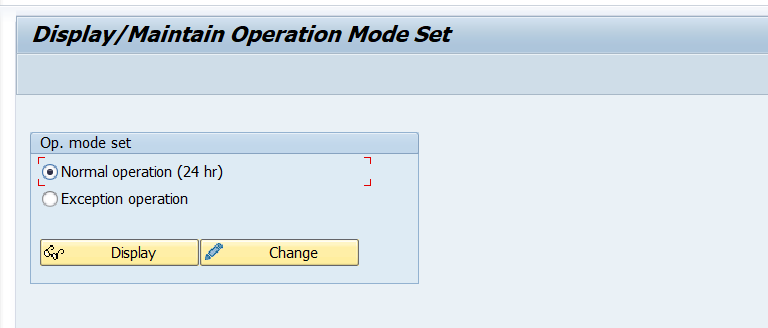
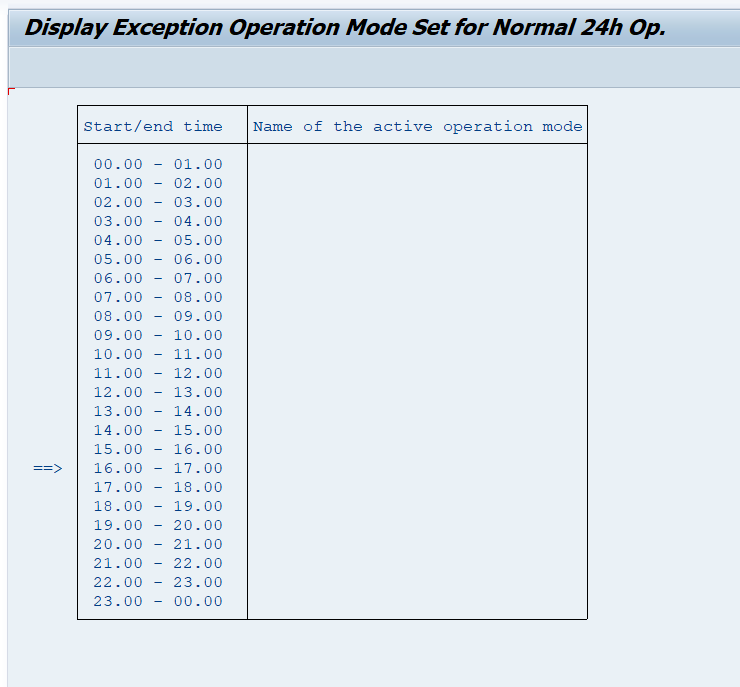
Screenshot 4.5 - SM63 Operation Mode Timetable
Validation and Capacity Control
After a switch, verify the active operation mode and actual work process distribution on each expected instance. Confirm that dialog and background queues remain healthy and that critical job windows still have sufficient capacity.
Kernel and Lifecycle Maintenance
Kernel Components
The SAP kernel contains platform-dependent executables and libraries used by the runtime and administration tools. Kernel level must be compatible with the SAP release, database client and operating system. Mixed or incomplete kernel files can prevent startup.
Kernel Update Workflow
A kernel update requires compatible media, backup of the current executable directory, controlled system stop, protected replacement, ownership and permission checks, startup and technical validation. The exact method depends on platform and architecture.
Record the old and new kernel versions and preserve a supported rollback path. Do not overwrite active files while processes are running.
Use this controlled workflow:
- Confirm the supported target kernel and database-library compatibility.
- Record current kernel versions and active executable paths.
- Download and verify the approved archives.
- Back up the current kernel directory and document rollback.
- Stop the SAP system through the approved procedure.
- Replace files using the platform-specific method and restore exact ownership and permissions.
- Start the system and verify kernel versions processes traces and connectivity.
- Complete application validation and retain old files according to policy.
Support Package and Upgrade Context
Support packages change ABAP and product components and require application-level tools and checks. An upgrade or conversion changes the target release and typically uses Software Update Manager. These activities are not equivalent to a kernel file replacement.
SUM and Maintenance Planning Boundaries
SUM executes release-specific maintenance phases, including shadow or downtime processing where applicable. Maintenance Planner inputs, add-on compatibility, simplification checks, custom code, SPDD or SPAU work and database migration options may affect the plan.
BASIS should follow the generated roadmap and official guide and should not treat a failed SUM phase like a normal system restart. Preserve phase logs and resolve the first technical cause.
High Availability and Infrastructure Dependencies
Central Services and Database Availability
High availability protects defined single points of failure through clusters, replication or failover designs. The operational procedure must distinguish service relocation from application restart and must verify enqueue, message and database consistency after failover.
Shared File Systems and Transport Directory
Shared global paths and the transport directory must remain accessible with consistent ownership and permissions. A stale mount or partial network file-system failure can create startup, profile, transport or update problems that resemble an SAP defect.
DNS Ports Time and Certificates
Reliable name resolution, open ports, synchronized time and valid certificates are foundational services. Time drift can affect authentication and log correlation. Expired certificates can break HTTPS, RFC or tool communication even when SAP processes appear green.
Backup and Recovery Readiness
A new or changed system is not production-ready until database and file backups are configured and a recovery approach is documented. Verify backup success, retention, monitoring and the ownership of restore testing.
Detailed Technical Reference
SAP System and Instance Installation Topology
An ABAP installation is built from separately controlled layers: operating system and virtual or physical hosts, database, SAP central services, primary application server, optional additional application servers, shared file systems and frontend or web entry points. Modern systems normally use an ASCS instance for the message server and enqueue service. High-availability designs may separate virtual hostnames and cluster resources from physical hosts. The exact instance set depends on product release and installation option.
Before SWPM is started, the architecture document must define SID, instance numbers, virtual and physical hostnames, database SID or tenant, domain and DNS names, filesystem layout, shared sapmnt and transport paths, ports, SAP system mount ownership, time synchronization, backup destinations and HA ownership. Changing these values during an installation often creates inconsistent profiles, services or secure-store entries.
Core Instance Roles
- ASCS provides central message and enqueue services for an ABAP system.
- The primary application server contains dispatcher and work processes and is normally the first application instance installed.
- Additional application servers add workload capacity and register with the same central services and database.
- The database persists repository, customizing and business data and must be available before application processing can complete.
- SAP Web Dispatcher, enqueue replication, content services and other components are installed only when required by the design.
SWPM Working Directories Logs and Restart Behavior
Software Provisioning Manager runs the SAPinst framework and writes state, parameter and execution logs in its installation working directory. File names and locations vary by tool version and operating system, but the administrator should preserve the complete directory until acceptance and recovery are complete. The browser UI may show a late summary error while the first useful operating-system, database, command or permission failure appears earlier in detailed logs.
A controlled retry uses the SWPM retry or continue function after correcting the confirmed cause. Deleting state files, changing internal XML/control data or starting an unrelated fresh installation can orphan partially created services, users, schemas or files. If restartability is uncertain, preserve the directory, record the step key and consult the product installation guide or SAP support before intervention.
SWPM Evidence Set
- Product and installation option selected, SWPM version and media versions.
- Host, SID, instance and database identifiers with sensitive passwords excluded.
- Parameter summary or exported parameters stored in an approved protected location.
- Exact failed phase, timestamp, step key, first causal message and related OS or DB log.
- Commands or services already created before failure and their current state.
- Retry action, resulting status and post-installation validation evidence.
Installation Users Groups and File Ownership
SWPM creates or uses operating-system identities such as the SAP administrator account and database-specific service accounts according to platform rules. Numeric UID and GID consistency matters when shared filesystems are mounted on multiple hosts. The global and instance directories must have the ownership and permissions required by SAP tools without granting broad write access to unrelated users.
Service accounts must not be used for routine interactive work beyond approved administration. Protect environment files, secure stores, profiles, RFC secrets, certificates and installer parameter exports. A recursive permission change over an SAP tree is not a safe generic fix: it can break executable ownership, secure files and supportability.
Profile Precedence and Effective Parameters
Profiles define runtime configuration at system and instance scope. The default profile normally supplies system-wide values, while the instance profile contains instance-specific process and resource definitions. Start-related configuration and start profiles differ by release and architecture. The effective value can also reflect a compiled default or a dynamic runtime change. Therefore, a text value found in one file is not proof that it is active.
Use RZ11 to review parameter documentation, default, current value, dynamic behavior and instance context. Use RZ10 for controlled profile import, versioning, checking and activation. After a restart, verify the effective value on every affected instance. Memory parameters are interdependent; increasing one area without checking host memory, address space and other instances can prevent startup or shift pressure elsewhere.
Profile Change Impact Checklist
- Parameter purpose and official documentation for the installed release.
- Current effective value on every affected instance and source profile.
- Dynamic or static classification and whether a runtime change survives restart.
- Units, allowed range, related parameters and calculated memory/resource impact.
- Restart order, outage, rollback value and access if SAP cannot start.
- Lower-environment test plus technical and business validation.
sapstartsrv sapcontrol and SAP Host Agent
The SAP Start Service sapstartsrv manages instance start and stop functions and exposes web-service methods used by sapcontrol and management tools. SAP Host Agent supplies host-level lifecycle and monitoring services. A healthy operating-system process alone does not prove that the SAP instance is operational; sapcontrol process information, instance traces, registration and application tests must agree.
Common sapcontrol functions include GetProcessList for process state, StartSystem or Start for controlled start and StopSystem or Stop for controlled stop, depending on the intended scope and supported release. Commands must be executed with the correct instance number and authorized operating-system identity. Do not issue repeated start commands while an earlier startup is still progressing.
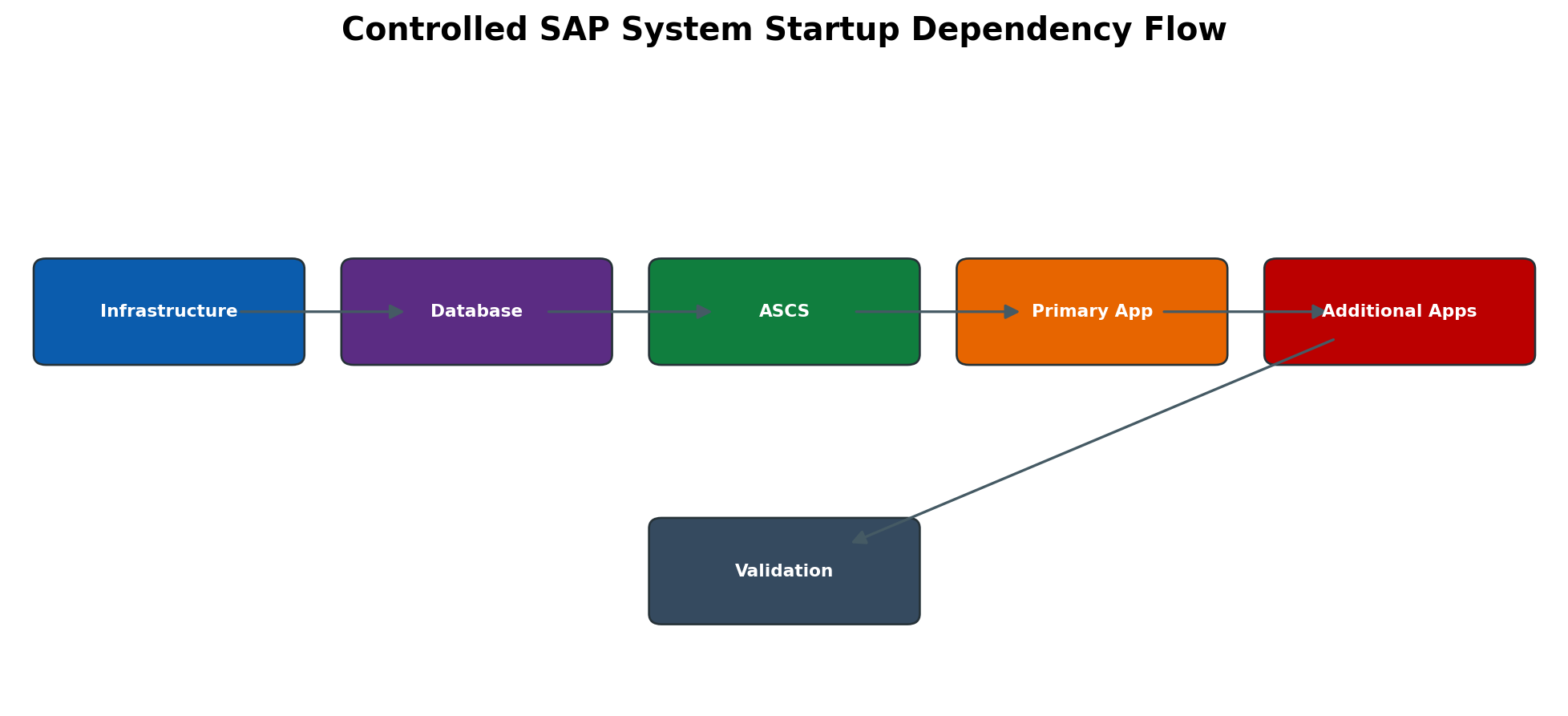
Figure 4.6 Controlled SAP system startup dependency flow
Kernel Executables Libraries and Compatibility
The SAP kernel contains core executables and libraries such as disp+work, gateway, message server, enqueue components, R3trans and tp. Exact files differ by release and platform. A kernel package must match operating system, database library requirements, Unicode architecture and product compatibility. Mixing archives or leaving old libraries in an inconsistent executable directory can cause load failures or process crashes.
Before replacement, record disp+work and R3trans version output, current executable directory, permissions, archive names and checksums. Back up the complete executable directory in a recoverable location. Stop all dependent SAP instances, verify processes ended and replace files as the correct owner. Afterward validate versions, R3trans connectivity, sapcontrol process state, work processes, logs, dumps and representative application functions.
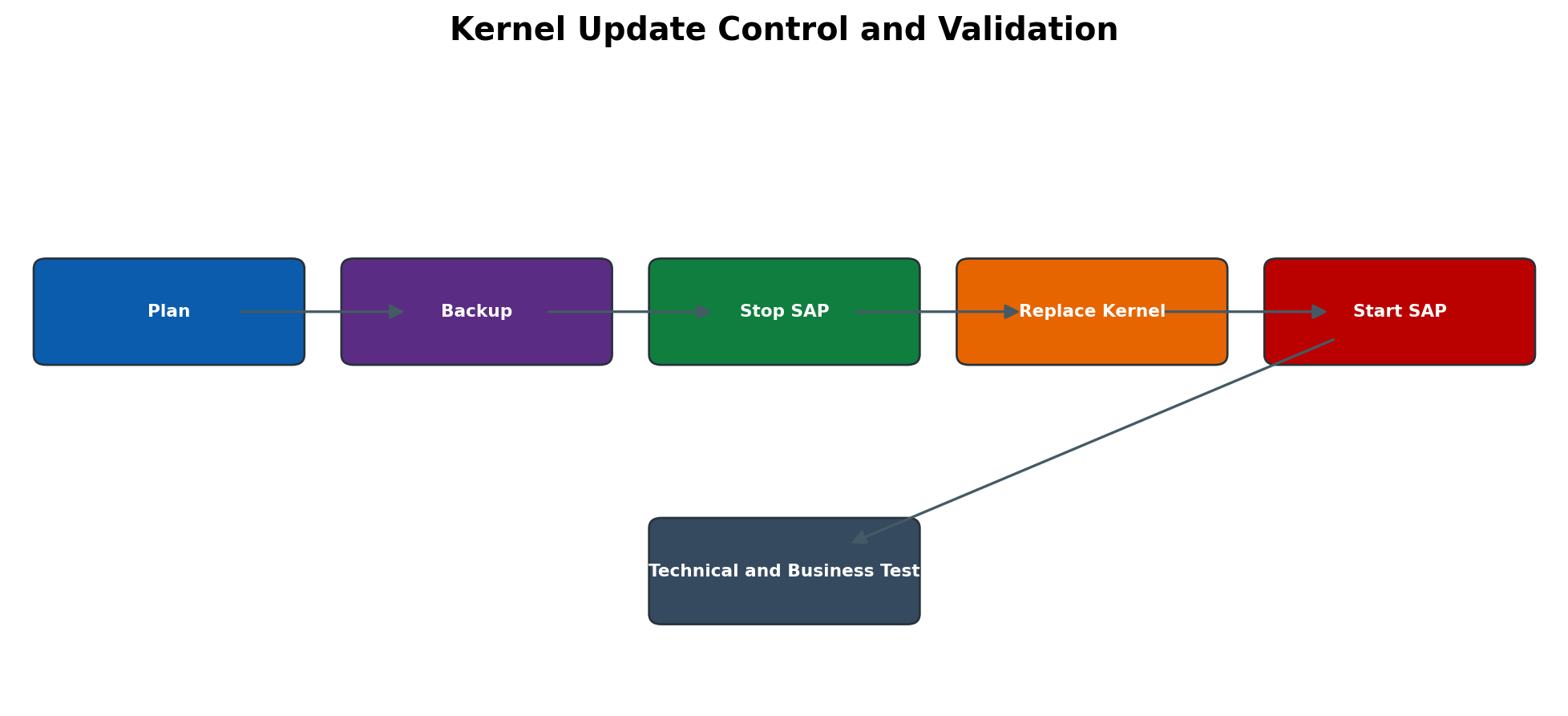
Figure 4.7 Kernel update control and validation
Operation Mode Runtime Behavior
An operation mode defines how configurable work processes are distributed among types for a named operating period. RZ04 maintains operation modes and instance definitions; SM63 assigns modes to time intervals. The switch can change the distribution of eligible work processes without restarting the instance, but it cannot create more total configured work processes or repair insufficient host capacity.
Design modes from measured workload: dialog peaks, background windows, update requirements and interface activity. Ensure a safe minimum for essential process types and validate that the timetable references existing modes for all required periods. Monitor SM50, SM66 and workload after a switch. A mode that helps batch throughput can harm dialog response or update processing if designed without end-to-end workload evidence.
High Availability Cluster and Shared Resources
In clustered installations, the cluster owns virtual hostnames, IP addresses, filesystems and SAP resources according to the approved HA design. Administrators must use the cluster-aware start and stop method when required. Starting a clustered ASCS manually outside the resource manager can create split ownership, failed monitoring or unsafe failover behavior.
A failover test must confirm virtual hostname movement, filesystem mounts, ASCS/message/enqueue health, enqueue replication where used, application-server reconnection and business transaction continuity. DNS, reverse lookup, firewall rules, time synchronization and certificates must work on every possible node.
System Copy Refresh and Post Copy Controls
A system copy or refresh changes more than database content. It can bring production users, jobs, RFC destinations, logical-system names, printers, interfaces, certificates and scheduled outbound processing into a non-production system. The post-copy plan must isolate external communication before application release.
Typical controls include locking or redirecting RFC and HTTP destinations, stopping outbound jobs, adjusting logical-system and transport settings, resetting secrets, validating licenses, reviewing profiles and host-dependent paths, updating printers, checking batch users and confirming backup. Exact tasks are product and copy-method dependent; use application-specific post-copy automation where supported.
Transaction Command and Log Reference
The reference below connects each administration task to its primary tool and required evidence. Exact menus and command options must be confirmed for the installed release.
| Task | Tool or navigation | Evidence and caution |
| Run installation | SWPM browser UI -> select product -> define parameters -> execute | Parameter summary, phase logs and post-install checks; never expose passwords. |
| Check process state | sapcontrol -nr <instance> -function GetProcessList | Expected processes GREEN or appropriate state; verify correct host and instance. |
| Start or stop system | Approved cluster tool or sapcontrol StartSystem/StopSystem by scope | Database, ASCS and application dependency order plus business outage approval. |
| Maintain profiles | RZ10 -> import/select profile -> extended maintenance -> check -> activate | Version history, syntax check, restart requirement and rollback version. |
| Inspect parameter | RZ11 -> enter parameter -> Display | Current/default value, dynamic flag, documentation and instance scope. |
| Maintain operation modes | RZ04 -> Operation modes and instances | Mode definition, process distribution and consistency check. |
| Schedule mode switches | SM63 -> timetable | Complete time coverage and correct named modes. |
| Check work processes | SM50 local instance; SM66 system-wide | Process type/status, reason, user/program and wait/error evidence. |
| Check system logs and dumps | SM21 and ST22 | Timestamp-correlated startup/runtime errors; protect sensitive data. |
| Validate kernel | disp+work -version and R3trans -d under approved OS account | Expected patch/platform version and database connection result. |
Practical Administration Procedures
Validate a New Installation
Validation should prove process health, connectivity, configuration, security and recoverability rather than only confirming that the installer ended successfully.
Validate the system in this order:
- Confirm operating system users groups limits mounts time and free space.
- Confirm database state connectivity backup setup and monitoring.
- Verify all expected SAP instances and processes.
- Review startup traces system log and configuration warnings.
- Check profiles licenses and effective instance parameters.
- Test SAP GUI or approved application logon and a safe display transaction.
- Verify basic background update spool RFC and transport readiness as applicable.
- Record results owners and open hardening or handover actions.
Perform a Controlled Instance Restart
An instance restart should be evidence-driven and limited to the approved scope. Preserve traces and active workload information before the stop when investigating an incident.
Use this restart sequence:
- Confirm approval scope user impact and maintenance window.
- Record active users jobs updates interfaces and process evidence.
- Notify stakeholders and stop or pause dependent business activity.
- Stop only the approved instance using the supported control interface.
- Confirm processes ended and preserve any abnormal trace.
- Start the instance once and monitor each configured process.
- Verify registration work processes logs database connectivity and application logon.
- Close the activity only after technical and business confirmation.
Plan and Validate a Kernel Update
Treat the kernel update as a controlled binary change with compatibility, backup, permissions, downtime and rollback checkpoints.
Use explicit checkpoints before during and after the binary change.
| Checkpoint | Before change | After change |
| Compatibility | Approved kernel database client OS and SAP release | Reported versions match approved levels |
| Recovery | Backup and rollback steps tested or reviewed | Old files retained according to policy |
| Files | Target paths owners groups and permissions recorded | Files and links have exact documented values |
| Runtime | Baseline processes logs and business test captured | Processes stable with no new trace errors |
| Operations | Downtime communications and owners confirmed | Monitoring backup and handover updated |
Execute an SWPM Installation with Controlled Gates
- 1. Confirm approved architecture, sizing, Product Availability Matrix, installation guide, Maintenance Planner inputs and licenses.
- 2. Validate hostnames, DNS, time, operating-system packages/limits, users/groups, filesystems, ports and database readiness.
- 3. Stage verified SWPM and product media with checksums and controlled permissions.
- 4. Start SWPM using the supported method and choose the exact product, system and instance option.
- 5. Enter parameters from the peer-reviewed build sheet; review the final parameter summary before execution.
- 6. Monitor the active phase, operating-system resources, database and SWPM logs; preserve the first causal error if execution stops.
- 7. Correct only the confirmed prerequisite or environmental cause and use supported retry/continue behavior.
- 8. After completion, validate services, profiles, database connection, instances, logon, license, time, jobs, spool, transports, security, backup and monitoring.
- 9. Record deviations, final values, log location and handover acceptance.
Change an SAP Profile Parameter Safely
- 1. Define the incident or requirement and identify all affected instances.
- 2. In RZ11 review parameter documentation, default/current value, dynamic flag, units and constraints.
- 3. Calculate memory/resource and dependent-parameter impact; define rollback and restart method.
- 4. In RZ10 select/import the correct active profile and create a new version through extended maintenance.
- 5. Change only the approved value, run profile consistency checks and compare the version.
- 6. Activate the profile; if dynamic change is approved, apply it through the supported runtime method without assuming persistence.
- 7. Restart in the approved window when required and monitor sapcontrol, SM50, SM21 and ST22.
- 8. Verify the effective value on each instance and execute performance plus business validation; roll back if acceptance fails.
Configure and Validate an Operation Mode
- 1. Collect workload requirements and current work-process configuration for every application instance.
- 2. Open RZ04 and create or review the named operation mode.
- 3. Maintain each instance distribution while preserving required dialog, update, spool and background capacity.
- 4. Run consistency checks and confirm the total configured processes do not exceed the instance definition.
- 5. Open SM63 and assign the mode to the approved time interval with full timetable coverage.
- 6. Observe the next controlled switch or trigger only through the approved function.
- 7. Validate active mode and distribution in RZ04/SM50/SM66, then compare dialog, batch and update behavior.
- 8. Document rollback mode and monitoring thresholds.
Perform a Controlled SAP System Start
- 1. Confirm maintenance is complete, filesystems and virtual hostnames are mounted/owned correctly, and no conflicting cluster action exists.
- 2. Confirm database and required infrastructure services are online and healthy.
- 3. Start ASCS or central services through the approved cluster or sapcontrol method.
- 4. Verify message and enqueue processes plus traces before starting application instances.
- 5. Start the primary application server, monitor sapcontrol GetProcessList and dispatcher/work-process traces.
- 6. Start additional application instances in the planned order and confirm registration in SM51.
- 7. Validate SM50/SM66, SM21, ST22, update, locks, jobs, spool, RFC/HTTP entry points and a controlled business transaction.
- 8. Announce service restoration only after technical and application owners accept results.
Perform a Controlled SAP System Stop
- 1. Obtain outage approval and notify users, interfaces, batch and business owners.
- 2. Stop or hold business schedules and inbound/outbound integrations according to the runbook.
- 3. Confirm critical updates, queues and jobs are complete or safely paused; preserve evidence.
- 4. Stop additional application instances, then the primary application server using the approved method.
- 5. Stop ASCS/central services only after application instances are down; stop the database last if it is in scope.
- 6. Verify processes ended, shared resources are in the expected cluster state and no orphaned executable remains.
- 7. Record stop time, exceptions and readiness for maintenance.
Execute and Validate a Kernel Update
- 1. Confirm supported target kernel and patch for product, OS and database; review required notes and dependencies.
- 2. Record current disp+work/R3trans versions, process state, ownership, free space and baseline tests.
- 3. Back up the executable directory and confirm a tested rollback method.
- 4. Stop SAP in the approved dependency order and verify all relevant processes ended.
- 5. Extract and replace kernel archives as the correct owner, preserving required permissions and complete package consistency.
- 6. Run version checks and R3trans -d before full startup where appropriate.
- 7. Start in dependency order and inspect startup traces, SM21, ST22, SM50/SM66 and database connectivity.
- 8. Validate logon, RFC, jobs, update, spool and representative business transactions; retain rollback until acceptance.
Security and Operational Controls
Privileged Accounts
Installation and lifecycle tools may require operating system, database and SAP privileges. Use named or controlled administrative access, protect credentials and review temporary elevation after the activity.
File Ownership and Permissions
SAP executables, profiles and shared directories require exact owners, groups and modes. Excessively broad permissions create security risk; overly restrictive permissions cause startup or tool failures. Apply only documented values.
Production Change Discipline
Every production installation, restart, parameter change or kernel update requires approved scope, timing, validation and recovery. Record deviations and do not continue into unrelated corrective work without authorization.
Common Errors and Solutions
Installation Errors
Installation failures often originate in prerequisites, media, permissions, database connectivity or resource limits. Start with the current SWPM phase and first detailed error.
Start with the current phase and the first detailed technical error.
| Error or symptom | Likely cause | Diagnostic action and solution | Validation |
| Prerequisite check fails | Missing package kernel setting limit or unsupported version | Compare the exact prerequisite result with the current product guide and correct the host baseline. | The check passes without ignored mandatory findings. |
| Media cannot be read | Incomplete download checksum failure permission or wrong archive | Validate media identity completeness checksum path ownership and extraction method. | SWPM recognizes the intended product media. |
| Database connection fails | Database listener service credentials or client library issue | Test database state and connectivity using the approved database method, then verify client and environment. | Installer and SAP processes connect consistently. |
| No space left during import | Filesystem capacity or growth estimate is insufficient | Stop safely, extend the correct filesystem and confirm space and inode availability before retry. | Phase completes and free-space monitoring remains healthy. |
| SAPinst phase appears hung | Long database work resource pressure or blocked subprocess | Check current log timestamps OS process activity database work and resources before intervention. | The phase progresses or the identified dependency is corrected. |
Startup and Profile Errors
Startup failures should be separated into start-service, profile, process, database, central-service and operating system causes. Developer traces and sapcontrol status provide complementary evidence.
Separate start service profile process database and central-service failures.
| Error or symptom | Likely cause | Diagnostic action and solution | Validation |
| Instance does not start | Invalid profile database unavailable permissions or port conflict | Check sapcontrol status start-service logs profiles database state and port ownership. | All configured processes reach expected status. |
| Dispatcher stops after start | Database or central service connection failure or invalid parameter | Read dev_disp from the first error and verify profile environment database and central services. | Dispatcher stays green and instance registers. |
| Profile change has no effect | Wrong profile inactive version dynamic-only change or restart missing | Compare effective value in RZ11 with the activated profile and required restart behavior. | Effective value matches the approved configuration. |
| Operation mode does not switch | Mode definition timetable instance assignment or process totals are inconsistent | Validate RZ04 definitions SM63 schedule active instances and permitted distribution. | Expected mode and work process counts are active. |
| Remote start command fails | SAP Host Agent or Start Service authorization communication or certificate issue | Check service state sapcontrol response permissions ports and secure communication. | Authorized remote status and control work normally. |
Lifecycle and Infrastructure Errors
Maintenance failures can arise from incompatible binaries, shared storage, host services, DNS, ports, certificates or incomplete planning inputs. Confirm the exact layer before repeating the activity.
Confirm the failed layer before repeating maintenance.
| Error or symptom | Likely cause | Diagnostic action and solution | Validation |
| Kernel version unchanged | Wrong executable path incomplete replacement or old process still running | Confirm all instances stopped target kernel directory file versions links and permissions. | disp+work reports the approved kernel level. |
| Executable permission denied | Owner group mode mount option or security control is wrong | Compare files and filesystem mount with the documented platform values. | Services start without broadening permissions beyond policy. |
| Shared directory unavailable | Network filesystem mount server or permission failure | Check mount health path consistency network service capacity and ownership on all hosts. | All hosts can access required paths consistently. |
| Certificate expired | Lifecycle monitoring or renewal failed | Identify the affected PSE or service, renew through approved PKI process and validate the chain. | Secure connection succeeds and expiry monitoring is active. |
| SUM phase fails repeatedly | Prerequisite add-on database resource or phase-specific issue remains unresolved | Preserve phase logs and correct the first cause using the current SUM guide before repeat. | Phase advances and no dependent checks remain failed. |
Detailed Error Resolution Runbooks
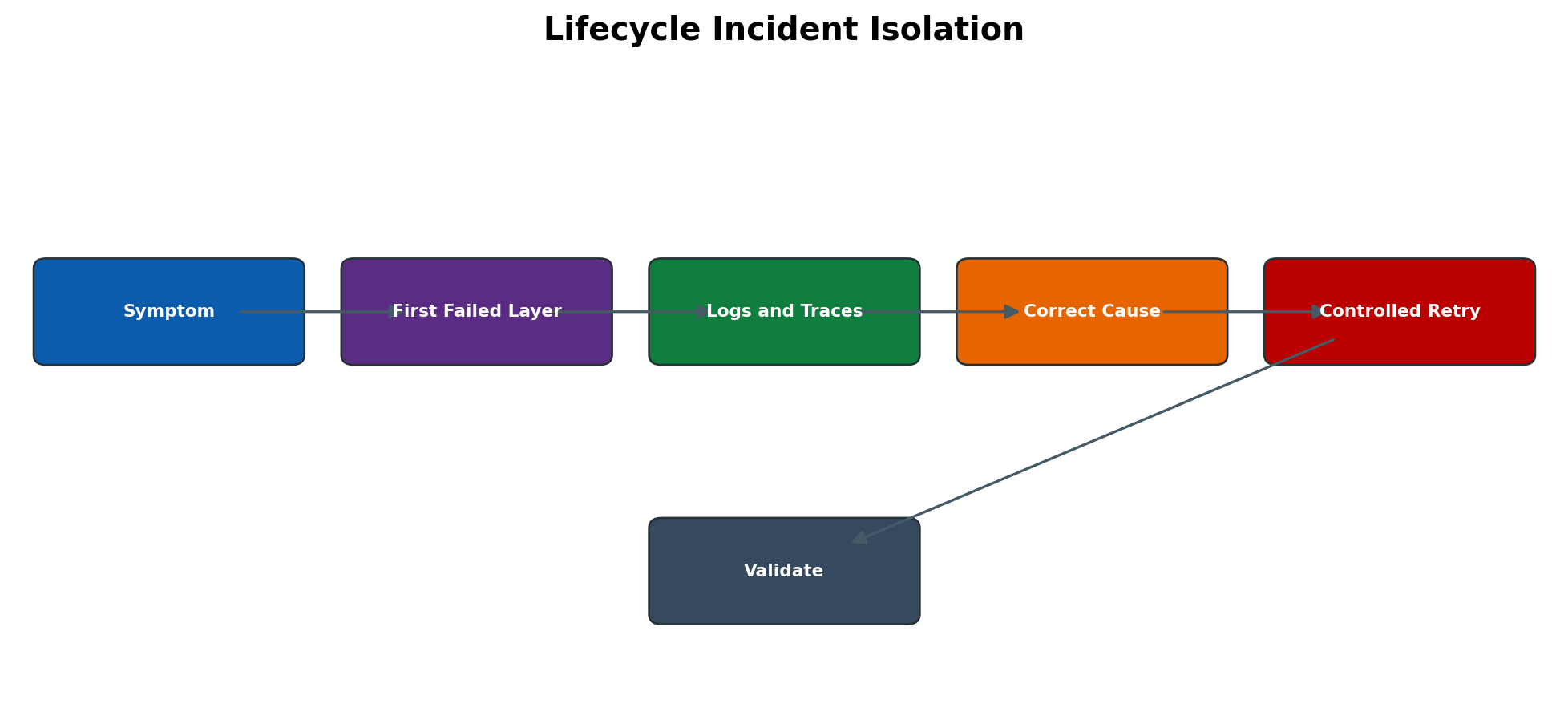
Figure 4.8 Lifecycle incident isolation flow
SWPM Stops During Prerequisite Check
Symptom: The installer blocks before main execution or flags unmet requirements.
Likely causes: Unsupported OS/kernel level, missing package, hostname/DNS inconsistency, insufficient limits, filesystem or permission problem.
Detailed diagnosis: Record the exact check and compare the host with the applicable installation guide and approved build sheet. Validate commands outside SWPM only in read-only mode.
Corrective solution: Correct the host prerequisite through the owning team, re-run the check and use supported retry. Do not bypass mandatory checks without explicit SAP guidance.
Validation: All prerequisite checks pass and the parameter summary remains correct.
SWPM Fails to Create an Operating System User or Service
Symptom: Installation stops while creating an account, group or service.
Likely causes: Account already exists with wrong UID/GID, domain policy, insufficient privilege, password restriction or stale partial-install object.
Detailed diagnosis: Inspect the first SWPM/OS error and current account/service state. Compare IDs and group membership across shared-storage hosts.
Corrective solution: Reconcile the account with the approved identity design or remove only confirmed partial artifacts using the documented recovery procedure.
Validation: SWPM creates/uses the identity successfully and file ownership is correct.
SWPM Cannot Connect to the Database
Symptom: Installer reports database logon, listener or connection failure.
Likely causes: Database not started, wrong host/port/service, credential issue, missing client library, firewall, TLS or name resolution.
Detailed diagnosis: Test database service and network from the installation host, verify client library and read DB/SWPM logs at the same timestamp.
Corrective solution: Correct the database/network/client dependency; rotate credentials securely if required and retry the same supported step.
Validation: SWPM connects, schema steps continue and later R3trans/database validation passes.
SWPM Retry Repeats the Same Failure
Symptom: Retry immediately returns to the failed phase.
Likely causes: Root cause not corrected, wrong log reviewed, cached environmental state, resource still locked or unsupported manual change.
Detailed diagnosis: Return to the first causal message, check related OS/DB logs and verify the correction actually applies to the process identity and host.
Corrective solution: Correct the owning layer and retry once. If state is inconsistent, preserve the work directory and follow SAP support guidance rather than deleting state.
Validation: The failed step completes and subsequent phases proceed without new inconsistency.
sapstartsrv Is Not Reachable
Symptom: sapcontrol cannot connect or reports a start-service communication error.
Likely causes: sapstartsrv stopped, wrong instance number/port, service registration, firewall, certificate or host-name issue.
Detailed diagnosis: Confirm target host and instance, service/process state, start-service trace, port listening and local versus remote behavior.
Corrective solution: Restore the correct start service and its configuration using the supported OS/SAP method; fix network or certificate trust as applicable.
Validation: GetProcessList works locally and from approved management hosts and reports the intended instance.
Instance Starts but Dispatcher Stops
Symptom: sapcontrol briefly shows processes then dispatcher becomes stopped or gray.
Likely causes: Invalid profile parameter, database connection, shared memory/resource limit, port conflict, missing library, license or central-service connectivity.
Detailed diagnosis: Read dispatcher and work-process traces from the first failure, correlate SM21/OS/DB evidence and compare the last profile/kernel change.
Corrective solution: Rollback or correct the exact parameter/library/dependency, clear only documented stale resources and restart once through the approved method.
Validation: Dispatcher and work processes remain healthy, logon succeeds and no repeating trace error occurs.
Application Server Cannot Register with Message Server
Symptom: The instance runs locally but is absent from the system or SM51.
Likely causes: Wrong message-server host/service, DNS/firewall, ASCS unavailable, profile error or network segmentation.
Detailed diagnosis: Check ASCS state, message-server trace, application-server profile values, name resolution and port reachability both ways.
Corrective solution: Restore central services or correct the approved profile/network setting; avoid hard-coding temporary IP addresses as a permanent fix.
Validation: Instance registers consistently and logon/load distribution works.
System Stop Hangs
Symptom: Stop command remains pending and processes do not end.
Likely causes: Long update/job, blocked work process, network filesystem, database wait, unresponsive process or cluster ownership conflict.
Detailed diagnosis: Identify remaining process and its activity using sapcontrol, SM50/SM66 if available, jobs/updates, traces and OS evidence.
Corrective solution: Allow graceful completion or cancel through the application-approved method. Use force/kill only under the emergency runbook after assessing transaction consistency.
Validation: All processes stop, no corrupt update/business state remains and restart is clean.
RZ10 Profile Check Reports an Error
Symptom: Profile syntax/consistency check fails or activation is blocked.
Likely causes: Typing error, invalid parameter/value, duplicate/conflicting entry, wrong profile version or missing include.
Detailed diagnosis: Read the exact check line, compare with RZ11 documentation and active previous version, and identify affected instances.
Corrective solution: Correct the new profile version or restore the last valid version. Do not edit production OS files outside the controlled profile process except documented emergency recovery.
Validation: RZ10 check passes and restart loads the intended effective values.
Parameter Change Has No Effect
Symptom: A value was changed but RZ11 or runtime behavior is unchanged.
Likely causes: Changed wrong profile/instance, static parameter without restart, dynamic change not persisted, spelling/unit issue or overridden value.
Detailed diagnosis: Compare current/default value and profile source on every instance. Review version/activation and startup trace for loaded profiles.
Corrective solution: Update the correct profile, activate and restart if static; align runtime and persistent values through supported functions.
Validation: RZ11 shows the expected effective value after the required lifecycle event.
Profile Change Prevents Startup
Symptom: Instance fails after a parameter change.
Likely causes: Excess memory allocation, invalid path/port, syntax issue, incompatible parameter or wrong unit.
Detailed diagnosis: Use start/dispatcher trace and last profile version; calculate resource totals and identify the precise new entry.
Corrective solution: Restore the last known good profile using the documented OS-level recovery path or RZ10 when available, then retest the change in lower environment.
Validation: Instance starts on the previous baseline and a corrected change passes controlled validation.
Operation Mode Does Not Switch
Symptom: Scheduled time passes but work-process distribution remains unchanged.
Likely causes: Incomplete SM63 timetable, mode/instance inconsistency, nonexistent mode, time-zone/time issue or switch service problem.
Detailed diagnosis: Check current time/time zone, timetable coverage, RZ04 consistency, active mode and system log.
Corrective solution: Correct the timetable or operation-mode definition and validate a controlled switch without reducing mandatory process capacity.
Validation: Expected mode becomes active and SM50/SM66 shows the approved distribution.
Operation Mode Causes Dialog or Batch Degradation
Symptom: After a switch, users are slow or batch backlog grows.
Likely causes: Distribution does not match measured workload, too few dialog/background processes or update/spool capacity affected.
Detailed diagnosis: Compare pre/post mode, SM50/SM66, ST03N workload, job backlog, update/spool status and host utilization.
Corrective solution: Return to the safe baseline mode, then redesign distribution from measurements and test in a representative window.
Validation: Response times and queues return to target while essential process types remain healthy.
Kernel Executable Will Not Start
Symptom: After update, a process fails with loader, symbol or permission error.
Likely causes: Wrong platform/archive, incomplete package mix, missing library, ownership/execute bit, OS dependency or corrupt extraction.
Detailed diagnosis: Compare package metadata and version output, inspect loader/start trace, file ownership and checksums; do not mix files from the backup and target kernel.
Corrective solution: Restore the complete backed-up executable directory or deploy the correct complete compatible package with required libraries.
Validation: All binaries report the intended version and processes start without loader errors.
R3trans Returns a Database Connection Error After Kernel Update
Symptom: R3trans -d fails although database was previously reachable.
Likely causes: Database library mismatch, environment/path, secure store, listener/service, permission or kernel incompatibility.
Detailed diagnosis: Read trans.log and DB client errors, compare environment as the SAP admin user, verify database service and library linkage.
Corrective solution: Correct the compatible database client/kernel library or connection configuration; roll back the kernel if acceptance criteria cannot be met.
Validation: R3trans -d returns success and application work processes connect.
ASCS Failover Completes but Application Servers Do Not Reconnect
Symptom: Cluster reports ASCS online on another node, yet applications remain disconnected.
Likely causes: Virtual hostname/IP, DNS cache, firewall, mount, profile endpoint, cluster dependency or enqueue takeover issue.
Detailed diagnosis: Validate cluster resource addresses, message/enqueue process state, traces and connectivity from every application host.
Corrective solution: Correct the cluster/network/resource dependency and restart only affected application services through the HA runbook if required.
Validation: All instances register, locks work and controlled business transactions complete.
Shared sapmnt or Transport Filesystem Is Unavailable
Symptom: Startup, profiles or transports fail because a shared path is missing or read-only.
Likely causes: Mount/network/storage outage, permission, stale NFS handle, cluster resource or capacity/inode exhaustion.
Detailed diagnosis: Confirm mount and write/read behavior with the correct service identity on every host; inspect storage and OS logs.
Corrective solution: Restore the managed filesystem and ownership. Do not create local look-alike directories that hide the missing mount.
Validation: Every host sees the same expected content and SAP/transport operations pass.
System Copy Starts Outbound Production Interfaces
Symptom: A refreshed non-production system sends jobs, RFC, email or messages externally.
Likely causes: Production destinations, jobs, logical systems or credentials were copied and isolation/post-copy steps were incomplete.
Detailed diagnosis: Stop outbound processing, preserve logs and identify every destination/message sent. Assess business and security exposure with owners.
Corrective solution: Lock/redirect interfaces, disable schedules, change logical-system and credentials through the approved post-copy plan, then reconcile effects.
Validation: Non-production communication reaches only approved endpoints and negative tests confirm isolation.
Diagnostic Decision Process
Define which component was changed and which component first failed. Compare the last known good state, preserve logs, verify external dependencies and correct only the owning layer.
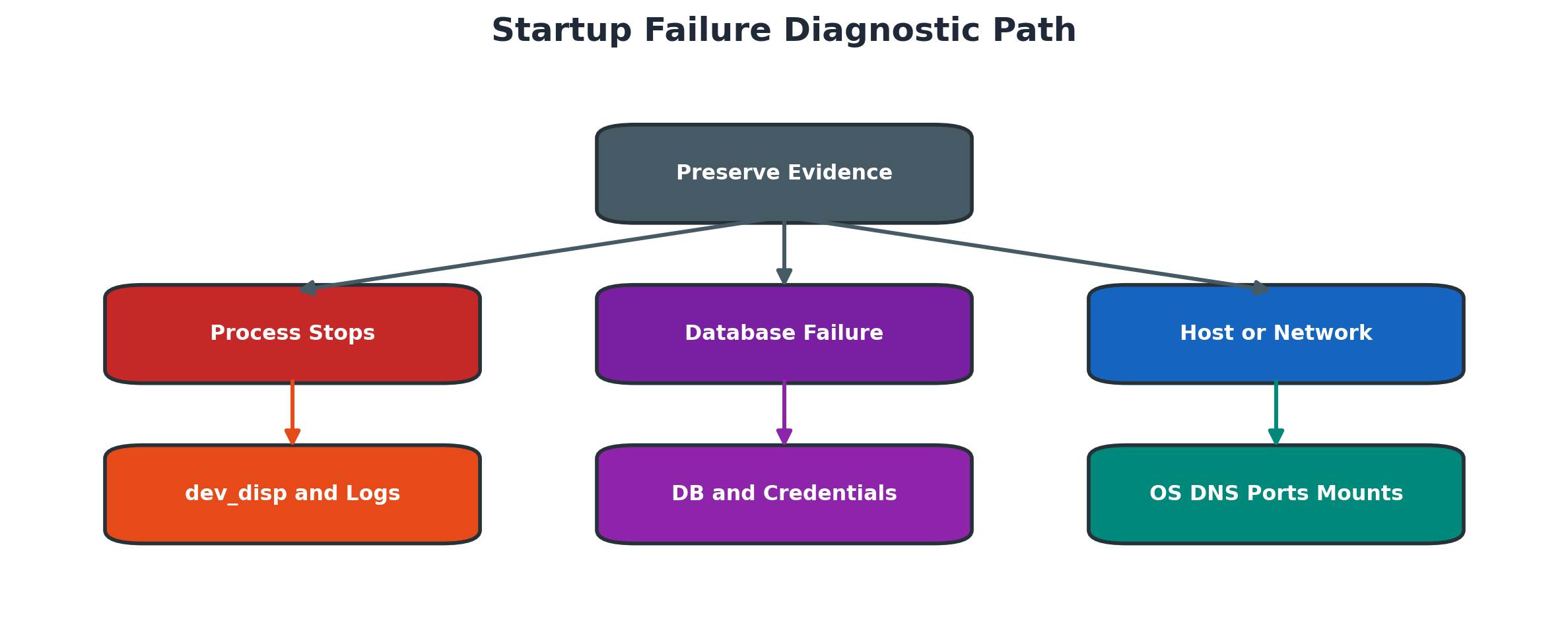
Figure 4.5 Startup failure diagnostic path
Use this diagnostic order:
- Record the changed component host instance time and visible symptom.
- Capture sapcontrol status relevant developer traces and system logs.
- Determine whether the failure is start service profile SAP process database or infrastructure.
- Compare profiles binaries environment ports mounts and service state with the last known good baseline.
- Correct only the owning layer through the approved procedure.
- Restart or retry once and collect fresh evidence.
- Validate instance registration processes connectivity and a controlled application request.
- Document root cause recovery and preventive monitoring.
Practical Scenario
Dispatcher Stops After Startup
After a planned profile change, the instance briefly shows a starting state and then the dispatcher stops. The operating system remains healthy, but the application server does not register in the system.
The administrator preserves sapcontrol output and developer traces, compares the active instance profile with the previous approved version and identifies an invalid parameter value. The previous value is restored through the approved process, the instance is restarted once and all affected services are validated.
A safe recovery is:
- Do not submit repeated start commands.
- Capture sapcontrol output dev_disp and start-service evidence.
- Confirm database and central services are available.
- Compare the active instance profile with the approved previous version.
- Identify the invalid or unsupported parameter and assess impact.
- Restore the approved value through profile administration.
- Start the instance once and monitor dispatcher and work processes.
- Validate logon business function and change documentation.
Expected Results and Validation
The dispatcher remains green, configured work processes start, the instance registers correctly, database connectivity is healthy and a controlled user transaction completes. The change record contains the invalid value, restored value, evidence and follow-up review.
Summary
SAP lifecycle administration is successful only when installation, configuration, startup, maintenance and recovery are treated as controlled technical changes. SWPM completion must be followed by layered validation; profile and operation-mode changes must be checked against effective runtime values; kernel and HA activities require tested rollback; and every incident must be diagnosed from the first failed dependency rather than repeated retries. The final acceptance combines healthy processes, database and infrastructure services, secure connectivity, monitoring, backup readiness and a verified business transaction.
Key Takeaways
Successful lifecycle work combines correct tools with verified operating system, database, network, storage, profile and security dependencies. Installation completion, process startup and business readiness are separate checkpoints.
Safe administration preserves evidence, uses approved control interfaces and validates the effective configuration after every restart or maintenance change.
Retain these operating habits:
- Plan product host database storage network and security as one build
- Treat installer completion and production readiness as different states
- Preserve SWPM and developer logs before retry or restart
- Verify effective profile values after activation and restart
- Use supported start and stop interfaces in dependency order
- Maintain tested backup rollback and recovery procedures
Content Coverage Validation
This chapter independently covers installation planning, SWPM, parameter collection, logs and recovery, profiles, startup and shutdown, operation modes, kernel maintenance, SUM context, infrastructure dependencies and structured troubleshooting.
The structure, wording, examples, tables and diagrams are original. Historical content was used for topic coverage, while procedures are presented with modern lifecycle terminology and release-aware cautions. Source figures and screenshots were not copied or traced.