
BASIS - Week 1 Foundations Architecture and Core Operations / SAP User Administration and Authorizations
Result :
SAP User Administration and Authorizations
Introduction
Purpose
This chapter explains how SAP users receive and lose access, how PFCG roles become generated authorization profiles, how ABAP authorization checks evaluate object fields and how administrators diagnose failures without granting excessive access. User administration is a security lifecycle, not only SU01 data entry. Correct administration connects identity proof, approval, role design, provisioning, testing, monitoring, review and timely removal.
Audience
The chapter is intended for SAP BASIS administrators, security administrators, role designers and technical support engineers. It covers classic AS ABAP user and authorization tools. SAP Cloud Identity Services, GRC Access Control, IDM and application-specific identity frameworks may automate parts of the lifecycle, but the target-system authorization concepts remain essential.
Learning Objectives
- Distinguish user types and apply the correct type for people, RFC, background and service use.
- Explain user master, role, generated profile, authorization object, fields and user buffer.
- Create and maintain users safely with SU01 and SU10.
- Build PFCG roles using menus, SU24 proposals, organizational levels and profile generation.
- Diagnose access failures with SU53, STAUTHTRACE, ST01, SU56 and SUIM.
- Control SAP standard, technical and emergency users with ownership, secret management and monitoring.
- Execute joiner, mover, leaver and periodic review processes with evidence.
Scope and Version Context
Classic SAP GUI transactions remain common, while current S/4HANA landscapes may use Fiori catalogs/spaces/pages, IAM integrations, business roles and centralized access governance. Exact user types, trace transactions and PFCG functions vary by release. This chapter explains stable ABAP concepts and requires release-specific verification before production changes.
Identity and Access Architecture
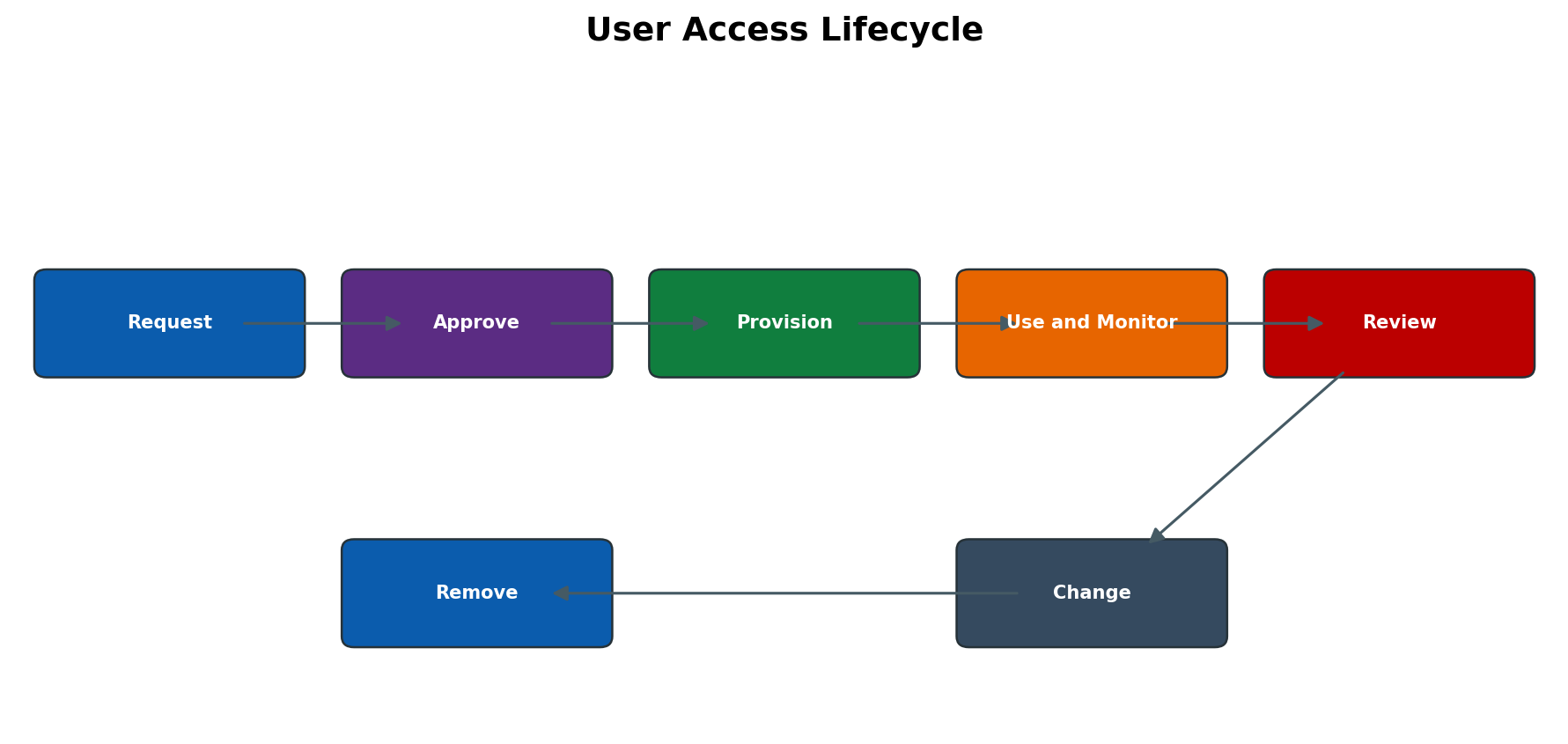
Figure 6.1 User access lifecycle
User Master Role Profile and Authorization Object
The user master stores identity, logon, validity, defaults and assigned roles/profiles. A PFCG role groups menu content and authorization data. When generated, it creates a profile containing authorizations. Authorization objects group fields that an application checks, such as activity and organizational values. Direct profile assignment can bypass role governance and should be limited to documented technical exceptions.
Authorization Check and User Buffer
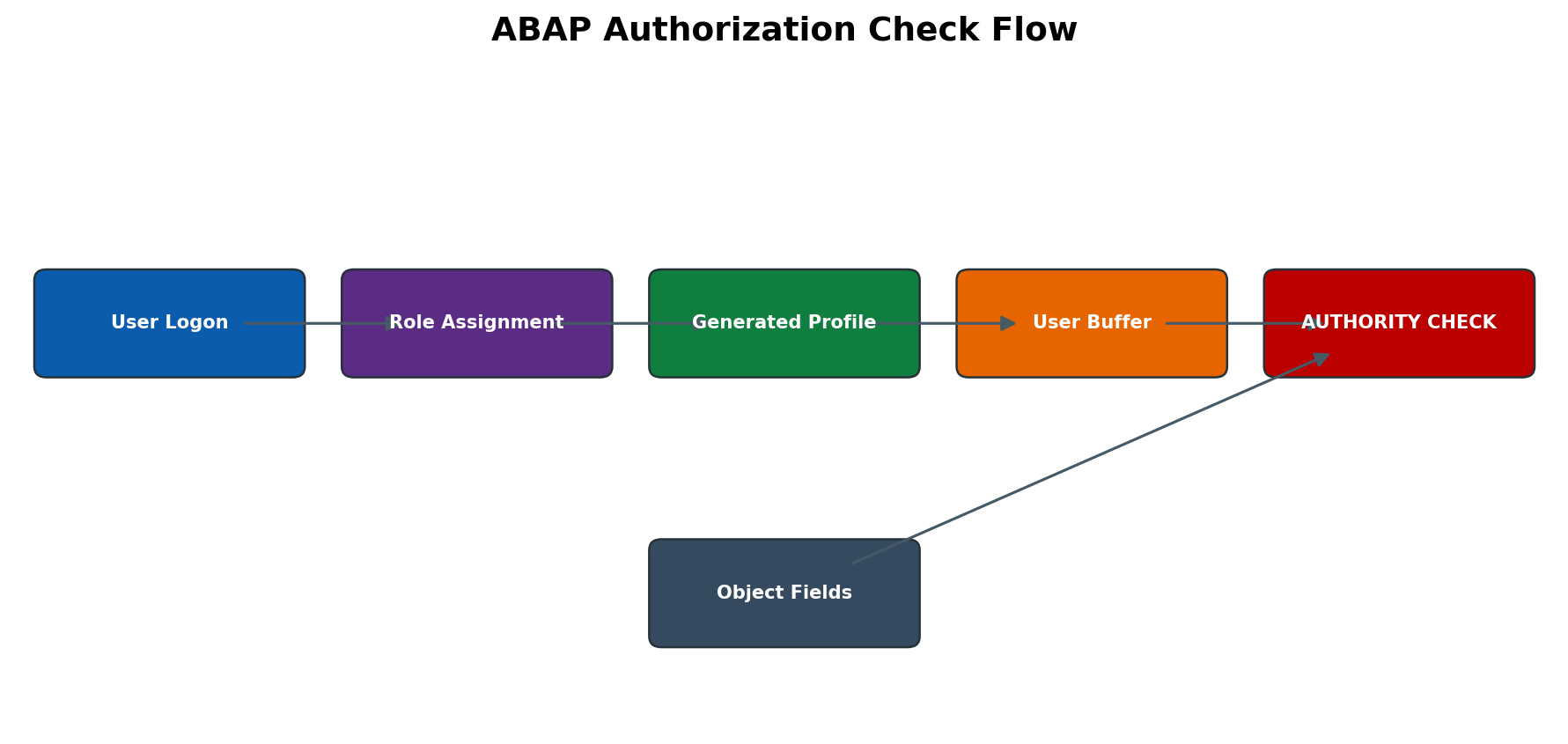
Figure 6.2 ABAP authorization check flow
At logon or buffer refresh, authorizations are loaded into the user context. ABAP AUTHORITY-CHECK compares required object fields with authorizations in the buffer. Access to a transaction code is only one layer: the program can check business objects and activities after the transaction starts. A successful menu display does not prove the user can execute every action, and a missing menu entry does not always mean the backend authorization is absent.
Client Scope and Central Identity Sources
ABAP user masters and role assignments are client-specific. The same user ID in another client is a separate master unless centrally provisioned. CUA, IDM, GRC, IAS/IPS or other identity sources may own attributes and assignments. Direct target changes can be overwritten by the source. Before editing, identify the authoritative system, connector and reconciliation schedule.
Access Lifecycle and Segregation of Duties
Joiner access should begin from approved job responsibilities. Movers require removal of old access, not only addition of new roles. Leavers must be locked or validity-ended quickly and technical ownership transferred. Segregation of duties identifies risky combinations such as creating and paying vendors. PFCG grants technical access; a GRC or manual risk process evaluates combinations and mitigation.
User Master Administration
SU01 User Master Structure
| Tab or area | Purpose | Administrative risk |
| Address | Identity and communication attributes | Wrong person mapping or privacy exposure. |
| Logon Data | User type, password, validity, lock and alias | Inappropriate interactive/technical use or expired service. |
| Defaults | Language, decimal/date format, printer and time zone | Incorrect output or scheduling interpretation. |
| Parameters | SET/GET parameter IDs | Unexpected default organizational values; not authorization. |
| Roles | PFCG assignments with validity | Overlapping or expired access. |
| Profiles | Generated/direct profiles | Direct profile can bypass role maintenance. |
| Groups | Administrative grouping | Delegated administration boundary may be misused. |
| Personalization | Application-specific user settings | Can affect behavior but does not replace authorization. |
User Types and Correct Use
| User type | Intended pattern | Important control |
| Dialog | Named interactive person | Password/change policy, lock behavior and no sharing. |
| System | Internal system communication/background where interactive logon is not required | Strong secret control; no dialog use; named owner and monitoring. |
| Communication | External RFC/communication scenario according to release behavior | No interactive use; least S_RFC/business authorization. |
| Service | Shared anonymous/limited service scenario where justified | Severely restricted; password and broad logon behavior require special governance. |
| Reference | Additional authorization reference; no normal logon | Control assignment and review; not a shared login. |
Logon Data Password and Validity
Validity dates enforce lifecycle boundaries. User lock reasons can be administrative, failed-logon or system-generated. Initial passwords should be transmitted securely and changed at first interactive logon where applicable. Technical users need managed secrets or SNC/certificates and rotation plans. Never place passwords in tickets, screenshots, scripts or role documentation.
Defaults Parameters and Personalization
Default printer, language, date/decimal format, time zone and start menu affect user experience and output. Parameter IDs prefill fields but do not authorize values. Copying parameters from another user can accidentally preselect sensitive company codes or plants. Maintain only documented parameters and confirm their business effect.
SU10 Mass Administration
SU10 performs mass locks, validity, role or other changes depending on function/release. Mass actions are high risk because the selection may include technical or emergency users. Export/record the selected user list, peer-review scope and use a reversible action where possible. Validate a sample and total counts after execution.
Copy Rename Lock Delete and Reference Controls
Copying a user should normally copy only approved attributes, not all roles/profiles blindly. User rename has implications for ownership, jobs, variants and audit history and may not be supported as a simple field change. Locking preserves history and stops logon; deletion removes the master and can weaken investigation. Follow retention policy and transfer ownership before deletion.
Role and Authorization Administration
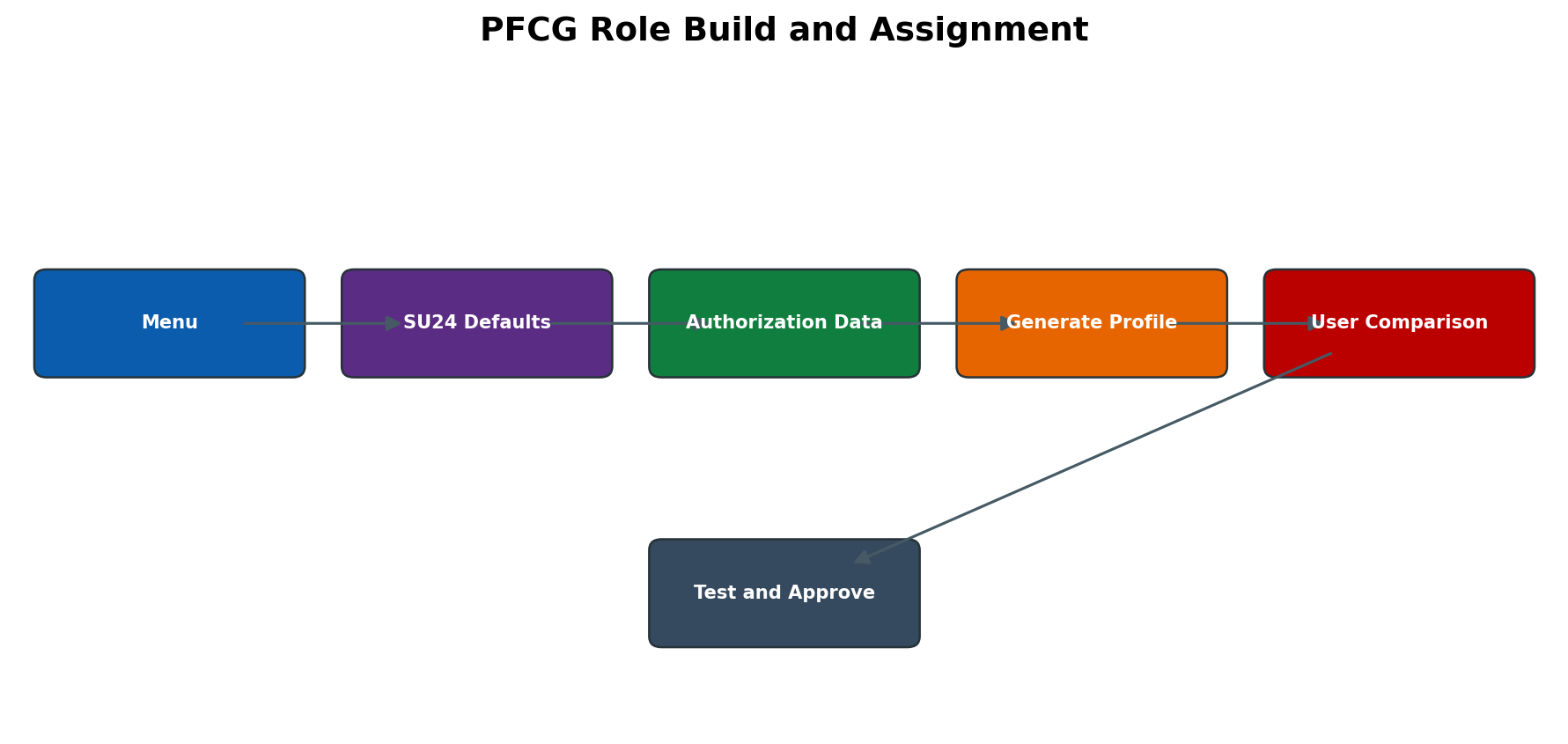
Figure 6.3 PFCG role build and assignment
PFCG Single Composite and Derived Roles
A single role contains menu and authorization data and generates a profile. A composite role groups single roles but has no independent authorization data. A derived role inherits menu and authorization structure from a master role while organizational values differ. Changes to the master can affect many children, so inheritance and testing must be controlled.
Role Menu and SU24 Proposals
The role menu can contain transactions, reports, URLs and Fiori content depending on release. PFCG uses SU24 authorization defaults for included applications to propose objects and field values. Proposals are a starting point, not proof of least privilege. Adding a transaction can introduce new proposals; deleting menu content can change authorization status. Review authorization data before generation.
Authorization Objects Fields and Activities
An authorization object groups up to the release-defined field structure; authorizations contain permitted values. ACTVT values represent actions such as display or change, but exact semantics depend on the application. Wildcards can create broad access. Status indicators in PFCG show maintained, changed, manual or inactive proposals. Manual objects require documentation because menu regeneration may not maintain them as expected.
Organizational Levels
Fields designated as organizational levels are maintained centrally within a role so the same value consistently applies across many objects. Company code, plant or sales organization are common examples, but actual org levels depend on configuration. Do not manually edit each object to bypass the org-level screen. Derived roles are useful when the authorization design differs mainly by organizational values.
Profile Generation and User Comparison
After authorization data is complete and status is green, generate the role profile. User comparison writes current role/profile assignments to user masters and respects validity. A role can look assigned in PFCG while the user buffer is stale or comparison incomplete. Schedule regular user comparison where required and have the user log off/on or reset buffer through supported methods for validation.
Role Transport and Target Validation
PFCG roles and authorization data are transported, but user assignments are generally environment/client-specific and often provisioned separately. Generated profiles, SU24 changes and Fiori content dependencies require sequence control. In the target, regenerate/compare where required, verify menu and authorizations and test with a non-privileged user. Never use production role editing to compensate for an incomplete transport without a back-port plan.
Authorization Diagnosis
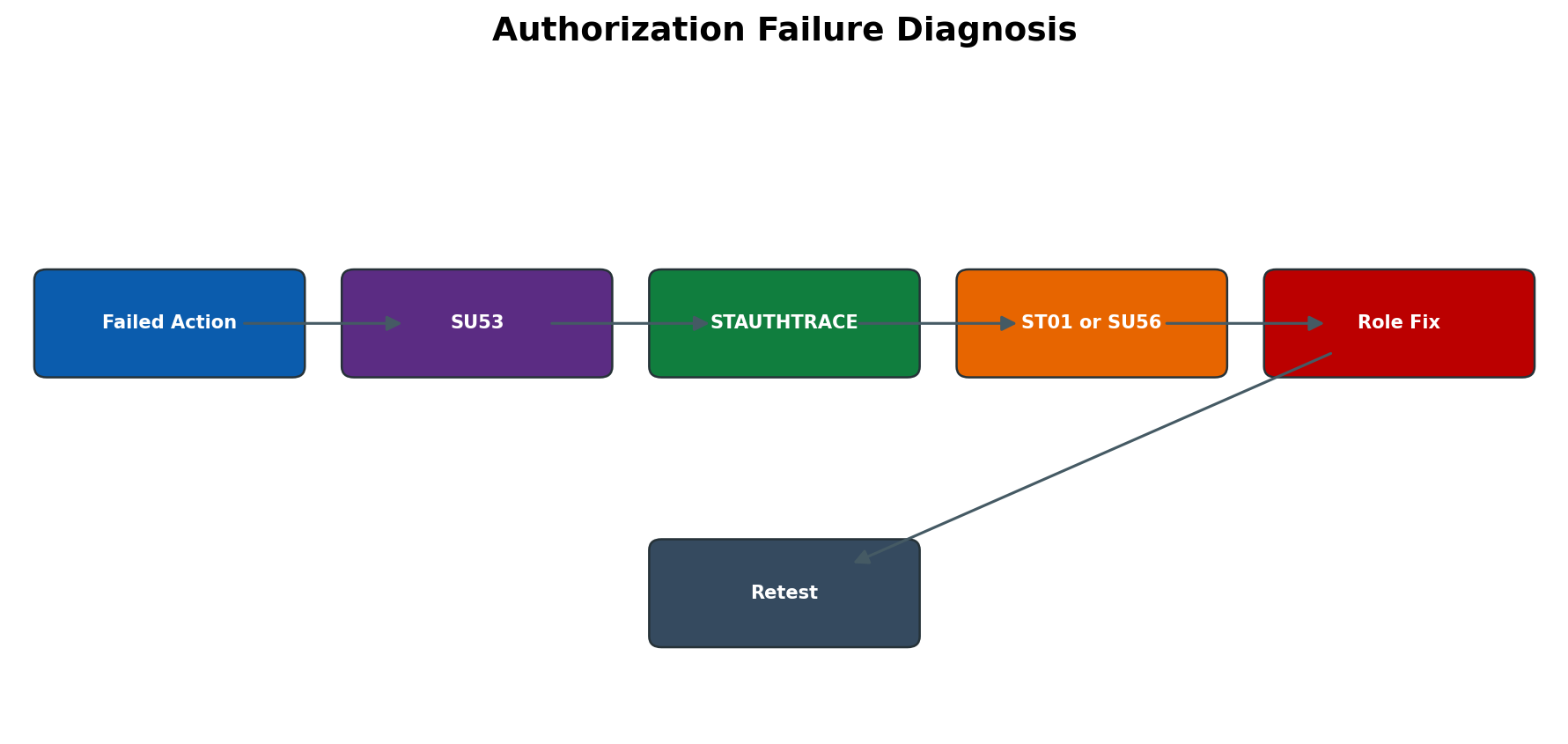
Figure 6.4 Authorization failure diagnosis
SU53 Last Failed Check
SU53 shows the user’s most recent failed authorization check in the current context. Run it immediately after reproducing the failure, preferably in the same session. Later checks can overwrite evidence. SU53 may not capture a failure in another user, server-side RFC or background job. Treat displayed object/values as evidence, not an instruction to grant every requested value.
STAUTHTRACE System Trace
STAUTHTRACE provides authorization tracing with filters and centralized usability in supported releases. Limit user, client, time and scope; start trace, reproduce once, stop trace and analyze failed plus successful checks in context. Trace data can expose sensitive object values and must be retained securely. Do not leave broad production traces running.
ST01 Trace and Server Scope
ST01 can trace authorization checks and other components on an application-server scope. Ensure the user action is routed to the traced instance or run the trace on relevant servers. Use precise filters and short duration. Stop and delete trace data according to policy. System-wide alternatives may be more suitable on current releases.
SU56 User Buffer
SU56 displays authorization data currently loaded in a user buffer. It helps determine whether a generated profile/assignment is present and what values are effective. Buffer data can be stale after assignment changes until user comparison and session refresh. Do not diagnose solely from PFCG design; compare the effective buffer and actual check.
SUIM Reporting and Where Used Analysis
SUIM reports users, roles, profiles, transactions, authorization objects and change relationships. Use it to find who has a critical authorization, which roles contain an object/value and whether inactive/expired assignments remain. Large wildcard searches can be expensive. Validate report scope, client and evaluation date before using results as audit evidence.
Technical RFC and Emergency Users
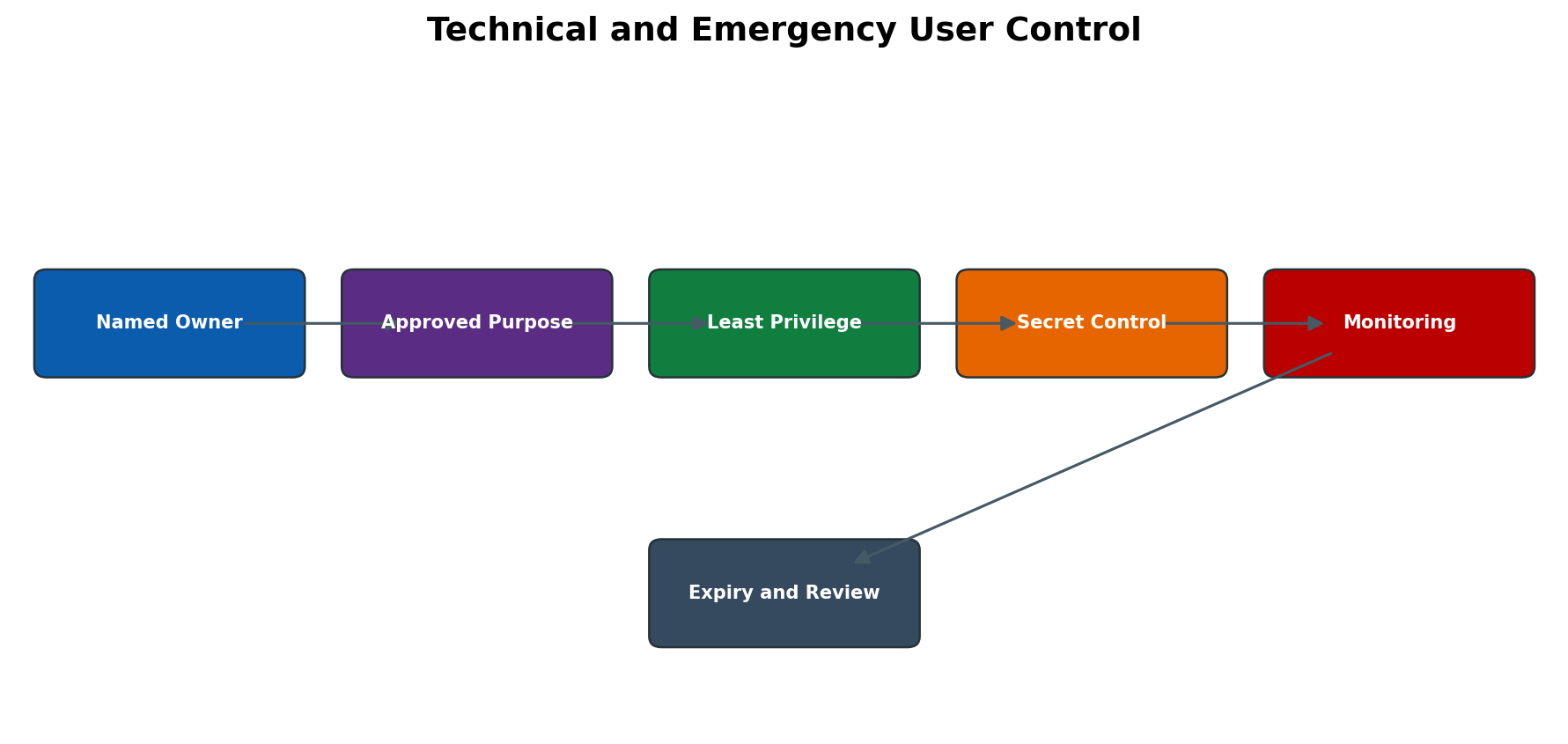
Figure 6.5 Technical and emergency user control
System Communication Service Reference and Dialog Users
Choose the user type from required logon behavior, not convenience. System/communication users should not be shared for dialog troubleshooting. Service users have special shared-use risk and need tight restriction. Reference users add authorizations to another user and require careful review. Dialog users represent individuals and support accountability.
RFC and Background User Design
RFC users require only the S_RFC function groups/functions and business authorizations needed by the interface, along with controlled destination credentials or SNC. Background job step users need stable validity and least privilege for the program. Assign a named owner, review date, monitoring and replacement process. Test both successful and denied operations.
SAP Standard and Emergency User Controls
SAP-delivered users such as SAP*, DDIC and communication users have release/client-specific purposes. Secure passwords, restrict network/logon, monitor use and follow current SAP guidance rather than deleting or casually unlocking them. Emergency access should be time-bound, approved, individually attributable and reviewed. Permanent SAP_ALL is not an emergency-control design.
Credential SNC and Certificate Lifecycle
Prefer managed secrets, SNC or certificate-based authentication where supported. Define creation, secure storage, distribution, rotation, expiry monitoring and revocation. Changing a technical password without updating destinations/jobs creates outages; rotating a destination without target validation can lock the account. Never test credentials by exposing them in command lines or screenshots.
Detailed Technical Reference
User and Role Tables
| Table or object | Purpose | Safe use |
| USR02 | Logon-related user data and status | Analyze through SU01/SUIM; never update directly. |
| USR21 and address tables | User-to-address/person relationships | Privacy-sensitive; use supported user tools. |
| AGR_DEFINE | Role header data | Use PFCG for maintenance. |
| AGR_USERS | Role-to-user assignments with validity | Use PFCG/SU01/SU10 or provisioning source. |
| AGR_1251 | Role authorization object/field values | Expert analysis only; never direct maintenance. |
| AGR_1252 | Organizational-level values | Maintain through PFCG org-level function. |
| UST04 and UST10C/UST12 | Profiles and authorization data in user/profile context | Use supported role/profile tools and SU56/SUIM. |
Authorization Buffer and Comparison
A user’s effective authorizations derive from assigned profiles and are loaded into the user context. PFCG assignment validity, profile generation and user comparison must all align. A user logged in before a change can retain an older buffer until refreshed according to session behavior. For critical removal, lock/end validity and terminate sessions through approved security procedure rather than waiting only for a future logon.
SU24 Proposal Maintenance
SU24 stores check indicators and default field proposals for applications/transactions. Customer maintenance affects future role builds and menu updates and can influence many roles. Change only with application/security design approval, document why the standard proposal is insufficient, transport in sequence and regression-test affected roles. SU25 supports authorization-default adjustment during upgrades and must follow upgrade guidance.
Role Design and Naming Standards
Name roles by system/application, business responsibility, access level and organizational pattern without embedding personal names. Separate business roles from technical/infrastructure roles. Keep menus understandable and authorization data traceable to requirements. One giant role simplifies assignment but weakens least privilege and testing; excessive micro-roles create assignment complexity. Use a documented design balance.
Composite and Derived Role Risks
Composite roles can hide which single role grants access and can accumulate obsolete children. Derived roles reduce duplication but a master change propagates widely; organizational values must remain correctly separated. Do not manually diverge a derived child’s inherited authorization structure. Before transport, list affected composites/children and test representative organizational values.
Critical Authorizations and Wildcards
| Risk area | Examples | Control |
| User/role administration | Broad S_USER_* objects | Separate role/user administration, restrict user groups and log changes. |
| Development and transports | S_DEVELOP, S_TRANSPRT, CTS admin | Limit object/type/activity and production use. |
| Background/OS commands | S_BTCH_ADM, S_LOG_COM, SM69 execution | Dedicated admin roles, command allowlist and monitoring. |
| RFC | Broad S_RFC or trusted RFC control | Limit function groups/functions and S_RFCACL. |
| Table access | Generic table display/maintenance | Use authorized groups and application transactions. |
| Superuser profiles | SAP_ALL or SAP_NEW | Emergency/temporary only with approval and review; remove promptly. |
| Wildcards | * in org values, activities or objects | Business justification, risk analysis, test and periodic review. |
Inactive Users and Offboarding
Lock users after defined inactivity according to policy, but exclude justified technical/emergency accounts through owned exceptions. Offboarding should end validity/lock, remove or expire assignments, terminate active sessions when required, transfer jobs/variants/RFC ownership and preserve audit history. Deletion occurs only after retention and dependency review.
Periodic Access Review and Evidence
Review active users, user types, validity, locked/inactive accounts, privileged roles, direct profiles, emergency assignments, technical owners and role usage. Evidence should include population, evaluation date, reviewer, decision and completed remediation. A spreadsheet approval without proof of target removal is incomplete. Reconcile central provisioning and target-system state.
System Copy and Client Copy Security
After a system copy, copied users, roles, RFC secrets, jobs and emergency credentials can create risk. Lock or scramble interfaces as planned, reset passwords/secrets, verify SAP standard users, remove production-only access where appropriate and reconnect the identity source carefully. Client copies have profile/role and user-data behavior determined by the selected copy profile; plan security post-processing explicitly.
Advanced Technical Reference
User Master Tables and Change Evidence
The user master is client-dependent and distributed across several tables. USR02 contains logon-related data and user type/status information; USR21 links users to address/person data; ADRP and related address tables hold person/address attributes; USR05 stores user parameters. AGR_USERS links roles to users with validity dates, AGR_1251 contains authorization object field values in roles, AGR_1252 stores organizational-level values, and AGR_PROF relates roles to generated profiles. These objects are diagnostic references. Direct maintenance through SE16, SQL or custom updates is not a supported provisioning method.
Change evidence is as important as current state. SU01 change documents and role change history help establish who changed what and when. User creation, lock/unlock, validity changes, password reset, role assignment and profile generation should be traceable to a request or incident. A current role list cannot prove that access was approved or identify the earlier state; preserve request, approval, transport, comparison and validation evidence.
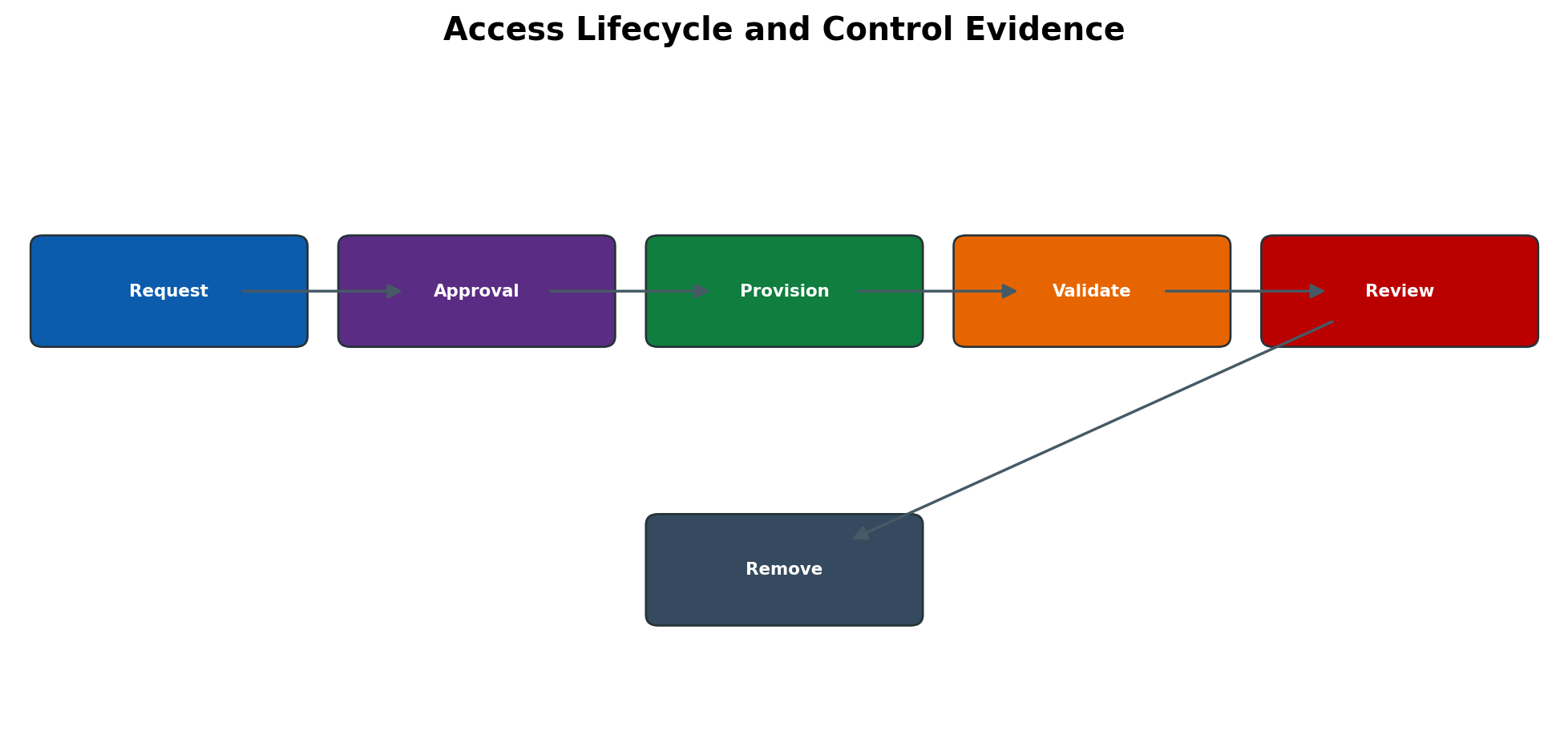
Figure 6.6 Access lifecycle and control evidence
Authorization Check Resolution and Return Codes
ABAP applications normally call AUTHORITY-CHECK for an authorization object and one or more fields. The runtime compares requested field values with authorizations available in the user buffer. A successful check returns sy-subrc 0; nonzero results indicate failure conditions whose exact meaning depends on the statement and program logic. Transaction start authorization such as S_TCODE is only one check. The program may subsequently check company code, plant, activity, table group, RFC function group or a custom object.
The effective decision depends on the exact client, user, application path, object, field values and time. A broad role may satisfy the check through a different authorization than the administrator expects. Conversely, a correct PFCG role can fail if its profile was not generated, user comparison is incomplete, assignment validity has not started, the wrong client was changed, or the session still holds an old buffer. Troubleshooting must prove the failing check rather than guessing from role names.
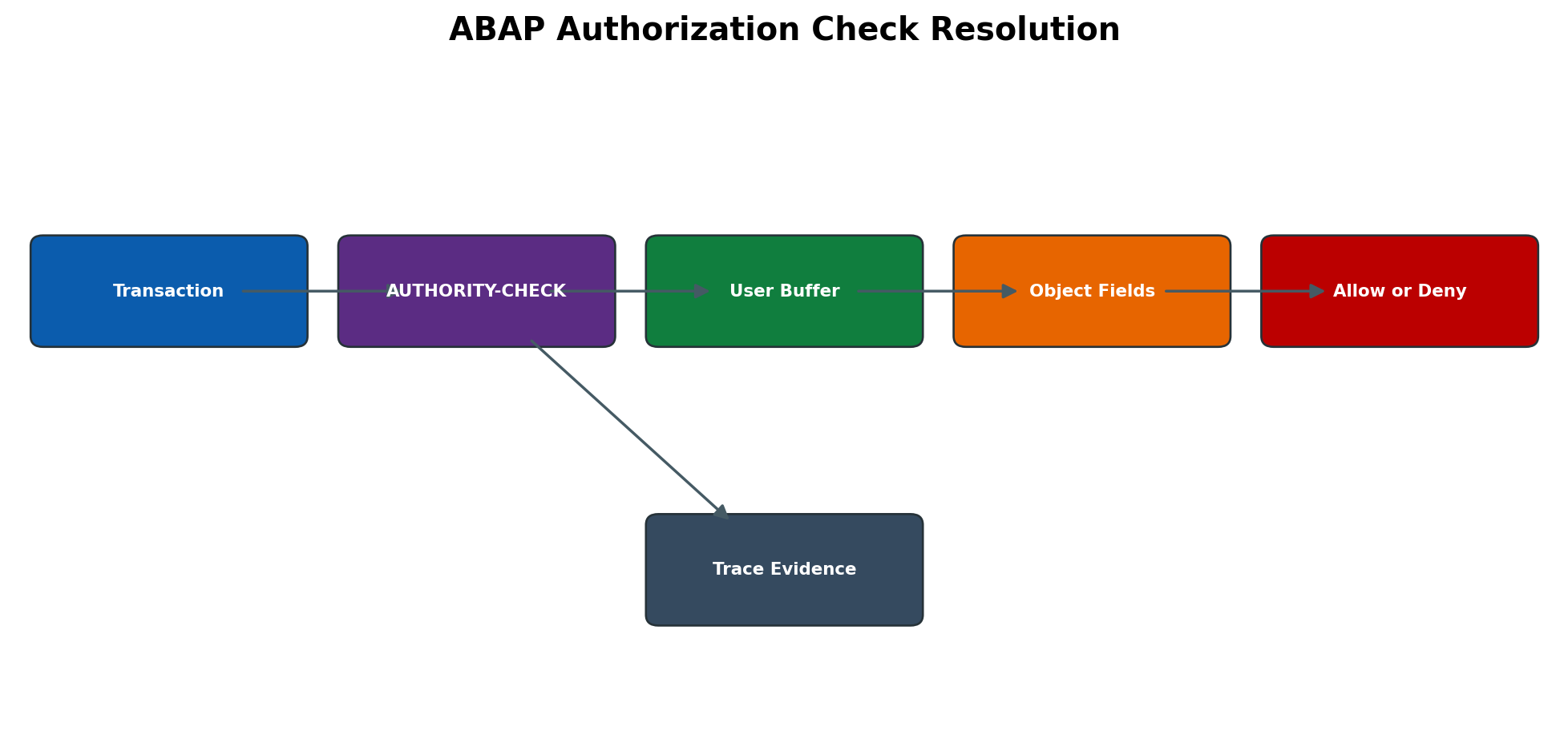
Figure 6.7 ABAP authorization check resolution
Key Authorization Objects
- S_TCODE controls the ability to start a transaction but does not grant every business action inside it.
- S_USER_GRP, S_USER_AGR and related user-administration objects restrict user groups and role assignment/maintenance.
- S_RFC controls RFC function-group/function access; the exact model depends on release and interface design.
- S_TABU_DIS and S_TABU_NAM can govern table-display/change paths, but application-specific checks may still apply.
- S_BTCH_JOB and S_BTCH_NAM affect background-job administration and execution under another user.
- S_DEVELOP and debugging-related authorizations are highly privileged and must be tightly controlled.
PFCG Generation Comparison and Buffer Refresh
A PFCG role combines a menu, authorization data, a generated profile and user assignments. Menu changes can introduce new SU24 proposals; authorization maintenance resolves proposal status, organizational levels and manual values; generation writes the profile; user comparison places valid profile assignments into the user master. These are distinct stages. A green menu does not prove green authorizations, and a generated profile does not prove that every assigned user is compared.
PFUD can execute scheduled user master comparison and related cleanup functions according to the release and selected options. Use conservative variants and record scope. For urgent validation, PFCG user comparison can update the selected role. After comparison, a user may need to end the old session and log on again so the buffer is rebuilt; do not use buffer-reset actions as a substitute for fixing an invalid role or comparison.
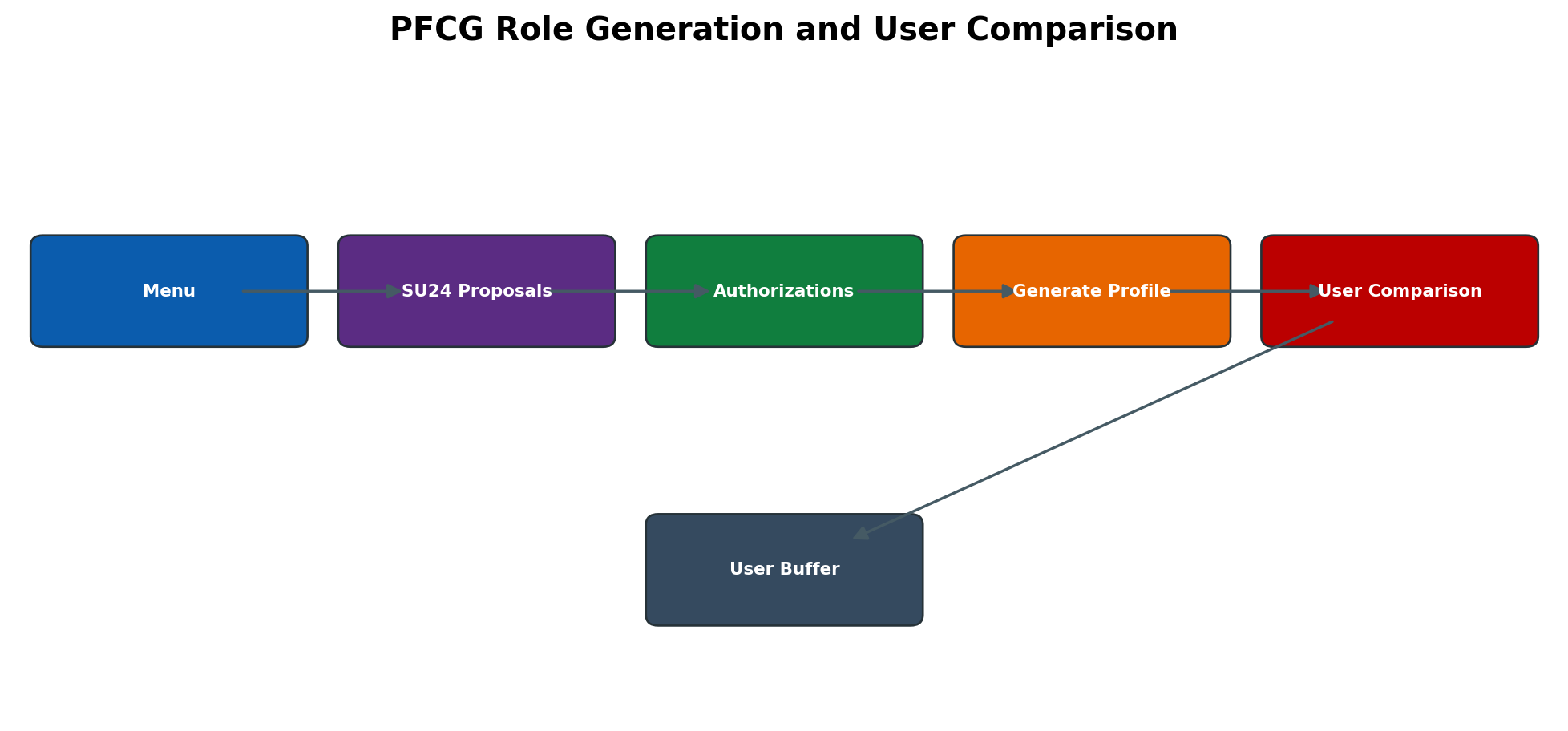
Figure 6.8 PFCG role generation and user comparison
SU24 Proposal Governance and Upgrade Impact
SU24 maintains authorization-check indicators and default field proposals associated with applications. PFCG uses these proposals when menu content is added. SU24 does not change every existing role automatically. Customer-maintained proposal values can influence many future role builds, so changes require security design review, transport control and regression testing. During upgrades, SU25 supports transfer/comparison activities for new SAP defaults; the exact steps depend on source and target release and must follow the upgrade guide.
Proposal status such as standard, maintained, changed or manually added should be understood before editing. Removing an object because it looks unused can break a later code path; adding wildcard values can silently expand every generated role based on the proposal. Use STAUTHTRACE or controlled test evidence to confirm actual checks, then update SU24 or the specific role at the correct design level.
RFC Trusted System and Technical Identity Controls
A technical RFC identity must have a named owner, purpose, source system, target client, allowed functions, credential method, rotation plan and monitoring. Communication or system user types are commonly chosen because they are not ordinary interactive users, but type selection depends on whether a human logon is required for controlled testing. Never convert to Dialog merely to simplify troubleshooting without a time-bound approval and rollback.
SM59 connection tests prove different layers: connection test checks reachability, authorization/logon test proves authentication and some logon capability, and the business call proves required S_RFC/application authorization. A successful connection test does not prove that the interface can execute its functions. Trusted RFC removes stored-password use only when the trust relationship and S_RFCACL authorization are correctly governed; it is not password-free unrestricted access.
Password Logon and Authentication Parameters
Password behavior is controlled by release-dependent login parameters such as minimum length, complexity, failed-logon handling, initial-password validity and productive-password lifetime. Review effective values in RZ11 and change only through approved profile management, considering dynamic/static behavior and every application server. Parameter names and defaults can change by release, so the installed documentation is authoritative.
SNC, X.509 certificates, SAML, Kerberos or identity-provider integration can reduce password exposure for interactive or technical access, but each introduces certificate, mapping and expiry dependencies. Record certificate subject, trust chain, expiry, owner and renewal test. Do not leave a powerful fallback password undocumented after certificate authentication is introduced.
Central Provisioning and Reconciliation
Identity-management, GRC access request, CUA or cloud provisioning tools may own the lifecycle. Manual SU01/PFCG changes can be overwritten during the next reconciliation or create unmanaged access. Determine the system of record before changing production. Record provisioning request ID, connector, target client, expected role validity and reconciliation result.
When central provisioning reports success but SAP access is absent, compare request status with actual AGR_USERS validity, generated profile and user comparison. When deleted access returns, inspect reconciliation rules, position/group mapping and pending requests. Fix the authoritative source and then reconcile; repeatedly removing the role locally treats only the symptom.
Emergency Access and Firefighter Governance
Emergency access must be time-bound, individually attributable and reviewed. Whether the environment uses a dedicated emergency user, GRC Emergency Access Management or another privileged-access platform, require a reason, approver, owner/controller, defined validity and activity-log review. Shared passwords without session attribution do not meet reliable accountability.
At the end of use, close the session, confirm log collection, remove or expire access, review executed transactions and reconcile sensitive changes. If emergency access is needed because standard role design is wrong, raise a permanent-role correction separately. Do not leave the emergency role assigned to avoid the next approval.
System Refresh and Production Identity Protection
A refresh can copy productive user masters, role assignments, RFC credentials, trusted relationships, certificates and active technical users into non-production. The post-copy security plan must lock or restrict copied users, reset or isolate credentials, disable outbound RFC/HTTP destinations, review logical-system mappings and re-establish only approved test access. Otherwise test users may inherit productive privileges or the refreshed system may authenticate to real endpoints.
Screenshot Capture Guide
Use screenshots only from a masked training or non-production client. Hide usernames where they identify real people, e-mail addresses, personnel numbers, role names that expose internal design, RFC hosts, certificates, passwords, ticket numbers and company data. Keep transaction title, relevant tabs, field labels and status messages visible so the image teaches the process.
Screenshot 1 SU01 Logon Data and User Type
Location: SU01 → enter training user → Display/Change → Logon Data. Show: User Type, Valid From, Valid To, lock indicator and password-status area; mask user ID and personal details. Caption: SU01 logon controls and validity for a managed user. Expected learning: user type and validity directly control allowed logon behavior.
Screenshot 2 PFCG Authorization Status
Location: PFCG → enter training single role → Authorizations tab → Change Authorization Data. Show: role name masked, status lights, organizational-level button and one non-sensitive object tree. Caption: PFCG authorization maintenance before profile generation. Expected learning: unresolved organizational or field values prevent a clean generated authorization profile.
Screenshot 3 PFCG User Assignment and Comparison
Location: PFCG → User tab. Show: masked user, validity dates, comparison status and User Comparison button. Caption: Role assignment validity and user master comparison. Expected learning: assignment, validity and comparison are separate controls.
Screenshot 4 SU53 Failed Authorization
Location: immediately after reproduced failure → /nSU53. Show: failed object, field names and requested values; mask user, client-sensitive values and business identifiers. Caption: Last failed authorization check captured in SU53. Expected learning: SU53 is timestamp-sensitive and must be collected immediately in the same user session.
Screenshot 5 STAUTHTRACE Filter and Result
Location: STAUTHTRACE → Trace for User → enter masked test user and controlled time window → Activate; reproduce once; Deactivate; Evaluate. Show: user filter, timestamps, return code, object and transaction/program fields. Caption: Focused authorization trace for one reproduced action. Expected learning: a narrow trace separates the relevant failed check from background noise.
Expanded Administration Procedures
Analyze an Authorization Failure End to End
- 1. Record user, client, system, timestamp, transaction/app, exact action and full error text. Confirm whether the issue affects one user or a role population.
- 2. Ask the user to reproduce once, then immediately run /nSU53 in the same session. Save the failed object, field values and return code; do not navigate through unrelated functions first.
- 3. If SU53 is empty or ambiguous, open STAUTHTRACE → Trace for User → filter the exact user and shortest practical time window → Activate. Reproduce once, then Deactivate and Evaluate.
- 4. Map the failed object/fields to the user’s effective roles using SUIM/PFCG. Check assignment validity, organizational values, profile generation and comparison status.
- 5. Confirm the requested access is approved and does not violate segregation-of-duties or critical-access policy. Fix the role design at the correct parent/derived or SU24 level; avoid direct profile assignment.
- 6. Generate the profile and perform user comparison. Ask the user to start a new session, repeat the original action and validate that no broader unintended function was granted.
Build a Derived Role Family Safely
- 1. Define the common menu and authorization design in the master role. Identify organizational fields that legitimately differ by company code, plant, sales organization or other approved boundary.
- 2. PFCG → create/change master role → maintain menu and authorization data → resolve non-organizational values → generate profile.
- 3. Create derived roles with the master-role relationship. Maintain only the permitted organizational-level values in each derived role; do not add inconsistent manual objects to individual children.
- 4. Run comparison/propagation from the master according to the release function. Review every child for changed status and generated profile.
- 5. Assign derived roles to test users with validity dates → perform user comparison → test permitted and prohibited organizational values.
- 6. Transport in dependency order, import to target, regenerate/compare if required and repeat negative tests. Document rollback to the previous role/profile version and user assignments.
Correct Access That Persists After Role Removal
- 1. SU01/SUIM → confirm the role is absent or validity ended in the affected client. Check whether a composite role, second single role, direct profile or centrally provisioned assignment grants the same object.
- 2. PFCG → verify user comparison for removed/expired assignments; run targeted comparison or approved PFUD option.
- 3. Ask the user to log off all sessions and log on again. Check SU56 only as diagnostic evidence of the rebuilt buffer.
- 4. If access remains, use STAUTHTRACE on the successful action and identify the authorization that satisfied the check.
- 5. Remove or restrict the actual granting source through approval. Correct identity-management mapping if it would reprovision the role.
- 6. Retest both the removed function and required normal work; preserve before/after role and trace evidence.
Rotate a Technical User Credential
- 1. Inventory every consumer of the technical user: SM59 destinations, jobs, middleware, secure stores, scripts and external schedulers. Confirm owner and maintenance window.
- 2. Create a protected rollback plan and capture connection/business test results without recording the old password.
- 3. SU01 or the approved identity platform → set the new credential according to user type and policy. Update each authorized secure store or destination; never send the password in e-mail or ticket text.
- 4. SM59 → test connectivity/logon as applicable, then execute the smallest safe business-interface test. Monitor SM21, SM37, RFC/queue/application logs.
- 5. Confirm every consumer uses the new credential and that no repeated failed logons lock the user. Remove temporary fallback or overlap credentials.
- 6. Record rotation date, next due date, owner and evidence; close the change only after downstream acknowledgement.
Run a Periodic Access Review
- 1. Define review population, client, key date, dormant threshold, privileged roles, technical users and evidence retention. Agree reviewer and application owner.
- 2. Use SUIM and approved reports to extract users, types, validity, role/profile assignments, critical objects and last-logon information where available. Protect the exported data.
- 3. Separate human, service, communication, system, reference and emergency identities. Do not judge technical accounts by interactive last logon alone; validate their interface/job activity and owner.
- 4. Review terminated/transferred users, expired temporary access, broad wildcards, direct profiles, unused powerful roles and SoD conflicts.
- 5. Obtain retain/remove decisions. Execute changes through approved requests, generate/compare roles and validate business continuity.
- 6. Re-run the report and reconcile every decision to the new state. Escalate unresolved ownership and retain signed review evidence.
| Object or tool | Technical purpose | Primary evidence | Important caution |
| SU01 | Single-user lifecycle and master data | Type, validity, lock, groups, roles/profiles, change documents | Do not use personal Dialog users for unattended interfaces. |
| SU10 | Mass user administration | Selection list, changed field, before/after population | Verify every selected user before execute; mass rollback may be manual. |
| PFCG | Role menu, authorization, profile and assignments | Authorization status, profile generation, user comparison | A green menu alone does not prove usable authorization. |
| SU24 | Check indicators and authorization defaults | Transaction/app proposal status and customer changes | Changes affect future role maintenance broadly and require governance. |
| SU25 | Upgrade-related authorization default migration | Upgrade step/result logs and follow-up role review | Steps are release-specific; follow the installed upgrade guide. |
| SU53 | Last failed authorization check | Object, fields, values and timestamp | Run immediately in the same session; only last failure is shown. |
| STAUTHTRACE | Focused authorization trace | User/time filters, check result, object and program | Keep scope/time narrow and deactivate promptly. |
| ST01 | Instance-oriented system trace | Trace server, user filter, start/stop time and evaluation | Wrong application server can miss the request. |
| SU56 | Current user authorization buffer | Buffered authorizations in active context | Diagnostic view, not a provisioning tool. |
| SUIM | User/role/authorization reporting | Selection criteria, key date and result export | Protect exports because they reveal security design. |
| PFUD | Scheduled/targeted user comparison functions | Variant, scope, log and reconciliation | Use release-appropriate options and conservative scope. |
Safe Administration Procedures
Create a Dialog User in SU01
- 1. Confirm verified identity, approved request, user group, validity, roles and manager/owner.
- 2. Open SU01 in the target client and enter the approved user ID.
- 3. Maintain address and logon data with Dialog type, validity and secure initial credential process.
- 4. Maintain defaults/parameters only when documented.
- 5. Save the user, then assign approved roles with validity or allow the provisioning workflow to do so.
- 6. Run user comparison where required and have the user log on/change password securely.
- 7. Validate permitted actions and at least one denied action; record request and result.
Assign a Role and Validate Access
- 1. Confirm approved role, target client, validity and risk/SoD decision.
- 2. In SU01/PFCG or the authoritative provisioning tool assign the role with dates.
- 3. Ensure role profile is generated and user comparison completes.
- 4. Refresh the user session/buffer through normal logoff/logon.
- 5. Execute the exact approved transaction/app and business action.
- 6. If denied, capture SU53/trace; do not add broad roles by guesswork.
- 7. Confirm no unapproved access and retain provisioning evidence.
Build and Generate a PFCG Role
- 1. Start from an approved access requirement and naming/design standard.
- 2. Create the single role in PFCG with description, owner and package/transport context.
- 3. Build the menu with only required transactions/apps.
- 4. Open authorization data, review SU24 proposals and maintain exact activities/values.
- 5. Maintain organizational levels centrally and resolve yellow/red statuses intentionally.
- 6. Generate the profile and execute user comparison for test users.
- 7. Perform positive, negative, SoD and regression tests.
- 8. Transport in sequence and repeat target validation.
Perform SU10 Mass Lock or Validity Change
- 1. Create the exact approved user list and exclude owned technical/emergency accounts.
- 2. Peer-review count, client, action and recovery method.
- 3. In SU10 load/select users and display the selection before change.
- 4. Choose lock or validity update and execute once.
- 5. Review processing log and exceptions.
- 6. Validate sample plus total user status in SUIM/SU01 and confirm central source alignment.
Diagnose Missing Authorization
- 1. Ask the user to reproduce the exact action and record client/time/input.
- 2. Run SU53 immediately for same-user same-session failure.
- 3. If insufficient, start filtered STAUTHTRACE or ST01 on correct scope, reproduce once and stop.
- 4. Identify object, fields, values and application context; compare SU56 and assigned generated roles.
- 5. Find the owning role with SUIM and correct the smallest approved role value.
- 6. Generate, compare, refresh session and retest positive plus negative scenarios.
- 7. Document root cause; do not grant SAP_ALL as diagnosis.
Create a Technical RFC User Safely
- 1. Document interface, owner, destination, functions, business scope, authentication and rotation.
- 2. Create appropriate System or Communication user type according to design/release.
- 3. Set validity/ownership and secure managed secret or SNC; prevent dialog use.
- 4. Assign least S_RFC and business authorizations through a dedicated role.
- 5. Configure destination without exposing credential and test connection, authorization and function.
- 6. Enable monitoring and expiry/rotation alerts; test denied functions.
- 7. Record decommission and system-copy handling.
Perform Secure Offboarding
- 1. Confirm authoritative termination time and all SAP clients/systems.
- 2. Lock or end validity and terminate active sessions when policy requires.
- 3. Remove/expire role and reference-user assignments through source workflow.
- 4. Identify jobs, variants, transports, RFCs, workflows and owned business objects needing transfer.
- 5. Revoke emergency access, certificates, SNC mappings and external identities.
- 6. Verify target state and preserve audit evidence; delete only after retention approval.
Security and Operational Controls
Use separate roles for user administration, role design, role assignment, transport and audit. Restrict S_USER_GRP, S_USER_AGR, S_USER_PRO, S_USER_OBJ and related objects by activity and user group. Monitor privileged changes and emergency access. Protect trace data, user reports and personal information. Test access with dedicated non-privileged accounts, and require approvals for production role changes and direct profile assignments.
Common Errors and Solutions
Detailed Error Resolution Runbooks
User Cannot Log On
Symptom: Valid user receives logon failure.
Likely causes: Administrative/failed-logon lock, expired validity, wrong client/password, user type, license or SNC issue.
Detailed diagnosis: Check SU01 status/validity/type, security log and client; never request the password.
Corrective solution: Unlock/reset through verified process or correct identity/SNC cause.
Validation: User logs on through intended method and failed attempts stop.
User Has Transaction but Action Is Denied
Symptom: Menu/transaction opens but business action fails.
Likely causes: Missing authorization object/field/activity/org value or stale buffer.
Detailed diagnosis: Capture SU53/trace and compare SU56/generated role.
Corrective solution: Correct smallest approved role value, generate/compare and refresh.
Validation: Approved action works and unapproved org/action remains denied.
SU53 Shows Unrelated Check
Symptom: SU53 does not explain reported failure.
Likely causes: Evidence overwritten, different session/user/server or application uses another mechanism.
Detailed diagnosis: Reproduce once and use filtered STAUTHTRACE/ST01 in correct scope.
Corrective solution: Analyze contextual failed checks rather than granting SU53 blindly.
Validation: Root check is identified and targeted fix passes.
Role Assigned but Access Missing
Symptom: PFCG/SU01 shows role yet user lacks access.
Likely causes: Profile not generated, assignment not valid, user comparison incomplete or buffer stale.
Detailed diagnosis: Check role status/profile, validity, comparison and SU56.
Corrective solution: Generate, compare and refresh session; fix assignment dates.
Validation: Effective buffer contains intended values and test succeeds.
User Has Too Much Access
Symptom: User can perform unapproved activity/org scope.
Likely causes: Wildcard, direct profile, composite child, reference user or overlapping role.
Detailed diagnosis: Use SUIM and SU56 to trace all granting sources and validity.
Corrective solution: Remove/correct granting source through governance; regenerate/compare.
Validation: Negative test fails as intended and no alternate grant remains.
PFCG Authorization Status Is Red
Symptom: Role cannot be cleanly generated.
Likely causes: Unmaintained org level/object, changed SU24 proposal or manual incomplete field.
Detailed diagnosis: Review status tree and recent menu/SU24 changes.
Corrective solution: Maintain approved exact values or remove unjustified object; generate.
Validation: Status is green and tests pass.
Derived Role Values Are Incorrect
Symptom: Child role grants wrong organization or loses inheritance consistency.
Likely causes: Org levels changed manually, master changed or derivation broken.
Detailed diagnosis: Compare master/child authorization structure and AGR_1252 through supported tools.
Corrective solution: Restore derivation and maintain only child org levels; retest all affected children.
Validation: Each child grants only intended organizational scope.
Composite Role Change Does Not Reach User
Symptom: Child added/removed but effective access unchanged.
Likely causes: User comparison/buffer, direct child assignment or validity overlap.
Detailed diagnosis: Inspect composite children, user assignments, SU56 and comparison status.
Corrective solution: Run supported comparison, remove duplicate assignment and refresh session.
Validation: Effective access matches composite design.
Technical User Password Expired or Locked
Symptom: RFC/job/interface fails authentication.
Likely causes: Wrong type/policy, password rotation mismatch or repeated destination attempts.
Detailed diagnosis: Check user status and destination logs; identify all consumers before change.
Corrective solution: Coordinate secret rotation across target and every destination; unlock after cause removed.
Validation: All consumers work and no repeated lock occurs.
RFC Logon Works but Function Is Unauthorized
Symptom: SM59 authentication passes; call fails.
Likely causes: Missing S_RFC/function group or business authorization.
Detailed diagnosis: Trace target technical user and exact function; review SU53/STAUTHTRACE.
Corrective solution: Grant least function/business values through dedicated role.
Validation: Intended function works and unrelated function is denied.
Background Job Fails After Employee Leaves
Symptom: Job step user is locked/deleted/expired.
Likely causes: Personal user used for operational job and ownership not transferred.
Detailed diagnosis: Check SM37 step user and offboarding timeline.
Corrective solution: Assign approved technical step user, test authorization and reschedule; preserve history.
Validation: Job runs with owned technical identity and monitoring.
Mass SU10 Change Affects Wrong Users
Symptom: Unexpected users locked or changed.
Likely causes: Broad selection, wrong client/file or no peer review.
Detailed diagnosis: Preserve SU10 log and exact affected list; classify technical/emergency users.
Corrective solution: Reverse verified changes through approved mass action and fix source selection.
Validation: All intended users changed, unintended users restored and interfaces validated.
Trace Shows Many Failed Checks
Symptom: Trace contains large volume and no clear root cause.
Likely causes: Broad trace, application optional checks or multiple parallel actions.
Detailed diagnosis: Filter exact user/time/transaction and compare successful vs failed context.
Corrective solution: Reproduce one action with narrow trace; consult application owner/SU24.
Validation: Target check is isolated and no excessive role is granted.
Emergency User Remains Active
Symptom: Temporary privileged access is still assigned after window.
Likely causes: Missing expiry, workflow/owner failure or direct assignment.
Detailed diagnosis: Identify assignment source, sessions and actions; preserve logs.
Corrective solution: Lock/expire/remove through emergency process, review activity and correct control.
Validation: Access is removed, sessions ended and review approved.
Access Returns After Removal
Symptom: Removed role reappears in target.
Likely causes: Central provisioning reconciliation, HR rule, composite/reference assignment or duplicate request.
Detailed diagnosis: Identify authoritative source and assignment path; compare provisioning logs.
Corrective solution: Correct source entitlement/workflow, then remove and reconcile target.
Validation: Access stays removed after next synchronization and negative test.
User Is Locked Repeatedly After Unlock
Symptom: SU01 unlock succeeds, but the user locks again. Likely causes: an old password stored in RFC, middleware, job, mobile client or multiple sessions. Diagnosis: record lock time, inspect logon failure evidence and correlate every consumer. Solution: stop the failing consumer, rotate/update the credential securely and unlock once. Validation: no new failed logons occur and the intended interface works.
Authorization Works in One Client but Not Another
Symptom: the same user and role name work in one client but fail in another. Cause: user master, role/profile generation, assignments, SU24/customizing or application data are client-specific or differ after transport/copy. Diagnosis: compare exact client, AGR_USERS validity, generated profile and trace values. Solution: correct the target-client role/comparison through approved transport or maintenance. Validation: controlled positive and negative tests match in the intended client.
Role Transport Imported but Authorization Is Old
Symptom: target PFCG menu or authorization values do not match the source after import. Causes include incomplete transport content, wrong import sequence, target-local changes, missing regeneration/comparison or derived-role dependency. Diagnosis: compare versions/status and transport logs. Solution: correct source role, transport parent/child dependencies, generate and compare as required. Validation: target role values, profile and user behavior match the approved design.
STAUTHTRACE Captures No Relevant Check
Symptom: failure is reproduced but trace evaluation is empty or irrelevant. Causes: wrong user/client/time filter, trace not active, request executed through another identity, or application checked on another system. Diagnosis: confirm execution user, destination and timestamps. Solution: narrow the correct trace target and reproduce once. Validation: the trace contains the application program and exact check.
RFC User Has Excess Interactive Access
Symptom: a technical account can log on with SAP GUI or execute broad transactions. Cause: wrong user type, inherited Dialog role, broad S_TCODE or temporary troubleshooting access not removed. Diagnosis: review user type, roles/profiles and logon activity. Solution: approve a least-privilege technical design, remove interactive roles and change type only when compatible with the interface. Validation: RFC business call succeeds while interactive access is blocked.
Initial Password Cannot Be Used
Symptom: a new Dialog user cannot log on or is prompted unexpectedly. Causes: expired initial password, validity dates, lock, authentication policy, wrong client or password case/entry. Diagnosis: inspect SU01 logon data and system message without exposing password. Solution: reset through the approved secure process and confirm correct client/validity. Validation: user changes the initial password and completes the intended logon once.
Critical Access Remains After Offboarding
Symptom: an employee is locked but scheduled jobs, RFC destinations, shared users or alternate accounts continue to run. Cause: offboarding covered only the named Dialog user. Diagnosis: map job step users, technical identities, role delegation and external provisioning. Solution: transfer ownership, disable personal technical use and remove all linked access through controlled changes. Validation: replacement services work and the former identity has no active access path.
SU24 Change Broadens Multiple Roles
Symptom: role maintenance proposes new or wider values across many roles. Cause: customer-default change at SU24 rather than a local role adjustment. Diagnosis: review SU24 change history, affected transactions and role proposal status. Solution: restore approved defaults or govern the new proposal, then remediate affected roles and regenerate carefully. Validation: trace-based tests pass without new wildcard access.
Diagnostic Decision Process
- 1. Define user, client, exact action, timestamp, input values and expected access.
- 2. Classify logon, transaction start, authorization object, organizational value, role generation, assignment, buffer, frontend/service or provisioning-source layer.
- 3. Preserve SU53/trace, user/role status and request evidence before change.
- 4. Identify exact object fields and every granting/denying context; avoid SAP_ALL testing in production.
- 5. Determine the authoritative source and risk/SoD approval needed.
- 6. Correct the smallest role/user/source element and generate/compare.
- 7. Refresh session and retest approved plus negative scenarios.
- 8. Document cause, approver, evidence, remaining risk and prevention.
Practical Scenario
User Receives Excess Access After Role Change
A finance user requests display access for one company code. A role administrator copies a broad role, assigns it and the user can change data across all company codes. SU53 is not useful because access succeeds. SUIM and SU56 show ACTVT change plus company-code wildcard from a composite child. The correction must remove the granting source, not add another restrictive role because SAP authorizations are generally additive.
Controlled Response
- 1. Record user, client, approved request, role assignments and successful unauthorized test.
- 2. Lock the user temporarily if business risk requires and preserve session/change evidence.
- 3. Use SUIM/SU56 to identify composite child and wildcard authorization.
- 4. Remove incorrect assignment and create/correct a least-privilege display role with exact organization value.
- 5. Generate profile, execute user comparison and refresh the user session.
- 6. Test permitted display and denied change/other-company-code actions.
- 7. Review whether other users received the same copied role and remediate population.
- 8. Update role-copy and approval controls to prevent recurrence.
Expected Results and Validation
- Each user type matches the actual logon pattern and has a named owner.
- Access is approved, time-bound where needed and traceable to roles rather than unmanaged direct profiles.
- PFCG roles have controlled menus, reviewed SU24 proposals, maintained org levels and generated profiles.
- User comparison and buffers reflect current assignments.
- Authorization failures are diagnosed with scoped evidence and least-privilege corrections.
- Technical/emergency credentials are managed, monitored, reviewed and removed on time.
- Joiner/mover/leaver and periodic review evidence reconciles source and target state.
Summary
SAP authorization administration connects identity lifecycle with runtime authorization checks. SU01/SU10 manage user masters; PFCG builds roles and profiles; SU24 supplies proposals; SU53 and traces explain actual checks; SU56 shows effective buffer data; and SUIM supports review. Secure operations depend on least privilege, authoritative-source control, positive and negative testing and timely access removal.
Key Takeaways
- Use the correct user type; do not solve technical access with shared dialog users.
- Roles generate profiles; assignments, validity, user comparison and buffer must all align.
- SU24 proposals are design inputs, not automatic proof of least privilege.
- SAP authorizations are additive, so a restrictive role does not cancel a broad grant.
- SU53 is last-check evidence; use scoped traces when it is insufficient.
- Never use SAP_ALL as routine troubleshooting.
- Technical and emergency users require owners, secret lifecycle, monitoring and expiry.
- Offboarding includes sessions, roles, jobs, RFCs, certificates and owned objects.
Content Coverage Validation
This chapter covers SAP user masters, user types, SU01/SU10 lifecycle administration, PFCG role/profile design, organizational levels, SU24 defaults, user comparison and diagnosis with SU53, STAUTHTRACE, ST01, SU56 and SUIM. It expands the source with technical-user security, emergency controls, offboarding, periodic review, system-copy risk, procedures and detailed error-resolution runbooks. Release-specific IAM, Fiori and GRC automation must be verified for the installed landscape.